
PYTH-260 · Lesson 8 of 12 · 23 min
Deploying web applications
▶ Video coming soon A video version of this lesson is on the way.
The wholesale ordering site is a Python web application: Flask code from PYTH-220 that reads and writes the ridgeline_db store. During development Jordan runs it with flask run, which starts a convenient single-process server with automatic reloading and a debugger in the browser. That server is explicitly not for production. It handles one request at a time, its debugger would let anyone who triggered an error run code on the server, and it has none of the safeguards a public website needs. Deploying a web application means putting it behind the right kind of server, in the right arrangement, so it is fast, secure and can be updated without taking it offline.
This lesson covers the interface between Python web frameworks and servers (WSGI and ASGI), production application servers such as Gunicorn and Uvicorn, reverse proxies and load balancers, health checks, static files, database migrations during a release, graceful shutdown and zero-downtime deployments.
WSGI and ASGI: how servers talk to Python
Python web frameworks do not listen on network sockets themselves in production. Instead, a separate server accepts connections, parses HTTP, and calls the application through a standard interface. The long-standing interface is WSGI, the Web Server Gateway Interface (PEP 3333): the application is a callable that receives a dictionary describing the request (the environ) and a start_response function, and returns the response body as an iterable of bytes. Flask and Django applications are WSGI applications, which is why any WSGI server can run them.
import json

def app(environ, start_response):
    """A complete WSGI application: one health endpoint and one stock endpoint."""
    path = environ.get("PATH_INFO", "/")
    if path == "/healthz":
        status, body = "200 OK", {"status": "ok"}
    elif path == "/stock/RC-104":
        status, body = "200 OK", {"sku": "RC-104", "name": "Sumatra Dark", "bags": 9}
    else:
        status, body = "404 Not Found", {"error": "not found"}
    data = json.dumps(body).encode()
    start_response(status, [("Content-Type", "application/json"), ("Content-Length", str(len(data)))])
    return [data]

def call(path):
    """What a WSGI server does for each request, in miniature."""
    captured = {}
    def start_response(status, headers):
        captured["status"], captured["headers"] = status, headers
    body = b"".join(app({"REQUEST_METHOD": "GET", "PATH_INFO": path}, start_response))
    return captured["status"], body.decode()

for path in ["/healthz", "/stock/RC-104", "/admin"]:
print(path, "->", *call(path))/healthz -> 200 OK {"status": "ok"}
/stock/RC-104 -> 200 OK {"sku": "RC-104", "name": "Sumatra Dark", "bags": 9}
/admin -> 404 Not Found {"error": "not found"}ASGI, the Asynchronous Server Gateway Interface, is the newer equivalent for asynchronous frameworks such as FastAPI and Starlette, and for Django's async views. An ASGI application is an async callable that can handle long-lived connections such as WebSockets and many slow requests concurrently. The deployment ideas in this lesson apply to both; only the server program differs.
Application servers
An application server runs the Python application and handles concurrency. For WSGI apps the most common choice on Linux is Gunicorn, which starts a master process and several worker processes, each running a copy of the application; the master restarts workers that crash or hang. Waitress is a pure-Python WSGI server that also runs on Windows. For ASGI apps, Uvicorn and Hypercorn are common, and Gunicorn can manage Uvicorn workers.
How many workers? Each synchronous worker handles one request at a time, so the number of workers sets how many requests are served at once. A widely quoted starting point from Gunicorn's documentation is two workers per CPU core plus one, then adjusting by measurement: more if requests spend most of their time waiting on the database, fewer if memory is tight. In containers, where the platform scales by running more copies, two to four workers per container is typical, and the wholesale site uses two.
def suggested_workers(cpu_cores, memory_mb, mb_per_worker=120):
    """Gunicorn's rule of thumb (2 x cores + 1), capped by available memory."""
    by_cpu = 2 * cpu_cores + 1
    by_memory = max(1, (memory_mb - 100) // mb_per_worker)   # leave room for the master process
    return min(by_cpu, by_memory)

for cores, memory in [(1, 512), (2, 1024), (4, 512), (4, 4096)]:
print(f"{cores} core(s), {memory:>4} MB -> {suggested_workers(cores, memory)} workers")1 core(s), 512 MB -> 3 workers 2 core(s), 1024 MB -> 5 workers 4 core(s), 512 MB -> 3 workers 4 core(s), 4096 MB -> 9 workers
> gunicorn --bind 0.0.0.0:8000 --workers 2 --timeout 30 --access-logfile - ridgeline.web:app
[INFO] Starting gunicorn 23.0.0
[INFO] Listening at: http://0.0.0.0:8000
[INFO] Using worker: sync
[INFO] Booting worker with pid: 8
[INFO] Booting worker with pid: 9
The --timeout option matters: a worker that does not answer within 30 seconds is killed and replaced, so one stuck request cannot freeze the site forever. --access-logfile - writes one line per request to standard output, where the platform collects it.
Reverse proxies and load balancers
Application servers are good at running Python and poor at facing the internet directly. In front of them sits a reverse proxy, such as nginx or Caddy on a single server, or a managed load balancer in the cloud. The proxy accepts connections from the internet and forwards requests to one of several application servers. It handles the jobs that do not need Python:
- TLS termination: it holds the certificate, decrypts HTTPS and forwards plain HTTP over the private network.
- Load balancing: it spreads requests across several application containers, and stops sending traffic to any that fail their health checks.
- Buffering and protection: it absorbs slow clients so workers are not tied up, limits request sizes, and can rate-limit abusive traffic.
- Static files: it serves images, stylesheets and scripts directly, or a content delivery network does, without touching Python at all.
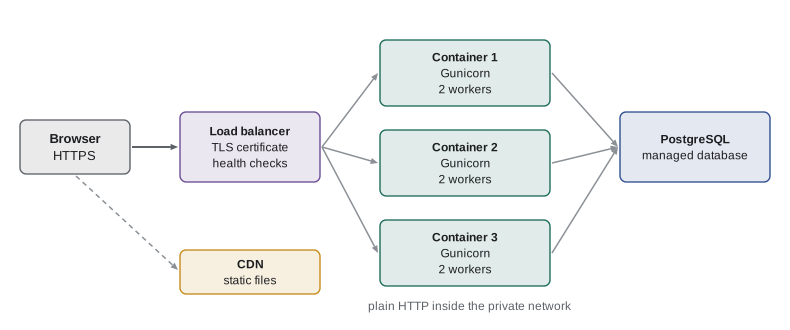
Because the proxy forwards requests, the application sees the proxy's address rather than the customer's, and sees plain HTTP rather than HTTPS. Proxies add headers such as X-Forwarded-For and X-Forwarded-Proto with the original values, and frameworks provide middleware (in Flask and Werkzeug, ProxyFix) to trust them. Trust them only from your own proxy, because anyone can send those headers.
Health checks
A load balancer needs to know which containers can take traffic, and a platform needs to know which containers to restart. Both ask through health checks: small HTTP endpoints that answer quickly. Two kinds are common. A liveness check answers whether the process is alive at all; if it fails, the platform restarts the container. A readiness check answers whether the container can serve requests right now, for example whether it has finished starting and can reach the database; if it fails, the load balancer sends traffic elsewhere but leaves the container running.
Health checks should be cheap and should not cascade. If the readiness check of every container fails because the database is briefly slow, the load balancer may take the whole site offline at once, which is worse than serving slowly. Many teams make liveness depend only on the process itself, and readiness on the critical dependencies with short timeouts.
import json, time

def health(checks, timeout_ms=200):
    """Run named dependency checks and summarize them as a readiness response."""
    results, ready = {}, True
    for name, check in checks.items():
        start = time.perf_counter()
        try:
            ok = bool(check())
        except Exception as exc:          # a failing dependency must not crash the endpoint
            ok = False
        ms = (time.perf_counter() - start) * 1000
        results[name] = "ok" if ok and ms <= timeout_ms else "failing"
        ready = ready and results[name] == "ok"
    return (200 if ready else 503), {"status": "ready" if ready else "not ready", "checks": results}

def database():
    return True
def shop_api():
    raise ConnectionError("shop API unreachable")

print(*health({"database": database}), sep="  ")
print(*health({"database": database, "shop_api": shop_api}), sep=" ")200 {'status': 'ready', 'checks': {'database': 'ok'}}
503 {'status': 'not ready', 'checks': {'database': 'ok', 'shop_api': 'failing'}}Database migrations during a release
Most releases of the wholesale site change only Python code. Some also change the database schema: a new column for delivery notes, a new table for standing orders. Schema changes are the riskiest part of a deployment, because during a rolling update old and new versions of the code run at the same time against the same database, and the database cannot be in two shapes at once.
The safe technique is called expand and contract. First, expand: add the new column or table in a way the old code ignores, such as a nullable column with no constraint the old code would violate. Deploy the new code, which writes and reads the new column. Later, once no old code is running and existing rows have been filled in, contract: add constraints, and remove columns or tables that are no longer used. Every step is compatible with the version before and after it, so the site never breaks mid-deployment. Migration tools such as Alembic and Django's migrations record which steps have run, and the pipeline runs pending migrations as a separate job before the new containers start.
steps = [
    ("release 0.6", "ALTER TABLE orders ADD COLUMN delivery_note TEXT NULL", "old code ignores the new column"),
    ("release 0.6", "deploy code that writes delivery_note when given", "old and new code both work"),
    ("release 0.7", "UPDATE orders SET delivery_note = '' WHERE delivery_note IS NULL", "backfill existing rows"),
    ("release 0.7", "deploy code that requires delivery_note", "no old code is running now"),
    ("release 0.8", "ALTER TABLE orders ALTER COLUMN delivery_note SET NOT NULL", "contract: tighten the schema"),
]
for release, action, why in steps:
print(f"{release}: {action}\n ({why})")release 0.6: ALTER TABLE orders ADD COLUMN delivery_note TEXT NULL
(old code ignores the new column)
release 0.6: deploy code that writes delivery_note when given
(old and new code both work)
release 0.7: UPDATE orders SET delivery_note = '' WHERE delivery_note IS NULL
(backfill existing rows)
release 0.7: deploy code that requires delivery_note
(no old code is running now)
release 0.8: ALTER TABLE orders ALTER COLUMN delivery_note SET NOT NULL
(contract: tighten the schema)Graceful shutdown and zero-downtime deployment
Containers are stopped all the time: during deployments, when the platform scales down, when a machine is replaced. The platform first sends the process the SIGTERM signal and waits a grace period, often 30 seconds, before forcing it to stop. A well-behaved server stops accepting new connections, finishes the requests already in progress, closes database connections, and exits. Gunicorn does this on SIGTERM by default; custom background workers must handle the signal themselves.
With graceful shutdown and readiness checks in place, a rolling deployment can replace every container without any customer seeing an error. The platform starts a new container, waits until its readiness check passes, adds it to the load balancer, then drains and stops one old container, and repeats. At every moment enough healthy containers are serving traffic. If a new container never becomes ready, the rollout stops and the old version keeps running.
def rolling_update(old, new_ready_after, surge=1):
    """Replace `old` containers one batch at a time; capacity never drops below `old`."""
    serving_old, serving_new, minute, log = old, 0, 0, []
    while serving_old > 0:
        minute += new_ready_after          # start `surge` new containers and wait until ready
        serving_new += surge
        log.append((minute, serving_old + serving_new, f"+{surge} new ready"))
        serving_old -= surge               # then drain and stop old ones
        log.append((minute, serving_old + serving_new, f"-{surge} old drained"))
    return log

for minute, capacity, event in rolling_update(old=3, new_ready_after=2):
print(f"minute {minute}: {event:<16} serving containers: {capacity}")minute 2: +1 new ready serving containers: 4 minute 2: -1 old drained serving containers: 3 minute 4: +1 new ready serving containers: 4 minute 4: -1 old drained serving containers: 3 minute 6: +1 new ready serving containers: 4 minute 6: -1 old drained serving containers: 3
Worked problem
Why the first deployment dropped orders
During the first production deployment, three cafes saw errors placing orders for about twenty seconds. Logs show the new containers received traffic as soon as they started, while the app was still loading and connecting to the database, and old containers were stopped immediately. What two changes fix this?
Show solution
- New containers took traffic before they were ready: add a readiness endpoint that returns 503 until start-up finishes and the database is reachable, and configure the load balancer to wait for it.
- Old containers were killed mid-request: make sure the process handles SIGTERM gracefully (Gunicorn does by default, but the start script ran it through a shell that did not pass the signal on) and give a grace period longer than the slowest request.
- Using the exec form CMD ["gunicorn", ...] in the Dockerfile, instead of a shell string, makes Gunicorn the main process so it receives SIGTERM directly.
Answer: Gate traffic on a readiness check, and let old containers shut down gracefully by making Gunicorn the main process that receives SIGTERM.
Try it yourself
Try it yourself
A WSGI router
Write a WSGI application app(environ, start_response) that returns "200 OK" with body b"ok" for PATH_INFO "/healthz", "200 OK" with body b"pong" for "/ping", and "404 Not Found" with body b"not found" for anything else. Always send a Content-Type of "text/plain". The helper call(path) in the setup runs your app and returns (status, body).
def app(environ, start_response):
    start_response("200 OK", [("Content-Type", "text/plain")])
    return [b"ok"]
Try it yourself
Readiness summary
Write readiness(results) where results maps dependency names to a tuple (ok, milliseconds). A dependency counts as healthy only if ok is True and it answered within 250 ms. Return (200, []) when all are healthy, otherwise (503, sorted list of unhealthy names). An empty dictionary is ready.
def readiness(results):
    return 200, []
Try it yourself
Minimum capacity during a rollout
In a rolling update the platform may stop up to max_unavailable old containers before their replacements are ready. Write min_capacity(replicas, max_unavailable) that returns the smallest number of serving containers during the update, and safe(replicas, max_unavailable, needed) that returns True if that minimum is at least needed. max_unavailable can never remove more than all containers.
def min_capacity(replicas, max_unavailable):
    return replicas

def safe(replicas, max_unavailable, needed):
    return True
Common mistakes
MistakeRunning flask run or the Django development server in production.
InsteadUse a production server such as Gunicorn, Waitress or Uvicorn behind a proxy, and never enable the debugger.
MistakeSending traffic to containers as soon as they start.
InsteadGate traffic on a readiness check that passes only when start-up is complete.
MistakeStarting the server through a shell string so it never receives SIGTERM.
InsteadUse the exec form of CMD so the server is the main process and shuts down gracefully.
MistakeRenaming or dropping a column in the same release that stops using it.
InsteadUse expand and contract over several releases so old and new code always work.
MistakeTrusting X-Forwarded-For from anyone.
InsteadTrust forwarded headers only from your own proxy or load balancer.
Summary and key terms
- WSGI (and ASGI for async apps) is the standard interface between Python web apps and servers.
- Production application servers such as Gunicorn run several workers, restart failed ones and enforce timeouts.
- A reverse proxy or load balancer handles TLS, load balancing, buffering and static files in front of the app.
- Liveness checks decide restarts; readiness checks decide whether a container receives traffic.
- Schema changes use expand and contract so old and new code can run at the same time.
- Graceful shutdown on SIGTERM plus readiness checks make rolling deployments invisible to customers.
- WSGI
- The Web Server Gateway Interface, the standard way servers call synchronous Python web apps.
- ASGI
- The asynchronous successor to WSGI, used by async frameworks and WebSockets.
- application server
- A program such as Gunicorn that runs the Python app and manages its worker processes.
- reverse proxy
- A server that receives client requests and forwards them to application servers.
- TLS termination
- Decrypting HTTPS at the proxy or load balancer and forwarding plain HTTP internally.
- readiness check
- An endpoint that says whether an instance can currently serve requests.
- expand and contract
- Changing a database schema in compatible steps spread over several releases.
- rolling deployment
- Replacing instances gradually so the service stays available throughout.
Practice problems
Work each problem on paper first, then reveal the answer to check.
What is the difference between a liveness check and a readiness check?
Show answer
Liveness failing means restart the container; readiness failing means stop sending it traffic for now.
A server has 2 cores and 1 GB of memory. What worker count does the rule of thumb suggest?
Show answer
Two per core plus one, 5, if memory allows each worker its share.
Why not drop an old column in the same release as the code that stops using it?
Show answer
During the rollout, old code still runs and still uses the column.
Name two jobs a reverse proxy does so the Python app does not have to.
Show answer
For example TLS termination, load balancing, buffering slow clients and serving static files.
Lesson quiz · 5 questions
Score 60% or more to complete this lesson.
Create a free account to save your progress, take quizzes and earn a certificate.