
PYTH-260 · Lesson 4 of 12 · 21 min
Dependency management
▶ Video coming soon A video version of this lesson is on the way.
ridgeline-tools depends on openpyxl to write Anita's spreadsheets. openpyxl in turn depends on et-xmlfile. The web extra depends on Flask, which depends on Werkzeug, Jinja2, itsdangerous, click, blinker and MarkupSafe. None of these was written by Ridgeline, all of them change on their own schedules, and any one of them can break Ridgeline's tools with a new release. Managing dependencies means deciding which versions are acceptable, making installs reproducible, keeping dependencies up to date without surprises, and watching for security problems. It is unglamorous work, and it is where many production incidents begin.
Direct and transitive dependencies
A direct dependency is one your project names itself: openpyxl and, with the web extra, Flask. A transitive dependency is one that arrives because a direct dependency needs it: et-xmlfile, Werkzeug, Jinja2 and the rest. Most projects have far more transitive dependencies than direct ones, and you are just as exposed to a bug or vulnerability in a transitive dependency as in a direct one. The full set forms a graph, and the installer's job is to find one version of every package in that graph that satisfies every constraint at once.
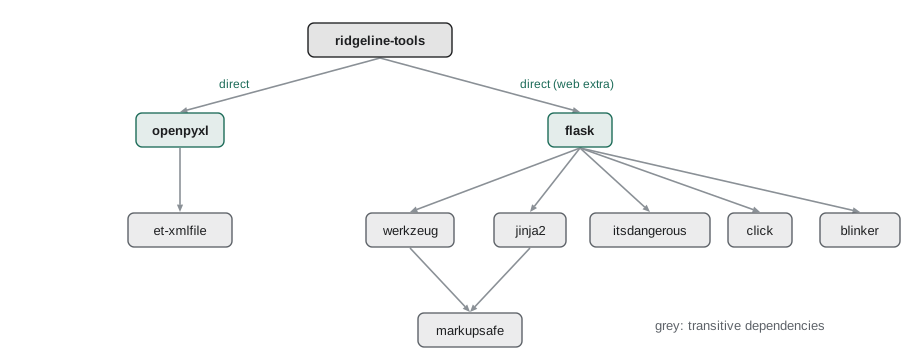
graph = {
    "ridgeline-tools": ["openpyxl", "flask"],
    "openpyxl": ["et-xmlfile"],
    "flask": ["werkzeug", "jinja2", "itsdangerous", "click", "blinker"],
    "jinja2": ["markupsafe"],
    "werkzeug": ["markupsafe"],
}

def all_dependencies(package):
    """Every package reachable from package, found with a depth-first search."""
    seen, stack = set(), [package]
    while stack:
        for dep in graph.get(stack.pop(), []):
            if dep not in seen:
                seen.add(dep)
                stack.append(dep)
    return sorted(seen)

deps = all_dependencies("ridgeline-tools")
print(len(graph["ridgeline-tools"]), "direct,", len(deps), "in total:")
print(", ".join(deps))2 direct, 9 in total: blinker, click, et-xmlfile, flask, itsdangerous, jinja2, markupsafe, openpyxl, werkzeug
Version numbers and specifiers
Python versions follow PEP 440. A release version is a series of numbers separated by dots, such as 3.1.5, optionally followed by a pre-release marker (a for alpha, b for beta, rc for release candidate, as in 2.0rc1), a post-release (.post1) or a development release (.dev3). Versions are compared numerically part by part, so 3.10 is newer than 3.9, which is why versions must never be compared as strings.
def parse(version):
    """Turn a release version such as '3.10.2' into a tuple of numbers for comparing."""
    return tuple(int(part) for part in version.split("."))

pairs = [("3.9", "3.10"), ("3.1.5", "3.1.10"), ("2.0", "2.0.0"), ("1.12.0", "1.2.9")]
for a, b in pairs:
    as_text = "newer" if b > a else "older or equal"
    as_numbers = "newer" if parse(b) > parse(a) else "older or equal"
print(f"{b:>7} vs {a:<6} compared as text: {as_text:<15} as numbers: {as_numbers}")3.10 vs 3.9 compared as text: older or equal as numbers: newer 3.1.10 vs 3.1.5 compared as text: older or equal as numbers: newer 2.0.0 vs 2.0 compared as text: newer as numbers: newer 1.2.9 vs 1.12.0 compared as text: newer as numbers: older or equal
Note the third pair. As tuples, (2, 0, 0) is greater than (2, 0) even though PEP 440 says 2.0 and 2.0.0 are equal; real tools pad the shorter version with zeros before comparing. The packaging library, which pip itself uses, implements the full rules, including pre-releases, and is the right choice in production code. The simple version above is enough to understand the idea.
A requirement such as openpyxl>=3.1,<4 combines a name with one or more version specifiers, separated by commas, all of which must hold. The operators are:
- == exact match (==3.1.5), or a prefix match with a wildcard (==3.1.*).
- != exclusion, useful for skipping one known-bad release (!=3.1.3).
- >=, <=, > and < ordered comparisons.
- ~= compatible release: ~=3.1 means >=3.1 and ==3.*, and ~=3.1.2 means >=3.1.2 and ==3.1.*. It expresses 'this version or any later one that should be compatible'.
def parse(v):
    return tuple(int(x) for x in v.split("."))

def pad(a, b):
    n = max(len(a), len(b))
    return a + (0,) * (n - len(a)), b + (0,) * (n - len(b))

def satisfies(version, spec):
    """Check one specifier such as '>=3.1' or '~=3.1.2' (release versions only)."""
    for op in ("~=", "==", "!=", ">=", "<=", ">", "<"):
        if spec.startswith(op):
            target = spec[len(op):]
            break
    v, t = pad(parse(version), parse(target))
    if op == "~=":
        prefix = parse(target)[:-1]
        return v >= t and parse(version)[:len(prefix)] == prefix
    return {"==": v == t, "!=": v != t, ">=": v >= t, "<=": v <= t, ">": v > t, "<": v < t}[op]

def allowed(version, requirement):
    return all(satisfies(version, s.strip()) for s in requirement.split(","))

for v in ["3.0.10", "3.1.0", "3.1.5", "3.2", "4.0"]:
print(f"openpyxl {v:<7} >=3.1,<4: {allowed(v, '>=3.1,<4')!s:<6} ~=3.1.2: {allowed(v, '~=3.1.2')!s:<6} ~=3.1: {allowed(v, '~=3.1')}")openpyxl 3.0.10 >=3.1,<4: False ~=3.1.2: False ~=3.1: False openpyxl 3.1.0 >=3.1,<4: True ~=3.1.2: False ~=3.1: True openpyxl 3.1.5 >=3.1,<4: True ~=3.1.2: True ~=3.1: True openpyxl 3.2 >=3.1,<4: True ~=3.1.2: False ~=3.1: True openpyxl 4.0 >=3.1,<4: False ~=3.1.2: False ~=3.1: False
Ranges for libraries, pins for applications
How tightly should you constrain a dependency? The answer depends on whether you are publishing a library or deploying an application, and getting it wrong in either direction causes pain.
A library is installed into other people's environments alongside other libraries. If ridgeline-tools demanded exactly openpyxl==3.1.5, and another package in the same environment demanded openpyxl==3.1.4, the two could never be installed together. Libraries should therefore declare the widest range they actually work with: a minimum version that has the features they use, and often an upper bound at the next major version, where breaking changes are allowed. Even upper bounds are debated, because a cautious <4 can block users from a 4.0 that would in fact have worked.
An application, such as the wholesale site's container or the morning report job, is the final environment. Nothing else needs to share it, and what matters most is that every install is identical, so that what was tested is what runs. Applications should therefore pin every package, direct and transitive, to an exact version, ideally with a hash of the exact file. Those pins do not go in pyproject.toml; they go in a lock file generated from it.
requirements = {
    "library (ridgeline-tools pyproject.toml)": ["openpyxl>=3.1,<4", "flask>=3.0,<4"],
    "application (wholesale site lock file)": ["openpyxl==3.1.5", "et-xmlfile==2.0.0", "flask==3.1.0",
                                               "werkzeug==3.1.3", "jinja2==3.1.4", "markupsafe==3.0.2"],
}

def pinned(req):
    return "==" in req and "*" not in req

for kind, reqs in requirements.items():
    share = sum(pinned(r) for r in reqs)
print(f"{kind}: {share} of {len(reqs)} pinned")library (ridgeline-tools pyproject.toml): 0 of 2 pinned application (wholesale site lock file): 6 of 6 pinned
Lock files
A lock file records the exact result of resolving the dependency graph: every package, its exact version and the hash of each file allowed for it. Installing from a lock file needs no resolution at all; the installer simply fetches the listed files and checks their hashes. Two installs from the same lock file, a month apart on different machines, produce the same environment, and a tampered or substituted file is rejected because its hash does not match.
For many years Python had no standard lock format, and each tool invented one: requirements.txt files with == pins and --hash options generated by pip-tools' pip-compile, poetry.lock, pdm.lock and uv.lock. In 2025 the community accepted PEP 751, which defines a standard pylock.toml file that any installer can read, and tools have begun to support it. Whichever format a team uses, the workflow is the same: edit the loose requirements in pyproject.toml, run a command to regenerate the lock file, review the changes in a pull request, and commit both files together.
# requirements.lock, generated by: uv pip compile pyproject.toml --generate-hashes -o requirements.lock
et-xmlfile==2.0.0 \
    --hash=sha256:7a91720bc7568435...
    # via openpyxl
openpyxl==3.1.5 \
    --hash=sha256:5282c12b107bffee...
# via ridgeline-tools (pyproject.toml)import hashlib
lock = {"openpyxl-3.1.5-py2.py3-none-any.whl": hashlib.sha256(b"genuine wheel bytes").hexdigest()}
def verify(filename, data):
"""Refuse any downloaded file whose hash is not the one recorded in the lock file."""
expected = lock.get(filename)
if expected is None:
return f"REFUSED {filename}: not in the lock file"
actual = hashlib.sha256(data).hexdigest()
return f"ok {filename}" if actual == expected else f"REFUSED {filename}: hash mismatch"
print(verify("openpyxl-3.1.5-py2.py3-none-any.whl", b"genuine wheel bytes"))
print(verify("openpyxl-3.1.5-py2.py3-none-any.whl", b"tampered wheel bytes"))
print(verify("openpyxl-9.9.9-py3-none-any.whl", b"surprise"))ok openpyxl-3.1.5-py2.py3-none-any.whl REFUSED openpyxl-3.1.5-py2.py3-none-any.whl: hash mismatch REFUSED openpyxl-9.9.9-py3-none-any.whl: not in the lock file
Isolation with virtual environments
Pins only help if nothing else interferes. A virtual environment, created with python -m venv .venv or uv venv, is a folder with its own copy of the interpreter's launcher and its own site-packages, so packages installed for ridgeline-tools do not mix with packages installed for anything else. Every project, CI job and deployment should use its own environment. Many Linux distributions now refuse pip installs into the system Python altogether (an externally managed environment, PEP 668), precisely to stop project packages from breaking operating system tools.
Containers (lesson 6) take isolation one step further by packaging the interpreter and operating system libraries too. Inside a container a virtual environment is optional, but many teams still use one so that the same commands work on a laptop and in the image.
Keeping dependencies current
Locking everything forever is not the goal. Old versions accumulate known bugs and security vulnerabilities, and the longer you wait, the larger and riskier each upgrade becomes. The healthy rhythm is small and frequent: regenerate the lock file regularly (weekly is common), let CI run the full test suite against the new versions, read the changelogs for anything major, and merge. Services such as Dependabot and Renovate automate this by opening a pull request for each update, and the CI pipeline from lesson 5 decides whether it is safe.
Security deserves its own check. Tools such as pip-audit compare the exact versions in your environment or lock file with public vulnerability databases, including the Python Packaging Advisory Database and the OSV database, and report any known vulnerability with its identifier and the first fixed version. Running pip-audit in CI means a newly disclosed vulnerability in a transitive dependency turns the build red, instead of waiting for someone to read the news.
Choosing dependencies in the first place
The cheapest dependency to manage is the one you never add. Before adding a package, Jordan asks a few questions. Does the standard library already do this? Python ships csv, json, sqlite3, tomllib, zipfile, logging and much more, and code that uses them has no upgrade schedule to follow. Is the package actively maintained, with recent releases, a responsive issue tracker and more than one maintainer? How many transitive dependencies does it bring with it? Does its license allow Ridgeline's use? A package that saves twenty lines of code but pulls in fifteen others is rarely a good trade.
When a dependency is worth having, it is worth wrapping. Ridgeline's spreadsheet code calls openpyxl from one module, ridgeline/export.py, rather than from all over the package. If openpyxl ever changes its interface, or Ridgeline switches libraries, the change touches one file. The same idea keeps tests simple, because the rest of the code can be tested without the third-party library involved at all.
# A tiny vulnerability database: package -> list of (affected_below, advisory id)
advisories = {
    "jinja2": [("3.1.5", "GHSA-example-0001")],
    "werkzeug": [("3.0.6", "GHSA-example-0002")],
}
installed = {"jinja2": "3.1.4", "werkzeug": "3.1.3", "openpyxl": "3.1.5"}

def parse(v):
    return tuple(int(x) for x in v.split("."))

for name, version in sorted(installed.items()):
    for fixed_in, ident in advisories.get(name, []):
        if parse(version) < parse(fixed_in):
            print(f"VULNERABLE {name} {version}: {ident}, fixed in {fixed_in}")
            break
    else:
print(f"ok {name} {version}")VULNERABLE jinja2 3.1.4: GHSA-example-0001, fixed in 3.1.5 ok openpyxl 3.1.5 ok werkzeug 3.1.3
Worked problem
Diagnosing a dependency conflict
Adding a new charting package to the web extra makes the installer fail: it says the charting package requires markupsafe<3, but jinja2 3.1.4 in the lock file requires markupsafe>=2.0 and werkzeug 3.1.3 requires markupsafe>=2.1.1, and the lock file pins markupsafe 3.0.2. What are the options?
Show solution
- Write down the constraints on the shared package: markupsafe<3 (charting), >=2.0 (jinja2), >=2.1.1 (werkzeug).
- They can all be satisfied by markupsafe 2.1.x, so the conflict is with the pinned 3.0.2, not with the other packages: regenerating the lock file with the new requirement lets the resolver choose 2.1.5.
- Check whether a newer charting release drops the markupsafe<3 cap; if it does, upgrading the charting package keeps markupsafe 3.
- If no combination worked, the choices would be a different charting package, or asking its maintainers to relax the cap.
Answer: Regenerate the lock file so the resolver picks a markupsafe 2.1 release that satisfies all three constraints, or upgrade the charting package if a newer one allows markupsafe 3.
Try it yourself
Try it yourself
Compare versions
Write newest(versions) that returns the newest of a list of release version strings such as ["3.9", "3.10.1", "3.10"], comparing them as numbers. Treat missing trailing parts as zero, so "3.10" and "3.10.0" are equal (return whichever appears first).
def newest(versions):
    return max(versions)
Try it yourself
Check a requirement
Write allowed(version, requirement) for requirements made of comma-separated specifiers using ==, !=, >=, <=, > and <, such as ">=3.1,<4,!=3.1.3". Versions are plain numbers like "3.1.5"; pad with zeros when comparing.
def allowed(version, requirement):
    return True
Try it yourself
Find loose requirements
An application lock file must pin every package exactly. Write unpinned(lines) that takes requirement lines and returns the package names (the part before any operator, lower case) of lines that are not pinned with a single "==" and no "*". Ignore blank lines and comment lines starting with "#".
def unpinned(lines):
    return []
Common mistakes
MistakeComparing version strings directly, so "3.10" sorts before "3.9".
InsteadCompare parsed versions, with the packaging library in real code.
MistakePinning exact versions in a library's pyproject.toml.
InsteadLibraries declare compatible ranges; exact pins belong in an application's lock file.
MistakeDeploying an application from loose ranges.
InsteadGenerate a lock file with hashes and install from it, so every install is identical.
MistakeNever updating dependencies because "it works".
InsteadUpdate small and often, with CI checking each update.
MistakeIgnoring transitive dependencies.
InsteadAudit the whole graph: run pip-audit on the lock file in CI.
Summary and key terms
- Direct dependencies bring transitive ones; you are exposed to the whole graph.
- PEP 440 versions compare numerically; specifiers combine ==, !=, ordered comparisons and ~= compatible release.
- Libraries declare ranges so they can coexist; applications pin everything for reproducibility.
- Lock files record exact versions and file hashes; pylock.toml (PEP 751) is the new standard format.
- Virtual environments isolate each project's packages; containers isolate the whole runtime.
- Update dependencies regularly with automated pull requests and CI, and audit for vulnerabilities with tools such as pip-audit.
- transitive dependency
- A package required by one of your dependencies rather than by your project directly.
- version specifier
- A condition on versions, such as >=3.1 or ~=3.1.2.
- compatible release
- The ~= operator: this version or a later one with the same leading parts.
- pin
- An exact version requirement, such as openpyxl==3.1.5.
- lock file
- A file recording the exact versions and hashes of every package in a resolved environment.
- virtual environment
- An isolated folder of installed packages for one project.
- vulnerability advisory
- A published notice that certain versions of a package have a security flaw, with the fixed version.
Practice problems
Work each problem on paper first, then reveal the answer to check.
Which versions does ~=2.4 allow?
Show answer
Version 2.4 and any later 2.x release, but not 3.0.
Why is "3.10" > "3.9" False in Python?
Show answer
Strings compare character by character, and "1" sorts before "9".
Should ridgeline-tools' pyproject.toml say openpyxl==3.1.5? Why or why not?
Show answer
No: it is a library used alongside others; it should say a range such as >=3.1,<4 and leave exact pins to applications.
What does a hash in a lock file protect against?
Show answer
A substituted or tampered file: the installer refuses any file whose hash differs.
Lesson quiz · 5 questions
Score 60% or more to complete this lesson.
Create a free account to save your progress, take quizzes and earn a certificate.