
PYTH-260 · Lesson 5 of 12 · 23 min
Continuous integration pipelines
▶ Video coming soon A video version of this lesson is on the way.
Ridgeline's test suite has grown to more than a hundred tests since PYTH-230. They are only useful if someone runs them, and people forget. Jordan ran them before every release, usually. Sam Okoye, the co-op student, ran them on Linux, but never on Windows, which is what the office computer uses. Continuous integration, or CI, removes the reliance on memory: every time anyone pushes a change or opens a pull request, a server checks out the code and runs the same checks, on every platform that matters, and reports the result on the pull request before it can be merged.
This lesson explains what a CI pipeline is, how a typical workflow file is structured, how a matrix tests many Python versions and operating systems at once, how to keep pipelines fast, and how CI connects to branch protection so that broken code cannot reach main.
What continuous integration means
The phrase comes from a practice popularized in the late 1990s: integrate everyone's work into the shared main branch often, at least daily, and verify each integration automatically with a build and tests. The opposite, where people work on long-lived branches for weeks and merge at the end, produces painful merges and bugs that are hard to trace because so much changed at once. Small, frequent, automatically checked changes are easier to review, easier to debug and easier to undo.
Today CI usually means a hosted service that runs a pipeline for every push and pull request. GitHub Actions, GitLab CI/CD, Azure Pipelines, Bitbucket Pipelines, CircleCI and Jenkins are common choices. They differ in syntax and pricing but share the same ideas: a workflow file in the repository describes the pipeline, the service starts a fresh virtual machine or container called a runner, the runner executes the steps, and the result is reported back to the code host.
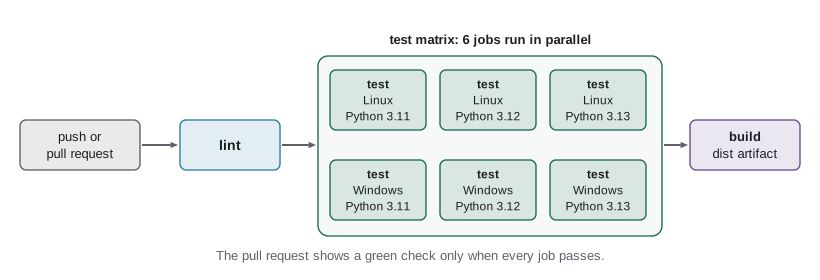
Anatomy of a workflow
Ridgeline's code is hosted on GitHub, so Jordan writes a GitHub Actions workflow. Workflows are YAML files in the .github/workflows folder. YAML is a configuration format that uses indentation for structure, dashes for list items and key: value pairs for settings. Here is the whole file:
name: CI

on:
  push:
    branches: [main]
  pull_request:

jobs:
  lint:
    runs-on: ubuntu-latest
    steps:
      - uses: actions/checkout@v4
      - uses: actions/setup-python@v5
        with:
          python-version: "3.12"
      - run: python -m pip install ruff
      - run: ruff check .
      - run: ruff format --check .

  test:
    needs: lint
    runs-on: ${{ matrix.os }}
    strategy:
      matrix:
        os: [ubuntu-latest, windows-latest]
        python-version: ["3.11", "3.12", "3.13"]
    steps:
      - uses: actions/checkout@v4
      - uses: actions/setup-python@v5
        with:
          python-version: ${{ matrix.python-version }}
          cache: pip
      - run: python -m pip install -e ".[web]" pytest pytest-cov
      - run: pytest --cov=ridgeline --cov-fail-under=85

  build:
    needs: test
    runs-on: ubuntu-latest
    steps:
      - uses: actions/checkout@v4
      - uses: actions/setup-python@v5
        with:
          python-version: "3.12"
      - run: python -m pip install build
      - run: python -m build
      - uses: actions/upload-artifact@v4
        with:
          name: dist
          path: dist/
The on section lists the events that trigger the workflow: pushes to main and every pull request. The jobs section defines three jobs. Each job runs on a fresh runner named by runs-on, and consists of steps that run in order. A step either runs a shell command with run, or uses a reusable action with uses. actions/checkout fetches the repository, actions/setup-python installs the requested Python version, and actions/upload-artifact saves files from the job so they can be downloaded or used by later jobs.
Jobs run in parallel unless a needs key orders them. Here test needs lint and build needs test, so a formatting mistake fails fast in the lint job, in well under a minute, without spending time on the slower test jobs, and a package is only built from code that passed every test. The doubled curly braces, as in matrix.os, are GitHub Actions expressions, filled in for each job.
jobs = {
    "lint":  {"needs": [], "minutes": 1},
    "test":  {"needs": ["lint"], "minutes": 4},
    "build": {"needs": ["test"], "minutes": 2},
    "audit": {"needs": ["lint"], "minutes": 1},
}

def finish_times(jobs):
    """Earliest finish time of every job when independent jobs run in parallel."""
    done = {}
    def finish(name):
        if name not in done:
            start = max((finish(n) for n in jobs[name]["needs"]), default=0)
            done[name] = start + jobs[name]["minutes"]
        return done[name]
    for name in jobs:
        finish(name)
    return done

times = finish_times(jobs)
for name, t in times.items():
    print(f"{name:<6} finishes at minute {t}")
print("pipeline takes", max(times.values()), "minutes; run one after another it would take",
sum(j["minutes"] for j in jobs.values()))lint finishes at minute 1 test finishes at minute 5 build finishes at minute 7 audit finishes at minute 2 pipeline takes 7 minutes; run one after another it would take 8
The total running time of a pipeline is set by its longest chain of dependent jobs, often called the critical path. The audit job adds work but no waiting, because it runs alongside the tests. Ordering jobs well is one of the main ways to keep a pipeline fast.
The test matrix
Ridgeline's code must run on the office computer's Windows, the roastery computer's Linux and Jordan's laptop, on Python 3.11 and later. Writing six copies of the test job would be tedious and error-prone. A matrix strategy expands one job definition into one job per combination of values: two operating systems times three Python versions gives six test jobs, which run in parallel on six runners. If any one fails, the pull request is marked as failing and the log shows exactly which combination broke.
from itertools import product

matrix = {"os": ["ubuntu-latest", "windows-latest"], "python": ["3.11", "3.12", "3.13"]}
exclude = [{"os": "windows-latest", "python": "3.11"}]   # not needed: the office has 3.12

def expand(matrix, exclude=()):
    keys = list(matrix)
    combos = [dict(zip(keys, values)) for values in product(*matrix.values())]
    return [c for c in combos if not any(all(c[k] == v for k, v in e.items()) for e in exclude)]

for job in expand(matrix):
    print("test", job)
print(len(expand(matrix)), "jobs;", len(expand(matrix, exclude)), "after excluding Windows with 3.11")test {'os': 'ubuntu-latest', 'python': '3.11'}
test {'os': 'ubuntu-latest', 'python': '3.12'}
test {'os': 'ubuntu-latest', 'python': '3.13'}
test {'os': 'windows-latest', 'python': '3.11'}
test {'os': 'windows-latest', 'python': '3.12'}
test {'os': 'windows-latest', 'python': '3.13'}
6 jobs; 5 after excluding Windows with 3.11Matrices can include and exclude particular combinations, and can set fail-fast: false so that one failing combination does not cancel the others, which is useful when you want to see every platform's result. Some projects add an allowed-to-fail entry for the next, not yet released Python version, to get early warning of incompatibilities without blocking merges.
What a good pipeline checks
A CI pipeline should run the checks a careful reviewer would want, automatically and in the same way every time. For a Python project the usual stages are:
- Lint and format: Ruff (or flake8 and black) catches unused imports, undefined names and style drift. Running ruff format --check fails if code is not formatted, without changing it.
- Type checking: mypy or pyright, if the project uses type hints, catches whole categories of bugs before the tests run.
- Tests with coverage: pytest runs the suite; pytest-cov measures which lines ran, and --cov-fail-under fails the build if coverage drops below an agreed level.
- Security: pip-audit for vulnerable dependencies (lesson 4) and a secret scanner for credentials committed by mistake (lesson 7).
- Build: python -m build proves the project still packages, and uploads the distributions as an artifact for later jobs and releases.
Every check must be deterministic. A test that passes or fails at random, called a flaky test, does more harm than no test, because people learn to rerun failures until they turn green and stop trusting the pipeline. Flaky tests usually depend on time, network access, test order or shared state; they should be fixed or quarantined quickly.
import subprocess, sys, json

def run_checks(checks):
    """Run each check command in order; stop at the first failure, like a CI job."""
    results = []
    for name, code in checks:
        proc = subprocess.run([sys.executable, "-c", code], capture_output=True, text=True)
        results.append((name, proc.returncode))
        if proc.returncode != 0:
            break
    return results

checks = [
    ("lint", "print('ruff: all checks passed')"),
    ("tests", "import sys; failures = 1; sys.exit(1 if failures else 0)"),
    ("build", "print('built dist/ridgeline_tools-0.6.0-py3-none-any.whl')"),
]
for name, status in run_checks(checks):
print(f"{name:<6} exit {status} {'PASS' if status == 0 else 'FAIL'}")lint exit 0 PASS tests exit 1 FAIL
Keeping pipelines fast
Developers wait for CI before merging, so pipeline time is developer time. Ten minutes is a common upper limit for the checks on a pull request; beyond that people start switching tasks and batching changes, which undoes the point of integrating often. The main speed-ups are:
- Fail fast: put quick checks such as lint first, so obvious mistakes are reported in seconds.
- Parallelize: split independent work into separate jobs, and large test suites across several runners.
- Cache: save the pip download cache or the virtual environment between runs, keyed by a hash of the lock file, so dependencies are not downloaded again unless they changed.
- Skip what did not change: run documentation builds only when docs change, using path filters on triggers.
import hashlib

def cache_key(os_name, python, lock_text):
    """Cache entries are reused only when the platform, Python and lock file are unchanged."""
    digest = hashlib.sha256(lock_text.encode()).hexdigest()[:10]
    return f"pip-{os_name}-py{python}-{digest}"

lock_v1 = "openpyxl==3.1.5\nflask==3.1.0\n"
lock_v2 = "openpyxl==3.1.5\nflask==3.1.1\n"
print(cache_key("ubuntu", "3.12", lock_v1))
print(cache_key("ubuntu", "3.12", lock_v1), "(same key: cache hit)")
print(cache_key("ubuntu", "3.12", lock_v2), "(lock changed: cache miss, rebuild)")pip-ubuntu-py3.12-337088dfae pip-ubuntu-py3.12-337088dfae (same key: cache hit) pip-ubuntu-py3.12-1ea255cc19 (lock changed: cache miss, rebuild)
Branch protection: making CI count
A pipeline that reports failures nobody must act on is only advice. Code hosts let repository owners protect important branches. Ridgeline's main branch, set up in PYTH-110, requires a pull request with one approving review. Jordan now adds required status checks: the lint, test and build jobs must all pass before the merge button is enabled. Nobody, including Jordan, can push broken code straight to main.
Protection also covers the moment after the merge. A pull request is tested against the main branch as it was when the pull request was opened; if main has moved on, the combination might not have been tested. Options include requiring branches to be up to date before merging, or a merge queue, which tests each pull request on top of everything queued ahead of it before merging. Ridgeline is small enough that requiring up-to-date branches is sufficient.
Worked problem
Reading a failed pipeline
A pull request from Jordan shows: lint passed, five of six test jobs passed, test (windows-latest, 3.12) failed with AssertionError in test_export: expected "data/report.csv", got "data\report.csv". build was skipped. What happened and what is the fix?
Show solution
- Only one combination failed, so the bug is platform-specific, not a general logic error.
- The expected and actual values differ only in the path separator: the code builds paths as strings with a forward slash, while the test compares against the platform's own separator, or the reverse.
- build was skipped because it needs test; nothing broken was packaged.
- The fix is to build and compare paths with pathlib (Path("data") / "report.csv") and compare Path objects, not strings; the Windows job will pass, and without the matrix this bug would have reached Anita's computer.
Answer: A path-separator bug that only shows on Windows; use pathlib for building and comparing paths. The matrix caught it before it reached the office computer.
Try it yourself
Try it yourself
Expand a test matrix
Write expand(matrix, exclude) where matrix maps names to lists of values and exclude is a list of partial combinations (dictionaries). Return every combination as a dictionary, in the order itertools.product gives, leaving out any combination that matches all the keys of some exclude entry.
from itertools import product

def expand(matrix, exclude):
    return []
Try it yourself
How long will the pipeline take?
Write pipeline_minutes(jobs) where jobs maps a job name to (minutes, list_of_needed_jobs). Jobs start as soon as everything they need has finished, and independent jobs run in parallel. Return the total minutes until the last job finishes (0 for no jobs).
def pipeline_minutes(jobs):
    return sum(m for m, _ in jobs.values())
Try it yourself
Validate a workflow
A workflow has been loaded into a dictionary like {"jobs": {"test": {"runs-on": "ubuntu-latest", "needs": ["lint"], "steps": [...]}}}. Write workflow_errors(wf) that returns a sorted list of messages: "no jobs" if there are none; for each job, "JOB: missing runs-on", "JOB: no steps" (missing or empty), and "JOB: needs unknown job NAME" for each needed job that does not exist.
def workflow_errors(wf):
    return []
Common mistakes
MistakeRunning the tests only on the developer's own operating system and Python version.
InsteadUse a matrix covering every platform and version the project supports.
MistakeLetting a pipeline grow to half an hour.
InsteadFail fast, parallelize, cache dependencies and skip unchanged areas; aim for under ten minutes on pull requests.
MistakeRerunning a flaky test until it passes.
InsteadFix or quarantine flaky tests; random failures destroy trust in CI.
MistakeTreating CI results as optional.
InsteadProtect main with required status checks so failing code cannot be merged.
MistakeInstalling whatever dependency versions are newest in CI.
InsteadInstall from the lock file, so CI tests what will be deployed.
Summary and key terms
- Continuous integration checks every push and pull request automatically, on a fresh runner, before code reaches main.
- A workflow file defines triggers, jobs and steps; jobs run in parallel unless needs orders them.
- A pipeline is as long as its longest chain of dependent jobs, the critical path.
- A matrix expands one job into one per combination of operating system and Python version.
- Good pipelines lint, type check, test with coverage, audit dependencies and secrets, and build the package.
- Keep pipelines fast with fail-fast ordering, parallel jobs and caches keyed on the lock file.
- Branch protection with required checks makes CI results binding.
- continuous integration
- Merging small changes often and checking each one automatically with builds and tests.
- workflow
- A file in the repository that defines a CI pipeline's triggers, jobs and steps.
- runner
- The fresh machine or container that runs a CI job.
- matrix
- A strategy that runs one job for every combination of listed values.
- critical path
- The longest chain of dependent jobs, which sets the pipeline's total time.
- artifact
- A file produced by a CI job and saved for download or for later jobs.
- flaky test
- A test that passes or fails unpredictably without any code change.
- required status check
- A CI result that must pass before a protected branch accepts a merge.
Practice problems
Work each problem on paper first, then reveal the answer to check.
A matrix lists 3 operating systems and 4 Python versions and excludes 2 combinations. How many test jobs run?
Show answer
3 x 4 - 2 = 10.
Why put the lint job before the tests?
Show answer
It is fast and catches common mistakes, so the pipeline fails in seconds instead of after the slow tests.
What should a CI cache key include so that a dependency change is never hidden by an old cache?
Show answer
A hash of the lock file, plus the operating system and Python version.
What does a merge queue protect against?
Show answer
Merging a pull request that passed on an older main but breaks when combined with changes merged since.
Lesson quiz · 5 questions
Score 60% or more to complete this lesson.
Create a free account to save your progress, take quizzes and earn a certificate.