
PYTH-260 · Lesson 3 of 12 · 23 min
Building and publishing packages
▶ Video coming soon A video version of this lesson is on the way.
With pyproject.toml in place, ridgeline-tools can be turned into files that anyone can install with one command. That process is called building, and the files it produces are called distributions. Once built, distributions can be copied to a shared folder, attached to a release, or uploaded to a package index, a server that installers search when you type pip install. This lesson explains the two kinds of distribution, what a build actually does, how wheel filenames encode where a package can run, how package indexes work, and how to publish safely, including the decision Ridgeline makes about where its packages should live.
Source distributions and wheels
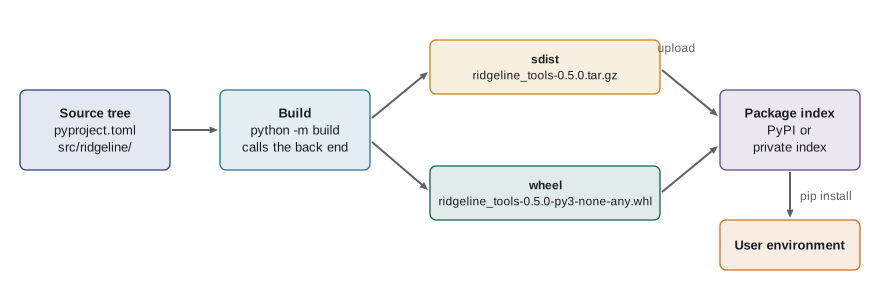
A Python project is usually published in two forms. A source distribution, or sdist, is a compressed archive (a .tar.gz file) of the source tree plus generated metadata. Installing from an sdist means running the build back end on the user's machine, which needs the back end and, for packages with compiled extensions, a working compiler. A wheel is a ready-to-install archive (a .whl file, which is a zip file with a particular structure). Installing a wheel is essentially unzipping it into the right folders: no build step, no compiler and no running of project code, so it is faster, more reliable and safer.
For a pure-Python project like ridgeline-tools, the wheel works on every operating system and every supported Python version. Projects with C, C++ or Rust extensions, such as numpy, publish many wheels, one for each combination of Python version, operating system and processor, plus an sdist as a fallback for platforms with no matching wheel. Publishing both forms is the norm: the wheel for speed and the sdist so the source is always available.
Running a build
The standard command-line front end is build, published by the Python Packaging Authority. Running python -m build in the project folder creates an isolated temporary environment, installs whatever [build-system] requires lists, asks the back end to build an sdist, then builds a wheel from that sdist, and leaves both in a dist/ folder. Building the wheel from the sdist rather than straight from the source tree is a deliberate check: if a file is missing from the sdist, the wheel build fails on your machine instead of on a user's. Newer tools such as uv offer the same thing with uv build.
> python -m pip install build
> python -m build
* Creating isolated environment: venv+pip...
* Installing packages in isolated environment:
  - hatchling>=1.25
* Building sdist...
* Building wheel from sdist
Successfully built ridgeline_tools-0.5.0.tar.gz and ridgeline_tools-0.5.0-py3-none-any.whl
> ls dist
ridgeline_tools-0.5.0-py3-none-any.whl   ridgeline_tools-0.5.0.tar.gz
Inside the wheel are the package's modules exactly as they will be installed, plus a folder named ridgeline_tools-0.5.0.dist-info holding the metadata: a METADATA file with the name, version, dependencies and description, a WHEEL file describing the wheel format, an entry_points.txt file with the commands, a RECORD file listing every file with its hash, and the license. Installers read this metadata to resolve dependencies and to create the command launchers. After installation the same metadata is available to running code through importlib.metadata.
import zipfile, io

# Build a tiny wheel-shaped zip in memory and look inside, as an installer would.
buf = io.BytesIO()
with zipfile.ZipFile(buf, "w") as z:
    z.writestr("ridgeline/__init__.py", "__version__ = '0.5.0'\n")
    z.writestr("ridgeline/cli.py", "def main():\n    return 0\n")
    z.writestr("ridgeline_tools-0.5.0.dist-info/METADATA",
               "Metadata-Version: 2.4\nName: ridgeline-tools\nVersion: 0.5.0\n"
               "Requires-Python: >=3.11\nRequires-Dist: openpyxl<4,>=3.1\n")
    z.writestr("ridgeline_tools-0.5.0.dist-info/entry_points.txt",
               "[console_scripts]\nridgeline = ridgeline.cli:main\n")

with zipfile.ZipFile(buf) as z:
    for name in z.namelist():
        print(name)
    meta = z.read("ridgeline_tools-0.5.0.dist-info/METADATA").decode()
    fields = dict(line.split(": ", 1) for line in meta.splitlines())
print("Requires-Dist ->", fields["Requires-Dist"])ridgeline/__init__.py ridgeline/cli.py ridgeline_tools-0.5.0.dist-info/METADATA ridgeline_tools-0.5.0.dist-info/entry_points.txt Requires-Dist -> openpyxl<4,>=3.1
What a wheel filename tells you
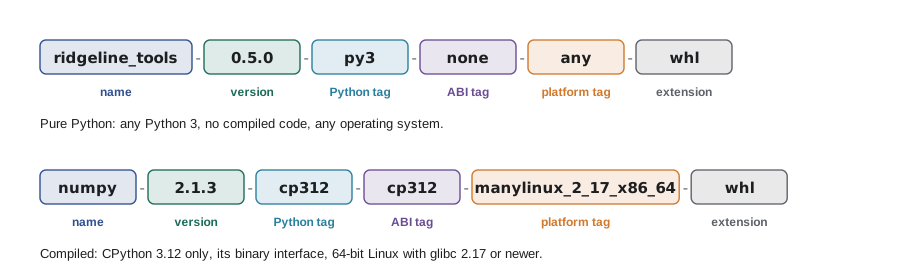
Wheel filenames are not decoration; installers parse them to decide whether a wheel can be installed. The format, defined in the wheel specification (PEP 427, updated by later standards), is name-version-pythontag-abitag-platformtag.whl, with an optional build number after the version. Each part is separated by a hyphen, so hyphens inside the project name are replaced with underscores: ridgeline-tools becomes ridgeline_tools.
- The python tag says which Python implementation and version the wheel targets. py3 means any Python 3; cp312 means CPython 3.12 specifically.
- The ABI tag says which binary interface compiled code needs. none means there is no compiled code; cp312 means the CPython 3.12 ABI; abi3 means the stable ABI shared by CPython 3.2 and later.
- The platform tag says which operating system and processor the wheel is for. any means every platform; examples of specific tags are win_amd64, macosx_11_0_arm64 and manylinux_2_17_x86_64, the last meaning Linux systems with glibc 2.17 or newer on 64-bit Intel and AMD processors.
def parse_wheel(filename):
    """Split a wheel filename into its parts."""
    if not filename.endswith(".whl"):
        raise ValueError("not a wheel")
    parts = filename[:-4].split("-")
    if len(parts) == 6:
        name, version, build, py, abi, plat = parts
    elif len(parts) == 5:
        name, version, py, abi, plat = parts
        build = None
    else:
        raise ValueError(f"cannot parse {filename}")
    return {"name": name, "version": version, "build": build,
            "python": py.split("."), "abi": abi, "platform": plat.split(".")}

for f in ["ridgeline_tools-0.5.0-py3-none-any.whl",
          "numpy-2.1.3-cp312-cp312-manylinux_2_17_x86_64.manylinux2014_x86_64.whl",
          "example-1.0-1-py2.py3-none-any.whl"]:
    w = parse_wheel(f)
print(f"{w['name']:<16} {w['version']:<6} build={w['build']} python={w['python']} abi={w['abi']} platform={w['platform']}")ridgeline_tools 0.5.0 build=None python=['py3'] abi=none platform=['any'] numpy 2.1.3 build=None python=['cp312'] abi=cp312 platform=['manylinux_2_17_x86_64', 'manylinux2014_x86_64'] example 1.0 build=1 python=['py2', 'py3'] abi=none platform=['any']
The last example shows two refinements. A build number (here 1) can distinguish two wheels of the same version, for instance after fixing a packaging mistake. And any tag can be a compressed set of values joined by dots: py2.py3 means the wheel works on both Python 2 and Python 3, and a platform tag can list several equivalent Linux tags. When pip looks for a wheel, it builds the list of tags the current interpreter supports, most specific first, and picks the first wheel whose tags match.
Package indexes
A package index is a server that stores distributions and answers the question: which files exist for this project? The Python Package Index, PyPI, at pypi.org, is the public index that pip uses by default. It hosts more than half a million projects. TestPyPI is a separate copy for practicing uploads without affecting the real index. Organizations often run private indexes for internal code, using hosted services from cloud providers and code hosts or self-hosted servers, and point pip at them with --index-url or a configuration file.
The protocol is simple: an index serves a page per project listing its files with their hashes, and a newer JSON form of the same information. Installers find the project page by normalizing the name, which is why ridgeline-tools, Ridgeline_Tools and ridgeline.tools all lead to the same page. The normalization rule, from PEP 503, is to lower-case the name and replace every run of hyphens, underscores and dots with a single hyphen.
import re

def normalize(name):
    """PEP 503 name normalization, used by package indexes and installers."""
    return re.sub(r"[-_.]+", "-", name).lower()

for n in ["ridgeline-tools", "Ridgeline_Tools", "ridgeline.tools", "RIDGELINE__-TOOLS", "requests"]:
    print(f"{n:<20} -> {normalize(n)}")
print(len({normalize(n) for n in ["ridgeline-tools", "Ridgeline_Tools", "ridgeline.tools"]}), "distinct project")ridgeline-tools -> ridgeline-tools Ridgeline_Tools -> ridgeline-tools ridgeline.tools -> ridgeline-tools RIDGELINE__-TOOLS -> ridgeline-tools requests -> requests 1 distinct project
Publishing safely
Uploading means sending distribution files to an index. The long-standing tool is twine: twine upload dist/* sends every file in dist/ and checks their metadata first. Every upload needs authentication, and how that is handled is the most important security decision in publishing, because anyone who can upload to your project can run code on every machine that installs it.
- Never use a personal account password for uploads. Indexes issue API tokens that can be limited to a single project and revoked at any time.
- Better still, use trusted publishing. Since 2023 PyPI lets a project trust a specific CI workflow, for example one GitHub Actions workflow in one repository. The workflow proves its identity to PyPI with a short-lived token from the CI system (using OpenID Connect), and PyPI issues a temporary upload token in return. No long-lived secret exists to leak.
- Releases are immutable. An index will not let you upload a different file under the same name and version, and deleting a release does not free the version number. If 0.5.0 has a bug, the fix is 0.5.1. This rule protects users: once they have seen a version, it never changes underneath them.
- Check before you upload. twine check validates the metadata and the README rendering; uploading to TestPyPI first lets you try a real install.
> python -m pip install twine
> twine check dist/*
Checking dist/ridgeline_tools-0.5.0-py3-none-any.whl: PASSED
Checking dist/ridgeline_tools-0.5.0.tar.gz: PASSED
> twine upload --repository testpypi dist/*
> python -m pip install --index-url https://test.pypi.org/simple/ ridgeline-tools
Where should Ridgeline publish?
Not every package belongs on the public index. ridgeline-tools contains Ridgeline's pricing rules, loyalty formulas and the wholesale customer schema. It is useful to Ridgeline's own computers, not to the world, and publishing it publicly would expose business logic and invite name collisions. Rosa and Jordan decide on a private index provided by their cloud account, reachable only with credentials. The office computer, the roastery's small computer and the wholesale site's containers are configured to install from it.
That decision brings a well-known risk called dependency confusion. If an installer is configured to search both a private index and PyPI, an attacker can upload a public package with the same name as a private one and a higher version number, and the installer may pick the public one. The defenses are to install private packages only from the private index, to reserve your private names on PyPI, and, best of all, to pin exact versions with hashes in a lock file (lesson 4), so an unexpected file is rejected.
Worked problem
Choosing what to publish where
Ridgeline has three pieces of code: (a) ridgeline-tools, its internal business package; (b) a small, general library Jordan wrote for reading coffee roaster temperature probes over USB, which other roasters have asked for; (c) the wholesale web app itself. Where should each go?
Show solution
- ridgeline-tools is internal business logic: publish wheels to the private index only, and reserve the name on PyPI to block dependency confusion.
- The probe library is general and useful to others, with no business secrets: it could be open-sourced and published to PyPI with trusted publishing, if Rosa agrees to the license.
- The web app is not a library at all: nobody pip installs it. It is deployed as a container image (lesson 6) that installs ridgeline-tools from the private index.
Answer: Internal package to the private index; general library to PyPI if open-sourced; the application as a container image, not a package.
Using the installed metadata
Once a package is installed, its metadata is available to any code in the same environment through importlib.metadata, part of the standard library since Python 3.8. That is how the ridgeline command can print its own version without the number being written in a second place, and how a health check can report exactly which version is running in production.
from importlib import metadata

try:
    version = metadata.version("ridgeline-tools")
except metadata.PackageNotFoundError:
    version = "not installed (running from a source checkout)"
print("ridgeline-tools:", version)

# Packages that are always present in a Python environment can be inspected too:
dist = metadata.distribution("pip") if any(d.metadata["Name"] == "pip" for d in metadata.distributions()) else None
print("pip metadata available:", dist is not None)
Try it yourself
Try it yourself
Parse a wheel filename
Write wheel_info(filename) that returns a tuple (name, version, python_tag, abi_tag, platform_tag) for a wheel filename with five parts, such as "ridgeline_tools-0.5.0-py3-none-any.whl". Raise ValueError if the name does not end in ".whl" or does not have exactly five parts.
def wheel_info(filename):
    return ()
Try it yourself
Will this wheel install?
Write compatible(filename, supported) where supported is a set of (python, abi, platform) tuples the interpreter accepts. Return True if any combination of the wheel's tags is in the set. Remember that each tag may contain several values joined by dots, as in "py2.py3".
def compatible(filename, supported):
    return False
Try it yourself
Normalize project names
Write same_project(a, b) that returns True when two distribution names refer to the same project under PEP 503 normalization: lower-case, with every run of "-", "_" or "." replaced by one "-".
def same_project(a, b):
    return a == b
Common mistakes
MistakePublishing only an sdist for a pure-Python project.
InsteadPublish a wheel too: it installs faster and never runs project code at install time.
MistakeUploading with a personal password or a token with access to every project.
InsteadUse trusted publishing from CI, or a token scoped to one project.
MistakeTrying to re-upload a fixed file under the same version.
InsteadVersions are immutable on indexes: release a new version, such as 0.5.1.
MistakeLetting pip search both a private index and PyPI for private package names.
InsteadInstall private packages only from the private index and pin hashes, to block dependency confusion.
MistakeAssuming a wheel built on your laptop works everywhere when the project has compiled extensions.
InsteadBuild one wheel per platform in CI, or ship pure Python with a py3-none-any wheel.
Summary and key terms
- An sdist is a source archive that must be built at install time; a wheel is a ready-to-install zip with metadata.
- python -m build builds an sdist, then a wheel from it, in an isolated environment.
- Wheel filenames encode name, version, Python tag, ABI tag and platform tag; installers match them against what the interpreter supports.
- Package indexes serve project pages found by normalized names; PyPI is public, TestPyPI is for practice, private indexes hold internal code.
- Publish with trusted publishing or scoped tokens; releases are immutable, so fixes get new version numbers.
- Dependency confusion is blocked by using only the private index for private names and pinning hashes.
- importlib.metadata reads installed metadata at run time, so the version is written in one place.
- distribution
- A built, installable form of a project: an sdist or a wheel.
- sdist
- A source distribution: an archive of the source plus metadata, built at install time.
- wheel
- A built distribution in zip format that installs without a build step.
- package index
- A server that stores distributions and lists them for installers, such as PyPI.
- platform tag
- The part of a wheel filename that says which operating system and processor it supports.
- trusted publishing
- Uploading from a specific CI workflow that proves its identity with short-lived tokens instead of stored secrets.
- dependency confusion
- An attack where a public package with a private package's name is installed instead of the private one.
Practice problems
Work each problem on paper first, then reveal the answer to check.
What do the three tags in ridgeline_tools-0.5.0-py3-none-any.whl mean?
Show answer
Any Python 3, no compiled ABI requirement, any platform: it installs everywhere Python 3 runs.
Why does python -m build make the wheel from the sdist rather than from the source tree?
Show answer
To prove the sdist contains everything needed; a missing file fails the build early.
A bug is found in version 0.5.0 an hour after uploading. What do you do?
Show answer
Fix it and release 0.5.1; the index will not accept a different 0.5.0.
Name two defenses against dependency confusion.
Show answer
Install private names only from the private index, reserve the names publicly, and pin exact versions with hashes.
Lesson quiz · 5 questions
Score 60% or more to complete this lesson.
Create a free account to save your progress, take quizzes and earn a certificate.