
PHOT-211 · Lesson 5 of 12 · 25 min
Mixing flash with ambient and continuous light
Every flash photograph contains two exposures: the flash exposure, controlled by flash power, distance, aperture and ISO, and the ambient exposure, controlled by shutter speed, aperture and ISO (PHOT-210 Lesson 3). In a dark studio, the ambient exposure is effectively zero, and only the flash matters. Many of the most interesting studio and location images, however, deliberately combine flash with window light, practical lamps, continuous LED or tungsten light, or the glow of screens and candles. Mixing light sources creates depth, atmosphere and realism, and allows creative effects such as motion trails and glowing practicals. This lesson covers controlling the two exposures independently, balancing flash with window light, incorporating practical lights, mixing flash and continuous lights, motion effects with mixed light, color temperature mismatches, and techniques for consistent results.
Controlling the two exposures
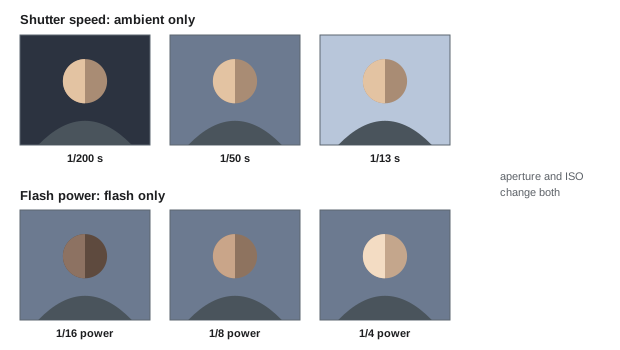
Because flash duration is very short, usually far shorter than the shutter speed, changing the shutter speed affects only the ambient exposure, while changing flash power or distance affects only the flash exposure. Aperture and ISO affect both. This gives photographers two independent controls:
- To brighten or darken the ambient light without changing the flash: change the shutter speed. A slower shutter speed brightens ambient light; a faster one darkens it, down to the flash sync speed (or beyond with high-speed sync, at a cost in flash power).
- To brighten or darken the flash without changing the ambient: change flash power or distance.
- To change both equally: change aperture or ISO.
A typical workflow sets the aperture for depth of field and the flash for the subject, then chooses the shutter speed to place the ambient light where you want it: matched to the flash for a natural look, one or two stops darker for a moody, flash-dominant look, or brighter for a soft, ambient-dominant look with flash as fill.
Balancing flash with window light
Window light is one of the most beautiful sources in photography, but it varies with weather and time of day and may not be strong or directional enough on its own. Combining it with flash offers control while keeping its character. Common approaches include using the window as the key light and a flash, bounced or through a large diffuser, as fill; using a flash outside the window or through it to imitate sunlight, keeping the look of daylight even on overcast days or at night; and using the window as a background light, glowing softly behind a subject lit by a softbox. To balance, meter or test the window light at the chosen aperture and shutter speed, then set the flash relative to it: matching it for a balanced look, or a stop or two above for flash-dominant images. Gel the flash with CTO if the window light is warm, or leave it at daylight if the window is lit by daylight.
Worked problem
Balancing a softbox key with a window background
A portrait is set up in front of a large window showing a city skyline at dusk. The ambient reading for the skyline is 1/30 s at f/4, ISO 400. The photographer wants the skyline about one stop darker than a normal exposure and the subject lit by a softbox at f/4. What settings should be used?
Show solution
- Keep f/4 and ISO 400 for both exposures.
- To darken the skyline by one stop, use a shutter speed of 1/60 s.
- Set the softbox power so that an incident flash reading at the subject gives f/4 at ISO 400.
- Check that the window does not reflect the softbox; angle the softbox or use a polarizer if needed, and gel the flash slightly warm if the interior should look cozy.
Answer: f/4, ISO 400, 1/60 s for the skyline one stop under, with the softbox set to give f/4 on the subject.
Incorporating practical lights
Practical lights, lamps, candles, neon signs, fairy lights and screens visible in the frame, add depth, warmth and realism. In flash photography, they often appear dim or invisible at normal flash exposures, because they are much weaker than the flash. To make them glow, use a slower shutter speed so that their ambient exposure becomes visible, raise ISO, or open the aperture, adjusting flash power to keep the subject correctly exposed. Practical lamps may also need dimming or lower-wattage bulbs to avoid clipping, and diffusion inside lampshades to avoid hot spots. In still life, candles and lamps are often photographed in a separate exposure and composited, so that each can be exposed correctly. The color of practicals, usually warm, can be embraced as part of the scene, or matched by gelling the flash.
Mixing flash with continuous light
Continuous LED and tungsten lights can be combined with flash in the studio. Reasons include using continuous light for a specific effect, such as a colored RGB background or a projected pattern, while the flash lights the subject; using a hard continuous source with a gobo or projector to create shapes; creating motion trails from continuous light combined with sharp flash images; and working in hybrid photo and video setups where continuous lights are already in place. Continuous light is usually much weaker than flash, so slower shutter speeds, wider apertures or higher ISO are needed for it to register. Movement during the longer exposure blurs anything lit by continuous light while flash freezes what it lights, which can be a creative effect or a problem. Ensure the continuous lights do not flicker at the chosen shutter speed.
| Goal | Shutter speed | Flash power | Result |
|---|---|---|---|
| Flash-dominant, dark background | At sync speed | Normal | Ambient suppressed |
| Balanced ambient and flash | Slower, matched to ambient | Normal | Natural mix |
| Ambient-dominant, flash as fill | Slower still | Reduced, 1–2 stops below ambient | Soft, natural with lifted shadows |
| Glowing practicals | Slow enough for practicals | Adjusted for subject | Lamps visible and warm |
| Motion trails | Slow, often 1/4 s or longer | Normal, rear curtain | Sharp subject with trails |
Motion effects with mixed light
Combining a slow shutter speed with flash creates motion effects. With first-curtain sync, the flash fires at the start of the exposure, and any ambient-lit movement continues afterward, so trails appear in front of a moving subject; with rear-curtain sync, the flash fires at the end, so trails appear behind the subject, which reads naturally as motion. Dancers, athletes and moving fabric photographed with rear-curtain sync, slow shutter speeds and continuous or ambient light create images that combine sharpness and flow. Moving the camera during a long exposure, sometimes called dragging or twisting, creates streaks of ambient light around a sharp flash-lit subject. These effects require experimentation: the ratio of flash to ambient, the speed of movement and the shutter speed all affect the result.
Color temperature mismatches
Flash is balanced to daylight, around 5,500 K; tungsten and household lamps are much warmer, around 2,700 to 3,200 K; LEDs vary; fluorescent and street lights may have green or orange casts. When mixed sources appear in one image, their color differences become visible. Approaches include matching them by gelling the flash to the dominant ambient color, such as full CTO to match tungsten, and setting white balance for tungsten; correcting the ambient sources, for example replacing bulbs or gelling windows, on larger productions; or embracing the mismatch, such as warm practical lamps in the background with a neutral subject, or cool blue dusk outside a window with warm interior light, which often looks natural and attractive. The key is to decide deliberately rather than letting mixed colors appear by accident, particularly on skin.
Ambient light in the studio
Even in the studio, ambient light can affect images. Modeling lights, room lights and window light leaking through blinds can add a faint, warm ambient exposure at slow shutter speeds, causing ghosting on moving subjects and color casts in shadows. To check, take a test shot with the flashes disabled at your chosen settings: if the image is not almost completely black, ambient light is contributing. Turning off modeling lights before shooting, closing blinds or using the fastest sync speed eliminates unwanted ambient. Conversely, a slower shutter speed can deliberately let modeling lights or practicals add a subtle warm glow.
High-speed sync and ND filters
Outdoors or near bright windows, the ambient light may be so bright that even at the sync speed it overwhelms the flash, or forces small apertures. High-speed sync (HSS) allows faster shutter speeds to darken ambient while using wide apertures, but reduces effective flash power significantly, often by one to two stops or more. Neutral density filters on the lens are an alternative: they reduce both ambient and flash exposure equally, allowing wide apertures at the sync speed, with the flash power raised to compensate. A 3-stop ND filter, for example, lets the photographer open from f/11 to f/4 at the same shutter speed, with the flash raised by three stops, which many strobes can supply more efficiently than HSS. Choosing between HSS and ND depends on the flash power available and the desired shutter speed.
Consistency and workflow
Mixed-light setups change as ambient light changes: clouds, sunset and dusk can alter ambient exposure by several stops within minutes. Monitor the ambient by taking occasional flash-off test shots or by watching the histogram, and adjust shutter speed to maintain the balance. For a series of images that must match, such as a product range or corporate portraits shot over a day, flash-dominant setups are more consistent than ambient-dominant ones. Record shutter speed, aperture, ISO, flash power and gels in your notes, and photograph the scene with the flash off as a reference.
Balancing flash with sunlight in the studio space
Studios with large windows or skylights mix daylight with flash constantly. On bright days, daylight may add significant ambient exposure even at the sync speed, raising shadow levels and adding color casts, especially if the light reflects from colored surroundings. Blackout curtains or blinds restore full control; alternatively, the daylight can be used deliberately as fill, with the flash as key, or as a soft background light. Because daylight changes with clouds and time, check the ambient exposure regularly when combining it with flash.
Shutter speed as a creative control
Once photographers understand that shutter speed controls only ambient light in a flash photograph, it becomes a creative tool. In a dim interior, slowing the shutter brings warm lamps, candles or city lights into the image while flash keeps the subject sharp; outdoors at dusk, it controls how blue and bright the sky appears; in a nightclub, it determines how much of the colored stage lighting appears around a flash-lit performer. Testing a range of shutter speeds at the same flash settings, from the sync speed down to a second or more, shows the full range of looks available from one setup.
Continuous light for video and stills together
Hybrid shoots that produce both stills and video increasingly use continuous LED lights for both, avoiding the need to change lighting. This simplifies the workflow but limits shutter speeds for stills, since continuous light is weaker than flash, and requires attention to motion blur and flicker. Some productions use continuous light for video and flash for stills, switching between them, or use LEDs with a stills boost mode. Planning which approach suits the shoot avoids compromises in either medium.
Testing the balance
A reliable way to understand a mixed-light scene is to shoot three test frames: one with only the ambient light (flashes off), one with only the flash (at the sync speed in a dark room or with a fast shutter), and one with both. Comparing them shows exactly what each source contributes, where color mismatches occur and how the balance should be adjusted.
Common mistakes
MistakeChanging aperture to fix only the background.
InsteadUse shutter speed to adjust ambient independently.
MistakePracticals invisible in flash images.
InsteadSlow the shutter or raise ISO so practicals glow.
MistakeUnplanned color mismatches on skin.
InsteadGel the flash or choose the mismatch deliberately.
MistakeGhosting from modeling lights.
InsteadTest with flash off and turn off modeling lights.
MistakeRelying on HSS when power is limited.
InsteadConsider an ND filter at the sync speed.
Summary and key terms
- Shutter speed controls ambient; flash power controls flash; aperture and ISO affect both.
- Window light can be key, background or fill in combination with flash.
- Practicals glow when the shutter is slow enough to record them.
- Continuous light blurs motion while flash freezes it.
- Rear-curtain sync produces natural motion trails.
- Mixed color temperatures must be matched or embraced deliberately.
- Test ambient contribution, consider ND instead of HSS and monitor changes.
- Ambient exposure
- Exposure from continuous light during the shutter time.
- Flash exposure
- Exposure from the flash burst.
- Dragging the shutter
- Using a slow shutter speed with flash.
- Flash-dominant
- Image where flash outweighs ambient light.
- Ambient-dominant
- Image where ambient light outweighs flash.
- Practical
- Light source visible in the frame.
- Rear-curtain sync
- Flash fired at the end of the exposure.
- Gobo
- Pattern placed in a light to project shapes.
- High-speed sync
- Flash mode allowing speeds above sync speed.
- ND filter
- Filter reducing light equally.
Practice problems
Work each problem on paper first, then reveal the answer to check.
Which control adjusts ambient only?
Show answer
Shutter speed.
Which control adjusts flash only?
Show answer
Flash power or distance.
What changes both exposures?
Show answer
Aperture and ISO.
How do you darken a background by one stop without changing the flash?
Show answer
Halve the shutter time.
Name a way to use window light with flash.
Show answer
Window key with flash fill, flash as sun, window as background.
How do you make practicals glow?
Show answer
Slow shutter speed or higher ISO.
Where do trails appear with rear-curtain sync?
Show answer
Behind the moving subject.
Which gel matches flash to tungsten?
Show answer
Full CTO.
How do you check ambient contribution in the studio?
Show answer
Take a test shot with flashes off.
What does a 3-stop ND allow?
Show answer
Opening from f/11 to f/4 at the same shutter speed.
Lesson quiz · 5 questions
Score 60% or more to complete this lesson.
Create a free account to save your progress, take quizzes and earn a certificate.