
NET-103 · Lesson 5 of 12 · 27 min
Package management and software installation
▶ Video coming soon A video version of this lesson is on the way.
A bare Ubuntu server does very little. Before ridge-web can serve the Ridgeline shop it needs a web server, a database, Python and a handful of tools, and every one of those programs depends on libraries, which depend on other libraries. Installing software by downloading files from websites and copying them into place, as people often do on a personal computer, would be slow, error-prone and impossible to keep updated. Linux distributions solve this with package managers: tools that install, update and remove software from trusted repositories, sort out dependencies automatically and keep a record of every file they put on the system.
This lesson covers packages and repositories, the apt commands that Jordan uses every week, how to inspect what is installed, how to add a third-party repository safely, how security updates can be installed automatically, and where other ways of installing software, such as snaps and Python's pip, fit in.
Packages, repositories and dependencies
A package is an archive that contains a program's files together with metadata: its name, version, a description, the scripts to run when it is installed or removed, and the list of other packages it needs. On Debian-family systems packages are .deb files, and on Red Hat-family systems .rpm files. A repository is a server that holds thousands of packages along with a signed index that lists them. Ubuntu's main repositories hold about seventy thousand packages, all built and signed by the distribution.
Dependencies are what make package management indispensable. The nginx package, for example, needs a particular version of the OpenSSL library for encrypted connections, which in turn needs the C library, and so on. When you ask the package manager for nginx, it works out the whole chain, downloads what is missing and installs everything in the right order. When a library gets a security fix, updating that single package fixes every program that uses it.
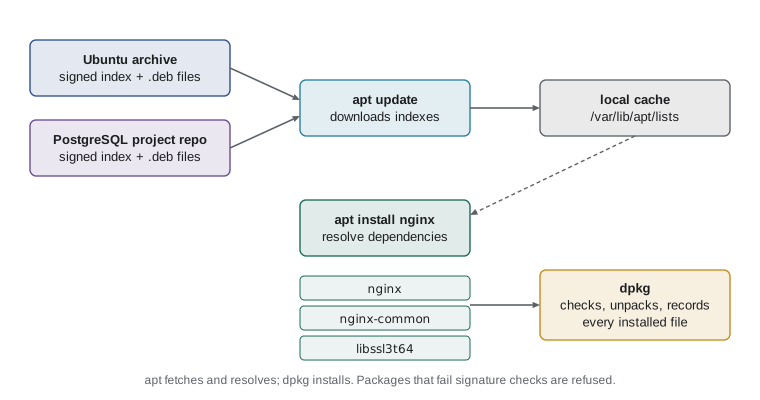
Trust is built in. Each repository's index is signed with the distribution's cryptographic key, and the package manager refuses packages whose checksums do not match a signed index. This means that even if a download mirror were tampered with, the altered package would be rejected. It is one of the strongest reasons to install software from the distribution's repositories rather than from random downloads.
The apt commands
Debian-family systems have two layers of tools. The low-level dpkg installs and removes individual .deb files and keeps a database of what is installed, but knows nothing about repositories or dependencies. The high-level apt fetches packages from repositories and resolves dependencies, then calls dpkg to do the actual installing. In day-to-day work you use apt, with sudo for anything that changes the system.
| Command | What it does |
|---|---|
| sudo apt update | Downloads the latest package indexes from every repository; installs nothing |
| apt list --upgradable | Lists installed packages that have newer versions available |
| sudo apt upgrade | Installs newer versions of installed packages, never removing anything |
| sudo apt full-upgrade | Upgrades, and may install or remove packages to complete the upgrade |
| sudo apt install nginx | Installs a package and its dependencies |
| sudo apt remove nginx | Removes a package but keeps its configuration files |
| sudo apt purge nginx | Removes a package and its configuration files |
| sudo apt autoremove | Removes dependencies that nothing needs any more |
| apt search keyword | Searches package names and descriptions |
| apt show nginx | Shows a package's description, version, size and dependencies |
| apt policy nginx | Shows the installed version and which repository each version comes from |
The difference between update and upgrade causes endless confusion, so it is worth stating plainly. apt update refreshes the list of what is available; it changes no software. apt upgrade installs the newer versions that the refreshed list shows. You almost always run them one after the other, and running upgrade without a recent update simply finds nothing new.
> sudo apt update
Hit:1 http://archive.ubuntu.com/ubuntu noble InRelease
Get:2 http://security.ubuntu.com/ubuntu noble-security InRelease [126 kB]
Fetched 2,104 kB in 2s (1,051 kB/s)
Reading package lists... Done
5 packages can be upgraded. Run 'apt list --upgradable' to see them.
> apt list --upgradable
Listing... Done
libssl3t64/noble-security 3.0.13-0ubuntu3.5 amd64 [upgradable from: 3.0.13-0ubuntu3.4]
openssl/noble-security 3.0.13-0ubuntu3.5 amd64 [upgradable from: 3.0.13-0ubuntu3.4]
python3.12/noble-updates 3.12.3-1ubuntu0.9 amd64 [upgradable from: 3.12.3-1ubuntu0.8]
tzdata/noble-updates 2026a-0ubuntu0.24.04 all [upgradable from: 2025b-0ubuntu0.24.04]
vim-tiny/noble-security 2:9.1.0016-1ubuntu7.9 amd64 [upgradable from: 2:9.1.0016-1ubuntu7.8]
> sudo apt upgrade
Each line of the upgradable list names the package, the repository section it comes from, the new version, the processor architecture and the version currently installed. The section matters: packages from noble-security are security fixes that should go on promptly, while noble-updates carries ordinary bug fixes. Ubuntu's version numbers have their own structure: in 3.0.13-0ubuntu3.5 the part before the dash is the upstream version from the OpenSSL project, and the part after it is Ubuntu's own revision, which increases each time Ubuntu patches the package. That is why a fixed release can receive security fixes without the upstream version changing at all.
Because apt prints in a regular format, a short program can summarize it. The listing below separates security updates from the rest, the first thing Sam looks at each Monday.
listing = """libssl3t64/noble-security 3.0.13-0ubuntu3.5 amd64 [upgradable from: 3.0.13-0ubuntu3.4]
openssl/noble-security 3.0.13-0ubuntu3.5 amd64 [upgradable from: 3.0.13-0ubuntu3.4]
python3.12/noble-updates 3.12.3-1ubuntu0.9 amd64 [upgradable from: 3.12.3-1ubuntu0.8]
tzdata/noble-updates 2026a-0ubuntu0.24.04 all [upgradable from: 2025b-0ubuntu0.24.04]"""

security, other = [], []
for line in listing.splitlines():
    name_part, new, arch, *_ , old = line.split()
    name, section = name_part.split("/")
    old = old.rstrip("]")
    (security if section.endswith("-security") else other).append(f"{name} {old} -> {new}")

print("Security updates:", *security, sep="\n  ")
print("Other updates:", *other, sep="\n ")Security updates: libssl3t64 3.0.13-0ubuntu3.4 -> 3.0.13-0ubuntu3.5 openssl 3.0.13-0ubuntu3.4 -> 3.0.13-0ubuntu3.5 Other updates: python3.12 3.12.3-1ubuntu0.8 -> 3.12.3-1ubuntu0.9 tzdata 2025b-0ubuntu0.24.04 -> 2026a-0ubuntu0.24.04
Installing the Ridgeline stack
With the basics in hand, Sam and Jordan install what the shop needs. The nginx web server will face the internet and pass requests to the shop application. PostgreSQL will hold the roast log and orders. The python3-venv package lets the shop run in its own isolated Python environment, and a few tools help with administration.
> sudo apt install nginx postgresql python3-venv python3-pip git ufw fail2ban
Reading package lists... Done
Building dependency tree... Done
The following additional packages will be installed:
  libpq5 nginx-common postgresql-16 postgresql-client-16 postgresql-common ...
The following NEW packages will be installed:
  fail2ban libpq5 nginx nginx-common postgresql postgresql-16 ...
0 upgraded, 31 newly installed, 0 to remove and 0 not upgraded.
Need to get 23.4 MB of archives.
After this operation, 89.2 MB of additional disk space will be used.
Do you want to continue? [Y/n] y
> systemctl is-active nginx postgresql
active
active
apt asked for seven packages and installed thirty-one, because it pulled in their dependencies. On Debian-family systems most services start automatically as soon as they are installed, and the last command confirms that nginx and PostgreSQL are running. Lesson 6 explains how those services are managed. On Red Hat-family systems services usually stay stopped after installation until an administrator enables them, a different default that is worth knowing about when you move between the two families.
Inspecting what is installed
A good administrator can answer three questions quickly: is a package installed, which files did it install, and which package does a given file belong to? The dpkg tool answers all three from its database.
> dpkg -l | grep nginx
ii  nginx          1.24.0-2ubuntu7.1  amd64  small, powerful, scalable web/proxy server
ii  nginx-common   1.24.0-2ubuntu7.1  all    small, powerful, scalable web/proxy server - common files
> dpkg -L nginx-common | grep etc/nginx | head -n 4
/etc/nginx
/etc/nginx/fastcgi.conf
/etc/nginx/mime.types
/etc/nginx/nginx.conf
> dpkg -S /usr/sbin/nginx
nginx: /usr/sbin/nginx
> apt-cache rdepends --installed libssl3t64 | head -n 5
The ii at the start of each dpkg -l line means the package is meant to be installed and is installed. Other codes show packages that were removed but left configuration behind (rc), or that failed part-way through installing, which is worth fixing at once with sudo apt install -f or sudo dpkg --configure -a.
Repositories and sources
apt reads its list of repositories from files in /etc/apt/sources.list.d. Ubuntu 24.04 uses a newer format, in a file called ubuntu.sources, in which each repository is a short block of fields. The Components field chooses parts of the archive: main for software Canonical supports, universe for community-maintained software, and restricted and multiverse for software with licensing restrictions.
# /etc/apt/sources.list.d/ubuntu.sources (abridged)
Types: deb
URIs: http://archive.ubuntu.com/ubuntu/
Suites: noble noble-updates noble-backports
Components: main restricted universe multiverse
Signed-By: /usr/share/keyrings/ubuntu-archive-keyring.gpg

Types: deb
URIs: http://security.ubuntu.com/ubuntu/
Suites: noble-security
Components: main restricted universe multiverse
Signed-By: /usr/share/keyrings/ubuntu-archive-keyring.gpg
Sometimes the distribution's version of a program is too old, or the program is not packaged at all. Many projects then run their own repositories. The PostgreSQL project, for example, publishes repositories with every current PostgreSQL version for each Ubuntu release. Adding one means downloading the project's signing key, saving it in /etc/apt/keyrings and adding a sources file that names that key in its Signed-By field, so the key is trusted only for that one repository. Third-party repositories deserve caution: every package in them can run scripts as root during installation, so add only repositories from organizations you trust, and keep the list short. Ubuntu also offers PPAs, personal package archives run by individuals, which carry the same risk and should be used sparingly on servers.
Automatic security updates
Security updates protect the server only if they are installed, and the gap between a fix being published and attackers exploiting the flaw can be days or even hours. Ubuntu Server installs the unattended-upgrades package by default and configures it to install updates from the security section automatically each day. Sam checks that it is enabled, adds an email report, and decides how reboots will be handled.
> cat /etc/apt/apt.conf.d/20auto-upgrades
APT::Periodic::Update-Package-Lists "1";
APT::Periodic::Unattended-Upgrade "1";
> sudo unattended-upgrade --dry-run --debug 2>&1 | grep "Allowed origins"
Allowed origins are: o=Ubuntu,a=noble, o=Ubuntu,a=noble-security, o=UbuntuESMApps,a=noble-apps-security, o=UbuntuESM,a=noble-infra-security
> ls /var/run/reboot-required 2>/dev/null && cat /var/run/reboot-required.pkgs
/var/run/reboot-required
linux-image-6.8.0-49-generic
Most updates take effect when the affected service restarts, which apt and a tool called needrestart arrange automatically. A new kernel, however, is used only after a reboot. Ubuntu signals this by creating the file /var/run/reboot-required, listing the packages responsible in reboot-required.pkgs. Ridgeline cannot have the shop disappear at lunchtime, so Sam schedules reboots for Tuesday mornings at 05:00, when orders are rare, and Jordan checks for the flag in the weekly maintenance routine.
Occasionally a package must be kept at its current version, for example while the shop's developers test a new PostgreSQL release. sudo apt-mark hold postgresql-16 prevents upgrades of that package until sudo apt-mark unhold is run. Holds should be rare and temporary, and recorded somewhere, because a forgotten hold quietly stops security fixes.
Other ways to install software
Not everything comes from apt. Canonical's snap system packages an application together with all its libraries in one container-like bundle that updates itself; Flatpak does something similar mainly for desktop applications. Programming languages have their own package managers too: pip for Python, npm for JavaScript, gem for Ruby. These are essential for developers, but mixing them with the system's packages can break things, because the operating system's own tools also rely on Python libraries.
Ubuntu 24.04 therefore marks the system Python as externally managed. If you run pip install as root to add a library to the system Python, pip refuses with an error that says externally-managed-environment. The right approach is a virtual environment: a directory containing its own copy of the Python interpreter's environment and its own libraries, separate from the system. The shop application runs from a virtual environment in /srv/ridgeline/shop/venv, and its exact library versions are listed in a requirements file so that the environment can be rebuilt identically.
> cd /srv/ridgeline/shop
> sudo -u shop python3 -m venv venv
> sudo -u shop venv/bin/pip install -r requirements.txt
Successfully installed Flask-3.1.0 gunicorn-23.0.0 psycopg-3.2.3 ...
> venv/bin/python -c "import flask; print(flask.__version__)"
3.1.0
Installing software from source code, by downloading it and compiling it, is the last resort on a server. It works, but nothing will update the program automatically, so it becomes the administrator's job to watch for security fixes. If you must, install it under /usr/local or /opt so that it never clashes with packaged files.
| Task | Debian and Ubuntu | Red Hat, Rocky and Fedora |
|---|---|---|
| Refresh indexes | apt update | dnf check-update (automatic) |
| Upgrade everything | apt upgrade | dnf upgrade |
| Install | apt install pkg | dnf install pkg |
| Remove | apt remove pkg | dnf remove pkg |
| Search | apt search word | dnf search word |
| Which package owns a file | dpkg -S /path | rpm -qf /path |
| Files in a package | dpkg -L pkg | rpm -ql pkg |
| Automatic updates | unattended-upgrades | dnf-automatic |
Worked problem
Planning the weekly update routine
Sam wants Jordan to own a short weekly maintenance routine for ridge-web that keeps it patched without surprising anyone. What steps should it include, and in what order?
Show solution
- Refresh the indexes with sudo apt update and review apt list --upgradable, noting anything from a -security section and anything that touches nginx, PostgreSQL or Python.
- Check that unattended-upgrades ran: its log is /var/log/unattended-upgrades/unattended-upgrades.log.
- Apply remaining updates with sudo apt upgrade, read what it plans to do before answering yes, then run sudo apt autoremove.
- Check /var/run/reboot-required; if it exists, plan the reboot for the Tuesday 05:00 window and tell Theo.
- After any update to the web or database stack, test the shop: load the home page and a product page, and run systemctl status for nginx, postgresql and ridgeline-shop.
- Record what was done and any held packages in the server's change log.
Answer: Update, review, confirm automatic updates, upgrade, clean up, check for a needed reboot, test the shop and record the work.
Try it yourself
Read the upgradable list
Write parse_upgradable(text) that reads the output of apt list --upgradable and returns a list of (name, old_version, new_version) tuples. Ignore the Listing... line and any blank lines.
def parse_upgradable(text):
    return []


sample = 'Listing... Done\nopenssl/noble-security 3.0.13-0ubuntu3.5 amd64 [upgradable from: 3.0.13-0ubuntu3.4]'
print(parse_upgradable(sample))
Try it yourself
Which updates are security fixes?
Write security_count(text) that returns how many lines of apt list --upgradable output come from a section ending in -security, and security_names(text) that returns their package names in alphabetical order.
def security_count(text):
    return 0

def security_names(text):
    return []
Common mistakes
MistakeRunning apt upgrade without apt update first and concluding that nothing needs updating.
InsteadRun sudo apt update first to refresh the indexes, then upgrade.
MistakeDownloading programs from websites and copying them into /usr/bin.
InsteadInstall from the distribution's repositories, or a trusted vendor repository, so the program is tracked and updated.
MistakeAdding third-party repositories or PPAs freely.
InsteadAdd only repositories you trust, with their key restricted by Signed-By, and keep the list short.
MistakeUsing sudo pip install to add libraries to the system Python.
InsteadCreate a virtual environment for each application and install its libraries there.
MistakeIgnoring /var/run/reboot-required after kernel updates.
InsteadPlan a reboot window and check the flag as part of routine maintenance.
MistakeHolding a package and forgetting about it.
InsteadRecord every hold and remove it as soon as testing is done.
Summary and key terms
- Packages bundle a program's files with metadata and dependencies; repositories serve signed indexes of packages.
- apt resolves dependencies and fetches packages, and dpkg installs them and records every file.
- apt update refreshes the indexes, apt upgrade installs newer versions, apt install adds software and apt remove or purge takes it away.
- dpkg -l, dpkg -L and dpkg -S show what is installed, what a package contains and which package owns a file.
- Repositories are listed in /etc/apt/sources.list.d; third-party repositories need a trusted key and care.
- unattended-upgrades installs security fixes daily; a new kernel needs a planned reboot, signaled by /var/run/reboot-required.
- Language package managers such as pip belong in virtual environments, not in the system Python.
- package
- An archive of a program's files plus metadata such as version and dependencies.
- repository
- A server that offers packages and a signed index of them.
- dependency
- Another package that a package needs in order to work.
- package index
- The list of packages and versions a repository offers, downloaded by apt update.
- dpkg
- The low-level Debian tool that installs .deb files and tracks installed files.
- apt
- The high-level tool that fetches packages from repositories and resolves dependencies.
- unattended upgrades
- Automatic installation of updates, usually security fixes, on a schedule.
- package hold
- A setting that stops a package from being upgraded.
- virtual environment
- An isolated Python environment with its own installed libraries.
Practice problems
Work each problem on paper first, then reveal the answer to check.
What is the difference between apt remove and apt purge?
Show answer
remove keeps the package's configuration files; purge deletes them too.
How do you find out which package installed /usr/bin/rsync?
Show answer
dpkg -S /usr/bin/rsync
Why does a repository's signing key matter?
Show answer
apt checks every package against the signed index, so tampered packages are rejected.
A kernel update was installed overnight. How do you know a reboot is needed?
Show answer
The file /var/run/reboot-required exists, and reboot-required.pkgs lists the kernel package.
What error does pip give on Ubuntu 24.04 when you install into the system Python, and what should you do instead?
Show answer
externally-managed-environment; create a virtual environment with python3 -m venv and install there.
In the version 3.12.3-1ubuntu0.9, which part is the upstream version and which is Ubuntu's revision?
Show answer
3.12.3 is the upstream Python version; 1ubuntu0.9 is the packaging revision.
Lesson quiz · 5 questions
Score 60% or more to complete this lesson.
Create a free account to save your progress, take quizzes and earn a certificate.