
NET-103 · Lesson 12 of 12 · 28 min
Capstone: building and hardening a Linux server
▶ Video coming soon A video version of this lesson is on the way.
Six weeks after Rosa's decision, ridge-web runs the Ridgeline shop and the roast log, the Raspberry Pi uploads every ten minutes, backups run nightly and Jordan can find his way around the server with confidence. Sam now asks for one last piece of work before he steps back to a monthly check-in: a written build and hardening plan that would let anyone rebuild ridge-web from scratch, and an audit of the live server against that plan. This capstone brings together every lesson in the course. It walks through building a server in a sensible order, the layers of hardening and the reason for each, verifying the result, and keeping it secure over time.
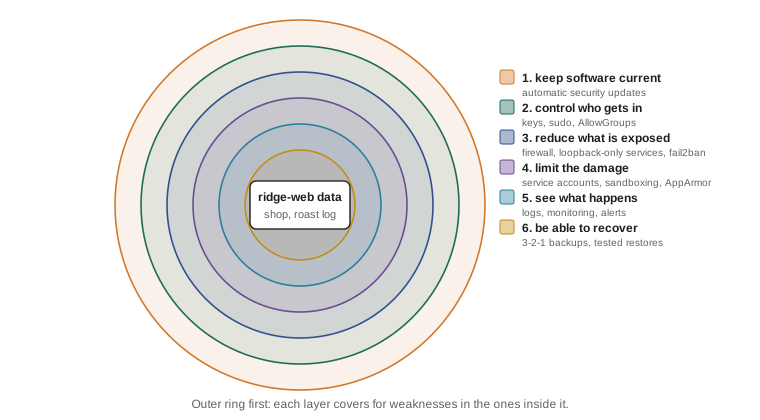
Hardening means reducing a system's attack surface, the set of ways it could be attacked, and limiting the damage if an attack succeeds. No single setting makes a server secure; security comes from layers, each covering for weaknesses in the others, an approach called defense in depth. The layers below follow roughly the order Sam used to build ridge-web, which is also a good order for any new server.
The build plan
A good build plan is a numbered list that someone else could follow, with each step's purpose and a way to check it. Sam's plan for ridge-web is below. Most steps were covered in earlier lessons; the capstone's job is to put them in order and make sure nothing is missed.
| Step | Action | Lesson | Check |
|---|---|---|---|
| 1 | Install Ubuntu Server LTS from the provider's image; record the host key fingerprint from the console | 1, 10 | cat /etc/os-release |
| 2 | Apply all updates and reboot; enable unattended security upgrades | 5 | apt list --upgradable is empty |
| 3 | Set the hostname and time zone; check time synchronization | 8 | hostnamectl, timedatectl |
| 4 | Create named admin accounts in the sudo group; lock unused accounts | 4 | getent group sudo |
| 5 | Install SSH keys, then disable root and password logins | 10 | sshd -T, a test login with keys only |
| 6 | Enable the firewall: SSH from known addresses, web from anywhere | 8 | ufw status numbered |
| 7 | Install only the needed packages; remove what is not needed | 5 | ss -tulpn shows only expected listeners |
| 8 | Prepare storage: data volume at /srv by UUID with nofail | 7 | findmnt --verify, df -h |
| 9 | Create service accounts and directories with least-privilege permissions | 4 | ls -l, namei -l on key paths |
| 10 | Install services with hardened systemd units | 6 | systemd-analyze security |
| 11 | Configure log rotation, monitoring and alerts | 9 | logrotate --debug, a test alert |
| 12 | Set up backups, copy them off the server and test a restore | 11 | A restore to a scratch database |
| 13 | Run an audit and record the result in the server's documentation | 12 | The audit report |
The order matters in a few places. Updates come first because a freshly installed image may be months old and missing security fixes. Key-based SSH access must work before password login is disabled, and the firewall rule for SSH must exist before the firewall is enabled, or the administrator is locked out. Backups are not finished until a restore has been tested, because an untested backup is only a hope.
Layer 1: keep the software current
Most successful attacks on servers use known flaws for which a fix already exists. Keeping software patched is therefore the single most valuable hardening step, and it is also the cheapest. On ridge-web, unattended-upgrades installs security fixes daily, the weekly routine from lesson 5 applies everything else, and the Tuesday 05:00 window handles reboots for new kernels. Ubuntu Pro, a Canonical subscription that is free for personal use on a few machines and paid for businesses, adds Livepatch, which applies many kernel security fixes without a reboot, and extended security coverage for packages in universe; Sam subscribes for ridge-web because the shop uses a few of those packages.
Old software is the other half of the problem. Ubuntu 24.04 receives standard security updates until 2029. Sam adds a reminder to the documentation to plan the move to the next LTS release, 26.04, well before then, by building a new server from this plan and moving the shop across, which is usually easier and safer than upgrading in place.
Layer 2: control who can get in
Access control covers people and programs. For people: named accounts only, no shared logins, sudo instead of root, SSH keys instead of passwords, logins limited to the sudo and roastsync groups, and accounts locked promptly when someone leaves. For automated access: each job has its own account and a restricted key, as the roaster-pi's upload key does. Sam also documents a break-glass procedure, how to get in through the provider's console if SSH ever fails, and keeps the console's login protected with multi-factor authentication, because the cloud provider's account is in effect a master key to the server.
> sudo sshd -T | grep -Ei "^(permitrootlogin|passwordauthentication|allowgroups|maxauthtries) "
permitrootlogin no
passwordauthentication no
maxauthtries 3
allowgroups sudo roastsync
> sudo passwd -S -a | grep " P "
sam P 2026-11-02 0 99999 7 -1
jordan P 2026-11-04 0 99999 7 -1
> getent group sudo
sudo:x:27:sam,jordan
The command sshd -T prints the settings the SSH server will actually use, after all files are combined, which is more reliable than reading the files yourself. The passwd -S -a command shows the password status of every account; on ridge-web only Sam and Jordan have passwords at all, used for sudo, and they log in with keys.
Layer 3: reduce what is exposed
Every listening service is a potential way in, so the next layer is to expose as little as possible. Remove packages that are not needed. Bind internal services to 127.0.0.1, as ridge-web does with PostgreSQL and the shop's gunicorn. Let the firewall allow only what must be reachable: HTTP and HTTPS from anywhere, SSH only from the office and the roastery. fail2ban adds a dynamic layer, banning addresses that repeatedly fail to log in.
> sudo ufw status verbose
Status: active
Default: deny (incoming), allow (outgoing), deny (routed)
To                         Action      From
--                         ------      ----
22/tcp                     ALLOW IN    198.51.100.17
22/tcp                     ALLOW IN    198.51.100.62
80/tcp                     ALLOW IN    Anywhere
443/tcp                    ALLOW IN    Anywhere
> sudo fail2ban-client status sshd
Status for the jail: sshd
|- Filter
|  |- Currently failed: 0
|  `- Total failed:     214
`- Actions
   |- Currently banned: 0
   `- Total banned:     11
HTTPS deserves a note. The shop takes orders, so every page is served over HTTPS with a free certificate from Let's Encrypt, obtained and renewed automatically by the certbot tool, which installs its own systemd timer. nginx redirects plain HTTP to HTTPS, and sends a header telling browsers to use HTTPS for the site in future.
Layer 4: limit the damage
Assume that one day something will be compromised, perhaps through a flaw in the shop's code. The next layer limits what an attacker could then do. The shop runs as the unprivileged shop account, not root. Its systemd unit uses NoNewPrivileges, ProtectSystem=strict and ReadWritePaths, so even a fully compromised shop process cannot write outside two directories. Files have least-privilege permissions: the shop's settings file is 640, backups are readable only by postgres and the accounts group, and private keys are 600.
Ubuntu adds mandatory access control with AppArmor, which confines programs to the files and capabilities their profile allows, regardless of their user's permissions; profiles ship with many packages, and aa-status lists them. The systemd-analyze security command scores each service's sandboxing, from exposed to well protected, and suggests settings to add.
> systemd-analyze security --no-pager | grep -E "UNIT|ridgeline|nginx|postgresql"
UNIT                         EXPOSURE PREDICATE
nginx.service                     9.6 UNSAFE
postgresql@16-main.service        8.4 EXPOSED
ridgeline-shop.service            4.9 OK
> sudo aa-status | head -n 4
apparmor module is loaded.
112 profiles are loaded.
28 profiles are in enforce mode.
The scores show what the extra unit settings achieved: the shop scores 4.9 thanks to its sandboxing, while the packaged nginx and PostgreSQL units score worse. Sam adds drop-in overrides with systemctl edit to tighten them too, testing each change, because some sandboxing settings can stop a service working, and records the scores in the audit.
Layer 5: see what happens
A layer that only prevents attacks is not enough; you also need to know when something goes wrong. Logs from lesson 9 record logins, sudo use, service failures and web requests. Log rotation keeps them from filling the disk. Monitoring watches disk, memory, load, services and the shop's availability from outside, and alerts Jordan by email and Sam by text. auth.log is reviewed weekly. For a business that grows, the next step would be sending logs to a central service, so that an attacker who gains root cannot simply erase them.
Layer 6: be able to recover
Backups are the last layer, the one that matters when every other layer has failed, whether the cause is an attacker, a hardware fault, a bad update or a mistaken rm. Sam follows the 3-2-1 rule: at least three copies of the data, on at least two kinds of storage, with at least one copy away from the server. On ridge-web, the database is dumped nightly to /srv/backups, an rsync job copies each new backup to object storage at a different provider, and every month a copy is kept for a year. The off-site copy uses an account that can add files but not delete them, so that ransomware on ridge-web could not destroy the backups too.
> sudo -u postgres createdb roastlog_restore_test
> gunzip -c /srv/backups/roastlog-2026-11-09.sql.gz | sudo -u postgres psql -q roastlog_restore_test
> sudo -u postgres psql -tAc "SELECT count(*) FROM roasts" roastlog_restore_test
18342
> sudo -u postgres psql -tAc "SELECT count(*) FROM roasts" roastlog
18355
> sudo -u postgres dropdb roastlog_restore_test
The restore test proves that the backup is complete and readable: the restored database holds 18,342 roasts, and the live one 18,355, the difference being the thirteen roasts logged since last night's backup. Recovery also needs a plan: Sam's documentation records how long a full rebuild from the build plan and the latest backup takes, about two hours, which Rosa accepts as the worst case.
Auditing the server
With the server built, Sam and Jordan audit it. Tools exist for this: Lynis, a free auditing tool, checks hundreds of settings and suggests improvements, and the Center for Internet Security publishes detailed benchmarks for Ubuntu with recommended settings. For ridge-web, Jordan also writes a short Python script that gathers a few key facts and checks them against the plan, so that the same audit can be run every month and the results compared. The facts come from commands seen throughout the course; here they are collected into a dictionary.
facts = {
    "security_updates_pending": 0,
    "unattended_upgrades": True,
    "permit_root_login": "no",
    "password_authentication": "no",
    "firewall_active": True,
    "ssh_allowed_from": ["198.51.100.17", "198.51.100.62"],
    "public_listeners": [22, 80, 443],
    "services_as_root": ["nginx"],
    "disk_use": {"/": 21, "/srv": 46},
    "last_backup_age_hours": 6.5,
    "last_restore_test_days": 9,
}

checks = [
    ("No security updates pending", facts["security_updates_pending"] == 0),
    ("Automatic security updates on", facts["unattended_upgrades"]),
    ("Root cannot log in over SSH", facts["permit_root_login"] == "no"),
    ("SSH passwords refused", facts["password_authentication"] == "no"),
    ("Firewall active", facts["firewall_active"]),
    ("SSH not open to everyone", "Anywhere" not in facts["ssh_allowed_from"]),
    ("Only 22, 80 and 443 public", set(facts["public_listeners"]) <= {22, 80, 443}),
    ("App services not running as root", set(facts["services_as_root"]) <= {"nginx"}),
    ("Disks below 80", all(v < 80 for v in facts["disk_use"].values())),
    ("Backup less than 26 hours old", facts["last_backup_age_hours"] < 26),
    ("Restore tested in the last 35 days", facts["last_restore_test_days"] <= 35),
]
passed = 0
for name, ok in checks:
    passed += ok
    print(("PASS " if ok else "FAIL ") + name)
print(f"{passed} of {len(checks)} checks passed")PASS No security updates pending PASS Automatic security updates on PASS Root cannot log in over SSH PASS SSH passwords refused PASS Firewall active PASS SSH not open to everyone PASS Only 22, 80 and 443 public PASS App services not running as root PASS Disks below 80 PASS Backup less than 26 hours old PASS Restore tested in the last 35 days 11 of 11 checks passed
nginx is allowed in the services-as-root check because its master process starts as root to open ports 80 and 443 and then runs its worker processes as www-data, a normal and well-understood design. Recording that kind of decision, and why it is acceptable, is part of a good audit: the next administrator should not have to rediscover the reasoning.
Keeping it secure
A server hardened once does not stay hardened. New flaws are found, people come and go, software is added and settings drift. Sam's handover note to Jordan lists the routine: daily, glance at alerts and the backup log; weekly, run the update routine and review auth.log; monthly, run the audit script, test a restore and review user accounts and SSH keys; every six months, review the firewall rules and the build plan itself; and before 2029, rebuild on the next LTS release. Every change goes in the server's change log with the date, who made it and why, which turns the next incident investigation from guesswork into reading.
Worked problem
Adding a new service safely
Theo wants a small inventory dashboard, written by a contractor, added to ridge-web. Using the layers, what should Jordan require before it goes live?
Show solution
- Install its dependencies from the Ubuntu archive or in a virtual environment, never with sudo pip into the system Python.
- Create a dedicated account with no login shell, and give it read access only to the data it needs, ideally a read-only database role.
- Run it as a systemd service with User=, NoNewPrivileges, ProtectSystem=strict and ReadWritePaths, and check its exposure score.
- Bind it to 127.0.0.1 and publish it through nginx with HTTPS and a login, rather than opening a new port in the firewall.
- Add a logrotate rule for its logs and include it in monitoring and the monthly audit.
- Record the change in the change log and update the build plan so that a rebuild includes it.
Answer: A dedicated account, a sandboxed unit, loopback binding behind nginx, logs, monitoring and documentation, before going live.
Try it yourself
Run the audit checks
Write failed_checks(facts) that returns, in this order, the names of the checks that fail: updates if security_updates_pending is not 0, root login if permit_root_login is not no, passwords if password_authentication is not no, firewall if firewall_active is false, exposed ports if public_listeners contains any port other than 22, 80 and 443, and backup if last_backup_age_hours is 26 or more.
def failed_checks(facts):
    return []
Try it yourself
Read ufw status
Write ufw_rules(text) that reads the output of ufw status and returns a list of (port, source) tuples for the ALLOW IN rules, where port is the int before /tcp and source is the last word on the line (for example Anywhere or an address). Skip the header lines and any (v6) duplicate rules.
def ufw_rules(text):
    return []
Try it yourself
Is the latest backup recent?
Write backup_age_hours(names, now) that finds the newest backup among names of the form roastlog-YYYY-MM-DD.sql.gz, assumes each backup was made at 02:30 on its date, and returns how many hours before now (a datetime) it was made, rounded to one decimal place. Return None if there are no backups.
from datetime import datetime

def backup_age_hours(names, now):
    return None
Common mistakes
MistakeTreating hardening as a one-off task.
InsteadKeep a routine of updates, reviews, audits and restore tests, and record changes.
MistakeRelying on one control, such as the firewall.
InsteadLayer controls so that each covers for failures in the others.
MistakeDisabling password login before testing keys, or enabling the firewall before allowing SSH.
InsteadFollow the build order and always keep a working session while changing access.
MistakeCalling backups done without a restore test.
InsteadRestore to a scratch database regularly and compare the result with the live data.
MistakeLeaving a cloud console account without multi-factor authentication.
InsteadProtect the provider account strongly; it can reach every server.
MistakeNot writing decisions down.
InsteadKeep a build plan, a change log and the reasons for exceptions such as nginx starting as root.
Summary and key terms
- Hardening reduces the attack surface and limits damage; security comes from layers, called defense in depth.
- Build in order: update, accounts, SSH keys then lockdown, firewall with SSH first, minimal packages, storage, services, logging, backups, audit.
- Patching is the most valuable single step; plan the move to the next LTS release well before support ends.
- Control access with named accounts, sudo, keys, AllowGroups and restricted automation keys.
- Expose little: loopback-only internal services, a deny-by-default firewall, fail2ban and HTTPS.
- Limit damage with service accounts, systemd sandboxing, AppArmor and least-privilege permissions.
- Log, monitor and alert so that problems are seen quickly.
- Follow 3-2-1 backups with an off-site, delete-protected copy, and test restores.
- Audit regularly with tools such as Lynis and your own checks, and keep a change log.
- hardening
- Configuring a system to reduce its attack surface and limit the damage from a compromise.
- attack surface
- All the ways a system could be attacked, such as open ports, accounts and software.
- defense in depth
- Using several independent layers of protection.
- least privilege
- Giving each user and program only the access it needs.
- AppArmor
- Ubuntu's mandatory access control system that confines programs with profiles.
- 3-2-1 rule
- Three copies of data, on two kinds of storage, with one off-site.
- restore test
- Restoring a backup to check that it is complete and usable.
- audit
- A systematic check of a system against a plan or benchmark.
- change log
- A record of every change to a system, with the date, person and reason.
Practice problems
Work each problem on paper first, then reveal the answer to check.
Why are updates the first step after installing a new server?
Show answer
The image may be months old and missing security fixes, and known flaws are the commonest way in.
Which two access changes must be made in the right order to avoid a lockout?
Show answer
Install and test SSH keys before disabling password login, and allow SSH before enabling the firewall.
What does systemd-analyze security show?
Show answer
An exposure score for each service's sandboxing, with settings that could improve it.
Explain the 3-2-1 backup rule with ridge-web's setup.
Show answer
Three copies (live database, local dump, off-site copy), two kinds of storage (block volume and object storage), one off-site at another provider.
Why should the off-site backup account be unable to delete files?
Show answer
So that an attacker or ransomware on the server cannot destroy the backups.
Name three items for a monthly routine.
Show answer
Run the audit, test a restore and review accounts and SSH keys (also acceptable: review alerts, check updates).
Lesson quiz · 5 questions
Score 60% or more to complete this lesson.
Create a free account to save your progress, take quizzes and earn a certificate.