
NET-103 · Lesson 4 of 12 · 29 min
Users, groups and permissions
▶ Video coming soon A video version of this lesson is on the way.
Linux was designed from the start as a multi-user system: many people and many programs sharing one machine, each able to keep their own files private and none able to damage the others by accident. That design rests on three ideas: every process runs as a user, users belong to groups, and every file has an owner, a group and a set of permissions that say who may read it, change it or run it. Getting these right is the foundation of a secure server. On ridge-web it decides whether Kai can drop roast log files into the shared directory, whether Theo can read the shop's settings, and whether a flaw in the shop application could let an attacker read the database backups.
This lesson covers user and group accounts and the files that store them, the commands for managing them, the read, write and execute permissions and how to change them, the special permission bits, and how sudo gives limited administrative power to named people.
Users and their accounts
Every account has a user name for people and a number, the user ID or UID, which is what the kernel actually uses. UID 0 is always root. On Ubuntu, UIDs from 1 to 999 are reserved for system accounts that run services, such as www-data for the web server and postgres for the database, and ordinary people get UIDs from 1000 upwards. Because files record the UID of their owner, not the name, two accounts with the same UID are effectively the same user to the kernel.
Account details live in plain text files in /etc. The file /etc/passwd lists every account, one per line, with seven fields separated by colons. Despite its name it no longer holds passwords; those moved long ago to /etc/shadow, which only root can read, because /etc/passwd must be readable by everyone so that programs can turn UIDs into names.
> grep -E "^(root|www-data|postgres|jordan|shop):" /etc/passwd
root:x:0:0:root:/root:/bin/bash
www-data:x:33:33:www-data:/var/www:/usr/sbin/nologin
postgres:x:110:117:PostgreSQL administrator,,,:/var/lib/postgresql:/bin/bash
jordan:x:1006:1006:Jordan Reyes,,,:/home/jordan:/bin/bash
shop:x:998:998:Ridgeline shop service:/srv/ridgeline/shop:/usr/sbin/nologin| Field | Example | Meaning |
|---|---|---|
| 1 | jordan | User name |
| 2 | x | Password placeholder; the real hash is in /etc/shadow |
| 3 | 1006 | User ID (UID) |
| 4 | 1006 | Primary group ID (GID) |
| 5 | Jordan Reyes,,, | Comment, usually the full name |
| 6 | /home/jordan | Home directory |
| 7 | /bin/bash | Login shell; /usr/sbin/nologin means no interactive login |
The shop service account has the shell /usr/sbin/nologin. Nobody can log in as shop; the account exists only so that the shop application runs with its own identity and its own limited permissions. This is a basic principle of server design: every service gets its own account, and that account can touch only what it needs. If an attacker ever finds a flaw in the shop's code, they get the powers of the shop account, not of root.
Because /etc/passwd is so regular, it is easy to process with a program. The listing below finds every account that can log in interactively, which is the kind of list an auditor asks for.
passwd = """root:x:0:0:root:/root:/bin/bash
daemon:x:1:1:daemon:/usr/sbin:/usr/sbin/nologin
www-data:x:33:33:www-data:/var/www:/usr/sbin/nologin
postgres:x:110:117:PostgreSQL administrator,,,:/var/lib/postgresql:/bin/bash
sam:x:1001:1001:Sam Ortiz,,,:/home/sam:/bin/bash
jordan:x:1006:1006:Jordan Reyes,,,:/home/jordan:/bin/bash
shop:x:998:998:Ridgeline shop service:/srv/ridgeline/shop:/usr/sbin/nologin"""

no_login = ("/usr/sbin/nologin", "/bin/false")
for line in passwd.splitlines():
    name, _, uid, gid, comment, home, shell = line.split(":")
    if shell not in no_login:
        kind = "person" if int(uid) >= 1000 else "system"
print(f"{name:10} uid {uid:>5} {kind:7} {shell}")root uid 0 system /bin/bash postgres uid 110 system /bin/bash sam uid 1001 person /bin/bash jordan uid 1006 person /bin/bash
The postgres account has a real shell because administrators switch to it to run database tools, but it has no password, so nobody can log in to it directly; root or a sudo user switches to it with sudo -u postgres. Lesson 12 audits these accounts as part of hardening.
Groups
A group is a named set of users, with a group ID or GID, listed in /etc/group. Groups let you give the same access to several people without listing them one by one on every file. Each user has one primary group, usually a group with the same name as the user, which new files they create belong to, and any number of supplementary groups. On ridge-web, Sam creates groups that match Ridgeline's teams: roasters for Kai and Jordan, shopstaff for Theo and Mei, and accounts for Anita. Membership in the special sudo group grants administrative rights.
> id jordan
uid=1006(jordan) gid=1006(jordan) groups=1006(jordan),27(sudo),1010(roasters)
> groups kai
kai : kai roasters
> getent group roasters
roasters:x:1010:kai,jordan
Managing accounts
On Ubuntu and Debian, adduser is the friendly way to create a person's account: it creates the home directory, copies default settings into it, asks for a password and fills in the full name. The lower-level useradd does the same work with options and no questions, which suits scripts. Every change to accounts needs root privileges, so these commands are run with sudo.
| Task | Command |
|---|---|
| Create a person's account interactively | sudo adduser mei |
| Create a service account with no login or home | sudo useradd --system --shell /usr/sbin/nologin --home-dir /srv/ridgeline/shop shop |
| Create a group | sudo groupadd roasters |
| Add a user to a supplementary group | sudo usermod -aG roasters kai |
| Set or change a password | sudo passwd mei |
| Lock an account | sudo usermod -L theo, or sudo passwd -l theo |
| Force a password change at next login | sudo chage -d 0 mei |
| Remove an account and its home directory | sudo userdel -r olduser |
One option deserves a warning. In usermod -aG roasters kai, the a means append. Without it, -G replaces all of Kai's supplementary groups with the one listed, silently removing him from every other group, including sudo if he were in it. Group changes also take effect only at the next login, so a user who has just been added to a group must log out and back in, or start a new session with newgrp, before the new access works.
When someone leaves, lock the account first rather than deleting it at once. Locking keeps their files and their entries in the logs tied to a name, which matters if anything needs investigating, while preventing logins. Delete the account later, after their files have been reviewed and either kept or removed.
Reading permissions
Every file and directory has three sets of permissions: one for its owner (the user who owns it), one for its group, and one for everyone else, called others. Each set has three bits: read, write and execute. A long listing shows them as nine characters after the file type, in the order owner, group, others, with a dash where a permission is missing.
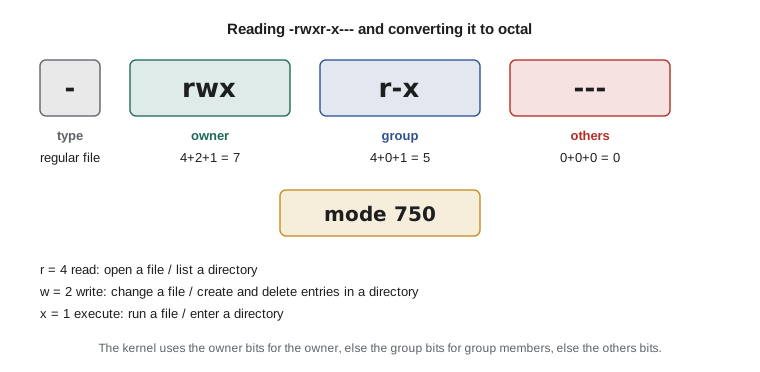
For a regular file, read means the contents can be read, write means they can be changed, and execute means the file can be run as a program or script. For a directory the meanings shift, and this trips up many beginners. Read on a directory lets you list the names in it. Write lets you create, delete and rename entries in it, which means that write permission on a directory lets you delete a file in it even if you cannot write to the file itself. Execute on a directory, often called search, lets you enter it with cd and reach the files inside by name.
| Permission | On a file | On a directory |
|---|---|---|
| r (read) | Read the contents | List the names inside |
| w (write) | Change the contents | Create, delete and rename entries inside |
| x (execute) | Run it as a program | Enter it and reach files inside by name |
The kernel checks permissions in a fixed order. If you are the owner, only the owner bits count. Otherwise, if you are in the file's group, only the group bits count. Otherwise the others bits apply. Root bypasses these checks almost entirely, which is another reason not to work as root.
Changing permissions with chmod
The chmod command changes permissions, and accepts two notations. The symbolic notation names who (u for the owner, g for group, o for others, a for all), an operator (+ to add, - to remove, = to set exactly) and the permissions. The octal notation writes each set as one digit made by adding 4 for read, 2 for write and 1 for execute, so rwx is 7, r-x is 5, r-- is 4 and --- is 0. Administrators use both: symbolic for small changes, octal to set everything at once.
| Octal | Symbolic | Typical use |
|---|---|---|
| 644 | rw-r--r-- | Ordinary files and configuration readable by all |
| 600 | rw------- | Private files such as SSH private keys |
| 640 | rw-r----- | Files a service group may read, such as an application's settings |
| 755 | rwxr-xr-x | Programs, scripts and public directories |
| 750 | rwxr-x--- | Directories for a team, closed to others |
| 700 | rwx------ | Private directories such as ~/.ssh |
> chmod u+x ~/scripts/check_disk.sh
> chmod go-w notes.txt
> sudo chmod 640 /srv/ridgeline/shop/settings.ini
> sudo chown shop:shopstaff /srv/ridgeline/shop/settings.ini
> ls -l /srv/ridgeline/shop/settings.ini
-rw-r----- 1 shop shopstaff 1204 Nov  3 11:20 /srv/ridgeline/shop/settings.ini
> sudo chmod -R g+rX /srv/ridgeline/roastlog
The chown command changes the owner, and the group too when written as owner:group; chgrp changes only the group. Both need sudo, because ordinary users cannot give their files away. In the last command, -R applies the change recursively, and the capital X adds execute only to directories and to files that are already executable, which is the safe way to open up a directory tree without making every data file executable.
Python's stat module knows how to turn a numeric mode into the string ls shows, which is a quick way to check your octal arithmetic.
import stat

for mode in (0o644, 0o600, 0o640, 0o755, 0o750, 0o2770, 0o1777):
    kind = stat.S_IFDIR if mode in (0o750, 0o2770, 0o1777) else stat.S_IFREG
print(oct(mode)[2:].rjust(4, "0"), stat.filemode(kind | mode))0644 -rw-r--r-- 0600 -rw------- 0640 -rw-r----- 0755 -rwxr-xr-x 0750 drwxr-x--- 2770 drwxrws--- 1777 drwxrwxrwt
Default permissions: umask
When a program creates a file it asks for a mode, usually 666 for files and 777 for directories, and the user's umask takes permissions away from that. The umask is written in octal too, and the default on Ubuntu is 002 for ordinary users in their own group or 022 in general, so new files come out as 664 or 644 and new directories as 775 or 755. Typing umask shows the current value. A service that handles private data can be given a stricter umask such as 027, so that nothing it creates is readable by others.
Special permission bits
Three extra bits sit in front of the usual nine. The setuid bit on a program makes it run with the permissions of the file's owner rather than the person running it; the passwd command is setuid root so that ordinary users can change their own password, which means writing to /etc/shadow. Setuid programs are powerful and are a favorite target for attackers, so administrators keep a list of them and investigate any new ones.
The setgid bit on a directory makes new files created inside it belong to the directory's group rather than the creator's primary group. That is exactly what a shared team folder needs, and it is how Sam sets up /srv/ridgeline/roastlog: owned by root and the roasters group, mode 2770, so Kai's and Jordan's files are always group-owned by roasters and both can work on them, while nobody outside the group can even look in. The sticky bit on a directory means that only a file's owner can delete or rename it, even though everyone may write to the directory; /tmp has mode 1777 for this reason.
> sudo mkdir -p /srv/ridgeline/roastlog
> sudo chown root:roasters /srv/ridgeline/roastlog
> sudo chmod 2770 /srv/ridgeline/roastlog
> ls -ld /srv/ridgeline/roastlog /tmp
drwxrws--- 2 root roasters 4096 Nov  3 11:42 /srv/ridgeline/roastlog
drwxrwxrwt 9 root root     4096 Nov  3 11:40 /tmp
In the listing, the s in the group's execute position shows the setgid bit, and the t at the end of /tmp's permissions shows the sticky bit. For situations that need more detail than owner, group and others allow, such as giving one extra person read access to a single file, Linux supports access control lists, managed with setfacl and viewed with getfacl, but the simple model covers most needs.
Worked problem
Who can read the backups?
The nightly backups in /srv/backups contain every order and customer address. Anita needs to read them for the year-end reconciliation, but nobody else except administrators should. How should the directory and files be set up?
Show solution
- The backup job runs as the postgres user, so the files are owned by postgres.
- Create a group for the people who may read backups; Anita is already in accounts, so use that group: sudo chgrp -R accounts /srv/backups.
- Directory mode 2750: postgres can write, members of accounts can list and enter, others get nothing, and setgid keeps new files in the accounts group.
- File mode 640: the owner can read and write, the group can read, others nothing. The backup script sets this with umask 027 before writing.
- Check from Anita's side: sudo -u anita ls /srv/backups works, and sudo -u theo ls /srv/backups fails with permission denied.
Answer: /srv/backups owned postgres:accounts with mode 2750, backup files 640, created with umask 027.
sudo in more detail
The sudo command checks the rules in /etc/sudoers and in files under /etc/sudoers.d to decide who may run what. On Ubuntu the rule that gives members of the sudo group full access is already in place, which is why adding Jordan to that group was enough. Rules can be much narrower: Mei, who helps with the shop, could be allowed to restart only the shop service and nothing else.
# /etc/sudoers.d/shopstaff  (edit with: sudo visudo -f /etc/sudoers.d/shopstaff)
%shopstaff ALL=(root) /usr/bin/systemctl restart ridgeline-shop, /usr/bin/systemctl status ridgeline-shop
Always edit sudo rules with visudo, which checks the syntax before saving. A broken sudoers file can remove everyone's ability to use sudo, and on a cloud server with the root password locked, fixing it may mean using the provider's rescue console. Every sudo command is logged to /var/log/auth.log with the user, the time and the command, which lesson 9 uses when investigating changes.
Try it yourself
Octal to permission string
Write mode_string(mode) that turns a three-digit permission mode, given as an integer such as 0o754, into the nine-character string rwxr-xr--. Do it with arithmetic on the digits rather than with the stat module.
def mode_string(mode):
    return '---------'


print(mode_string(0o754))
Try it yourself
Who can log in?
Write login_users(passwd_text) that returns a sorted list of the user names in an /etc/passwd file whose login shell is not /usr/sbin/nologin or /bin/false, and whose UID is 1000 or more, so that system accounts are left out.
def login_users(passwd_text):
    return []


print(login_users('jordan:x:1006:1006::/home/jordan:/bin/bash'))
Try it yourself
May this user read the file?
Write can_read(perms, owner, group, user, user_groups) where perms is a nine-character string like rw-r-----. Return True if user may read the file, following the kernel's rule: if the user is the owner only the owner bits count, otherwise if any of the user's groups is the file's group only the group bits count, otherwise the others bits count. The user root may always read.
def can_read(perms, owner, group, user, user_groups):
    return perms[0] == 'r'


print(can_read('rw-r-----', 'shop', 'shopstaff', 'theo', ['theo', 'shopstaff']))
Common mistakes
MistakeRunning usermod -G group user without -a, wiping the user's other groups.
InsteadAlways use usermod -aG to append a group.
MistakeExpecting a new group membership to work immediately.
InsteadThe user must log out and back in, or start a new session, for the change to apply.
MistakeFixing a permission problem with chmod 777.
InsteadWork out who needs what access and grant just that with the right owner, group and mode; 777 lets anyone change or replace the file.
MistakeForgetting that write on a directory allows deleting files in it.
InsteadProtect shared directories with the right group and, where everyone may write, the sticky bit.
MistakeRunning every service as root.
InsteadGive each service its own account with no login shell and only the access it needs.
MistakeEditing /etc/sudoers with a normal editor.
InsteadUse visudo, which checks the syntax before saving.
Summary and key terms
- Every process runs as a user with a numeric UID; root is UID 0, system accounts are below 1000 and people from 1000 up.
- /etc/passwd lists accounts in seven colon-separated fields, /etc/shadow holds password hashes and /etc/group lists groups.
- adduser, useradd, usermod -aG, passwd, chage and userdel manage accounts; services get their own accounts with no login shell.
- Each file has an owner, a group and read, write and execute bits for owner, group and others.
- On directories, read lists names, write creates and deletes entries, and execute lets you enter.
- chmod sets permissions symbolically or in octal (4 read, 2 write, 1 execute); chown and chgrp change ownership.
- The umask removes permissions from new files; setuid, setgid and the sticky bit add special behavior.
- sudo rules in /etc/sudoers and /etc/sudoers.d, edited with visudo, give named people limited root powers.
- UID
- The number that identifies a user to the kernel.
- GID
- The number that identifies a group.
- service account
- An account used only to run a program, with no interactive login.
- primary group
- The group that new files created by a user belong to by default.
- permission bits
- The read, write and execute flags for owner, group and others.
- octal mode
- Permissions written as three digits such as 640, each the sum of 4, 2 and 1.
- umask
- A mask of permissions removed from newly created files and directories.
- setuid
- A bit that makes a program run with its owner's permissions.
- setgid directory
- A directory whose new files inherit its group.
- sticky bit
- A directory bit that lets only a file's owner delete or rename it.
- principle of least privilege
- Giving each user and program only the access it needs.
Practice problems
Work each problem on paper first, then reveal the answer to check.
Convert rwxr-x--x to octal.
Show answer
751: rwx is 7, r-x is 5 and --x is 1.
What mode should an SSH private key file have, and why?
Show answer
600, so that only the owner can read or change it; SSH refuses keys that others can read.
Write the command that adds mei to the shopstaff group without removing her other groups.
Show answer
sudo usermod -aG shopstaff mei
A user has write permission on a directory but not on a file inside it. Can they delete the file?
Show answer
Yes, unless the directory has the sticky bit; deleting is a change to the directory.
Why does the passwd command need the setuid bit?
Show answer
Ordinary users must be able to change their own password, which means writing to /etc/shadow, a file only root can change.
With a umask of 027, what permissions does a new file requested as 666 get?
Show answer
640: the umask removes write from the group and everything from others.
Lesson quiz · 5 questions
Score 60% or more to complete this lesson.
Create a free account to save your progress, take quizzes and earn a certificate.