
MSBA-204 · Lesson 8 of 12 · 18 min
Audit logging and search
▶ Video coming soon A video version of this lesson is on the way.
Around November 19, 2026, a branch manager left her laptop on a city bus. Ama issued a remote wipe that evening. The next morning the privacy officer asked the question every privacy officer asks: what could someone have seen? Answering it needed the unified audit log, which records user and administrator activity across Microsoft 365. Audit is not in AB-650's skill list, but almost every other Purview solution depends on it, and it is the administrator's main source of evidence in an investigation.
What the unified audit log records
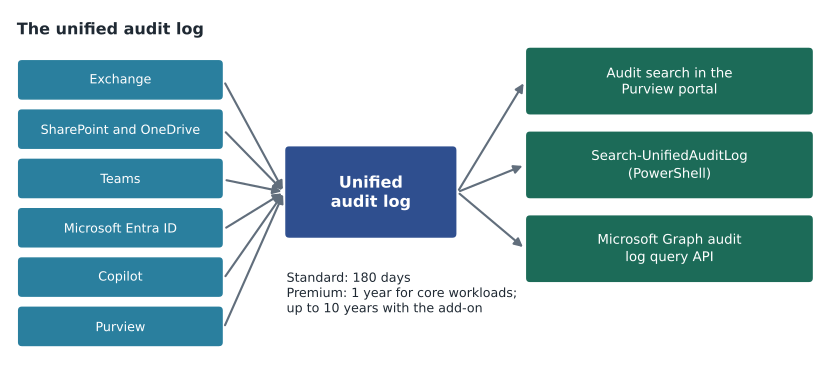
The audit log collects activity records from Exchange, SharePoint, OneDrive, Teams, Microsoft Entra ID, Power Platform, Copilot and many other services, including Purview itself. Each record has common properties, such as the time, user, workload, operation and client IP address, and a JSON AuditData field with details specific to the activity. Auditing is turned on by default for Microsoft 365 organizations, and mailbox auditing is on by default for user mailboxes, so Corvallin already had records from before anyone planned to look at them.
Audit (Standard) and Audit (Premium)
| Audit (Standard) | Audit (Premium) | |
|---|---|---|
| Licensing | Included with Microsoft 365 and Office 365 enterprise subscriptions | E5-level licensing for the users whose records need it |
| Default retention | 180 days | One year for Exchange, SharePoint, OneDrive and Microsoft Entra records |
| Custom retention | Not available | Audit retention policies by record type, activity or user; up to 10 years with the add-on license |
| High-value events | A growing subset | Additional intelligent insights events for investigations |
| API access | Standard bandwidth | Higher bandwidth for organizations that export large volumes |
Microsoft changed the Standard retention from 90 to 180 days for records generated from October 17, 2023 onward, so older advice about "90 days" is out of date. For an investigation that starts more than six months after the activity, only records retained by Audit (Premium) or by the organization's own export will help, which is one reason Corvallin's twelve E5 Compliance users, including the managers most likely to handle sensitive material, got Premium retention.
Audit (Premium) also records high-value events that are useful in investigations, such as MailItemsAccessed, which shows when mail items were read, and search events that record what people searched for in Exchange and SharePoint. Microsoft has expanded which of these events Standard customers receive over time, so Teodor checked the current list before relying on any one of them.
Searching in the portal
The Audit solution in the Purview portal runs searches as jobs. An administrator enters a date and time range and can filter by activities, users, record types, workloads, keywords, file or folder names and administrative units. Searches run in the background; results can be viewed, filtered and exported to CSV, where the AuditData column holds the JSON details. Searching requires an audit role: Corvallin used Audit Reader for the privacy officer and Ines, who needed to search but not change settings, and Audit Manager for Teodor.
| Question | Search on |
|---|---|
| Which files did this user open? | User, plus the FileAccessed activity in SharePoint and OneDrive |
| Who changed sharing on this site? | Site URL keyword, plus sharing activities |
| Who created an inbox rule? | Exchange activities New-InboxRule and Set-InboxRule |
| Did anyone sign in from an unusual country? | Microsoft Entra sign-in records, or Entra sign-in logs directly |
| What did this user ask Copilot? | The CopilotInteraction record type for the user; prompt text itself is retrieved with eDiscovery |
| Who changed a DLP or retention policy? | Purview policy change activities |
Searching with PowerShell and the API
For repeatable or large searches, administrators use Search-UnifiedAuditLog in Exchange Online PowerShell or the Microsoft Graph audit log query API, which runs asynchronous queries suited to automation. Search-UnifiedAuditLog returns results in pages, so large exports need the paging parameters; the Graph API is the better tool for scheduled exports into another system.
# Exchange Online PowerShell: files a user accessed in the last 30 days
Connect-ExchangeOnline -UserPrincipalName teodor.admin@corvallincare.example
$start = (Get-Date).AddDays(-30)
Search-UnifiedAuditLog -StartDate $start -EndDate (Get-Date) `
  -UserIds branchmgr3@corvallincare.example `
  -Operations FileAccessed,FileDownloaded `
  -ResultSize 5000 |
  Select-Object CreationDate, Operations, AuditData |
  Export-Csv filesaccessed.csv -NoTypeInformation
The laptop investigation
The audit search turned the privacy officer's question into facts:
| Finding | Source | Significance |
|---|---|---|
| The laptop's last sign-in was Thursday at 17:42 | Entra sign-in logs | Establishes the last time the device was used |
| Remote wipe issued at 20:05 and completed on next check-in | Intune device actions | Shows containment and timing |
| 14 files accessed from the device in the previous 30 days | FileAccessed and FileSyncDownloaded records | Defines what might have been cached |
| 6 of the 14 were labeled Confidential / Clinical and encrypted | Activity explorer and label audit records | Encrypted files cannot be opened without the manager's account |
| No activity from the device or account after Thursday evening | Audit and sign-in logs | No evidence of misuse |
The device was encrypted with BitLocker and protected by Windows Hello, and the remaining eight files were General or Confidential without client health information. Those facts went into the breach assessment covered in lesson 12.
Retention policies for audit
With Audit (Premium), administrators create audit retention policies that keep chosen records longer or shorter than the default, scoped by record type, activity and user, with a priority to resolve overlaps. Corvallin created one policy that kept all SharePoint and Exchange records for the E5 Compliance group for one year (the Premium default) and planned a second, after buying the 10-year add-on, to keep Purview administration records for seven years so that policy changes could be proven long after they were made.
Audit as a control, not just a log
Audit records also feed alert policies, which can notify administrators when specific activities occur. Corvallin added alerts for creation of forwarding inbox rules, a lesson from the September phish, for mass file downloads by a single user, and for changes to Purview retention and DLP policies. Teodor also scheduled a monthly export of administrator activity for Ines to review, because the people who administer the tenant should be the most visible users in it.
Worked problem
Reconstructing the September phish
In September a branch coordinator's account was used to create a hidden inbox rule that moved replies from a supplier into a folder called RSS Archive. Which audit searches reconstruct what happened?
Show solution
- Search Exchange activities New-InboxRule and Set-InboxRule for the coordinator to find when the rule was created and from which IP address.
- Search Entra sign-in logs for the same IP address and time to confirm the attacker's session.
- Search MailItemsAccessed, if available, to see which messages the session read.
- Search Send activities to find messages sent from the account during the session.
Answer: Inbox rule activities, sign-in records, mail access events and send activities together show the attacker's actions and their timing.
Common pitfalls
Audit records are not instant: most appear within an hour or so, but some services take longer, so a search right after an incident can miss recent activity. Records use UTC times, which caused confusion when the Atlantic Time sign-in at 17:42 appeared as 21:42 in the export. And the log records actions, not intent: a FileAccessed record shows a file was opened, not that anyone read it closely.
Who can search, and why it matters
The ability to search the audit log is powerful. An audit search shows which files a person opened, when they signed in, what they searched for and, with eDiscovery, what they asked Copilot. Corvallin treated audit search access like access to client records. Only three people held audit roles: Teodor as Audit Manager and the privacy officer and Ines as Audit Readers. Every audit search they ran was itself recorded, and Ines reviewed the list of searches each quarter. When a branch manager asked IT to "check what my team has been doing", Teodor declined politely and pointed her to HR: an audit search needs a defined purpose, such as a privacy incident or a security alert, not curiosity about workload.
Copilot activity in the audit log
Copilot interactions create audit records of the CopilotInteraction type. They show when a user interacted with Copilot, in which app, and which resources were referenced in the response, such as files or messages, along with sensitivity labels where present. For the readiness plan this was valuable: an audit search for Copilot interactions that referenced items in Branch 3 Operations was one of the ways Teodor confirmed how often Copilot was surfacing content from that site. The content of the prompts and responses is retrieved through eDiscovery, which is covered in the next lesson, so the audit record works as an index pointing to what to collect.
| Investigation need | Audit tells you | Then use |
|---|---|---|
| Did Copilot use a sensitive file? | Interactions that referenced the file, by user and time | eDiscovery to collect the interaction content if needed |
| Who downgraded a label? | The user, time and old and new labels | Activity explorer for the justification text |
| Who changed a DLP policy? | The administrator, time and policy | The policy's version history and the decision log |
| Was a file shared externally? | Sharing activities with the link type and recipient | SharePoint sharing reports and Manage access |
Exporting and preserving evidence
Audit exports are evidence, and evidence must be handled carefully. The CSV from the laptop investigation contained file names that themselves included client surnames. Teodor saved it to the privacy officer's restricted investigation site, labeled Confidential / Clinical, rather than to his own OneDrive. He also recorded the exact search criteria, the time it was run and the number of records returned in the investigation notes, so the search could be repeated if anyone later asked how the list was produced. For a matter likely to involve lawyers, eDiscovery is the better route for preserving content, because it has holds and a case history, but audit exports are often the first facts available.
A monthly audit routine
Teodor scheduled a short monthly routine that took less than an hour: export administrator activity for Ines's review; check alert policy results for forwarding rules and mass downloads; confirm that audit retention policies had not changed; and spot-check three random users' sign-in and file activity against their roles, with the privacy officer's approval and a record of why each was chosen. The spot-check found nothing unusual in its first two months, which was the point: it established a baseline and showed that someone was looking.
Activity explorer and the audit log
Activity explorer, part of Information Protection, is often confused with audit search. It shows activity related to labels and sensitive content, such as labels applied, changed or removed, DLP matches and files copied to USB on onboarded devices, with filters for labels, SITs, users and locations. It is the faster tool for questions about labeled content, such as "who downgraded labels this week?". Audit search is broader and covers activity that has nothing to do with labels, such as sign-ins and mailbox rules. For the laptop investigation, Teodor used both: audit for file access and sign-ins, activity explorer for the labels on the files.
| Question | Faster tool |
|---|---|
| Who removed a label from a clinical file? | Activity explorer |
| Which files did a user open last week? | Audit search |
| Did anyone copy labeled files to USB? | Activity explorer |
| Who created a mailbox forwarding rule? | Audit search |
Audit and the help desk
Ama's help desk asked for audit access during the autumn, because users regularly asked "who deleted this file?" or "who changed this team?". Teodor proposed a narrower solution than an audit role. SharePoint's own version history and recycle bin answered most file questions, and the Teams admin center showed membership changes. For the rare questions those tools could not answer, the help desk opened a ticket and Teodor ran the audit search. The help desk kept its speed for common questions without gaining the ability to search everyone's activity, and the audit roles stayed with the three people who needed them.
Common mistakes
MistakeAssuming audit records are kept for 90 days.
InsteadAudit (Standard) keeps 180 days for records since October 2023; Premium keeps longer.
MistakeStarting an investigation months later without Premium retention.
InsteadPlan retention before incidents happen, for the users who handle the most sensitive data.
MistakeReading audit times as local time.
InsteadConvert from UTC before building a timeline.
MistakeExpecting the audit log to contain Copilot prompt text.
InsteadUse the audit record to find the interaction and eDiscovery to retrieve its content.
Summary and key terms
- The unified audit log records activity across Microsoft 365 and is on by default.
- Audit (Standard) keeps records 180 days; Audit (Premium) keeps core records one year and supports custom retention policies up to 10 years with an add-on.
- Searches run in the Purview portal, with Search-UnifiedAuditLog, or with the Microsoft Graph audit log query API.
- Audit evidence turns incident questions into documented facts for breach assessments.
- Alert policies built on audit records make important activity visible as it happens.
- Unified audit log
- The combined record of user and administrator activity across Microsoft 365 services.
- AuditData
- The JSON field in an audit record holding activity-specific details.
- Audit (Premium)
- The higher audit tier with longer retention, retention policies and high-value events.
- MailItemsAccessed
- A high-value audit event recording when mail items are read.
- Audit retention policy
- A Premium policy that sets how long chosen audit records are kept.
- Alert policy
- A rule that notifies administrators when specified activities occur.
Practice problems
Work each problem on paper first, then reveal the answer to check.
How long does Audit (Standard) keep records generated after October 17, 2023?
Show answer
180 days.
Which PowerShell cmdlet searches the unified audit log?
Show answer
Search-UnifiedAuditLog, in Exchange Online PowerShell.
What is the maximum audit retention with the add-on license?
Show answer
10 years.
Lesson quiz · 5 questions
Score 60% or more to complete this lesson.
Create a free account to save your progress, take quizzes and earn a certificate.