
MSBA-204 · Lesson 5 of 12 · 18 min
Retention policies, labels and records management
▶ Video coming soon A video version of this lesson is on the way.
The readiness plan had set the main retention decisions: email kept seven years, Teams chats three, Copilot interactions two years and then deleted, and client records kept seven years after discharge with a disposition review. Ansel Marrowby, the records manager, had spent fifteen years as a health-records clerk and knew paper retention schedules thoroughly. His question for Teodor was practical: how would Purview do in the cloud what he used to do with archive boxes and a shredding company? This lesson covers the administrative side of data lifecycle management and records management, which AB-650 lists as "retention labels, retention label policies, and retention policies".
Retention policies and their scopes
A retention policy applies retention settings to whole locations: mailboxes, SharePoint sites, OneDrive accounts, Teams chats and channel messages, Viva Engage, Microsoft 365 groups and the Microsoft Copilot experiences location. Its settings either retain content for a period, delete it after a period, or retain then delete. Retention policies are blunt by design: everything in the location gets the same treatment.
Each policy has a scope. A static scope lists locations, either all of a type ("all Exchange mailboxes") or specific named ones. An adaptive scope is a query against user, group or site attributes, such as users whose Department is Clinical or sites with a particular property, which Purview evaluates regularly so the policy follows people and sites as they change. Adaptive scopes are defined in the Data Lifecycle Management settings and need well-maintained attributes: Corvallin's Department values had been cleaned up during the identity project, which made them usable.
| Static scope | Adaptive scope | |
|---|---|---|
| How locations are chosen | All of a type, or a named list | A query on attributes |
| When people join or leave | Named lists must be edited manually | Membership updates automatically |
| Limits | Policies naming specific locations have limits on how many can be listed | Avoids the per-policy location limits |
| Risk | Forgotten sites or mailboxes | Wrong results if attributes are wrong |
| Corvallin use | All mailboxes: 7 years; all Teams chats: 3 years | Clinical sites: retention for clinical content |
Retention labels
Retention labels apply settings to individual items, which makes them the tool for records. A label can retain content, delete it, retain then delete, or retain then start a disposition review. Its retention period can start when content was created, when it was last modified, when it was labeled, or when an event happens. A label can also mark content as a record or a regulatory record.
Labels reach content in three ways. They can be published in a retention label policy so users choose them in Outlook, SharePoint, OneDrive and Office apps; set as the default label for a SharePoint library, folder or document set; or auto-applied by a policy based on sensitive information types, keywords or a KQL query, trainable classifiers, or to cloud attachments shared in email and Teams. Auto-apply, like service-side auto-labeling for sensitivity labels, needs E5-level licensing and should be simulated first.
| Label | Setting | Starts from | How applied | Record? |
|---|---|---|---|---|
| Client record | Retain 7 years, then disposition review | Event: Client discharged | Default label on client record libraries | Record |
| Consent form | Retain 7 years, then disposition review | Event: Client discharged | Auto-applied by the consent form fingerprint | Record |
| Job application | Retain 2 years, then delete | When created | Published to HR | No |
| Incident report | Retain 10 years, then disposition review | When labeled | Published to managers | Record |
| Transitory | Delete after 90 days | When created | Published to everyone | No |
Records and regulatory records
Declaring an item a record restricts what users can do with it: they cannot delete it, and depending on settings they cannot edit its content, though SharePoint and OneDrive support record versioning, which lets a record be unlocked for editing while each locked version is kept. A regulatory record is stricter: the label cannot be removed by anyone, its retention period cannot be shortened, and it cannot be deleted even by administrators until the period ends. Regulatory records must be enabled before they can be selected, with a PowerShell setting, because Microsoft wants administrators to decide deliberately. Ansel and the privacy officer agreed that Corvallin did not need regulatory records: ordinary records, which an administrator can unlock in a documented emergency, were safer for a small organization that might make a labeling mistake.
Event-based retention
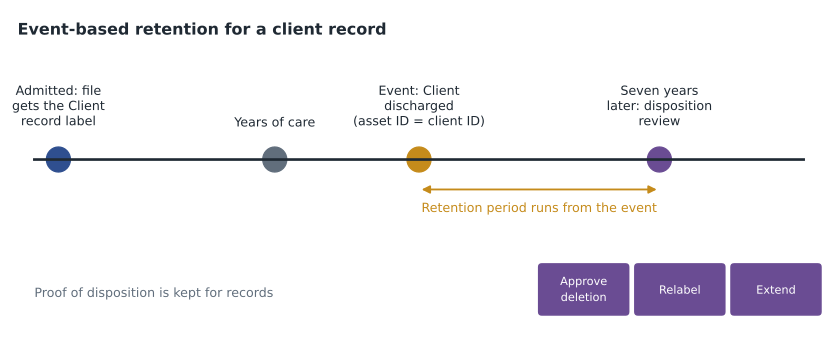
Client records must be kept for years after a client is discharged, not after a file is created. Event-based retention handles this. The administrator creates an event type, Client discharged, and a retention label whose period starts from that event type. Files are labeled when they are created and get an asset ID, for example the client ID in a document property. When a client is discharged, someone creates an event of type Client discharged with the client's asset ID, and the seven-year clock starts for every item with that label and that asset ID.
Events can be created in the Records Management solution in the portal, with PowerShell or through Microsoft Graph, so a line-of-business system can raise them. Corvallin's scheduling system could not call Microsoft Graph, so Ansel planned a weekly manual step: export the list of discharged clients, then create events in a batch with PowerShell.
# Security & Compliance PowerShell: create a discharge event for one client
Connect-IPPSSession -UserPrincipalName ansel.marrowby@corvallincare.example
New-ComplianceRetentionEvent -Name "Discharge CL482913" `
  -EventType "Client discharged" `
  -SharePointAssetIdQuery "ComplianceAssetId:CL482913" `
  -EventDateTime (Get-Date "2026-11-02")
The file plan
Records Management provides a file plan view of retention labels with descriptors: reference ID, business function, category, authority type and citation, which records managers use to map labels to a records schedule. Ansel imported Corvallin's retention schedule, a spreadsheet of 31 record classes, using the file plan import template, then collapsed it to 14 labels after he realized that several classes had identical periods and owners. The descriptors let him show an auditor which law or policy each label implemented.
Disposition review
When a label's period ends and it is configured for disposition review, reviewers receive a notification and see the items in the Disposition page of Records Management. Reviewers can approve permanent deletion, relabel the item with a different retention label (for example, if litigation is expected), extend the retention period, or add reviewers. Reviews can have several stages, with different reviewers at each, such as the records manager first and the privacy officer second. After items are disposed of, Purview keeps proof of disposition for records, a list of what was deleted, when and by whom. Disposition reviewers need the Disposition Management role, and Microsoft recommends keeping the role to records staff.
How retention actually works underneath
Retention does not stop users from deleting or editing ordinary content. Instead, the service keeps a copy. In SharePoint and OneDrive, deleted or modified content that must be retained goes to the Preservation Hold library of the site; in Exchange, retained items go to a hidden folder in Recoverable Items. Users do not see these copies, but eDiscovery can find them. When an employee leaves, a mailbox under retention becomes an inactive mailbox after the account is deleted, so it can still be searched. When several retention settings apply to the same item, the principles of retention decide: retention wins over deletion, the longest retention period wins, explicit inclusion wins over implicit, and the shortest deletion period wins among deletion settings.
Worked problem
Two settings on one chat
Teams chats are under a policy that retains for 3 years and then deletes. One nurse is also under a litigation-related eDiscovery hold. A chat from 2023 reaches its three-year date. What happens?
Show solution
- Retention and holds both preserve content; deletion waits until nothing requires the item to be kept.
- The eDiscovery hold has no end date, so it keeps the chat beyond three years.
- When the hold is released, the retention policy's deletion action can proceed.
Answer: The chat is kept while the hold exists; it is deleted only after the hold is released, because preservation wins over deletion.
Preservation Lock and other safeguards
A retention policy or label policy can be placed under Preservation Lock, which means nobody, including administrators, can turn it off, delete it or make it less restrictive. Some regulations require this. It is irreversible, so Corvallin chose not to use it: Ines did not want a configuration mistake to become permanent. Teodor also set an alert for changes to retention policies, using an audit log alert policy, so that any edit to RET- policies would be noticed.
Exchange-specific settings
Some mailbox lifecycle features still come from Exchange messaging records management (MRM): archive policies that move older mail to the online archive after a number of years, and personal tags users can apply in Outlook. Microsoft recommends Purview retention for retention and deletion, and MRM mainly for moving mail to archives. Corvallin used one MRM archive policy, moving mail older than two years to the archive, and Purview for everything else.
Planning with the records manager
Teodor's first draft of the retention configuration was technically correct and practically useless: thirty-one labels, one for each line of the paper schedule, with names nobody outside records would recognize. Ansel suggested a test. He printed the label list, handed it to three branch managers and asked them to label ten documents each. Their choices matched his in fewer than half the cases. The redesigned plan had fourteen labels with plain names, defaults set on the libraries that held records so most staff never chose a label at all, and auto-apply for consent forms and client records. People choose labels only for the few cases that defaults and auto-apply could not decide.
| Approach | Where Corvallin used it | Why |
|---|---|---|
| Retention policy | All mailboxes, all Teams chats, Copilot interactions | Broad rules that apply to everyone |
| Default label on a library | Client record libraries in clinical sites | Every file in the library is a record without user action |
| Auto-apply policy | Consent forms, client records outside clinical sites | Finds records where they should not be |
| Published label | Job applications, incident reports, transitory | Few users, clear choices |
What happens when people leave
Retention also changes how an organization handles departing staff. When a branch nurse leaves, her account is eventually deleted. Because all mailboxes are under the seven-year retention policy, her mailbox becomes an inactive mailbox and remains searchable by eDiscovery. Her OneDrive is kept under the OneDrive retention setting for deleted users and the retention policy, and its files remain discoverable. Ama's offboarding checklist added one step: the manager confirms that any client records saved in the departing person's OneDrive are moved to the branch's client record library, where the default label applies, before the account is deleted.
Testing retention safely
Retention changes are hard to test because their effects take years. Teodor used three techniques. He created labels with short periods, such as one day, in a test site to see disposition review notifications and proof of disposition work end to end. He used simulation for auto-apply policies to see what they would label. And he checked the retention settings shown on a test file in SharePoint, which lists the labels and policies applying to it. Only after those checks did the real labels, with real periods, go to the pilot libraries.
Who can change retention
Retention is one of the few areas where a single mistake can destroy information permanently, so Corvallin restricted it tightly. Only Teodor, through PIM, could create or change retention policies; only Ansel and the privacy officer could approve dispositions; and every change triggered the audit alert described above. Ansel also reviewed the list of retention policies and labels with Teodor each quarter, line by line against the file plan, so that the configuration and the schedule never drifted apart. The first review found a test label with a one-day deletion period still published to the IT team, which was removed the same day.
Common mistakes
MistakeUsing a retention policy for records that need individual periods.
InsteadUse retention labels for item-level records; use policies for broad location rules.
MistakeStarting client record retention from the creation date.
InsteadUse event-based retention so the period starts at discharge.
MistakeEnabling regulatory records or Preservation Lock without a legal requirement.
InsteadThey are irreversible protections; use them only when the law requires it.
MistakeAssuming retention stops users deleting files.
InsteadUsers can delete; retained copies go to the Preservation Hold library or Recoverable Items.
Summary and key terms
- Retention policies apply to whole locations through static or adaptive scopes.
- Retention labels apply to items, can declare records, and can be published, set as defaults or auto-applied.
- Event-based retention starts the clock from an event matched to items by asset ID.
- Disposition review lets records staff approve deletion, relabel or extend, and keeps proof of disposition.
- The principles of retention resolve conflicts: retention beats deletion and the longest retention wins.
- Adaptive scope
- A query on user, group or site attributes that decides which locations a retention policy covers.
- Retention label
- An item-level label that retains or deletes content and can declare it a record.
- Regulatory record
- A record whose label cannot be removed and whose retention cannot be shortened by anyone.
- Event-based retention
- Retention that starts when an event of a defined type occurs for matching items.
- Disposition review
- A review at the end of a retention period where reviewers approve or change what happens to items.
- Preservation Lock
- An irreversible setting that prevents a retention policy from being turned off or weakened.
Practice problems
Work each problem on paper first, then reveal the answer to check.
Which kind of scope updates its membership automatically from attributes?
Show answer
An adaptive scope.
What links an event to the items whose retention it starts?
Show answer
The asset ID, such as a client ID in a document property.
Where do retained copies of deleted SharePoint files go?
Show answer
The site's Preservation Hold library.
Lesson quiz · 5 questions
Score 60% or more to complete this lesson.
Create a free account to save your progress, take quizzes and earn a certificate.