
MSBA-204 · Lesson 1 of 12 · 20 min
The Microsoft Purview portal and roles
▶ Video coming soon A video version of this lesson is on the way.
In October 2026 Corvallin bought something its compliance work had been waiting for: twelve Microsoft 365 E5 Compliance add-on licenses, for the privacy officer, the records manager Ansel Marrowby, two HR staff, Ines, Teodor and a few others who would run investigations or govern records. The licenses arrived on a Monday. On Tuesday Teodor opened the Microsoft Purview portal and realized that knowing what each solution does, which he had learned while preparing the Copilot readiness plan, is a different skill from administering it. Administration means deciding who can see what, building policies that survive contact with real users, and being able to prove later what was configured and why. This course follows that administrative work, one solution at a time, and ends with a case study on meeting a health privacy regulation.
Teodor was also studying for Exam AB-650, the Microsoft 365 and AI Services Administrator exam that succeeds MS-102. Its "Protect data in Microsoft 365 by using Microsoft Purview" skills cover DLP for Exchange, SharePoint, OneDrive, Teams, endpoints and Copilot, information protection, data lifecycle management, responding to DLP alerts and monitoring AI activity with Data Security Posture Management. Insider risk, communication compliance, audit, eDiscovery and Compliance Manager are not listed in AB-650's skills, but an administrator of a health organization still has to run them, and they are central to the information protection administrator role. The course flags which lessons map most directly to the exam.
The Microsoft Purview portal
The Microsoft Purview portal is the single web console for Purview's data security, data governance and risk and compliance solutions. The older Microsoft Purview compliance portal has been retired in favor of it, so older articles and screenshots that show a different left navigation describe a page that no longer exists. The home page shows solution cards; administrators can pin the solutions they use most, and each solution has its own overview, policies, alerts and reports.
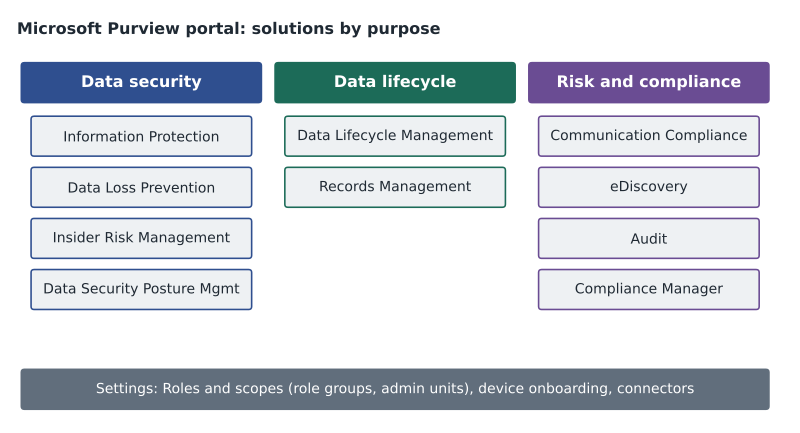
| Solution area | Solutions | What an administrator mostly does there |
|---|---|---|
| Data security | Information Protection, Data Loss Prevention, Insider Risk Management, Data Security Posture Management | Classify content, publish labels, build and tune policies, triage alerts |
| Data lifecycle | Data Lifecycle Management, Records Management | Create retention policies and labels, manage the file plan, review disposition |
| Risk and compliance | Communication Compliance, eDiscovery, Audit, Compliance Manager | Run reviews and cases, search the audit log, track regulatory controls |
| Settings | Roles and scopes, connectors, device onboarding, solution settings | Grant access, onboard devices, connect HR and other data sources |
Some Purview features are still configured elsewhere. Exchange archiving and the old messaging records management (MRM) retention tags live in the Exchange admin center, and Microsoft notes that the Purview portal does not manage every service permission. Device onboarding for endpoint DLP is shared with Microsoft Intune and Microsoft Defender for Endpoint. Microsoft also moves features into and between solutions often, so Teodor learned to search the portal by name rather than memorize where a page sat last month.
Licensing shapes what appears
Many Purview capabilities appear in the portal for any Microsoft 365 or Office 365 enterprise tenant, but what an administrator can turn on, and which users a policy may cover, depends on licenses. Corvallin's office staff have Microsoft 365 E3 and its home-care staff have Microsoft 365 F3. Those licenses cover manual sensitivity labeling, basic retention, standard DLP for email and files, Audit (Standard) and the eDiscovery case features. Automatic labeling, endpoint DLP, insider risk management, communication compliance, Audit (Premium), records management features and premium eDiscovery analytics generally require E5-level licensing, which Corvallin now has for twelve people through the E5 Compliance add-on.
The consequence is easy to miss: a policy that protects only licensed users must be scoped to them. Teodor created a security group, Purview E5 Compliance Users, assigned the add-on to it with group-based licensing and used it to scope insider risk policies. For tenant-wide protections that need E5 licensing for every protected user, such as automatic labeling of all mail, Corvallin either has to license more users or accept that the feature covers only part of the organization. Microsoft's licensing guidance for Purview is long and changes, so Teodor kept a link to the Purview service description in his decision log and checked it before each design.
| Feature | Typical licensing at Corvallin | Design consequence |
|---|---|---|
| Manual sensitivity labels | Included with E3 and F3 | Every employee can label files and email |
| Automatic labeling (service-side) | E5-level licensing | Scope to licensed users or plan more licenses |
| DLP for Exchange, SharePoint, OneDrive | Included with E3 | Health card policy can cover the whole tenant |
| Endpoint DLP and Teams DLP | E5-level licensing | Start with the twelve licensed users and the IT team |
| Insider risk management | E5-level licensing | Scope policies to the licensed group |
| Audit (Premium) | E5-level licensing | One-year default retention and extra events for licensed users |
The permission model: roles, role groups and members
Purview uses role-based access control with three layers. A role grants permission to perform a set of tasks; for example, the Case Management role lets someone work with eDiscovery cases. A role group bundles roles so that a person can do a job across a solution; adding someone to the Insider Risk Management role group gives them that solution's permissions in one step. Members are the users or security groups added to a role group. Roles and role groups are managed in the portal under Settings, then Roles and scopes, then Role groups.
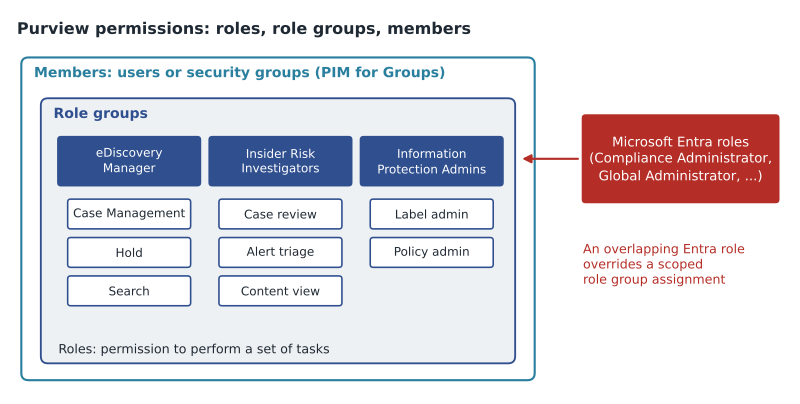
Microsoft Entra roles sit alongside this model and map onto it. The Entra Compliance Administrator role maps to the Purview role group of the same name, the Entra Compliance Data Administrator role maps to its matching group, and the Entra Global Administrator role maps to several groups including Organization Management. The Entra AI Administrator role maps to the Compliance Manager Administrators and the Data Security AI Admins and Viewers groups. Organization Management is the only role group that contains the Role Management role, which is required to view, create and change role groups.
| Role group | Who should be a member at Corvallin | Why |
|---|---|---|
| Compliance Administrator | Teodor (through PIM), no one permanently | Broad configuration across solutions; too wide for daily use |
| Information Protection Admins | Teodor | Create and publish labels and label policies |
| eDiscovery Manager | The privacy officer and Ines | Run cases they create or are added to |
| eDiscovery Administrator | Ines only | Can see and manage all cases, so kept to one person |
| Insider Risk Management Admins | Teodor | Configures settings and policies but cannot see case content |
| Insider Risk Management Investigators | The privacy officer and Ines | Review alerts and cases, per the canon set in the readiness plan |
| Communication Compliance Investigators | The privacy officer | Review flagged messages |
| Records Management | Ansel Marrowby | Manage the file plan and disposition |
| Audit Reader | The privacy officer and Ines | Search the audit log during investigations |
Precedence: why an Entra role can undo careful scoping
Purview lets an administrator scope a role group assignment to administrative units, so a branch privacy lead could, for example, manage DLP policies only for users in one branch's admin unit. But Microsoft documents a precedence rule that catches many tenants: if a user has both a Microsoft Entra role and a scoped Purview role group assignment for the same permissions, the Entra role wins and the user's permissions are unscoped. An Entra Compliance Administrator assignment overrides a scoped Compliance Administrator role group assignment.
Teodor found exactly this problem in his first week. A former IT manager had given the HR director the Entra Compliance Administrator role years earlier "so she could see the audit log". She did not need it, and it meant she had tenant-wide compliance permissions that no Purview scoping could limit. He removed the Entra role and added her to the Audit Reader role group, after Ines confirmed what she actually needed.
Worked problem
Scoping a branch privacy lead
The Truro branch has a privacy lead who should manage DLP alerts for Truro staff only. Truro users are already in an administrative unit called AU-Truro. What should Teodor configure, and what must he check?
Show solution
- Choose the smallest role group that allows DLP alert management, rather than Compliance Administrator.
- Add the privacy lead as a member and select Assign admin units, choosing AU-Truro.
- Check in Microsoft Entra ID that the privacy lead holds no Entra role with overlapping compliance permissions, because that would override the scope.
- Test with a DLP alert for a head office user and confirm the privacy lead cannot see it.
Answer: A scoped role group assignment to AU-Truro, verified by confirming there is no overlapping Entra role and by testing with an out-of-scope alert.
Least privilege, temporary access and PIM
Microsoft recommends using the roles with the fewest permissions and keeping Global Administrator assignments to a minimum, and Purview adds two tools for that. First, role group assignments can be given an expiration from one day to two years. When it passes, access is removed; operations already in progress are not affected, the user is not notified and no extra audit record is written at expiry. The eDiscovery Administrator and eDiscovery Manager role groups do not support expiring assignments. Second, an administrator can make an Entra security group a member of a Purview role group and put that group under Privileged Identity Management for Groups, so members activate access just in time. PIM cannot manage just-in-time activation for users added directly to a role group.
Corvallin already used PIM for Entra roles after the autumn identity project. Teodor extended it: a group called PIM-Purview-Compliance-Admins became the only member of the Compliance Administrator role group, and activation required a justification, Ines's approval and lasted four hours. For a contractor helping Ansel build the file plan, he added a direct assignment to the Records Management role group with a 60-day expiration rather than a permanent one.
# Connect to Security & Compliance PowerShell (Exchange Online PowerShell module)
Connect-IPPSSession -UserPrincipalName teodor.admin@corvallincare.example

# List role groups and who is in them
Get-RoleGroup | Sort-Object Name | Select-Object Name
Get-RoleGroupMember -Identity "eDiscovery Manager"

# Check who holds the eDiscovery Administrator role
Get-eDiscoveryCaseAdmin
Audit your own access
Purview administration is itself audited: changes to role groups, policies and cases are recorded in the audit log. That matters for a health organization, because a regulator or auditor may ask not only what a policy did but who could change it. Teodor kept an access register in the IT decision log listing every Purview role group, its members, the business reason and the review date, and scheduled a quarterly review with Ines. The first review removed two people who had left IT and one test account that had somehow been added to Organization Management.
Settings worth reviewing on day one
Before building policies, Teodor walked through the solution settings in the portal. Insider risk settings control pseudonymization, indicators and detection windows; communication compliance settings include privacy options and notice templates; Data Lifecycle Management settings hold adaptive scopes; and device onboarding sits under Settings. Several of these need decisions from people other than IT. Pseudonymization, for example, is on by default in insider risk management, and Corvallin's privacy officer wanted it to stay on, so investigators see a pseudonym until they have a reason to reveal a name.
Change control for compliance policies
A DLP rule that blocks the wrong thing can stop a nurse from sending a discharge summary to a family doctor; a retention policy set to delete can destroy records that the law requires Corvallin to keep. Purview changes therefore deserve the same discipline as firewall changes. Teodor adopted four habits. First, every policy starts in simulation or test mode where the solution offers it, and is scoped to IT and a pilot group before it reaches anyone else. Second, every policy has an owner outside IT who agrees what it should do: the privacy officer for DLP and insider risk, Ansel for retention and records, Ines for eDiscovery. Third, names follow a convention, such as DLP-Health-Card-Exchange or RET-Client-Record-7y, so that alerts and audit records are readable months later. Fourth, every change gets a line in the decision log with the date, the reason and the person who approved it.
Those habits also make the course's later case study possible. When a regulator or a client's family asks how Corvallin protects personal health information, the answer is not "we bought E5 Compliance" but a set of named policies, owners, test results and audit records that show what was configured and when.
Working alongside Defender, Entra and Intune
Purview does not stand alone. DLP alerts can appear as incidents in the Microsoft Defender portal, where the security team triages them alongside phishing and malware alerts. Insider risk management uses Microsoft Defender for Endpoint signals for its security policy violation templates. Adaptive Protection hands insider risk levels to Microsoft Entra Conditional Access. Endpoint DLP depends on devices being onboarded through Intune or Defender. At a small organization the same few people run all of these, which is convenient but tempting: it is easy to give everyone every role. Teodor drew a simple matrix of which person needed which role in each portal and used it to argue, successfully, that the help desk did not need any Purview role at all.
Common mistakes
MistakeGiving people the Entra Compliance Administrator role so they can do one task.
InsteadAdd them to the narrowest Purview role group for that task; an Entra role overrides any scoping.
MistakeScoping role groups to admin units without checking Entra role assignments.
InsteadConfirm the person holds no overlapping Entra role, then test with an out-of-scope item.
MistakeAdding many people to eDiscovery Administrator.
InsteadKeep it to one or two people; it can see and manage every case.
MistakeBuilding E5-only policies for the whole tenant.
InsteadScope them to licensed users and record the licensing decision.
Summary and key terms
- The Microsoft Purview portal is the single console for data security, lifecycle and compliance solutions; some settings still live in the Exchange admin center, Intune or Defender.
- Licensing decides which features can be used and for whom; E5-level features must be scoped to licensed users.
- Purview permissions are roles bundled into role groups with users or security groups as members.
- An overlapping Microsoft Entra role overrides a scoped Purview role group assignment.
- Expiring assignments and PIM for Groups give temporary, just-in-time compliance access.
- Microsoft Purview portal
- The web console for Purview data security, data lifecycle and risk and compliance solutions.
- Role
- A set of permissions to perform specific tasks, such as Case Management.
- Role group
- A bundle of roles assigned to members so they can do a job across a solution.
- Organization Management
- The role group mapped from Global Administrator; the only one with the Role Management role.
- Administrative unit scoping
- Limiting a role group assignment to the users in chosen admin units.
- PIM for Groups
- Just-in-time activation of membership in a security group that is assigned to a role group.
Practice problems
Work each problem on paper first, then reveal the answer to check.
Which role group is the only one that contains the Role Management role?
Show answer
Organization Management.
A user has a scoped Purview assignment and the Entra Compliance Administrator role. What are her effective permissions?
Show answer
Unscoped; the Entra role takes precedence.
Which two role groups do not support expiring assignments?
Show answer
eDiscovery Administrator and eDiscovery Manager.
Lesson quiz · 5 questions
Score 60% or more to complete this lesson.
Create a free account to save your progress, take quizzes and earn a certificate.