
MSBA-204 · Lesson 6 of 12 · 18 min
Insider risk management
▶ Video coming soon A video version of this lesson is on the way.
In 2025, before Corvallin had any of these tools, a branch scheduler left for a competitor and took her branch's client list with her. Nobody noticed until families began calling to ask why another agency had contacted them. That incident is the reason insider risk management appeared in the readiness plan, and why the privacy officer insisted that it be set up carefully: it watches what employees do, and done badly it would damage trust far more than it protected data. Insider risk management is not part of AB-650's skills list, but for a health organization that holds thousands of client records, it is one of the most important things a Purview administrator configures.
How insider risk management works
Insider risk management correlates signals about user activity to identify potentially risky behavior, such as data theft by someone leaving the organization. It works through policies built from templates. A policy defines which users are in scope, which triggering events start scoring for a user, and which indicators are scored. Activity above thresholds creates alerts, which analysts triage; confirmed concerns become cases for investigation.
| Concept | Meaning | Corvallin example |
|---|---|---|
| Triggering event | What makes a user eligible for scoring under a policy | A resignation or termination date from the HR connector |
| Indicator | An activity that can add to a user's risk score | Copying files to USB, uploading to personal cloud storage, downloading many files from SharePoint |
| Sequence | Activities in a series, such as download, rename, then exfiltrate | Downloading client exports, renaming them, then uploading them |
| Cumulative exfiltration | Activity well above the user's or peers' normal level | Many more downloads than other schedulers |
| Priority user group | Users whose activity deserves closer attention | Not used yet at Corvallin |
Policy templates
Microsoft offers templates for common scenarios. Each has prerequisites, and a policy without its prerequisites will not detect anything useful:
| Template | Key prerequisites |
|---|---|
| Data theft by departing users | Optional HR connector with resignation or termination dates, or the Entra account deletion option |
| Data leaks | A DLP policy that creates high severity alerts, or customized triggering indicators |
| Data leaks by priority users | As for data leaks, plus priority user groups |
| Data leaks by risky users | HR connector disgruntlement data, a communication compliance policy, or both |
| Patient data misuse (preview) | A healthcare or Epic connector, plus the HR connector for address matching |
| Risky AI usage | The insider risk browser extension for Edge or the Purview extension for Chrome, and a browsing indicator |
| Risky Agents (preview) | Copilot Studio or Microsoft Foundry agents; applied by default |
| Risky browser usage (preview) | Browser signal detection |
| Security policy violations (four variants) | Microsoft Defender for Endpoint integrated with Purview |
The patient data misuse template looked tailor-made for Corvallin, but it depends on a connector to an electronic health record system such as Epic, and Corvallin's scheduling and visit records lived in a vendor system without such a connector. Teodor recorded it as a future option rather than pretending it would work.
Prerequisites Corvallin set up
The plan called for two policies: Data theft by departing users and Risky AI usage. Their prerequisites took longer than the policies.
| Prerequisite | Why | What Teodor did |
|---|---|---|
| Licensing for users in scope | Insider risk management needs E5-level licensing for covered users | Scoped both policies to the E5 Compliance licensed group; a business case for licensing schedulers is in preparation |
| HR connector | Supplies resignation and termination dates as triggering events | Created the connector and a scheduled script that uploads a CSV from payroll nightly |
| Device onboarding | Device indicators such as USB copy need onboarded devices | Already done for endpoint DLP |
| Browser extension | Risky AI usage and browsing indicators need it | Deployed the insider risk extension for Edge and the Purview extension for Chrome with Intune |
| Audit | Indicators come from audited activity | Audit was already on by default |
The HR connector deserves care. It reads a CSV file with fields such as the user's email address, resignation date, last working date and termination date, uploaded by a script on a schedule using a Microsoft Entra app registration. Teodor and the HR director agreed what the file would contain and nothing more: no performance ratings, no disciplinary notes. The privacy officer reviewed the field list before the connector went live, and the script ran from a locked-down service account with its secret in a vault.
Settings that protect employees too
Insider risk management has global settings that shape every policy. Several of them exist to protect the people being monitored:
| Setting | What it controls | Corvallin choice |
|---|---|---|
| Privacy | Whether user names are shown or **pseudonymized** in alerts and cases | Pseudonymized (the default); names revealed only within a case |
| Policy indicators | Which activity categories can be scored | Office, device and browsing indicators; no physical access or Defender for Cloud Apps |
| Policy timeframes | How long scoring lasts after a trigger and how far back past activity is checked | Defaults, after reading what each does |
| Intelligent detections | File type exclusions, domains to ignore, alert volume | Excluded the company's own SharePoint domain from upload indicators |
| Analytics | Tenant-wide scan for risk patterns before policies exist | Turned on for the first month to see baseline activity |
Microsoft documents that users are pseudonymized by default and that role-based access and audit logs protect user-level privacy. That default matched what the privacy officer wanted: an analyst reviewing an alert sees a pseudonym and the activity, and the real name is revealed only when there is a reason to investigate.
Roles: separating configuration from investigation
Insider risk management has its own role groups: Insider Risk Management Admins configure settings and policies; Analysts triage alerts; Investigators work cases and see content; Auditors review the solution's audit log; and the combined Insider Risk Management group holds all of these. The readiness plan had set a rule that Teodor now implemented: IT configures but cannot see cases. Teodor became an Insider Risk Management Admin only; the privacy officer and Ines became Investigators. Teodor could build a policy, but if a policy flagged a colleague in IT, he would not see the alert.
From alert to case
Alerts appear in the Alerts dashboard with a severity, the user (pseudonymized) and a timeline of activities. Analysts can dismiss an alert with a reason, or confirm it and create a case. In a case, investigators review activity explorer for the user, the content involved and the user's activity history, add notes, and can send notices to the user from templates, for example a reminder of the acceptable use policy. Cases can be escalated to eDiscovery when legal action or a formal investigation is likely, which creates an eDiscovery case that preserves and searches the user's content. Finally, cases are resolved with a classification such as benign or confirmed policy violation.
Worked problem
Would the 2025 incident be caught now?
Replay the 2025 scheduler's actions under the new policy: she gave notice on a Monday, exported the branch client list from the scheduling system to Excel on Tuesday, saved it to OneDrive, then uploaded it to a personal cloud storage site from her laptop on Thursday. What would happen, assuming she was in scope?
Show solution
- The HR connector's nightly upload adds her resignation date; that is the triggering event that brings her into scoring.
- The download of a large export and its upload to a personal cloud site are scored indicators, and the upload is a likely sequence.
- An alert would appear for the privacy officer, pseudonymized, within the detection window.
- Endpoint DLP could also block the upload if the file contained health card numbers, which the client list did.
- Without licensing her, none of this applies, which is why licensing schedulers matters.
Answer: Yes, if she were licensed and in scope: the HR trigger plus the export and upload indicators would raise an alert, and endpoint DLP could block the upload itself.
Adaptive Protection
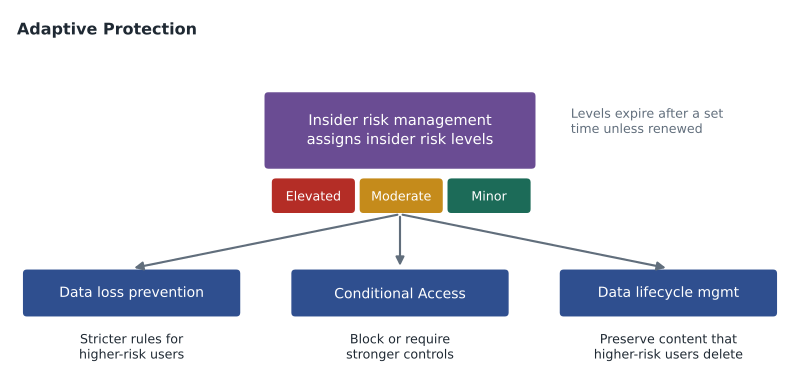
Adaptive Protection uses insider risk management to assign each user an insider risk level, elevated, moderate or minor, based on their activity, and makes that level available to other controls. DLP policies can use the level as a condition, so elevated-risk users get stricter rules; Microsoft Entra Conditional Access can use an insider risk condition to block or require stronger controls; and data lifecycle management can preserve content that elevated-risk users delete. Levels expire after a set time unless renewed. The Risky AI usage template's detections also contribute to Adaptive Protection risk scoring. Corvallin planned to enable Adaptive Protection with DLP only after the policies had run quietly for three months, so the levels would be trustworthy before they changed anyone's experience.
Policy design choices
Each insider risk policy asks a series of questions during setup: which template, which users or groups, which content to prioritize, which triggering events, which indicators and which thresholds. Corvallin's answers for the departing users policy illustrate the trade-offs.
| Setting | Choice | Reason |
|---|---|---|
| Users in scope | The E5 Compliance licensed group | Licensing; schedulers to be added when licensed |
| Priority content | Sites with Confidential / Clinical content; the client ID and health card types | Focus scoring on what matters most |
| Triggering event | HR connector resignation and termination dates | Matches how Corvallin records departures |
| Indicators | Downloads from SharePoint, copy to USB, upload to cloud storage, print | The routes used in the 2025 incident |
| Thresholds | Microsoft defaults at first | Change only with evidence from the first three months |
The Risky AI usage policy used the browser extension to score visits and pastes to generative AI sites and Copilot interactions flagged by Prompt Shields. Its purpose was narrower than it sounds: Corvallin allowed Copilot and expected staff to use it, so the policy existed to notice sensitive data going to unapproved AI sites, not to discourage AI use.
Working with HR and the union
Many of Corvallin's home-care staff were represented by a union, and the collective agreement had a clause on employee monitoring. Before any policy covered represented staff, the HR director, the privacy officer and Ines met the union representative to explain what insider risk management did and did not do: it scored activity on company devices and services, it showed pseudonyms until an investigation was justified, and it did not read message content. The representative asked for the policy description in writing and a commitment that alerts would not be used for routine performance management. Corvallin agreed, and the commitment went into the acceptable use policy.
Reviewing the first month
Analytics and the first policy alerts gave Corvallin its first picture of normal activity. Most alerts in the first month came from Teodor's own test account, which was in scope deliberately, and from one manager who regularly copied large exports to an encrypted USB drive for a board member who refused to use SharePoint. That second pattern was not a policy violation; it was a process problem, and Ines solved it by giving the board member a secure board portal. The privacy officer dismissed the alerts with notes explaining why, so the history would make sense to whoever reviewed it next.
| Alert source | Count | Outcome |
|---|---|---|
| Test account activity | 9 | Dismissed as testing |
| Manager copying board packs to USB | 3 | Dismissed; process fixed with a board portal |
| Downloads before a planned retirement | 1 | Reviewed; personal photos only; dismissed |
Keeping alerts manageable
Small organizations cannot staff an insider risk operations center. Corvallin's alert volume target was fewer than five alerts a week for the privacy officer, which shaped every threshold decision. Teodor used the alert volume setting in intelligent detections to start at a lower volume, excluded the company's own SharePoint and the approved partner domains from upload indicators, and agreed with the privacy officer that a policy producing more than ten alerts a week would be paused and tuned rather than left running. An insider risk program that nobody has time to review creates risk of its own: a missed alert can look like negligence.
Common mistakes
MistakeTurning on a departing users policy without an HR connector or another trigger.
InsteadSet up the HR connector or the Entra account deletion option first.
MistakeTurning off pseudonymization so analysts can work faster.
InsteadKeep it on and reveal names only within justified cases.
MistakeLetting the IT administrator who configures policies also investigate cases.
InsteadSeparate Admins from Analysts and Investigators.
MistakeUploading performance or disciplinary data in the HR feed.
InsteadSend only the fields the templates need, agreed with HR and the privacy officer.
Summary and key terms
- Insider risk management scores indicators for users after a triggering event and turns risky activity into alerts and cases.
- Each template has prerequisites, such as the HR connector, Defender for Endpoint, a browser extension or a health record connector.
- Pseudonymization is on by default and protects employees during triage.
- Separate role groups let administrators configure without seeing investigations.
- Adaptive Protection shares insider risk levels with DLP, Conditional Access and data lifecycle management.
- Triggering event
- The event that brings a user into scoring under an insider risk policy.
- Indicator
- An activity type that can add to a user's insider risk score.
- HR connector
- A data connector that imports HR events such as resignation dates from a CSV file.
- Pseudonymization
- Showing alerts with pseudonyms instead of user names.
- Insider risk case
- An investigation created from a confirmed alert.
- Adaptive Protection
- Dynamic controls in DLP, Conditional Access and lifecycle management based on insider risk levels.
Practice problems
Work each problem on paper first, then reveal the answer to check.
What triggering event does the data theft by departing users template use?
Show answer
A resignation or termination date from the HR connector, or Entra account deletion.
Which template needs a healthcare or Epic connector?
Show answer
Patient data misuse.
Name the three insider risk levels used by Adaptive Protection.
Show answer
Elevated, moderate and minor.
Lesson quiz · 5 questions
Score 60% or more to complete this lesson.
Create a free account to save your progress, take quizzes and earn a certificate.