
MSBA-204 · Lesson 11 of 12 · 17 min
Data Security Posture Management
▶ Video coming soon A video version of this lesson is on the way.
The readiness plan used DSPM for AI, now called the classic experience, to discover how Corvallin's staff were using AI: 37 head office employees had visited consumer AI sites and 11 prompts had contained health card numbers. Since then Microsoft has made a broader Data Security Posture Management (DSPM) experience generally available. AB-650 lists "Monitor and secure AI activity by using Microsoft Purview Data Security Posture Management (DSPM)" as a skill, so this lesson focuses on how an administrator uses DSPM day to day: setting it up, reading its priorities, acting on recommendations and running data risk assessments.
From classic experiences to the new DSPM
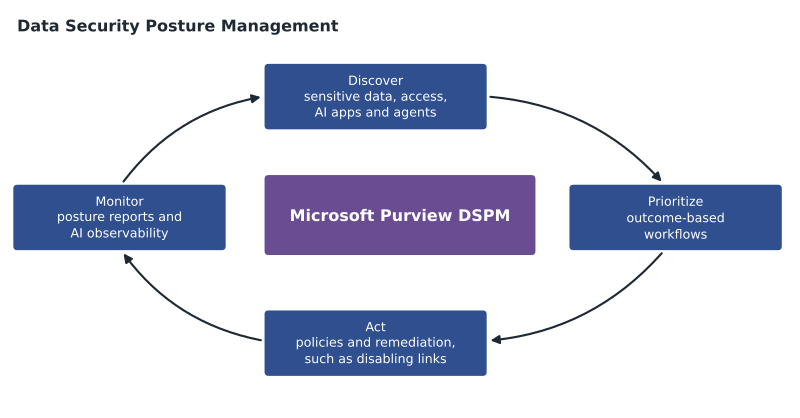
Microsoft announced the new DSPM experience in Message center post MC1191257. It reached public preview from December 2025 and general availability in May 2026. The existing DSPM (classic) and DSPM for AI (classic) experiences remain available alongside it; policies and configuration created in them are unchanged, and organizations already onboarded do not need to repeat onboarding. The new experience brings several things together:
| Capability | What it adds |
|---|---|
| Unified visibility | One view of data risk across traditional data and AI environments, rather than separate AI and non-AI tools |
| Outcome-based guided workflows | Risks grouped by the outcome an organization wants, such as reducing oversharing, with steps to get there |
| AI observability | Which AI apps and agents are in use and what data they touch |
| Posture reporting | Trends over time for the board and for auditors |
| Security Copilot agents | Agents that help with tasks such as alert triage and policy management, for organizations that use Security Copilot |
| Partner signals | Findings from BigID, Cyera, OneTrust and Varonis for data outside Microsoft 365 |
| Extended data risk assessments | Assessments that reach Fabric, with item-level analysis and remediation such as bulk disabling overshared SharePoint links |
Prerequisites
DSPM is only as good as the signals it receives. The prerequisites Corvallin had already met for other solutions were the same ones DSPM depends on: Audit turned on so activity is recorded; devices onboarded to Purview so endpoint activity is visible; the browser extension in Edge and Chrome so visits and pastes to AI websites are seen; and, for AI interactions in Microsoft 365, Copilot activity flowing into Purview. Some insights also depend on licenses and on solutions being set up, for example insider risk management for user risk and DLP for policy coverage.
| Prerequisite | Signals it unlocks | Status at Corvallin |
|---|---|---|
| Audit | Activity in Microsoft 365, including Copilot interactions | On by default |
| Device onboarding | File activity and pastes on laptops | IT laptops and head office laptops onboarded |
| Browser extensions | Visits and prompts to third-party AI sites | Deployed with Intune to head office |
| Labels and SITs | Which data is sensitive | Labels in pilot; tested SITs published |
| Insider risk management | Risky users and risky AI usage | Two policies scoped to licensed users |
Reading the priorities
The first time Teodor opened the new experience in November, the overview grouped findings by outcome. Three stood out, each linked to evidence and suggested actions:
| Finding | Evidence | Suggested action |
|---|---|---|
| Sensitive data shared with third-party AI apps | Pastes of health card numbers into consumer AI sites from head office laptops | Endpoint DLP rule for generative AI sites, starting with a warning |
| Overshared sensitive content reachable by Copilot | Items with health card numbers in sites with organization-wide links | Data risk assessment and remediation of links |
| Unlabeled sensitive content | Files matching the client ID type with no label | Service-side auto-labeling in simulation |
Some actions create policies with defaults, which is convenient and risky in equal measure. Teodor used them to start policies but always opened the created policy, renamed it to Corvallin's convention, put it in simulation and scoped it before it touched anyone. A one-click policy is still a policy, and the change control rules from lesson 1 apply.
AI observability: apps and agents
The AI observability views show which AI applications are being used, by how many people and with what kinds of data, and which agents exist and what they access. At Corvallin this surfaced two agents: the intake agent built by a scheduling team member in Copilot Studio and the scheduling vendor's rota agent, both pilots. Neither was supposed to touch clinical sites, and DSPM confirmed that neither had. Microsoft also applies the Risky Agents insider risk template by default to organizations using Copilot Studio or Microsoft Foundry agents, and AB-650 covers protecting data and evaluating compliance gaps for agents with Agent 365, which reached general availability on May 1, 2026. Teodor noted where agent findings appeared so he could connect them to the agent inventory in the Microsoft 365 admin center.
Data risk assessments
A data risk assessment examines a defined set of locations, such as SharePoint sites, for sensitive content and how exposed it is. The default assessment in the classic AI experience scanned the top 100 SharePoint sites weekly; custom assessments let an administrator choose sites and keep results for review. The new experience adds item-level analysis and remediation actions, so an administrator can move from "this site is risky" to "these files, shared by these links, were accessed by Copilot" and act on them.
Worked problem
Remediating Branch 3 Operations
An assessment of Branch 3 Operations shows 310 items with sensitive information, 290 of them shared with organization-wide links, and 45 accessed by Copilot in a single month. Restricted content discovery is already on. What should Teodor do next, and in what order?
Show solution
- Agree the plan with the branch manager, who owns the site, and the privacy officer.
- Bulk disable the 290 organization-wide links from the assessment; people who need access can request it.
- Apply the Confidential / Clinical label to the clinical items with service-side auto-labeling, after simulation.
- Start a site access review so the owner confirms who should be a member.
- Rerun the assessment and keep restricted content discovery until exposure is low, then decide whether to remove it.
Answer: With the owner and privacy officer: disable the overshared links, label the clinical items, review membership, rerun the assessment, then reconsider restricted content discovery.
Reports and monitoring
DSPM's posture reports show trends: sensitive items exposed, AI interactions involving sensitive data, policy coverage and user risk. Corvallin planned a monthly report for the privacy officer and a quarterly summary for the board, alongside the Compliance Manager figures. Teodor also learned to read the reports critically. A rising count of AI interactions with sensitive data could mean more risk, or simply that more devices had been onboarded and the extension had started reporting; he annotated each report with configuration changes that month so trends were not misread.
Partner and non-Microsoft data
The new experience can ingest findings from partner data security tools such as BigID, Cyera, OneTrust and Varonis, and its assessments reach Microsoft Fabric. Corvallin had no such tools and no Fabric workloads, so these features stayed off. For larger organizations they are a reason to make DSPM the single place where data risk is prioritized, rather than one console among several.
Where DSPM sits among the other solutions
| Solution | Role relative to DSPM |
|---|---|
| Information Protection | Labels and SITs tell DSPM what is sensitive; DSPM suggests labeling where gaps exist |
| DLP | DSPM recommends DLP policies and shows their coverage |
| Insider risk management | Supplies user risk and risky AI usage; DSPM shows it in context |
| SharePoint Advanced Management | Provides the access controls DSPM remediation uses for oversharing |
| Audit | Supplies the activity DSPM analyses |
| Compliance Manager | Tracks controls; DSPM shows the posture those controls are meant to improve |
Setting up DSPM step by step
When Teodor opened the new DSPM experience for the first time, it showed which prerequisites were met and which were not. His setup sequence, recorded in the decision log, was the same one he would recommend to any small organization:
| Step | Action | Why |
|---|---|---|
| 1 | Confirm audit, device onboarding and browser extensions | Without them, DSPM shows only part of the picture |
| 2 | Review the outcome-based workflows and choose two to start | Trying to address everything at once produces nothing |
| 3 | Run a custom data risk assessment on the highest-risk sites | Turns general findings into specific items |
| 4 | Create policies from recommendations, then rename, scope and simulate them | Keeps change control intact |
| 5 | Set a monthly review of posture reports with the privacy officer | Measures whether actions are working |
Corvallin chose two outcomes to start with: preventing sensitive data from going to third-party AI apps, and reducing oversharing of sensitive content that Copilot could reach. Both mapped directly to conditions in the Copilot pilot's go/no-go decision.
Who should use DSPM
DSPM gathers information from many solutions, including some that show user activity. Access to it should be limited to people with a reason to see that picture. The Microsoft Entra AI Administrator role maps to the Data Security AI Admins and Data Security AI Viewers role groups, among others, so Teodor checked who held that role before deciding who could open DSPM. At Corvallin, Teodor administered it and the privacy officer viewed it; nobody else needed it.
DSPM and the go/no-go decision
The readiness plan required a go/no-go decision before Copilot pilot licenses were assigned in 2027. DSPM supplied most of the measurable conditions. Teodor drafted the criteria with the privacy officer so the decision would be based on evidence rather than enthusiasm:
| Condition | Measure from DSPM | Target |
|---|---|---|
| Oversharing in clinical content | Sensitive items with organization-wide links in assessed sites | Below 5 percent of the November figure |
| Sensitive data to third-party AI | Pastes and uploads of health information to AI sites | None unblocked in the previous month |
| Label coverage | Sensitive items without labels in clinical sites | Below 10 percent |
| Policy coverage | DLP and Copilot location policies enforced | All enforced, none in simulation |
Writing the targets down in November meant that when the decision came, nobody would be tempted to adjust them to match whatever the numbers turned out to be.
Reading DSPM with the right people
DSPM findings are most useful when they reach the people who can act on them. Teodor could disable links and create policies, but only site owners knew whether a link was still needed, and only the privacy officer could decide whether a risk was acceptable. He set up a short monthly review: DSPM's top findings, the actions taken since the last review, and decisions needed from owners. Branch managers attended when their sites appeared. The first review took an hour; by the third, it took twenty minutes, because the worst exposures had been fixed and the findings were becoming routine.
What DSPM cannot see
DSPM sees what Microsoft 365, onboarded devices, browser extensions and connected partner tools report. It does not see the scheduling vendor's system, paper records in branch cabinets or personal phones that are not managed. The privacy officer's inventory, built in Compliance Manager, covered those locations separately. Teodor wrote this on the first slide of every DSPM report to the board, so a clean dashboard was never mistaken for a clean organization.
DSPM and agents in 2027
The Copilot pilot planned for spring 2027 would bring more agents: the readiness plan expected at least two departmental agents built in Copilot Studio. DSPM's agent views, together with the Risky Agents insider risk template and the agent inventory in the Microsoft 365 admin center, would be how Teodor and the privacy officer kept track of what each agent could reach. Teodor added a rule to the agent approval process: no agent would be published until DSPM showed its knowledge sources contained no overshared sensitive content.
Common mistakes
MistakeExpecting DSPM to show activity from devices and browsers that are not onboarded.
InsteadComplete Audit, device onboarding and browser extension prerequisites first.
MistakeAccepting one-click policies as created.
InsteadRename, scope and simulate every policy DSPM creates.
MistakeTreating the classic and new experiences as separate configurations to rebuild.
InsteadClassic policies carry over; the new experience is added alongside.
MistakeReading report trends without considering configuration changes.
InsteadAnnotate reports with onboarding and policy changes.
Summary and key terms
- The new Microsoft Purview DSPM became generally available in May 2026 alongside the classic DSPM and DSPM for AI experiences.
- It adds unified visibility, outcome-based workflows, AI observability, posture reports, Security Copilot agents, partner signals and extended data risk assessments.
- Audit, device onboarding, browser extensions, labels and insider risk supply its signals.
- Data risk assessments connect sensitive content, exposure and AI access, and support remediation such as bulk disabling overshared links.
- Policies created from recommendations still need naming, scoping and simulation.
- Data Security Posture Management (DSPM)
- A Purview experience that discovers, prioritizes and helps remediate data risk across data and AI.
- DSPM for AI (classic)
- The earlier AI-focused experience that remains available alongside the new DSPM.
- AI observability
- Visibility into which AI apps and agents are used and what data they reach.
- Data risk assessment
- An analysis of sensitive content and its exposure in chosen locations.
- Outcome-based workflow
- Guided steps grouped by the security outcome an organization wants.
- Partner signals
- Findings imported from non-Microsoft data security tools.
Practice problems
Work each problem on paper first, then reveal the answer to check.
When did the new DSPM experience reach general availability?
Show answer
May 2026.
Do organizations onboarded to DSPM for AI (classic) need to onboard again?
Show answer
No; onboarding carries over.
Name one remediation action available from data risk assessments.
Show answer
Bulk disabling overshared SharePoint links.
Lesson quiz · 5 questions
Score 60% or more to complete this lesson.
Create a free account to save your progress, take quizzes and earn a certificate.