
MSBA-121 · Lesson 8 of 12 · 18 min
Security Copilot
▶ Video coming soon A video version of this lesson is on the way.
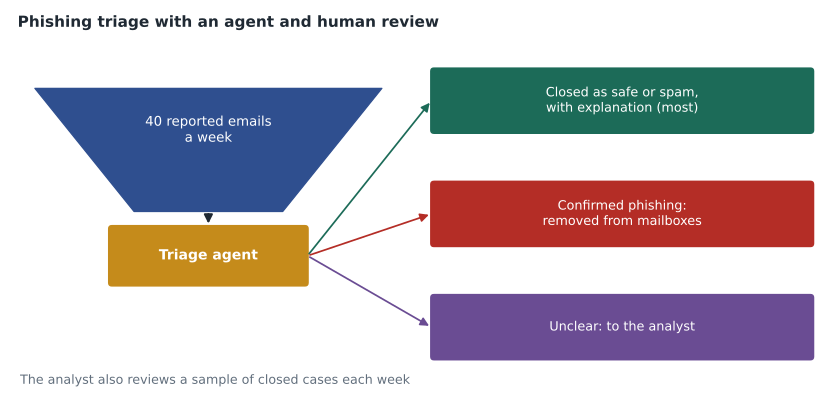
Quillfield's security team was two people: Saoirse Ndlovu-Park, who also ran IT, and Wystan Castellanos-Weir, a security analyst. A managed security provider watched alerts overnight. In a typical week, Wystan handled around 40 suspicious-email reports from staff, a dozen alerts about risky sign-ins and a steady stream of questions from leaders about whether a news story affected the firm. When Celestine reached security in her briefings, she asked a direct question: "Can AI help two people do the work of five?" Microsoft's answer is Microsoft Security Copilot.
Security Copilot is not named in the AB-731 study guide. Leaders still need to understand it, because it is one of the most mature uses of generative AI inside Microsoft's products, because it changes the economics of small security teams, and because from late 2025 it began to be included with Microsoft 365 E5 and E7.
What Security Copilot is
Microsoft Security Copilot is a generative AI assistant and set of agents for security and IT professionals. It combines language models with security-specific knowledge, Microsoft's threat intelligence and signals from the organization's own Microsoft security products, such as Microsoft Defender, Microsoft Entra, Microsoft Intune and Microsoft Purview. It helps analysts investigate incidents, understand alerts, write queries, summarize threats and respond faster, and it can run agents that handle repetitive work such as triaging reported phishing emails.
It is used in two ways. The standalone experience is a dedicated portal where an analyst can ask questions, run multi-step investigations called promptbooks and see results drawn from several security tools at once. The embedded experiences put Security Copilot inside the products analysts already use, for example as a pane in the Microsoft Defender portal that summarizes an incident, explains a suspicious script or suggests next steps, or inside Entra to explain why a sign-in was risky.
What it helps with
| Task | How Security Copilot helps | Quillfield example |
|---|---|---|
| Incident investigation | Summarizes an incident across alerts, devices, users and emails, and suggests next steps | Summarize a compromised mailbox incident in plain language for Saoirse |
| Script and file analysis | Explains what a suspicious script or command does | Explain an obfuscated command found on a laptop |
| Query writing | Turns a plain-language question into a hunting query | "Show sign-ins from new countries for finance staff this week" |
| Phishing triage | An agent assesses user-reported emails and closes false alarms | Handle the 40 weekly suspicious-email reports |
| Identity and access | Explains risky sign-ins and suggests policy improvements | Find gaps in Conditional Access policies |
| Threat intelligence | Summarizes whether a reported threat affects the organization | Answer a leader's question about a news story |
| Reporting | Drafts incident reports and executive summaries | Write the monthly security summary for the board |
Microsoft has introduced a growing set of security agents in Security Copilot, starting in 2025. Examples include agents for triaging phishing emails reported by users in Defender, for triaging alerts in Purview's data loss prevention and insider risk tools, for finding gaps in Conditional Access policies in Entra and for prioritizing vulnerability remediation in Intune. Like agents elsewhere, they work toward a goal with defined permissions, and administrators decide what they may do without a person's approval. Partners also build agents that work with Security Copilot.
Why it matters for leaders
Security work has three properties that make it a strong fit for generative AI. There is far more data than people can read, so summarizing and prioritizing are valuable. Much of the work is repetitive triage, so agents can take on the routine cases. And the skills are scarce, so AI that helps less experienced analysts reach good answers faster narrows a real gap.
There are also reasons for caution. Security decisions can have serious consequences, such as disabling an executive's account during a client meeting or, worse, closing a real attack as a false alarm. AI output can be wrong. And an attacker who knows an organization relies on AI may try to manipulate it, for example by planting misleading text in an email that an agent will read. Leaders should expect Security Copilot to make analysts faster, not to replace their judgment, and should ask how the team checks AI conclusions before acting on them.
How Security Copilot is paid for
Security Copilot is measured in Security Compute Units (SCUs), units of capacity that its experiences and agents consume. Organizations have bought it in two ways: provisioned SCUs, a set number of units per hour reserved in advance, and overage SCUs, used beyond the provisioned amount and billed on a pay-as-you-go basis. The heavier the workload, such as agents processing every reported email, the more SCUs it consumes.
In November 2025 Microsoft announced that Security Copilot would be included for customers with Microsoft 365 E5, and its documentation now covers E5 and E7. Microsoft's inclusion page describes the allocation: 400 SCUs per month for every 1,000 paid user licenses, up to a maximum of 10,000 SCUs per month. SCUs reset each month and do not roll over. The rollout began on November 18, 2025 with existing Security Copilot customers that had E5, and continues to other eligible customers. Microsoft has said that usage above the included allocation will be throttled at a future date, with the option to scale beyond it on a pay-as-you-go basis at 6 US dollars per SCU, given 30 days' notice. Organizations without E5 or E7 can still buy Security Copilot under its standard pricing.
Worked problem
What would Quillfield receive?
Quillfield has 380 staff. Saoirse is considering moving everyone from Microsoft 365 E3 to Microsoft 365 E5 for its security features. Using Microsoft's inclusion ratio of 400 SCUs per month per 1,000 paid user licenses, how many SCUs a month would Quillfield receive? If its planned agents and investigations need about 220 SCUs a month, what would the extra usage cost at 6 US dollars per SCU once throttling applies?
Show solution
- Included SCUs: 380 divided by 1,000 times 400 = 152 SCUs a month.
- Shortfall: 220 minus 152 = 68 SCUs a month.
- Cost of the shortfall at 6 US dollars per SCU: 68 times 6 = 408 US dollars a month.
- The E5 decision rests mainly on its security features; Security Copilot's inclusion strengthens the case but should be tested with real usage before planning on extra spending.
Answer: About 152 SCUs a month would be included. If usage reached 220 SCUs, the extra 68 would cost about 408 US dollars a month at the stated rate once Microsoft applies throttling to included usage.
The example shows a pattern leaders will see across Microsoft's AI products: capacity included with a higher license, plus a meter for use beyond it. The questions are always the same. How much is included? How quickly will our use grow? What happens when we exceed the allocation? Who watches the meter?
Measuring value
Security leaders measure Security Copilot's value with operational metrics they usually already track.
| Metric | Before | What to look for |
|---|---|---|
| Mean time to triage a reported email | Minutes to hours, depending on the queue | Faster triage with no rise in missed phishing |
| Mean time to investigate an incident | Hours for a complex incident | Shorter investigations, especially for junior analysts |
| Share of alerts closed as false positives | High in many teams | More false positives closed by agents, with sampled checks |
| Analyst hours on routine work | Often most of the week | More time for proactive hunting and improvement |
| Quality of AI conclusions | Not measured yet | Regular sampling of agent decisions by a person |
Microsoft and independent researchers have published studies of Security Copilot's effect on analyst speed and accuracy, but as with all productivity studies, leaders should measure results in their own environment. Wystan's plan for Quillfield was simple: record triage time and outcomes for four weeks before any agent was enabled, then compare four weeks after, while reviewing a sample of 20 agent decisions each week.
Governance for security AI
Because Security Copilot can see sensitive security data and, through agents, take actions, its own governance matters. Access is controlled through roles, so only authorized people can use it and its agents act within defined permissions. Its activity is logged. Organizations choose which plugins and data sources it can use. And leaders should insist on a clear rule for which actions an agent can take on its own, for example closing an obviously safe reported email, and which need a person, such as disabling an account or isolating a device.
Security Copilot and the rest of the AI landscape
Security Copilot also plays a part in protecting the organization's other AI investments. As agents spread, security teams need to know which agents exist, what data they can reach and whether anyone is trying to manipulate them. Microsoft's security products have added features for these questions: Defender and Purview can surface risky AI use, Entra manages agent identities, and Microsoft has positioned Agent 365, covered in lesson 11, as a way to observe and secure agents across the organization. Security Copilot can help analysts investigate incidents involving these systems in the same way it helps with other incidents.
This links security back to the leader's overall AI plan. An organization that adopts Copilot, agents and Foundry solutions without strengthening its security operations is adding new kinds of risk without new capacity to manage them. For Quillfield, the case for Security Copilot was as much about keeping pace with its own AI adoption as about the existing alert backlog.
A leader's checklist for Security Copilot
Before approving Security Copilot, Celestine asked Saoirse and Wystan to answer six questions in writing. Which licenses do we hold, and does any Security Copilot capacity come with them? Which security products feed it, and are they configured well enough to provide good signals? Which agents will we enable first, and with what permissions? How will we measure triage time, investigation time and quality? Who reviews agent decisions, and how often? And what is the monthly cost if usage exceeds the included allocation? The answers formed a one-page proposal that the leadership team could approve or reject on its merits.
| Question | Quillfield's answer |
|---|---|
| Licenses and included capacity | E3 today; E5 under review, which would include about 152 SCUs a month |
| Signal sources | Defender for Office 365 and Entra configured; Intune partly deployed |
| First agents | Phishing triage, recommending only for the first month |
| Measures | Triage time, investigation time, missed phishing, sampled quality |
| Review | Wystan reviews 20 agent decisions a week |
| Cost above allocation | Budget for up to 100 extra SCUs a month, reviewed quarterly |
How embedded AI changes daily security work
The practical effect of Security Copilot is often clearest in small moments. When an alert arrives about a suspicious sign-in, the analyst sees a plain-language summary of what happened, which user and device were involved, what the sign-in risk factors were and what similar incidents looked like, instead of assembling that picture from several screens. When a leader asks whether a widely reported vulnerability affects the firm, the analyst can ask Security Copilot to check exposure against the organization's devices and summarize the answer. When the monthly report is due, a first draft is ready in minutes.
None of these moments is dramatic, but together they change where analysts spend their time. Wystan estimated that summarizing incidents and drafting reports took about a day of his week. If Security Copilot cut that in half, he could spend the time on work that rarely got done: tuning detection rules, reviewing access policies and training staff to spot phishing. That shift, from reacting to improving, is the real return on security AI.
Common mistakes
MistakeExpecting Security Copilot to replace security analysts.
InsteadUse it to make analysts faster and to handle routine triage, with people checking conclusions.
MistakeAssuming every Microsoft 365 plan includes Security Copilot.
InsteadInclusion applies to Microsoft 365 E5 and E7; others can buy it separately.
MistakePlanning on unlimited included capacity.
InsteadCalculate the allocation of 400 SCUs per 1,000 licenses a month and plan for usage beyond it.
MistakeLetting agents disable accounts or isolate devices without approval from day one.
InsteadStart with agents that recommend or handle low-risk actions, and review a sample of decisions.
Summary and key terms
- Security Copilot is a generative AI assistant and set of agents for security and IT professionals, using signals from Microsoft security products and threat intelligence.
- It is used in a standalone portal and embedded in Defender, Entra, Intune and Purview.
- It helps with investigation, script analysis, queries, phishing triage, identity, threat intelligence and reporting.
- It is measured in Security Compute Units; Microsoft 365 E5 and E7 include 400 SCUs a month per 1,000 paid licenses, up to 10,000.
- Leaders should measure value with operational metrics and require human approval for high-impact actions.
- Security Copilot
- Microsoft's generative AI assistant and agents for security and IT professionals.
- Security Compute Unit (SCU)
- The unit of capacity Security Copilot consumes, bought provisioned or as overage.
- Embedded experience
- Security Copilot features inside another product, such as a pane in the Defender portal.
- Promptbook
- A saved sequence of prompts that runs a multi-step investigation in Security Copilot.
- Phishing triage
- Assessing user-reported emails to decide whether they are malicious, safe or need review.
- False positive
- An alert that turns out not to be a real threat.
Practice problems
Work each problem on paper first, then reveal the answer to check.
How many SCUs a month would an organization with 2,500 paid Microsoft 365 E5 licenses receive?
Show answer
2,500 divided by 1,000 times 400 = 1,000 SCUs a month.
Name two of the security products Security Copilot draws signals from.
Show answer
Any two of Microsoft Defender, Microsoft Entra, Microsoft Intune and Microsoft Purview.
Why should an organization sample an agent's closed cases each week?
Show answer
To check that the agent is not closing real threats as false alarms and to measure its quality.
Lesson quiz · 5 questions
Score 60% or more to complete this lesson.
Create a free account to save your progress, take quizzes and earn a certificate.