
MSBA-121 · Lesson 10 of 12 · 18 min
Matching capabilities to use cases
▶ Video coming soon A video version of this lesson is on the way.
By the eighth briefing, Quillfield's leadership team had a long list. Every department had ideas, and every idea seemed to need "AI". Celestine put the list on one page: 26 use cases, from meeting recaps for account executives to a claims photo system for personal lines. "We now know what each product does," she said. "The harder skill is deciding which product each idea needs, or whether it needs AI at all." This lesson is about that skill, which the AB-731 study guide describes as mapping business processes and use cases to Copilot and to Microsoft's AI apps and services.
Start with the work, not the product
The most common mistake in choosing AI tools is to start with a product and look for uses. Vendors encourage it, because every briefing ends with a demonstration. Leaders get better results by starting with the work: who does it, what information they use, where they do it, what judgment it requires and what would count as success. The product follows from those answers.
Celestine's team used six questions for every use case.
| Question | What it reveals |
|---|---|
| Who does the work, and how many people? | Whether per-user licenses or a shared agent make sense |
| Where does the work happen? | Microsoft 365 apps, a business application, a website, an editor or a custom system |
| What information does it need? | Work files and email, structured records, images, audio, public data or several sources |
| Does it create, find, analyze, decide or act? | Copilot is strong at create, find and analyze; agents and integrations are needed to act |
| How distinctive is it? | Common needs are bought; distinctive ones may be extended or built |
| What is the cost of a wrong answer? | How much review, control and testing the solution needs |
A decision path
The six questions lead to a simple decision path. It does not cover every case, but it sorts most ideas quickly.
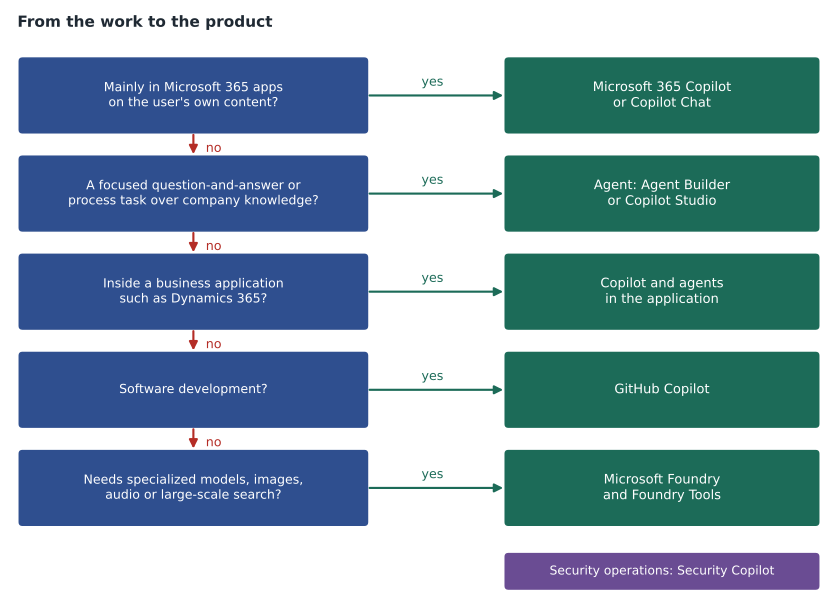
Two branches deserve a comment. Security operations is a separate branch because the users, data and controls are specific to security teams. And the last branch, Foundry, is where an organization goes when no ready-made product fits; it is the most flexible option and the most expensive to build and run, so it should be reached by elimination rather than chosen first.
Mapping Quillfield's list
Celestine's team applied the path to the 26 ideas. A selection shows how different the answers were.
| Use case | Where the work happens | Best fit | Why |
|---|---|---|---|
| Recap client meetings and track follow-ups | Teams and Outlook | Microsoft 365 Copilot | Meeting transcripts and email, for licensed account executives |
| Explain coverage wording to contact center staff | Chat while on calls | Agent built with Agent Builder, used through Copilot Chat | Focused knowledge, many unlicensed users |
| Answer client questions after hours on the website | Public website | Copilot Studio agent | Public channel, topics, handoff and an action |
| Turn enrollment forms into records | Shared mailbox and broker system | Power Automate with AI document processing | Structured extraction plus an update to a system |
| Track commercial prospects and pipeline | Spreadsheets today | Dynamics 365 Sales pilot with Copilot | A system of record with AI built in |
| Search insurers' appetite guides | Broker research | Microsoft Foundry with Azure AI Search | Large-scale semantic search with citations |
| Sort and describe claim photos | Claims liaison | Microsoft Foundry with Azure Vision in Foundry Tools | Image analysis integrated with a claims workflow |
| Triage suspicious emails reported by staff | Security operations | Security Copilot phishing triage agent | Security signals, routine triage, analyst review |
| Explain old integration code | Developers' editors | GitHub Copilot | Code context and developer tools |
| Compare quarterly claims ratios | Finance spreadsheets | Analyst in Microsoft 365 Copilot | Reasoning over structured data |
Four of the 26 ideas turned out not to need generative AI. A request for "AI to remind clients about renewals" was better served by a scheduled report and an existing email template. A request for "AI to approve small endorsements" was a rules problem, already supported by the broker management system once a setting was changed. Recognizing when the answer is ordinary automation, or simply better use of existing software, is part of the skill.
The benefits of an integrated solution
The study guide asks candidates to identify the benefits and capabilities of an integrated Microsoft AI solution, including risk mitigation and safety benefits. For a leader, the argument for using Microsoft's products together, rather than a different vendor for each use case, rests on five points.
One identity. People, and increasingly agents, are managed in Microsoft Entra ID, so access is granted, reviewed and removed in one place.
One permission model for data. Copilot, agents and Foundry solutions that use Microsoft 365 or Dataverse data respect the same permissions, so a file restricted to the finance team stays restricted whether a person or an AI system is asking.
One set of data protections. Microsoft Purview sensitivity labels, data loss prevention and audit apply across Microsoft 365 Copilot and, increasingly, agents and other AI apps, so policies do not have to be rebuilt for each tool.
Shared responsible AI tooling. Content filtering, evaluations and monitoring are built into Copilot, Copilot Studio and Foundry, and Microsoft publishes the responsible AI principles its products are designed to follow.
Shared administration. The Microsoft 365 admin center, the Power Platform admin center, Agent 365 and the Azure portal give administrators views of usage, cost and agents across products.
Integration is not free of trade-offs. Concentrating on one vendor can reduce bargaining power and may mean accepting a product that is good enough rather than the best available for a specific task. Many organizations, Quillfield included, use Microsoft for most AI needs and specialist tools where they are clearly better, while requiring those tools to work with the same identity and data protection.
Prioritizing the list
Mapping tells leaders which product fits each idea. It does not tell them which ideas to do first. For that, Celestine's team reused the value and feasibility scoring from MSBA-120 and added one more dimension: reuse. A use case that builds something the next one can reuse, such as connecting the broker system to Microsoft Graph or cleaning up SharePoint permissions, scores higher than one that stands alone.
Worked problem
Scoring three ideas
The team scores ideas from 1 to 5 on value, feasibility and reuse, weighting them 50, 30 and 20 percent. The after-hours website agent scores 4 for value, 4 for feasibility and 3 for reuse. The appetite-guide search scores 5, 2 and 4. Meeting recaps score 3, 5 and 2. Which scores highest?
Show solution
- Website agent: 4 times 0.5 plus 4 times 0.3 plus 3 times 0.2 = 2.0 plus 1.2 plus 0.6 = 3.8.
- Appetite-guide search: 5 times 0.5 plus 2 times 0.3 plus 4 times 0.2 = 2.5 plus 0.6 plus 0.8 = 3.9.
- Meeting recaps: 3 times 0.5 plus 5 times 0.3 plus 2 times 0.2 = 1.5 plus 1.5 plus 0.4 = 3.4.
Answer: The appetite-guide search scores highest at 3.9, narrowly ahead of the website agent at 3.8. Because the search is harder to build, Celestine started both, using the website agent as an early win while Bram's team built the search.
Common mapping errors
Several patterns came up repeatedly in Quillfield's review and are worth naming.
| Error | Example | Better choice |
|---|---|---|
| Licensing everyone for a narrow need | Full licenses for 45 agents who need one coverage assistant | A shared agent billed on usage |
| Building what can be bought | A custom meeting summarizer | Meeting recaps in Teams |
| Using chat for a process | Asking Copilot to update records one by one | An agent or flow that updates the system |
| Using AI for a rules problem | AI to approve small endorsements | A rule in the existing system |
| Ignoring where people work | A new portal staff must open separately | An agent in Teams or Microsoft 365 Copilot |
When the answer is "not yet"
Mapping also produces a third answer besides a product or "no AI needed": not yet. Some use cases fit a product in principle but depend on something that is not ready. Quillfield's idea of an agent that drafted coverage recommendations for commercial clients was a good fit for Copilot Studio, but the underwriting guidelines it would need were scattered, out of date and contradictory. Building the agent first would have produced confident answers from bad sources. The team put the agent on hold and started a project to consolidate the guidelines, which would later feed both the agent and Bram's underwriting search.
Not-yet decisions are healthy. They point the organization at the foundations, data quality, permissions, processes and skills, that every AI solution depends on. Leaders should track them on the same list as approved use cases, with the condition that must be met and an owner for meeting it, so that good ideas are not lost.
| Use case on hold | Condition to proceed | Owner |
|---|---|---|
| Coverage recommendation agent | Underwriting guidelines consolidated and approved | Head of commercial lines |
| Agent to answer HR policy questions | HR policies reviewed and moved to one site with clean permissions | HR manager |
| Claims photo system for auto claims | Agreement with two insurers on the photo format they accept | Claims liaison lead |
Revisiting the map
A capability map is a snapshot. Microsoft adds products, changes prices and moves features between products several times a year, and the organization's needs change too. A use case that needed a custom Foundry solution last year might be covered by a built-in agent this year; a license that seemed expensive might now include features that replace another tool. Quillfield scheduled a review of its map every six months, alongside its budget cycle, with Saoirse responsible for bringing relevant product changes and Hamish for bringing usage and value data. The first review moved two use cases from "build" to "buy" because Microsoft had released agents that covered them.
The value of the map is less in any single answer than in the discipline it creates: every request for AI is described in terms of the work, compared with the available options and given an owner and a decision. That discipline is what turns a long list of ideas into a program.
Mapping exercises for the exam
The AB-731 exam presents short scenarios and asks which capability fits. A reliable approach is to read the scenario for four clues: who the users are, where they work, what data is involved and what action is needed. A scenario about sales staff wanting meeting preparation from their emails points to Microsoft 365 Copilot. One about a website answering public questions points to Copilot Studio. One about analyzing images or searching a large document collection points to Foundry Tools such as Azure Vision in Foundry Tools or Azure AI Search. One about choosing a model for a task points to the model catalog in Microsoft Foundry and to evaluation on real examples. One about cost points to licenses, Copilot Credits, pay-as-you-go or commitment tiers.
Practicing with the use cases in this lesson, and writing a one-line justification for each choice, is a good way to prepare. The justification matters as much as the answer, because many exam options are plausible and the correct one is the one that best fits all four clues.
Celestine's team kept the full map, all 26 ideas with their product, owner and status, on a single shared page that anyone in the firm could read. Making it visible reduced duplicate requests and showed staff that their ideas were being considered.
Common mistakes
MistakeChoosing a product and then looking for uses.
InsteadStart with the work: who, where, what information, what judgment and what success looks like.
MistakeJumping to Foundry because it can do anything.
InsteadReach Foundry by elimination when ready-made products and extensions do not fit.
MistakeAssuming every idea needs generative AI.
InsteadCheck whether a rule, report, template or existing feature solves it.
MistakeIgnoring reuse when prioritizing.
InsteadFavor use cases that build foundations, such as connectors or clean permissions, for the next ones.
Summary and key terms
- Map use cases by starting with the work: who, where, what information, what kind of task, how distinctive and the cost of a wrong answer.
- A decision path sorts most ideas into Microsoft 365 Copilot, agents, business application AI, GitHub Copilot, Security Copilot or Foundry.
- Some ideas need ordinary automation or better use of existing software rather than generative AI.
- An integrated Microsoft solution shares identity, permissions, data protection, responsible AI tooling and administration.
- Prioritize with value, feasibility and reuse, and balance early wins with harder strategic work.
- Use case mapping
- Matching a business process or task to the product or approach most likely to serve it.
- Integrated AI solution
- AI products that share identity, data permissions, protection and administration.
- Reuse
- The extent to which a use case builds foundations that later use cases can use.
- Rules problem
- A task that follows fixed rules and is better solved by configuration or automation than by generative AI.
- Early win
- A use case that delivers visible value quickly and builds confidence in the program.
Practice problems
Work each problem on paper first, then reveal the answer to check.
A team wants AI to answer questions about a set of internal procedures inside Teams. Which product fits first?
Show answer
An agent built with Agent Builder or Copilot Studio, published in Teams or Microsoft 365 Copilot.
With weights of 50, 30 and 20 percent, what is the score for value 3, feasibility 4 and reuse 5?
Show answer
1.5 plus 1.2 plus 1.0 = 3.7.
Name two benefits of an integrated Microsoft AI solution.
Show answer
Any two of one identity, one permission model, shared data protection, shared responsible AI tooling and shared administration.
Lesson quiz · 5 questions
Score 60% or more to complete this lesson.
Create a free account to save your progress, take quizzes and earn a certificate.