
MSBA-121 · Lesson 7 of 12 · 18 min
Microsoft Foundry and Foundry Tools
▶ Video coming soon A video version of this lesson is on the way.
Bram Oosterhuis had two ideas that did not fit inside Microsoft 365. The first came from personal lines claims. After every hailstorm, clients sent hundreds of photographs of damaged roofs, cars and siding, and the claims liaison team sorted them by hand before passing them to insurers' adjusters. Bram wanted a system that read each photo, described the visible damage, flagged photos that were unusable and grouped them by claim. The second came from commercial underwriting submissions: brokers spent hours searching hundreds of insurers' appetite guides and underwriting manuals to find which insurers would consider an unusual risk. Bram wanted a search that understood questions such as "Which of our markets write cannabis retail with product liability above two million?" Both ideas needed platform work. In Microsoft's world, that platform is Microsoft Foundry.
This lesson covers the second half of the AB-731 study guide's Microsoft AI apps and services domain: the benefits and capabilities of Foundry Tools, which the guide lists as including Azure Vision in Foundry Tools, Azure AI Search and Microsoft Foundry, along with mapping business processes to Foundry Tools, matching an AI model to a business need, and the benefits of scalability and security.
What Microsoft Foundry is
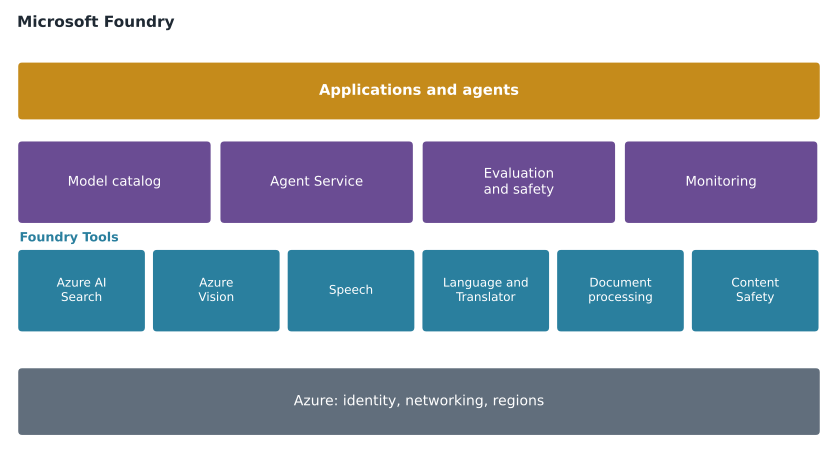
Microsoft Foundry is Microsoft's platform for building, deploying and managing AI applications and agents in Azure. It was previously called Azure AI Foundry, and before that Azure AI Studio; the portal has stayed at the same web address through each change. Foundry brings together the pieces a development team needs: a model catalog, an agent service for building agents, tools for evaluation, safety and monitoring, and access to Foundry Tools, the ready-to-use AI services for vision, speech, language, documents and search.
Foundry is aimed at professional developers, data scientists and AI engineers. Where Copilot Studio lets makers assemble agents in a visual designer, Foundry lets developers choose models, write code, connect data, run evaluations and deploy solutions with full control of the architecture. The two are complementary: a Copilot Studio agent can call a model or agent built in Foundry, and an agent built in Foundry can be published to Microsoft 365 Copilot and Teams.
In 2026 Microsoft introduced a new, agent-first Foundry portal alongside the classic portal, with a toggle between them. The new portal focuses on Foundry projects and adds multi-agent workflows, support for the Model Context Protocol and agent-to-agent communication, and, in preview, long-term memory, knowledge bases and a large catalog of tools for agents. The classic portal remains for some older workloads. Leaders do not need to know which portal their developers use, but they should know that the platform is changing quickly and that some capabilities are in preview.
Foundry Tools
Foundry Tools are prebuilt AI capabilities that developers can call without training a model from scratch. They are the descendants of what Microsoft previously called Azure AI services and, before that, Cognitive Services. The ones a leader is most likely to hear about are listed below.
| Foundry Tool | What it does | Business use at Quillfield |
|---|---|---|
| Azure AI Search | Indexes content and retrieves the most relevant passages using keyword, semantic and vector search | Search insurers' appetite guides and manuals by meaning, not just keywords |
| Azure Vision in Foundry Tools | Examines images: describes content, detects objects, reads text in images | Describe visible damage in claim photos and reject unusable ones |
| Speech | Converts speech to text and text to speech, including real-time transcription | Transcribe contact center calls for summaries |
| Language and Translator | Extracts key phrases and entities, detects sentiment, summarizes, translates | Translate client letters; detect complaints in emails |
| Document processing | Extracts fields and tables from forms, invoices and other documents | Read loss runs and certificates of insurance |
| Content Safety | Detects harmful content and attempts to manipulate AI with hidden instructions | Screen inputs and outputs of a public-facing agent |
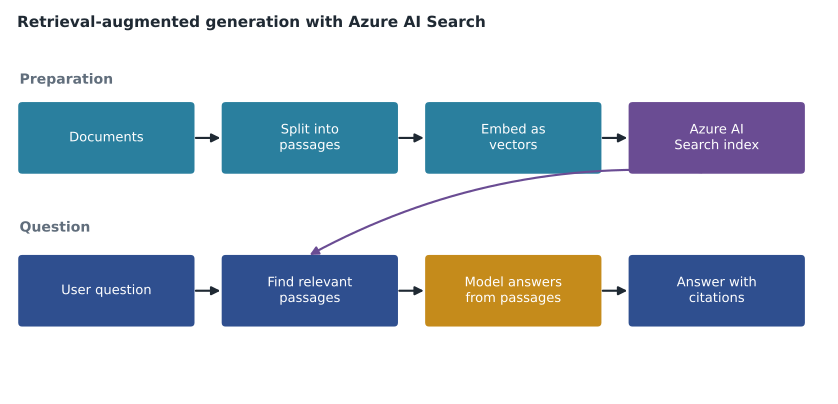
Azure AI Search deserves special attention because it powers retrieval-augmented generation, the pattern behind most business AI. Content is broken into passages, indexed with both keywords and vector embeddings, numerical representations of meaning, and retrieved by similarity to a question. The most relevant passages are then given to a language model to compose an answer with citations. Bram's underwriting search was a textbook case: index the appetite guides, retrieve the relevant passages for each question, and have a model summarize which insurers fit and why, with links to the source pages.
Azure Vision in Foundry Tools illustrates the other main pattern: applying AI to unstructured content such as images. For the hail photos, the service could describe each image, read license plates or addresses in it where that was appropriate, and flag blurry or irrelevant images. For more specialized judgments, such as estimating the severity of roof damage, Bram would compare a general multimodal model from the catalog with a custom model trained on labeled examples.
Mapping business processes to Foundry Tools
The study guide asks candidates to map business processes and use cases to Foundry Tools. The method is to look at the kind of input the process handles and the kind of judgment it needs.
| If the process involves | Consider |
|---|---|
| Finding answers in large collections of documents | Azure AI Search with a language model (retrieval-augmented generation) |
| Images or video | Azure Vision in Foundry Tools or a multimodal model |
| Phone calls or recorded audio | Speech, then Language or a language model for summaries |
| Forms, invoices or structured documents | Document processing |
| Text in several languages | Translator |
| A public-facing AI system | Content Safety on inputs and outputs |
| Reasoning, drafting or multi-step tasks | A suitable model from the catalog, often inside an agent |
Most real solutions combine several tools. Bram's claims photo solution used Vision to describe images, a language model to write a short summary for the adjuster, Azure AI Search to match photos to claims by address and date, and Content Safety to screen uploads from the public.
Matching an AI model to a business need
The Foundry model catalog offers models sold directly by Azure, including OpenAI models, models from other providers such as DeepSeek and xAI, and partner and open-source models available through the catalog. Choosing among them is a business decision as much as a technical one. Leaders should expect their teams to compare models on six factors.
| Factor | Question | Example |
|---|---|---|
| Capability | Can it handle the input type and the difficulty of the task? | Images need a multimodal model; complex analysis may need a reasoning model |
| Quality | How accurate is it on our own test cases? | Run an evaluation set of 200 real underwriting questions |
| Cost | What does it cost per task at our volume? | Price per million input and output tokens times expected tokens |
| Speed | How quickly must it respond? | A live chat needs seconds; an overnight batch can wait |
| Context | How much text can it read at once? | Long policy documents need a large context window or retrieval |
| Location and terms | Where is it hosted and under what data terms? | Data residency in the United States for client data |
A common mistake is to choose the most capable model for everything. Large reasoning models are slower and cost more per token; small models are fast and cheap and often good enough for classification, extraction and short summaries. Many solutions route easy requests to a small model and hard ones to a larger model. The only reliable way to choose is to test candidate models on the organization's own examples, which Foundry's evaluation tools are designed to do.
Worked problem
Choosing between two models
Bram tests two models on 200 sample underwriting questions. Model A answers 92 percent correctly and costs an illustrative 2.50 US dollars per million input tokens and 10 US dollars per million output tokens. Model B answers 88 percent correctly and costs 0.15 US dollars per million input tokens and 0.60 US dollars per million output tokens. Each question uses about 6,000 input tokens, mostly retrieved passages, and 500 output tokens. The brokers expect 5,000 questions a month. What is the monthly model cost of each?
Show solution
- Tokens a month: input 5,000 times 6,000 = 30 million; output 5,000 times 500 = 2.5 million.
- Model A: 30 times 2.50 = 75 US dollars input, plus 2.5 times 10 = 25 US dollars output, total 100 US dollars.
- Model B: 30 times 0.15 = 4.50 US dollars input, plus 2.5 times 0.60 = 1.50 US dollars output, total 6 US dollars.
- Both are small compared with broker time. The four-point accuracy gap matters more than the 94 US dollar difference, because a wrong answer could send a submission to the wrong insurer.
Answer: About 100 US dollars a month for model A and 6 US dollars for model B at these illustrative prices. Bram chose model A for underwriting answers and model B for a simpler task, classifying incoming submission emails.
Paying for Foundry and Foundry Tools
The AB-731 study guide expects candidates to understand Foundry Tools subscription models, including pay-as-you-go and commitment tiers. Pay-as-you-go charges for actual use, for example per thousand transactions, per hour of audio or per million tokens, billed monthly through Azure. Commitment tiers let an organization commit to a fixed monthly quantity of a supported Foundry Tool at a discounted rate. Microsoft's documentation describes their main features: they are bought per calendar month, the first month is prorated, usage above the committed quota is billed at an overage rate, unused quota is not refunded, they apply to single-service resources rather than multi-service resources, and some services offer yearly commitments for disconnected containers that run without a connection to Azure.
| Model | Best when | Risk |
|---|---|---|
| Pay-as-you-go | Usage is new, low or unpredictable | Costs rise with volume; needs budgets and alerts |
| Commitment tier | Usage is steady and well understood | Paying for unused quota if volume falls |
Language models in Foundry are typically priced per million input and output tokens on a standard pay-as-you-go basis, with options for reserved capacity, called provisioned throughput, when an organization needs guaranteed performance at high volume.
Benefits: scalability and security
The study guide also asks candidates to identify the benefits of Microsoft Foundry and Foundry Tools, including scalability and security. For a leader, the benefits come from building on Azure rather than on a standalone AI service.
Scalability. Solutions run on Azure's global infrastructure, can scale up during peaks such as the week after a hailstorm, and can be deployed in many regions. Provisioned capacity offers predictable performance for high-volume workloads.
Security and identity. Access is controlled with Microsoft Entra ID, including managed identities for applications, so no passwords are embedded in code. Solutions can use private networking so data does not travel over the public internet, and data is encrypted at rest and in transit.
Data handling. Microsoft states that customer prompts and outputs in Foundry are not used to train the foundation models, and organizations can choose the regions where their resources run, which helps with residency requirements.
Responsible AI tools. Content Safety, evaluation tools and monitoring help teams test quality, detect harmful content and attempts to manipulate models, and watch for problems after release.
An integrated platform. Because Foundry, Copilot Studio, Microsoft 365 and Purview share identity and governance, a solution built in Foundry can be governed and surfaced alongside the rest of the organization's AI. The study guide calls this the benefit of an integrated Microsoft AI solution, including risk mitigation and safety.
Bram's first Foundry project, the underwriting search, took ten weeks from first prototype to pilot. Most of that time went into preparing and cleaning the appetite guides, writing an evaluation set with the brokers and agreeing how answers should cite their sources, not into choosing or calling models.
Common mistakes
MistakeUsing the largest model for every task.
InsteadTest candidate models on real examples and match capability, cost and speed to each task.
MistakeBuying a commitment tier for a new, unproven workload.
InsteadStart on pay-as-you-go, measure usage, then commit when volume is steady.
MistakeBuilding a document search by sending whole documents to a model.
InsteadUse Azure AI Search to retrieve relevant passages, then ask the model to answer from them.
MistakeTreating preview features as production-ready.
InsteadCheck which Foundry capabilities are generally available before relying on them.
Summary and key terms
- Microsoft Foundry, formerly Azure AI Foundry, is Microsoft's platform for building AI applications and agents with models, an agent service, evaluation, safety and monitoring.
- Foundry Tools are prebuilt AI capabilities such as Azure AI Search, Azure Vision in Foundry Tools, speech, language, document processing and Content Safety.
- Map processes to Foundry Tools by the input type and judgment needed; most solutions combine several tools.
- Match models to needs on capability, quality, cost, speed, context and location, using evaluations on real examples.
- Foundry Tools are paid by pay-as-you-go or commitment tiers, and Foundry's benefits include Azure scale, Entra security and responsible AI tooling.
- Microsoft Foundry
- Microsoft's Azure platform for building, deploying and managing AI applications and agents.
- Foundry Tools
- Prebuilt AI capabilities in Foundry, such as Azure AI Search and Azure Vision in Foundry Tools.
- Azure AI Search
- A Foundry Tool that indexes content and retrieves relevant passages using keyword, semantic and vector search.
- Vector embedding
- A numerical representation of the meaning of text or images, used to find similar content.
- Commitment tier
- A discounted monthly commitment to a fixed quantity of a Foundry Tool, with overage billed above the quota.
- Provisioned throughput
- Reserved model capacity for predictable performance at high volume.
Practice problems
Work each problem on paper first, then reveal the answer to check.
Which Foundry Tool would you use to search thousands of documents by meaning?
Show answer
Azure AI Search, usually combined with a language model in a retrieval-augmented generation pattern.
A model costs 1 US dollar per million input tokens. A workload uses 40 million input tokens a month. What is the input cost?
Show answer
40 US dollars a month.
Give two features of Foundry Tools commitment tiers.
Show answer
Any two of: bought per calendar month; first month prorated; overage billed above quota; unused quota not refunded; single-service resources only.
Lesson quiz · 5 questions
Score 60% or more to complete this lesson.
Create a free account to save your progress, take quizzes and earn a certificate.