
MSBA-121 · Lesson 11 of 12 · 18 min
Governance features leaders should know
▶ Video coming soon A video version of this lesson is on the way.
Wendell Pike-Amari had attended every briefing and said little. At the tenth, he spoke first. "We are about to give AI access to client files, put an agent on our public website, let another one triage our security alerts and build a search over every insurer's manual. Before we do, I want to know what controls Microsoft gives us, and which of them we are actually going to use." This lesson is the answer Saoirse and Bram prepared. It is not an administrator's guide; the companion courses on Microsoft 365 administration and data governance cover the settings in detail. It is a leader's map of the governance features that exist, so that leaders can ask the right questions and hold the right people accountable.
Four questions governance must answer
Every AI governance feature helps answer one of four questions.
| Question | What it covers | Main Microsoft features |
|---|---|---|
| Who and what can access AI? | Users, groups and agents allowed to use or build AI | Microsoft Entra ID, licenses, Microsoft 365 admin center, Power Platform admin center |
| What data can AI see and produce? | Permissions, sensitivity, oversharing, data loss | Microsoft Purview, SharePoint Advanced Management |
| What is AI doing? | Usage, agent inventory, audit, cost | Admin center reports, Copilot analytics, Purview audit, Agent 365 |
| Is AI behaving responsibly? | Safety, quality, transparency, accountability | Content filtering, evaluations, responsible AI policies |
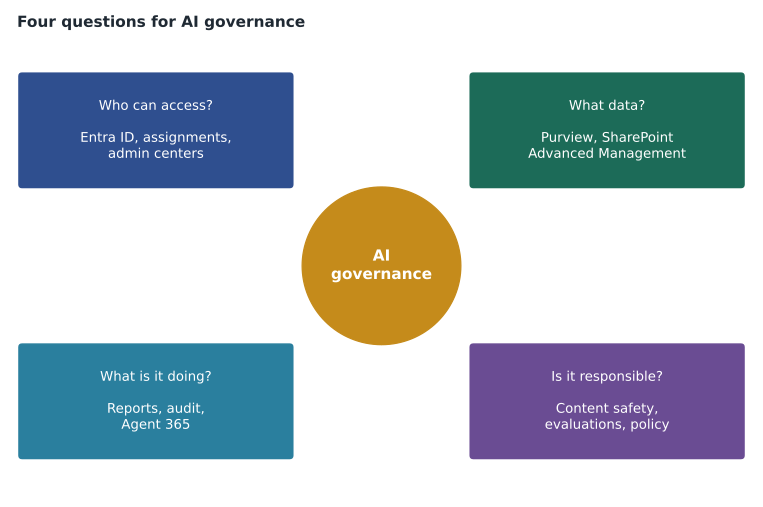
Microsoft groups many of the controls for Microsoft 365 Copilot and agents under the name Copilot Control System, which brings together security and governance, management controls, and measurement and reporting. The name matters less than the coverage: leaders should check that someone owns each of the four questions.
Who and what can access AI
Licenses and assignment. The simplest control is who gets which product. Microsoft 365 Copilot licenses are assigned to users or groups in the Microsoft 365 admin center. Copilot Chat is available to eligible users and can be pinned in the Microsoft 365 Copilot app, Teams and Outlook. Administrators can decide which users may use pay-as-you-go agents and set spending policies for usage that is billed.
Who can build and share agents. In the Microsoft 365 admin center, administrators can control who may create agents with Agent Builder, who may share them and which agents are available to which users. In Copilot Studio, environments and security roles in the Power Platform admin center decide who can build, and data policies decide which connectors agents can use.
Agent identities. Agents increasingly act on their own, so they need identities just as people do. Microsoft Entra has added capabilities for managing agent identities, so that an agent's access to data and systems can be granted, reviewed and removed, and so that its actions can be traced to it. Microsoft has also introduced built-in administrative roles for managing AI, such as an AI Administrator role in Entra ID.
What data AI can see and produce
Most AI incidents in organizations are data incidents: an assistant surfaced something to someone who should not have seen it, or produced output containing information that should have stayed internal. Microsoft's controls here are some of its most important.
Permissions and oversharing. Copilot and agents retrieve content within each user's permissions, so the first control is clean permissions. SharePoint Advanced Management provides reports on sites shared with everyone or with many people, tools to restrict access to sensitive sites and the ability to stop specific sites from appearing in Copilot results while they are cleaned up. Quillfield's first governance project was an oversharing review of its 140 SharePoint sites, which found 17 shared with the whole firm that should not have been, including the draft commission plans mentioned in lesson 3.
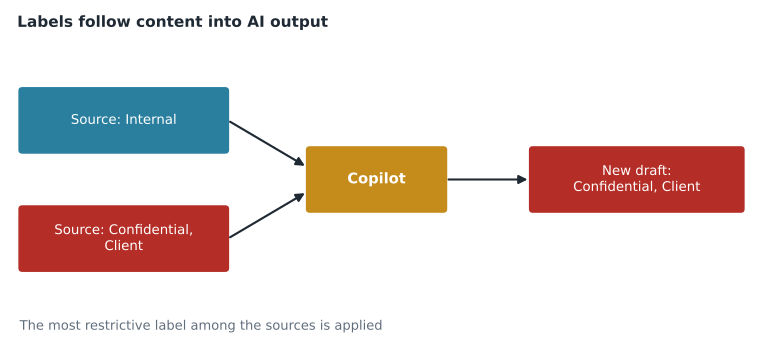
Sensitivity labels. Microsoft Purview sensitivity labels classify and protect content, for example "Confidential, Client" or "Internal, Finance". Copilot respects labels and the encryption they apply, shows the label of content it references, and applies the most restrictive label of its sources to content it creates. Labels therefore carry protection from source documents into AI output.
Data loss prevention. Purview data loss prevention policies can restrict what AI processes or shares, such as preventing Copilot from summarizing documents with a particular label, or warning users who try to paste sensitive information into AI apps in a browser.
Data Security Posture Management for AI. Purview includes a dashboard, referred to as DSPM for AI, that shows how people use AI across Microsoft and other AI apps, where sensitive data appears in prompts and responses, and which policies to turn on. For a leader, it answers the question "where are we exposed?" with data rather than guesses.
Retention, audit and eDiscovery. Copilot and agent interactions can be retained, audited and searched under the organization's Purview policies, so the organization can investigate incidents and meet legal or regulatory requests. For a brokerage, which must be able to show what it told clients, this mattered as much as any security control.
What AI is doing
Usage and adoption. The Microsoft 365 admin center reports Copilot usage by app and user, and Copilot analytics, including the Copilot Dashboard in Viva Insights, show adoption and estimated impact. These reports supplied the 210 users figure that opened lesson 3.
Agent inventory. The Microsoft 365 admin center lists agents available in the organization and lets administrators approve, block or remove them. The Power Platform admin center shows Copilot Studio agents by environment, owner and consumption.
Microsoft Agent 365. In 2026 Microsoft made Microsoft Agent 365 generally available as a management layer for observing, governing and securing agents across the organization, including agents built with other vendors' platforms. It was priced at 15 US dollars per user per month, or included in Microsoft 365 E7, a suite Microsoft launched at the same time that bundles Microsoft 365 E5, Microsoft 365 Copilot, the Microsoft Entra Suite and Agent 365 for 99 US dollars per user per month. For an organization with many agents from several sources, Agent 365 addresses the problem sometimes called agent sprawl.
Cost. Billing views in the Microsoft 365 admin center, Power Platform admin center and Azure cost management show consumption of Copilot Credits, Foundry usage and other meters. Budgets and alerts turn reports into controls.
Is AI behaving responsibly
Microsoft publishes a Responsible AI Standard built on six principles: fairness, reliability and safety, privacy and security, inclusiveness, transparency and accountability. Its products include features that support them: content filtering on prompts and responses, protection against attempts to manipulate models with hidden instructions, citations that show sources, and evaluation tools in Copilot Studio and Foundry. Microsoft also offers commitments such as its Customer Copyright Commitment, under which it defends eligible commercial customers against certain copyright claims arising from the output of covered Copilot services when they use the required safeguards.
Features do not make an organization responsible; policies and people do. Quillfield wrote a two-page AI policy covering acceptable use, approved tools, data rules, disclosure to clients, agent approval and incident reporting, and named owners for each part. Wendell owned the policy; Saoirse owned the technical controls; each agent had a named business owner.
| Governance area | Owner at Quillfield | Review cycle |
|---|---|---|
| AI policy and client disclosure | Wendell Pike-Amari, compliance | Twice a year |
| Licenses, access and spending policies | Saoirse Ndlovu-Park, IT | Monthly |
| Oversharing and sensitivity labels | Saoirse with site owners | Quarterly |
| Agent approvals and inventory | Yusra Kamaludin with each agent's business owner | Before release and quarterly |
| Value and adoption reporting | Hamish Quarrington, operations | Monthly to leadership |
| Security AI decisions | Wystan Castellanos-Weir, security | Weekly sample review |
Regulation and industry expectations
Governance also answers to regulators. In financial services, supervisors increasingly expect firms to manage AI like other models and risks. In Canada, the Office of the Superintendent of Financial Institutions' Guideline E-23 on model risk management, which explicitly covers AI and machine learning models, applies to federally regulated financial institutions from May 2027; brokerages are usually regulated provincially, but insurers who work with them expect comparable discipline. In the United States, the National Association of Insurance Commissioners adopted a model bulletin on insurers' use of AI systems in December 2023, and a number of states have adopted it. Quillfield's policy referred to the NAIC model bulletin and state insurance department expectations so that staff understood why the controls mattered.
Worked problem
A governance gap
Three months after rollout, a personal lines adviser asks the Coverage Explainer agent about a client's claims history and receives an answer drawn from a spreadsheet in a site the adviser should not have been able to open. Which governance questions failed, and what should change?
Show solution
- What data can AI see: the spreadsheet's site was overshared, so the adviser had access; the oversharing review missed it.
- Who can build and share: the agent's knowledge sources should have been limited to the curated library, but a maker added the site later without review.
- What is AI doing: no one reviewed changes to the agent's knowledge sources after release.
- Fixes: restrict the site and label the spreadsheet; require review for any change to a released agent's knowledge; add knowledge-source changes to the quarterly agent review.
Answer: The failure was in data permissions and change control, not in the AI itself. Copilot and the agent did what permissions allowed. The fix is cleaner permissions, labels and a rule that released agents cannot change their knowledge sources without review.
Governance that enables
Governance can fail in two directions. Too little, and the organization ends up with overshared data, unknown agents and surprise bills. Too much, and staff wait months for approval, give up and go back to consumer tools, which is the least governed outcome of all. Celestine asked Wendell and Saoirse to design governance that made the safe path the easy path: approved tools available by default, clear rules on one page, fast review for low-risk agents, and serious review reserved for agents that reach clients, change records or use sensitive data.
They used a simple tiering, similar to the one Quillfield had adopted for Power Platform. Personal agents built with Agent Builder over a user's own content needed no approval. Agents shared with a team needed a champion's check of their knowledge sources. Agents shared across the firm, reaching clients or taking actions needed the full design review described in lesson 4. Tiering kept the review effort where the risk was.
Governance checklist for a new AI capability
Saoirse turned the four questions into a short checklist that every new AI capability at Quillfield had to pass before launch. It fitted on one page and took less than an hour for most agents, which kept governance from becoming a bottleneck.
| Check | Evidence required |
|---|---|
| Named business owner and technical owner | Names recorded in the agent inventory |
| Users and channels defined | Security group or audience and publishing channels listed |
| Knowledge sources reviewed | Each source owned, current and correctly permissioned |
| Actions limited | List of actions and which need human approval |
| Sensitive data handled | Labels and data loss prevention policies confirmed |
| Quality tested | Evaluation results against agreed criteria |
| Cost forecast and budget | Expected consumption, budget and alert configured |
| Review date set | First review within three months of launch |
The checklist also gave Wendell something he could show to auditors and insurers: evidence that each AI capability had been considered, tested and approved by named people, which is what supervisors in financial services increasingly expect.
Six months after launch, the checklist had been used for 14 agents. Two were rejected because their knowledge sources were not owned by anyone, and one was sent back because it could create records without approval. None of the approved agents caused a reportable incident in that period.
Common mistakes
MistakeAssuming Copilot's permission trimming solves data protection.
InsteadClean up oversharing and apply sensitivity labels; AI makes existing access problems visible.
MistakeApproving agents once and never reviewing them.
InsteadReview agents before release and on a schedule, including changes to knowledge and actions.
MistakeWriting an AI policy with no named owners.
InsteadName an owner for each governance area and set a review cycle.
MistakeTreating responsible AI as a product feature.
InsteadUse product features to support policies, people and processes the organization owns.
Summary and key terms
- AI governance answers four questions: who and what can access AI, what data it can see and produce, what it is doing, and whether it behaves responsibly.
- Access controls include licenses, agent creation and sharing settings, Power Platform environments and data policies, and agent identities in Entra.
- Data controls include oversharing tools in SharePoint Advanced Management, Purview sensitivity labels, data loss prevention, DSPM for AI, retention and audit.
- Visibility comes from usage reports, Copilot analytics, agent inventories, cost views and Microsoft Agent 365.
- Responsible AI needs policies and owners, supported by Microsoft's principles, safety features and commitments, and by regulators' expectations.
- Copilot Control System
- Microsoft's grouping of security, governance, management and reporting controls for Copilot and agents.
- SharePoint Advanced Management
- SharePoint tools for finding and fixing oversharing and restricting what appears in Copilot.
- Sensitivity label
- A Purview classification that marks and protects content and carries into AI output.
- DSPM for AI
- Purview's Data Security Posture Management view of AI use and sensitive data exposure.
- Microsoft Agent 365
- Microsoft's management layer for observing, governing and securing agents across an organization.
- Agent sprawl
- The uncontrolled growth of agents with unclear owners, data access and costs.
Practice problems
Work each problem on paper first, then reveal the answer to check.
Copilot drafts a document from one Internal source and one Confidential source. Which label applies to the draft?
Show answer
Confidential, the most restrictive label among the sources.
What does Microsoft 365 E7 bundle, according to Microsoft's 2026 launch?
Show answer
Microsoft 365 E5, Microsoft 365 Copilot, the Microsoft Entra Suite and Agent 365.
Name Microsoft's six responsible AI principles.
Show answer
Fairness, reliability and safety, privacy and security, inclusiveness, transparency and accountability.
Lesson quiz · 5 questions
Score 60% or more to complete this lesson.
Create a free account to save your progress, take quizzes and earn a certificate.