
MSBA-121 · Lesson 6 of 12 · 18 min
AI in Power Platform
▶ Video coming soon A video version of this lesson is on the way.
Every organization has work that falls between its big systems: a spreadsheet that tracks certificates of insurance, an email chain that approves exceptions, a shared folder where scanned forms wait for someone to type them into another system. At Quillfield, the group benefits team handled about 900 enrollment change forms a month this way. Staff opened each scanned form, read it, typed the details into the broker management system and filed the form. Hamish Quarrington had timed it at about four minutes a form. When Celestine asked where AI could take friction out of everyday operations, Hamish pointed to work like this, and Yusra Kamaludin pointed to Microsoft Power Platform.
Power Platform is not named in the AB-731 study guide, but it is where many organizations first combine AI with automation, and Copilot Studio, which the guide does name, is built on it.
What Power Platform is
Microsoft Power Platform is a family of low-code tools for building business solutions. Power Apps builds apps, from simple forms to complex business applications. Power Automate builds automated workflows across cloud services and, through desktop flows, across older desktop applications. Power Pages builds secure websites for customers and partners. Copilot Studio builds agents, as lesson 4 described. Underneath them sit Dataverse, the data platform, more than a thousand connectors to other systems, and AI Builder, a set of prebuilt and customizable AI models. Power BI, Microsoft's business intelligence tool, has historically been part of the Power Platform family but is now also part of Microsoft Fabric, Microsoft's analytics platform.
Power Platform serves two groups of builders. Makers, sometimes called citizen developers, are business staff who build solutions for their own teams with guidance from IT. Professional developers extend those solutions with code, build complex applications and integrate with enterprise systems. Generative AI has changed what both groups can do.
Building with AI
Generative AI first changed how Power Platform solutions are built. Instead of starting with a blank screen, a maker can describe what they need in plain language and let Copilot propose a starting point.
Describing an app or table. In Power Apps, a maker can describe the app or the data they need, such as "an app for tracking certificate of insurance requests with client, insurer, due date and status", and Copilot proposes tables, columns and screens that the maker refines.
Plan designer. For larger problems, the plan designer asks the maker to describe the business problem and the people involved, then proposes a solution plan: the user roles, the data, and a combination of apps, flows and agents. Microsoft lists the plan designer among the Power Platform skills tested on its PL-900 fundamentals exam as of July 2026, a sign of how central it has become.
Describing a flow. In Power Automate, a maker can describe a workflow, such as "when a form arrives in this mailbox, extract the details, check the policy and create a task", and Copilot builds a draft flow with the right connectors and steps.
Code generation for developers. For professional developers, Microsoft has added ways to build apps by describing them in natural language and getting working code, sometimes informally called "vibe" coding, along with code apps that let developers bring their own front-end code into Power Platform's governance.
The leader's point is that AI lowers the cost of building small solutions dramatically. That is good news for productivity and a challenge for governance, because many more solutions will be built.
Running with AI
The second change is that AI now runs inside the solutions themselves.
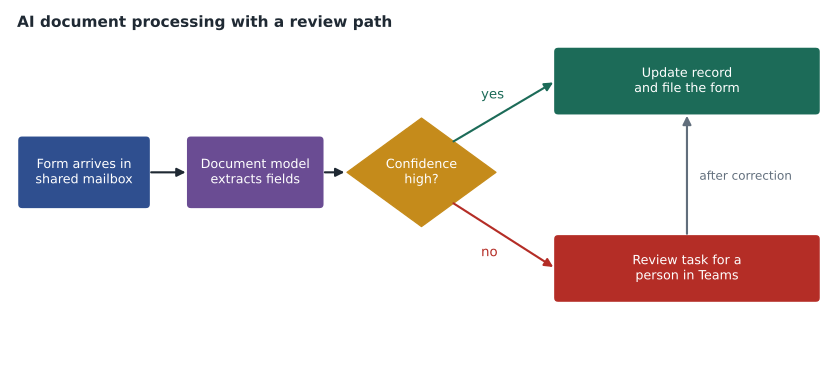
Document processing. AI Builder includes models that extract information from documents such as forms, invoices and receipts. A flow can watch a mailbox or folder, send each document to the model, and pass the extracted fields to the next step. A confidence score shows how sure the model is about each field, so the flow can send uncertain documents to a person.
Prompts. Makers can create reusable prompts that send text to a generative model with instructions, such as "classify this email as a claim, a change request or a complaint, and extract the policy number", and use the result in an app or flow.
Agents in apps and flows. Copilot Studio agents can be embedded in apps, called from flows, and given flows as tools, so an agent can decide when to run a process. Microsoft's 2026 wave 1 release plans also include Copilot Studio actions inside cloud flows and AI-assisted authoring and self-healing for desktop flows, where AI helps repair a desktop automation when an application screen changes.
Process mining. Power Automate includes process mining, which examines event logs from business systems to show how a process actually runs, where it waits and where it loops back. Microsoft's 2026 plans include general availability of object-centric process mining, which follows several related objects, such as orders and invoices, through a process together. Process mining is useful before AI is added, because it shows where automation would save the most time.
Dataverse and agents. Microsoft's 2026 plans also describe Dataverse becoming easier for agents to use, including through MCP servers and APIs, so agents built in Copilot Studio or elsewhere can read and update business data under Dataverse security.
Worked problem
Automating enrollment forms
Quillfield receives 900 enrollment change forms a month. Manual handling takes 4 minutes per form. With a Power Automate flow and an AI Builder document model, Hamish expects 80 percent of forms to process automatically with a 30-second spot check, and 20 percent to need a person's review taking 2 minutes. How many staff hours a month does the automation save?
Show solution
- Manual time now: 900 forms times 4 minutes = 3,600 minutes, or 60 hours.
- Automatic forms: 80 percent of 900 = 720 forms times 0.5 minutes = 360 minutes.
- Reviewed forms: 20 percent of 900 = 180 forms times 2 minutes = 360 minutes.
- New total: 720 minutes, or 12 hours. Saving: 60 minus 12 = 48 hours a month.
Answer: About 48 staff hours a month, roughly 80 percent of the current effort, before counting the cost of AI Builder or Copilot Credits and the time to build and maintain the flow.
The example shows why the review path matters. Without it, the 20 percent of uncertain forms would either be processed with errors or block the flow. With it, people handle the hard cases and the automation handles the routine ones.
Licensing in brief
Power Platform licensing has many parts, and it changes regularly. Leaders need the broad shape. Many Microsoft 365 users already have limited rights to use Power Apps and Power Automate with standard connectors to Microsoft 365 data. Solutions that use premium connectors, Dataverse or on-premises data generally need standalone licenses, such as Power Apps Premium or Power Automate Premium, or a pay-as-you-go plan billed through Azure. Microsoft announced that the price of Power Apps Premium will rise from 20 to 22 US dollars per user per month for terms starting on or after January 1, 2027. AI features add a consumption element: AI Builder and generative actions have historically been paid with AI Builder credits, and Microsoft has been moving AI consumption across Power Platform toward Copilot Credits, so the exact meter depends on the feature and the date.
| Cost element | Typical basis | Leader's check |
|---|---|---|
| Using apps and flows on Microsoft 365 data | Included in many Microsoft 365 plans | Does the solution stay on standard connectors? |
| Premium connectors and Dataverse | Standalone per-user or per-app licenses, or pay-as-you-go | How many people use the solution each month? |
| AI models, prompts and agents | Credits consumed per use | What is the expected volume, and is there a budget alert? |
| Building and maintaining | Staff time from makers and IT | Who maintains it when the maker changes jobs? |
Governance at scale
Because AI makes building faster, Power Platform governance matters more than ever. Microsoft provides the controls through the Power Platform admin center: environments that separate development, testing and production; data policies that decide which connectors can be used together, so that, for example, a flow cannot copy client data from the broker system to a personal storage service; Managed Environments, which add controls such as limits on sharing, usage insights and solution checks; and reports on who is building what. Microsoft has said its Center of Excellence starter kit is no longer actively maintained, with its core capabilities moved into the admin center itself.
Quillfield adopted a simple model. Makers could build in a personal productivity environment for their own use. Anything shared with more than ten people, or using client data, moved to a managed team environment with Yusra's review. Anything business-critical, such as the enrollment flow, moved through development, test and production environments with an owner in the business and a support contact in IT.
| Tier | Who can build | Data allowed | Review |
|---|---|---|---|
| Personal productivity | Any trained maker | Their own Microsoft 365 data; no client data | None beyond data policies |
| Team solutions | Makers with a champion's support | Team data, including client data with approval | Yusra reviews before sharing beyond ten people |
| Business-critical | Makers and IT together | Any approved data | Development, test and production with an owner and support contact |
Citizen development and professional support
AI-assisted building raises an old question in a new form: who should build what? Power Platform has always aimed to let people close to a problem solve it themselves. Generative AI makes that easier, which means more people will build more solutions, some of them excellent and some of them fragile. Most organizations that use Power Platform successfully combine three roles. Makers in business teams build solutions for their own work. Champions in each department help makers, spot good ideas and recognize when a solution needs more support. A center of excellence or platform team in IT sets standards, manages environments and licenses, supports business-critical solutions and builds reusable components such as connectors to the organization's main systems.
At Quillfield, Yusra became the first champion, and Saoirse's team acted as a small platform team. The enrollment-form flow started as Hamish's idea, was built by a maker in the group benefits team with Yusra's help, and moved into a managed environment once it handled client data. That path, from idea to maker to managed solution, is the pattern leaders should expect and encourage.
| Role | Responsibilities | Quillfield example |
|---|---|---|
| Maker | Builds solutions for their own team's work | A group benefits administrator who built the enrollment flow |
| Champion | Helps makers, reviews solutions, connects them with IT | Yusra Kamaludin |
| Platform team | Sets standards, manages environments, supports critical solutions | Saoirse's IT team |
| Business owner | Accountable for a solution's outcome and continued use | Hamish for the enrollment flow |
When Power Platform is not the answer
Power Platform is powerful, but it is not the right home for everything. Very high transaction volumes, complex algorithms, solutions that must run outside Microsoft's cloud, or applications sold to customers are usually better built by professional developers on Azure or in other tools. Leaders should ask, for each proposed solution, whether low-code is a good fit for its scale, complexity and expected life, and should expect the platform team to say no sometimes.
Leaders can help by asking one question of every proposed solution: who will look after this in two years? A solution with a clear owner, documentation and a home in a managed environment can outlive its original maker. One that lives in a single person's account usually cannot.
For Quillfield, the enrollment flow became the model case that Yusra used to train new makers: a real problem, a measured saving, a review path for uncertain results and a clear owner.
Common mistakes
MistakeTreating AI-generated apps and flows as finished.
InsteadCopilot gives a starting point; makers still review the data model, logic and security.
MistakeAutomating document processing with no path for uncertain results.
InsteadUse confidence scores and route low-confidence documents to a person.
MistakeAssuming every Microsoft 365 user can run every Power Platform solution at no extra cost.
InsteadCheck whether the solution uses premium connectors, Dataverse or AI consumption.
MistakeLetting AI-built solutions spread without environments and data policies.
InsteadUse environments, data policies and Managed Environments, with tiers by risk.
Summary and key terms
- Power Platform includes Power Apps, Power Automate, Power Pages and Copilot Studio on Dataverse, connectors and AI Builder.
- AI helps build solutions: describing apps, tables and flows, the plan designer, and natural-language code generation for developers.
- AI runs inside solutions: document processing, prompts, agents in apps and flows, process mining and agent access to Dataverse.
- Licensing combines Microsoft 365 rights, standalone premium licenses or pay-as-you-go, and AI consumption.
- Faster building needs stronger governance: environments, data policies, Managed Environments and risk-based tiers.
- Power Platform
- Microsoft's low-code family of Power Apps, Power Automate, Power Pages and Copilot Studio.
- Maker
- A business user who builds solutions with low-code tools, also called a citizen developer.
- AI Builder
- Prebuilt and customizable AI models, such as document processing, used in Power Platform solutions.
- Plan designer
- A Power Platform feature that turns a described business problem into a proposed solution plan.
- Process mining
- Analyzing event logs to see how a process actually runs and where it can improve.
- Data policy
- A Power Platform rule controlling which connectors can be used together in an environment.
Practice problems
Work each problem on paper first, then reveal the answer to check.
Why does an AI document flow need a path for low-confidence results?
Show answer
So uncertain documents go to a person instead of being processed with errors or blocking the flow.
A process takes 5 minutes for 600 items a month. Automation cuts it to 1 minute per item. How many hours a month are saved?
Show answer
600 times 4 minutes = 2,400 minutes, or 40 hours.
Name three governance controls in the Power Platform admin center.
Show answer
Environments, data policies and Managed Environments (also usage reports and solution checks).
Lesson quiz · 5 questions
Score 60% or more to complete this lesson.
Create a free account to save your progress, take quizzes and earn a certificate.