
MSBA-121 · Lesson 1 of 12 · 18 min
The Microsoft AI landscape
▶ Video coming soon A video version of this lesson is on the way.
Celestine Nwachukwu-Hale had spent the autumn making the business case for generative AI at Quillfield Insurance Brokers. The leadership team now agreed that AI could save time in the contact center, speed up renewals and reduce compliance rework. The next question came from Lorne Macpherson-Ibe, the chief financial officer, at the start of the first of a new series of leadership briefings: "Fine. So what exactly are we buying? Every Microsoft email I get mentions a different Copilot."
Lorne's complaint is common. Microsoft sells AI in many places at once: inside Word and Outlook, inside Teams, inside its business applications, inside its security tools, inside GitHub and as a cloud platform for building custom solutions. The names change often, and the same word, Copilot, appears on products with very different prices, users and purposes. A leader does not need to know every feature. A leader does need a map: which products exist, who each one is for, what data it works on, how it is paid for, and which questions to ask before signing.
This course draws that map. It follows Celestine's briefings as Quillfield decides which Microsoft AI apps and services fit which parts of the business, and it ends with a case study of a manufacturer making the same choices. It also covers the second domain of Exam AB-731, Microsoft AI Transformation Leader, which asks candidates to identify the benefits, capabilities and opportunities of Microsoft's AI apps and services. In the study guide for skills measured as of January 11, 2027, that domain carries 35 to 40 percent of the exam, the same weight as the business value domain.
Four layers
The easiest way to make sense of Microsoft's AI offerings is to sort them into layers. Each layer builds on the ones below it.
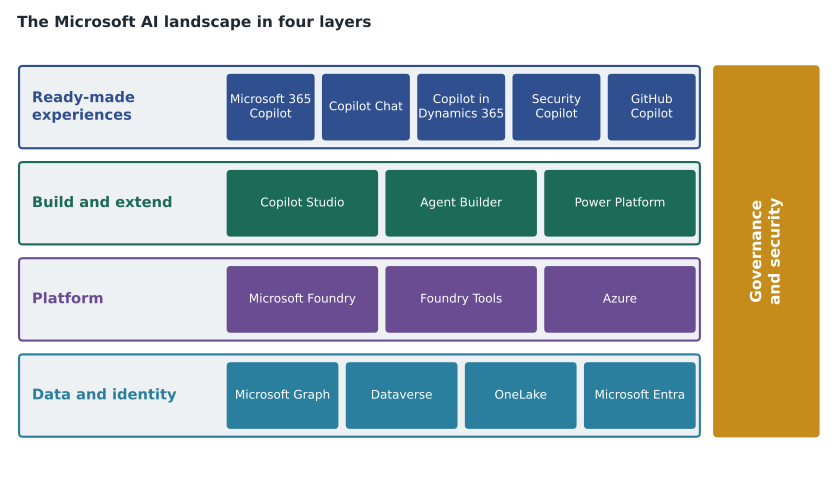
Ready-made experiences. These are AI features people use directly in the tools they already work in: Microsoft 365 Copilot in Word, Excel, PowerPoint, Outlook and Teams; Microsoft 365 Copilot Chat; Copilot features inside Dynamics 365 business applications; Security Copilot for security teams; and GitHub Copilot for software developers. The organization buys licenses or capacity, configures settings and trains people. Nobody has to build anything.
Build and extend. When ready-made experiences do not cover a need, organizations can extend them or build their own agents. Agent Builder, inside Microsoft 365 Copilot, lets a user create a simple agent from instructions and a few knowledge sources. Copilot Studio is Microsoft's low-code tool for building more capable agents that use company knowledge, follow processes and take actions in other systems. Power Platform, which includes Power Apps and Power Automate, adds AI to the apps and workflows that business teams build themselves.
Platform. Microsoft Foundry is the platform for professional developers building AI applications and agents in Azure. It offers a catalog of models from Microsoft, OpenAI and many other providers, an agent service, evaluation and safety tools, and a family of ready-to-use AI capabilities called Foundry Tools, such as Azure AI Search for searching company content and Azure Vision in Foundry Tools for analyzing images.
Data and identity. Every AI answer is only as good as the data behind it and the permissions that control access to that data. Microsoft Graph connects the mail, files, calendars, chats and people in Microsoft 365. Dataverse stores data for Dynamics 365 and Power Platform. OneLake is the data lake at the center of Microsoft Fabric, Microsoft's analytics platform. Microsoft Entra ID decides who, and increasingly which agent, can see what.
Governance and security run through all four layers: Microsoft Purview for data protection and compliance, Microsoft Defender for threat protection, Microsoft Entra for identity, the Microsoft 365 admin center and Power Platform admin center for settings, and Microsoft Agent 365 for managing agents across the organization. Lesson 11 covers them.
The products at a glance
| Product | Main users | Works on | How it is paid for |
|---|---|---|---|
| Microsoft 365 Copilot | Knowledge workers | Work data in Microsoft 365 through Microsoft Graph, plus the web | Per-user license added to a Microsoft 365 plan |
| Microsoft 365 Copilot Chat | Anyone with an eligible work account | The web, files the user uploads, and agents | Included with eligible plans; agents that use work data are billed on usage |
| Copilot Studio | Makers and IT teams building agents | Knowledge sources, connectors and actions the agent is given | Copilot Credits, by pay-as-you-go or capacity packs |
| Copilot in Dynamics 365 and Power Platform | Sales, service, finance and operations staff; app makers | Business data in Dataverse and the applications | Mostly included in the application licenses; some agents use credits |
| Microsoft Foundry and Foundry Tools | Professional developers and data scientists | Models and data the developers connect | Azure consumption, pay-as-you-go or commitment tiers |
| Security Copilot | Security operations and IT teams | Signals from Defender, Entra, Intune and Purview | Security Compute Units, some included with Microsoft 365 E5 and E7 |
| GitHub Copilot | Software developers | Code, repositories and developer tools | Per-user plans on GitHub plus usage-based AI credits |
The table hides an important difference. Some products are per user: the organization pays for each person who has access, whether or not they use it heavily. Others are consumption-based: the organization pays for what is used, measured in credits, compute units or tokens. Per-user pricing is predictable but can be wasted on light users. Consumption pricing matches cost to use but needs budgets, alerts and someone watching the meter. Most organizations end up with both.
One word, many products
The word Copilot causes most of the confusion. Microsoft uses it as a brand for AI assistance across its products, so "Copilot" in a meeting could mean any of the following.
| When someone says | They probably mean |
|---|---|
| "Copilot" on a personal Windows PC or phone | The consumer Microsoft Copilot app, signed in with a personal Microsoft account |
| "Copilot Chat" at work | Microsoft 365 Copilot Chat, signed in with a work account and covered by enterprise data protection |
| "Copilot" in Word or Teams at work | Microsoft 365 Copilot, the paid license that adds work data and in-app features |
| "Copilot for Sales" or "Copilot in Customer Service" | AI features in Dynamics 365 or role-based agents in Microsoft 365 Copilot |
| "Security Copilot" | Microsoft Security Copilot, for security analysts and IT administrators |
| "GitHub Copilot" | The AI pair programmer and coding agent for developers on GitHub |
For a business leader, the most important line is between consumer and work products. The consumer Copilot app is aimed at individuals and is signed in with a personal account. Microsoft 365 Copilot Chat and Microsoft 365 Copilot are signed in with a work account managed by the organization's Microsoft Entra ID, and Microsoft applies enterprise data protection to them: prompts and responses are handled under the organization's commercial data protection terms and are not used to train Microsoft's foundation models. Quillfield's first policy decision was simple: staff use AI only with their work accounts.
Agents
Almost every Microsoft AI product now talks about agents. In Microsoft's usage, an agent is an AI system that works toward a goal using instructions, knowledge and tools. A simple agent answers questions from a set of documents. A more capable agent follows a process: it reads a customer email, looks up the policy, drafts a reply and creates a task for a person to approve. An autonomous agent can start on its own when something happens, such as a new email arriving, and complete steps without a person prompting each one.
Agents appear in every layer. Microsoft ships ready-made agents, such as Researcher and Analyst in Microsoft 365 Copilot and the agents built into Dynamics 365 and Security Copilot. Users can build simple agents with Agent Builder. Makers build richer agents in Copilot Studio. Developers build custom agents with Microsoft Foundry. And Microsoft Agent 365 helps administrators see and govern all of them, including agents from other vendors. Lesson 3 explains how leaders should think about agent autonomy and cost.
What changes, and how to keep up
Microsoft's AI products change faster than almost any software the business has bought before. In the two years before Celestine's briefings, Azure AI Studio became Azure AI Foundry and then Microsoft Foundry; Azure AI services became Foundry Tools; Microsoft 365 Copilot gained a free Chat tier for eligible work accounts; the per-user Copilot license gained a lower-priced Business edition for smaller organizations; and Microsoft introduced Agent 365 as a separate product for governing agents. Licensing for agents moved to Copilot Credits.
Leaders cannot track every change, but they can build habits that keep the organization current. Quillfield adopted four.
Name an owner. Saoirse Ndlovu-Park, Quillfield's head of IT, was made responsible for tracking changes to the AI products the firm used. She reviews the Microsoft 365 message center weekly and summarizes anything that affects cost, data handling or user experience.
Check the official source. For product facts, the official sources are Microsoft Learn documentation, the Microsoft 365 roadmap, the Dynamics 365 and Power Platform release plans, and Microsoft's pricing pages. For exam facts, it is the study guide for the exam, which shows the date its skills were last updated.
Read the release cadence. Microsoft 365 features roll out continuously. Dynamics 365 and Power Platform publish plans for two release waves a year: wave 1 releases between April and September, and wave 2 between October and March. Knowing the cadence helps leaders time training and pilots.
Revisit decisions on a schedule. Because prices and capabilities shift, Quillfield agreed to review its AI product choices twice a year, alongside its budget cycle.
Worked problem
Sorting a request
Daria Velikova, head of personal lines, asks for "Copilot" so her team can draft renewal letters from policy notes stored in SharePoint. Tomasz Rybak, the contact center manager, wants AI to answer common client questions on Quillfield's website at night. Bram Oosterhuis, the solutions architect, wants to build a model that reads photographs of hail damage. Which layer does each request belong to?
Show solution
- Daria's team needs AI in Word and Outlook working on files they already have access to in SharePoint. That is a ready-made experience: Microsoft 365 Copilot.
- Tomasz needs an agent that answers the public on a website, using approved knowledge, outside office hours. That is a custom agent built in Copilot Studio and published to a website channel.
- Bram needs image analysis tuned to a specific task and integrated into a claims system. That is platform work: Microsoft Foundry with Azure Vision in Foundry Tools or a suitable model from the catalog.
Answer: Ready-made experience for Daria, build and extend for Tomasz, platform for Bram. The same word, "AI", led to three different products, budgets and teams.
What the exam expects
The AB-731 study guide lists the skills for this domain under two headings. The first covers Microsoft Copilot: mapping business processes to Copilot; the differences between versions of Copilot; Copilot Chat on the web and mobile; Copilot in the Microsoft 365 apps; Copilot Studio; Microsoft Graph; the benefits of an integrated Microsoft AI solution, including risk mitigation and safety; when to use Researcher or Analyst; and when to build, buy or extend, including the Copilot extensibility framework. The second heading covers Foundry Tools: mapping business processes to Foundry Tools; the capabilities of Foundry Tools, including Azure Vision in Foundry Tools, Azure AI Search and Microsoft Foundry; matching an AI model to a business need; and the benefits of Microsoft Foundry and Foundry Tools, including scalability and security.
The study guide does not list Dynamics 365, Power Platform, Security Copilot or GitHub Copilot by name. This course covers them anyway, in lessons 5, 6, 8 and 9, because a leader choosing AI for a whole organization will meet them, and because the exam's scenario questions about mapping processes to Microsoft's AI apps and services are easier when the whole landscape is clear. Where a lesson goes beyond the exam, it says so.
Common mistakes
MistakeTreating "Copilot" as one product with one price.
InsteadAsk which Copilot: consumer, Copilot Chat, Microsoft 365 Copilot, a Dynamics 365 or Power Platform feature, Security Copilot or GitHub Copilot.
MistakeLetting staff use consumer AI apps with personal accounts for work.
InsteadUse work accounts so the organization's identity, data protection and audit controls apply.
MistakeStarting with the platform because it is the most flexible.
InsteadStart with ready-made experiences where they fit, extend when needed, and build only where the need is distinctive.
MistakeRelying on a vendor slide deck from last year.
InsteadCheck Microsoft Learn, the roadmap, release plans and pricing pages, and review choices on a schedule.
Summary and key terms
- Microsoft's AI offerings sort into four layers: ready-made experiences, build and extend, platform, and data and identity, with governance running through all of them.
- Some products are licensed per user and some are paid by consumption; most organizations use both.
- The Copilot brand covers consumer and work products with different data protection, users and prices.
- Agents use instructions, knowledge and tools to work toward a goal, and range from assistance to autonomy.
- Products and names change quickly, so leaders need an owner, official sources and a review schedule.
- Ready-made experience
- An AI feature people use directly in an existing product, with configuration but no building.
- Agent
- An AI system that uses instructions, knowledge and tools to work toward a goal, sometimes taking actions on its own.
- Microsoft Graph
- The data and API layer that connects mail, files, calendars, chats and people in Microsoft 365.
- Enterprise data protection
- Microsoft's commercial data handling terms for work-account AI use, under which prompts and responses are not used to train foundation models.
- Consumption pricing
- Paying for what is used, measured in credits, compute units or tokens, rather than per user.
- Release wave
- One of the two planned release periods a year for Dynamics 365 and Power Platform features.
Practice problems
Work each problem on paper first, then reveal the answer to check.
Name the four layers of the Microsoft AI landscape in this lesson, from top to bottom.
Show answer
Ready-made experiences; build and extend; platform; data and identity.
What is the main difference between the consumer Copilot app and Microsoft 365 Copilot Chat for a business?
Show answer
Copilot Chat is used with a work account managed by the organization and covered by enterprise data protection; the consumer app uses a personal account.
Which two product areas does the AB-731 study guide name under its Microsoft AI apps and services domain?
Show answer
Microsoft Copilot (including Copilot Chat, Copilot Studio and Microsoft Graph) and Foundry Tools (including Microsoft Foundry).
Lesson quiz · 5 questions
Score 60% or more to complete this lesson.
Create a free account to save your progress, take quizzes and earn a certificate.