
MSBA-121 · Lesson 2 of 12 · 18 min
Microsoft 365 Copilot for knowledge work
▶ Video coming soon A video version of this lesson is on the way.
Most of Quillfield's 380 people spend their day in email, documents, spreadsheets, meetings and chat. Account executives write proposals and renewal letters. Personal lines staff answer questions about coverage. The group benefits team builds spreadsheets comparing plans. Managers sit in meetings and then try to remember who agreed to do what. For this kind of work, Microsoft 365 Copilot is the product most leaders meet first, and it was the first item on Celestine's briefing agenda.
What Microsoft 365 Copilot is
Microsoft 365 Copilot is an AI assistant built into the Microsoft 365 apps and into a dedicated Microsoft 365 Copilot app. It combines a large language model with the user's work data, reached through Microsoft Graph, and with information from the web where web grounding is allowed. It is sold as a per-user license added on top of an eligible Microsoft 365 or Office 365 plan.
The license adds three things that the free Copilot Chat tier does not. First, work grounding: Copilot can find and use the emails, files, meetings, chats and people the user has permission to see, without the user uploading them. Second, in-app experiences: Copilot appears inside Word, Excel, PowerPoint, Outlook, Teams, OneNote and other apps and can work on the open document or meeting. Third, advanced agents such as Researcher and Analyst, which are covered in lesson 3, with usage included for licensed users within fair-use limits.
How Copilot answers: grounding through Microsoft Graph
When a user asks Copilot a question, Copilot does not simply pass the question to a language model. It first works out what information the answer needs and searches for it, a process called grounding. For work questions, it searches Microsoft Graph, the layer that connects the user's mail, calendar, files in OneDrive and SharePoint, Teams chats and meetings, and information about people in the organization. It then sends the question together with the relevant extracts to the model, and returns the model's answer with references to the sources it used.
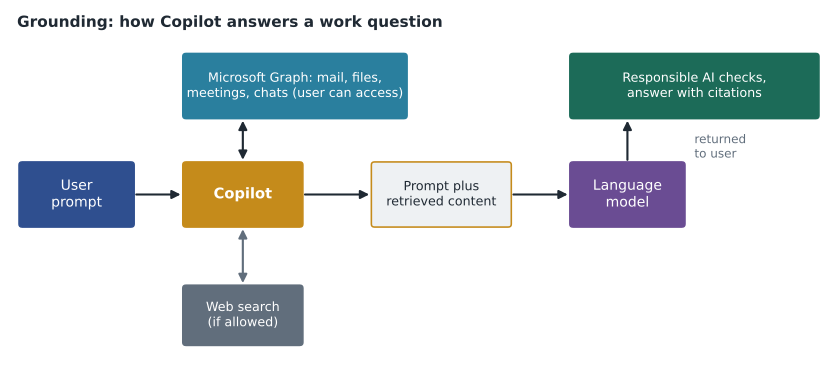
Two consequences matter for leaders. The first is that Copilot respects existing permissions. It can only retrieve content the user could already open. It does not grant new access. The second is the flip side: if permissions are too broad, Copilot makes that visible. A spreadsheet of salaries shared with "everyone in the organization" years ago was always technically accessible, but nobody found it. Copilot can find it in seconds. That is why Microsoft's deployment guidance puts reviewing oversharing before broad rollout, and why lesson 11 covers the tools for doing so.
Microsoft Graph matters for another reason: it is how Copilot understands context that a generic chatbot lacks. Graph knows who a user's manager is, which colleagues they work with most, which documents they edited recently and which meetings they attended. When Hamish Quarrington asks "What did we agree with the Prairie Growers account last week?", Copilot can look in the meeting transcript, the follow-up email thread and the shared notes because Graph links them to Hamish and to each other. Through Copilot connectors, organizations can also bring content from other systems into Graph, so Copilot can search it too.
Copilot in the apps
Each Microsoft 365 app has Copilot features suited to the work done there. The details change often, so the table describes typical capabilities rather than a complete list.
| App | Typical uses | Quillfield example |
|---|---|---|
| Word | Draft from a prompt and source files; rewrite, summarize, change tone; ask questions about a long document | Draft a renewal letter from the policy summary and last year's letter |
| Excel | Explain data, suggest formulas, create charts and summaries, highlight patterns; analyze with code in advanced scenarios | Summarize claims frequency by product line from a table |
| PowerPoint | Create a draft presentation from a document or prompt; summarize a deck; add slides | Turn a group benefits proposal into a client presentation |
| Outlook | Summarize a long thread; draft replies; coach on tone and clarity; prepare for meetings | Catch up on a 30-message thread about a disputed claim |
| Teams | Recap meetings with decisions and action items; answer questions about what was said; summarize chats | Get a recap of a client review with who owns each follow-up |
| OneNote and Loop | Summarize notes; generate lists and plans; collaborate on Copilot output in shared pages | Turn workshop notes into a shared action plan |
Meeting recaps in Teams were the feature that won over Quillfield's managers in the pilot. Copilot in Teams works from the meeting transcript, so transcription has to be on for most of its features, and attendees are told when it is. Quillfield set a simple rule: transcripts are on by default for internal meetings and off for client meetings unless the client agrees. Wendell Pike-Amari, the compliance officer, insisted on the rule because transcripts are records that may have to be kept or produced.
The Microsoft 365 Copilot app
Besides the features inside each app, Microsoft offers the Microsoft 365 Copilot app, available on the web, on Windows and on mobile devices. It is the main place to chat with Copilot across all work data, to find and use agents, to create content and to open recent files. Microsoft has added features such as Notebooks, which collect files, notes and chats on a topic so Copilot can work across them, and Pages, editable canvases for turning Copilot responses into shared content. Leaders should expect the app's features to keep changing; the stable idea is that it is the front door to Copilot and agents for most users.
Versions and prices
The AB-731 study guide expects candidates to understand the differences between versions of Copilot. For a leader, the essential comparison is between Copilot Chat, which comes with eligible Microsoft 365 subscriptions at no extra charge, and the Microsoft 365 Copilot license.
| Capability | Microsoft 365 Copilot Chat | Microsoft 365 Copilot license |
|---|---|---|
| Chat grounded in the web | Yes | Yes |
| Enterprise data protection with a work account | Yes | Yes |
| Work on files the user uploads or opens | Yes | Yes |
| Search across all the user's work data through Microsoft Graph | No | Yes |
| Copilot inside Word, Excel, PowerPoint, Outlook and Teams with work context | Limited | Yes |
| Agents that use work data | Yes, billed on usage | Yes, included for licensed users within fair use |
| Researcher and Analyst agents | Not included | Included |
| Price | No extra charge with eligible plans | Per user per month, added to the Microsoft 365 plan |
At the time of Celestine's briefing, Microsoft listed Microsoft 365 Copilot for enterprises at 30 US dollars per user per month, and a lower-priced Microsoft 365 Copilot Business edition for smaller organizations at 21 US dollars per user per month, with a promotional price of 18 US dollars for new purchases between July 1 and December 31, 2026. Prices vary by agreement, currency and term, so these are list prices for comparison, not quotes. In September 2026 Microsoft also announced a split between "everyday" AI features covered by the license under fair use and "advanced" AI use billed in Copilot Credits, and enterprise tenants must set a spending policy before advanced usage is charged.
Worked problem
Licensing a first wave
After its 60-person pilot, Quillfield is considering 60 more Microsoft 365 Copilot licenses in the new year: 45 contact center agents and 15 account executives. At 30 US dollars per user per month, what is the annual license cost? If the contact center agents mostly need meeting recaps and email summaries, and Copilot Chat covers drafting from uploaded files, what alternative should Celestine test?
Show solution
- Monthly cost: 60 users times 30 US dollars = 1,800 US dollars.
- Annual cost: 1,800 times 12 = 21,600 US dollars.
- Agents in the contact center rarely attend Teams meetings; their main need is summarizing call notes and emails from a separate system.
- Test whether Copilot Chat, plus an agent built for the contact center and billed on usage, meets the need at lower cost than 45 full licenses.
Answer: The 60 extra licenses cost about 21,600 US dollars a year at list price. Licensing only the 15 account executives (5,400 US dollars a year) and testing Copilot Chat with a usage-billed agent for the contact center may deliver most of the value for less.
This is exactly the kind of judgment the AB-731 exam tests: matching the version of Copilot to the work rather than assuming everyone needs the most capable license.
Mapping processes to Copilot
The study guide's first objective in this domain is to map business processes and use cases to Copilot. A useful method is to break a process into steps and ask, for each step, whether it involves finding information, creating a first draft, summarizing, analyzing or communicating. Those are Copilot's strengths in the Microsoft 365 apps. Steps that require updating a system of record, following strict rules or acting without a person in the loop usually need an agent or an integration rather than Copilot alone.
| Renewal process step | Copilot fit | Why |
|---|---|---|
| Gather last year's policy, claims history and client emails | Strong | Finding and summarizing work content is grounding's main purpose |
| Draft a renewal recommendation | Strong | Drafting from sources in Word |
| Compare quotes from three insurers | Good with review | Excel analysis works if quotes are in structured tables |
| Update the broker management system | Weak | Copilot in the apps does not update other systems; an agent or integration is needed |
| Send the renewal pack to the client | Assist only | Copilot can draft the email; a person sends it and stays accountable |
What Copilot does not do
Leaders should be clear about limits as well as strengths. Copilot can produce confident text that is wrong, a problem usually called fabrication or hallucination; grounding and citations reduce it but do not eliminate it. Copilot's output reflects the quality of the content it finds, so outdated or contradictory documents produce outdated or contradictory answers. Copilot cannot see content the user lacks permission for, which is a protection but also means it cannot answer questions that need data from systems not connected to Graph. And Copilot does not change accountability: the person who sends a letter or approves a recommendation remains responsible for it.
Quillfield's user guidance, written by Wendell and Hamish, put these limits into four short rules: check facts and figures against the source; never paste client information into a non-work AI tool; tell a colleague when a document you share was mostly drafted by Copilot; and report answers that reveal content you should not be able to see, because that points to a permissions problem.
Preparing an organization for Copilot
Microsoft's adoption guidance for Microsoft 365 Copilot follows a pattern that leaders can recognize without knowing every setting. Technical readiness comes first: eligible base licenses, current versions of the Microsoft 365 apps, network access to Microsoft's services, and modern authentication. Data readiness comes next: reviewing oversharing, applying sensitivity labels to the most sensitive content and setting retention for Copilot interactions. Then come people: champions in each team, training that shows real tasks rather than features, and a channel where staff can share prompts that worked. Finally comes measurement: a baseline before rollout and usage and impact reports after it.
Quillfield followed that order. Its 60-person pilot group spent their first two weeks with a champion who showed them three tasks only: catching up on a long email thread, preparing for a client meeting from past correspondence, and recapping a meeting with action items. Hamish measured time spent on those three tasks before and after. Starting narrow made the training memorable and the measurement possible; staff discovered other uses on their own once the first three became habits.
Common mistakes
MistakeAssuming Copilot gives users access to new information.
InsteadCopilot only retrieves what the user can already access; fix oversharing before rollout.
MistakeBuying the full license for every employee on day one.
InsteadMatch the version to the work: Copilot Chat for some, the license for heavy users of Microsoft 365 apps and meetings.
MistakeTreating cited answers as automatically correct.
InsteadCitations show where an answer came from; people still check facts against the source.
MistakeExpecting Copilot in Word to update the broker management system.
InsteadUse an agent or integration for steps that change systems of record.
Summary and key terms
- Microsoft 365 Copilot is a per-user license that adds work grounding through Microsoft Graph, in-app experiences and advanced agents to Microsoft 365.
- Grounding retrieves only content the user can access, so Copilot respects permissions but exposes oversharing.
- Copilot features differ by app; meeting recaps in Teams depend on transcription.
- Copilot Chat comes with eligible plans; the license adds Graph search across work data, full in-app features, and Researcher and Analyst.
- Map each process step to finding, drafting, summarizing, analyzing or communicating to see where Copilot fits.
- Grounding
- Retrieving relevant information and giving it to the model so its answer is based on real sources.
- Microsoft 365 Copilot
- The per-user license that adds AI grounded in work data to the Microsoft 365 apps.
- Copilot connector
- A connection that brings content from another system into Microsoft Graph so Copilot can search it.
- Oversharing
- Content shared more widely than intended, which AI search makes easier to find.
- Fabrication
- Confident but false output from a language model, also called hallucination.
- Microsoft 365 Copilot app
- The app on web, desktop and mobile that serves as the main entry point to Copilot chat, agents and content.
Practice problems
Work each problem on paper first, then reveal the answer to check.
Why can Copilot answer "what did we agree with this client last week?" when a generic chatbot cannot?
Show answer
Through Microsoft Graph it can retrieve the user's meetings, emails and files related to the client, within the user's permissions.
At 30 US dollars per user per month, what does Microsoft 365 Copilot cost for 25 users for a year?
Show answer
25 times 30 times 12 = 9,000 US dollars at list price.
Name one step in a process that Copilot in the Microsoft 365 apps is a weak fit for, and why.
Show answer
Updating a system of record, because Copilot in the apps drafts and summarizes but does not change other systems; an agent or integration is needed.
Lesson quiz · 5 questions
Score 60% or more to complete this lesson.
Create a free account to save your progress, take quizzes and earn a certificate.