
MSBA-110 · Lesson 6 of 12 · 18 min
Microsoft 365 Copilot and your data
▶ Video coming soon A video version of this lesson is on the way.
Two weeks into the pilot, an account manager asked Microsoft 365 Copilot to "summarize everything about the Hendry Logistics renewal". The summary was excellent. It also mentioned a figure from a spreadsheet the account manager had never seen: the commission split negotiated for the account. She was entitled to see it, it turned out, because the spreadsheet sat in a SharePoint site shared with the whole commercial lines department. But nobody had realized it was there. Wendell called it "the best possible way to discover an oversharing problem: before anything went wrong".
This lesson explains what happens to your data when you use Microsoft 365 Copilot: how a prompt is processed, why Copilot can only show what you can already open, what enterprise data protection promises, how Copilot interactions are kept and governed, and why the biggest data risk is usually not Copilot itself but permissions that were too broad long before Copilot arrived.
How Copilot answers a prompt
When you type a prompt into Microsoft 365 Copilot, several steps happen in a few seconds. Copilot first interprets the request, then gathers grounding information. It searches the content you have access to in Microsoft 365, such as emails, chats, meetings, files and calendar, using Microsoft Graph and the semantic index, and it may run a web search if web grounding is on and the question needs current public information. It combines your prompt with the most relevant retrieved content and sends this to the language model. The model drafts a response, which is checked by responsible AI filters before it comes back to you with citations to the sources used.
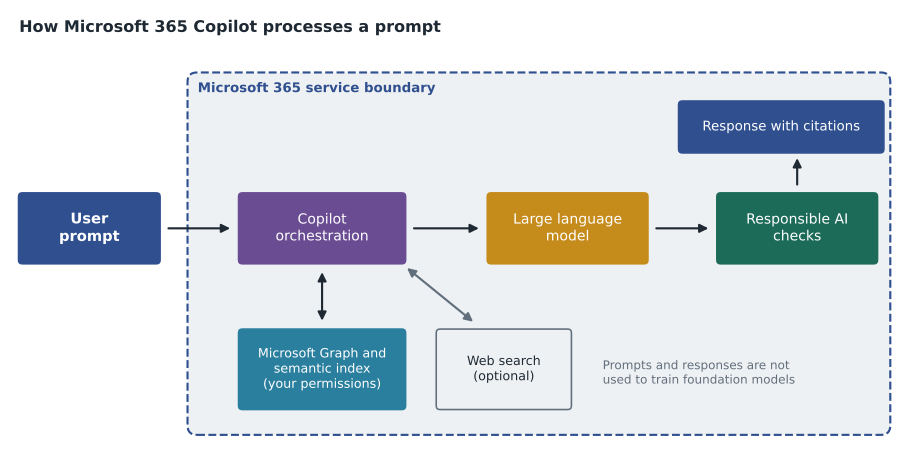
Two points in that flow matter most. The retrieval step runs as you: Copilot uses your identity and finds only content that you already have permission to view. And the whole exchange happens inside the Microsoft 365 service boundary under your organization's agreement with Microsoft. Microsoft states that prompts, responses and the data accessed through Microsoft Graph are not used to train the foundation language models.
Copilot respects permissions, all of them
The most important sentence in this lesson is this: Copilot does not give anyone access to anything they could not already open. If you cannot open a file in SharePoint, Copilot cannot use it in your answers. If a file is protected with a sensitivity label that encrypts it and you lack the right to extract its content, Copilot cannot use that content for you either. Copilot inherits the permission model that your organization already has.
That is reassuring and alarming at the same time. Before Copilot, a file shared with "everyone in the company" by mistake might sit unnoticed for years, because nobody would stumble across it. Copilot is extremely good at finding relevant content, so a broadly shared file that answers a question will be found and used. This is called oversharing: content that is accessible to more people than it should be. Copilot does not create oversharing, but it makes existing oversharing visible very quickly, as Quillfield discovered with the commission spreadsheet.
| Situation | Can Copilot use it for you? | Why |
|---|---|---|
| A file in a site you are a member of | Yes | You have permission to open it |
| A file in a colleague's OneDrive not shared with you | No | You have no permission |
| A file shared through an "anyone in the organization" link you received | Yes | The link gives you access |
| An encrypted file whose label does not let you extract content | No | The label's usage rights block it |
| A Teams chat you were in | Yes | You are a participant |
Reducing oversharing
Organizations prepare for Copilot by tightening permissions. Microsoft provides tools for this, which the administrator courses cover in depth: reports on sites and files with broad access, SharePoint Advanced Management features that restrict which sites appear in Copilot and search while owners review them, sensitivity labels that classify and protect confidential content, and Data Security Posture Management for AI in Microsoft Purview, which shows risky data and AI activity. MSBA-102 covers these controls for the AB-900 exam.
Everyday users have a part to play too. Share files with specific people or groups rather than "everyone". Store client work in the client's site, not in a department-wide site. Remove access when someone leaves a project. Apply the right sensitivity label when you create a confidential document. And when Copilot shows you something you were surprised to be able to see, report it, as Quillfield's account manager did. At Quillfield the commission spreadsheet moved to a restricted finance site the next day, and the IT team ran a review of all department-wide sites.
Worked problem
How big is the exposure?
Quillfield's commercial lines site is shared with the whole 64-person department. A review finds 1,200 files, of which 90 contain commission or compensation details that only 6 managers should see. How many people currently have access they should not have, and to how many sensitive files?
Show solution
- People with unneeded access: 64 - 6 = 58.
- Sensitive files exposed to each of them: 90.
- Person-file exposures: 58 x 90 = 5,220.
Answer: Fifty-eight people can open 90 files they should not see, more than five thousand unnecessary exposures. Moving those files to a restricted site fixes all of them at once.
Enterprise data protection
When people sign in to Copilot with a work account, Microsoft applies enterprise data protection. In Microsoft's description, prompts and responses are protected by the same contractual terms and commitments that customers rely on for email in Exchange and files in SharePoint. Prompts and responses stay within the Microsoft 365 service boundary, are logged and kept under the organization's retention policies, can be found in eDiscovery and audit searches through Microsoft Purview, and are not used to train the underlying large language models. Organizations subject to data-location rules can rely on Microsoft's data residency commitments, such as the EU Data Boundary, with details that vary by region and service.
Enterprise data protection is about how Microsoft handles your data. It is not a promise that every answer will be correct, and it does not fix permissions that were set too broadly. It also does not stretch to tools outside Microsoft's service: if someone pastes a client file into an unapproved website, enterprise data protection cannot help.
Where Copilot interactions are kept
Your Copilot conversations are not lost after you close the window. Microsoft 365 stores Copilot interactions for each user, and administrators can apply retention policies to them, find them in eDiscovery cases and see them in audit logs. For a regulated business such as an insurance brokerage, this matters: if a client complaint involves advice drafted with Copilot, the conversation may be part of the record. Wendell's guidance to staff was simple: write prompts as you would write an email that a regulator might read one day.
| Control | What it does for Copilot data | Who manages it |
|---|---|---|
| Retention policies | Keep or delete Copilot interactions for set periods | Compliance administrators |
| Audit | Record that a Copilot interaction happened and which files it used | Security and compliance teams |
| eDiscovery | Find and hold Copilot interactions for legal or regulatory cases | Legal and compliance teams |
| Sensitivity labels | Protect content; Copilot respects their usage rights and labels new content created from labeled files | Information owners and administrators |
| Data loss prevention | Can stop Copilot from processing content with certain labels or sensitive information | Compliance administrators |
Sensitivity labels have a useful extra behavior. When Copilot creates new content from labeled files, for example a Word draft based on a confidential document, the new content can inherit the most protective label of its sources. That keeps protection with the information as it moves. Data loss prevention policies can go further and stop Copilot from summarizing content that carries specific labels.
Web search and your data
When Copilot uses web grounding, it sends a search query to Bing to find current public information. The query is generated from your prompt rather than being the whole prompt, and Microsoft describes protections that keep web queries separate from your identity and organization. Administrators can turn web grounding off for Microsoft 365 Copilot if their policies require it. For Quillfield, web grounding stayed on, because brokers often needed public information such as insurer announcements, but Wendell added a reminder: a question that names a client and a claim does not need the web, so keep such questions to work content and phrase them so that no web search is needed.
Privacy laws still apply
Using Copilot does not change an organization's legal obligations. Client personal information remains subject to privacy law: in the United States, sector rules such as the Gramm-Leach-Bliley Act for financial institutions, including insurance, and state privacy and insurance laws. The organization must still collect, use and disclose personal information only for appropriate purposes, protect it, and be able to explain its practices. Copilot is a tool for processing information the organization already holds; the privacy rules for that information do not go away. Lesson 8 covers what this means for individual users.
Questions staff asked
Wendell kept a list of the questions staff asked about Copilot and data during the pilot, and the answers he gave. Several are worth repeating because almost every organization hears them.
"Can my manager read my Copilot conversations?" Not casually. Copilot interactions are stored as part of the organization's records, so authorized compliance and legal staff can find them through eDiscovery when there is a legitimate reason, just as they can with email. Usage reports show patterns such as how often features are used, not the content of conversations.
"If I delete a conversation, is it gone?" Deleting it removes it from your view, but the organization's retention policies decide how long the underlying record is kept. Treat Copilot prompts like business email: assume they may be kept.
"Does Copilot remember what I told it last week?" Within a conversation, it uses earlier turns. Across conversations, Microsoft 365 Copilot can draw on your work content, and some versions offer features that remember stated preferences, which users can review. It does not learn from your conversations in a way that changes the model for other people.
"Can a colleague see my prompts?" No. Your Copilot conversations are yours, apart from the compliance access described above. But anything Copilot helps you write and then share, such as a document in a team site, is visible to whoever can open that location.
| Staff question | Short answer |
|---|---|
| Can my manager read my Copilot chats? | Not casually; authorized compliance staff can find them for legitimate reasons, like email |
| Does deleting a chat erase it? | It leaves your view; retention policies decide how long the record is kept |
| Is my data training the AI? | No; prompts and responses are not used to train the foundation models |
| Can Copilot see files I cannot? | No; it uses only what you can open |
| Can colleagues see my prompts? | No; only content you share is visible to others |
When people change roles or leave
Permissions drift over time. People join projects and never leave them; staff move between teams and keep their old access. Before Copilot, this "access creep" mostly went unnoticed. With Copilot, a person who moved from commercial lines to personal lines a year ago may still get answers that draw on commercial clients' files. Good practice is to review site and group membership regularly, remove access when people change roles, and use groups rather than individual sharing so that one change updates everything. These are administrator tasks, but managers and site owners trigger them, and users can help by asking to be removed from sites they no longer need.
A habit for every user
Hamish suggested one small habit that ties this lesson together: before you share something Copilot helped you create, look at where its citations point. If a citation leads to a site or file you did not expect, pause. Either the information is fine to use and you have learned where it lives, or you have found content that should be better protected. In both cases you are now making the decision deliberately rather than by accident, which is what responsible use of a powerful search-and-draft tool requires.
Common mistakes
MistakeBelieving Copilot bypasses permissions.
InsteadCopilot uses only content the user can already open.
MistakeBlaming Copilot for exposing a file that was shared too widely.
InsteadFix the sharing; Copilot only revealed an existing problem.
MistakeAssuming Copilot conversations disappear.
InsteadThey are stored and can be retained, audited and discovered.
MistakeThinking enterprise data protection covers any AI website.
InsteadIt covers Microsoft's work Copilot experiences signed in with a work account.
Summary and key terms
- Copilot grounds answers in content found through Microsoft Graph and the semantic index, using the user's own permissions.
- Copilot never gives access to content a user cannot already open, but it makes oversharing visible.
- Enterprise data protection keeps prompts and responses within the Microsoft 365 service boundary under contractual commitments and out of model training.
- Copilot interactions are stored and governed with retention, audit, eDiscovery, sensitivity labels and data loss prevention.
- Privacy and industry laws still apply to client information used with Copilot.
- Oversharing
- Content accessible to more people than should have access to it.
- Sensitivity label
- A Microsoft Purview label that classifies content and can encrypt it and restrict what users and Copilot can do with it.
- Service boundary
- The protected environment within which Microsoft 365 processes and stores customer data.
- Retention policy
- A rule that keeps or deletes content, including Copilot interactions, for a set period.
- eDiscovery
- Finding and preserving content for legal or regulatory purposes.
Practice problems
Work each problem on paper first, then reveal the answer to check.
Why could the account manager see the commission figure?
Show answer
Because the spreadsheet was in a site shared with the whole department, so she already had permission to open it.
Name three Microsoft Purview controls that apply to Copilot interactions.
Show answer
Any three of: retention policies, audit, eDiscovery, sensitivity labels and data loss prevention.
Does enterprise data protection guarantee accurate answers?
Show answer
No. It governs how Microsoft handles data, not the correctness of responses.
Lesson quiz · 5 questions
Score 60% or more to complete this lesson.
Create a free account to save your progress, take quizzes and earn a certificate.