
MSBA-110 · Lesson 5 of 12 · 18 min
Copilot, Copilot Chat and agents
▶ Video coming soon A video version of this lesson is on the way.
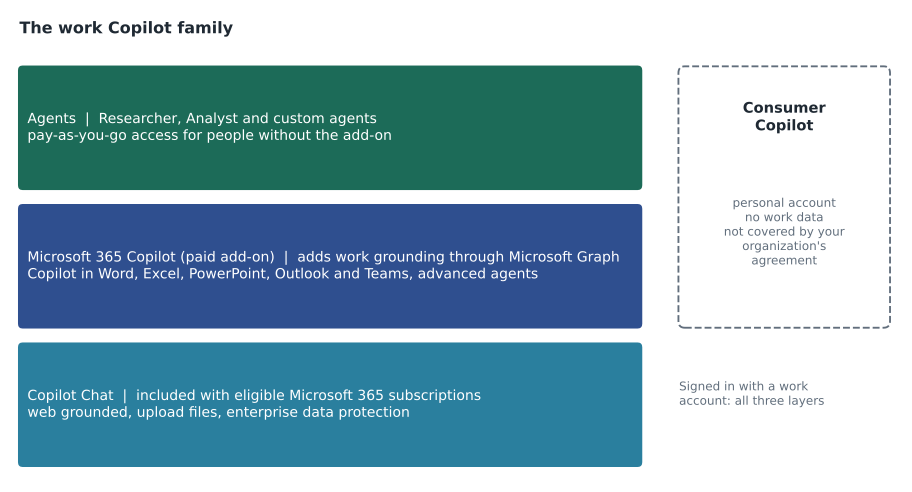
By the fifth session, people at Quillfield were using three or four different things they all called "Copilot". Some had the Copilot app on their personal phones. Everyone had Copilot Chat on their work computers. The 60 pilot users had a Microsoft 365 Copilot license and saw Copilot inside Word, Excel, Outlook and Teams. And Yusra Kamaludin had built a small agent that answered questions about the service team's procedures. Hamish spent this session untangling the names, because choosing the right tool starts with knowing which one you are using.
This lesson explains the Microsoft Copilot family for business users: the difference between a consumer Copilot and a work Copilot, what Copilot Chat includes, what a Microsoft 365 Copilot license adds, and what agents are. Microsoft renames and repackages these products often, so the lesson focuses on the underlying differences, which change much more slowly than the labels: who you are signed in as, what data the tool can reach, where it appears, and how it is paid for.
Consumer Copilot and work Copilot
Microsoft offers a consumer Copilot for personal use, signed in with a personal Microsoft account, and work Copilot experiences signed in with a work or school account managed in Microsoft Entra ID. The difference matters more than any feature. When you sign in with a work account, your prompts and responses are covered by enterprise data protection: they stay within the Microsoft 365 service boundary, they are handled under the same contractual commitments that cover your organization's email and files, and they are not used to train the underlying models. A consumer account does not carry your organization's agreement or its controls.
Quillfield's policy, which Wendell wrote in September, was short: client or company information goes only into Copilot signed in with a Quillfield account. A personal Copilot on a phone is fine for planning a holiday, not for summarizing a client's claim. In the work experiences, a shield or "protected" indicator shows that enterprise data protection applies; lesson 8 shows how to check.
Copilot Chat: included with Microsoft 365
Copilot Chat is a chat assistant included at no extra cost with eligible Microsoft 365 business subscriptions for users signed in with a work account. Microsoft has used both "Microsoft 365 Copilot Chat" and "Microsoft Copilot Chat" for it; the capability is what matters. Copilot Chat is grounded in the web: it can search for current public information and cite the pages it used. It does not, by itself, search your organization's data through Microsoft Graph. You can still work with your own content by uploading a file to the chat, and Copilot Chat in Outlook and Teams can work with the message or chat you have open.
Copilot Chat also gives access to agents. Simple agents that use only instructions and public websites are included. Agents that reach into work data, and custom agents, are available on a pay-as-you-go basis: the organization turns on metered billing and pays for usage, measured in Copilot Credits, rather than buying a license for each person. This lets a company give a specialized agent to many people who do not need a full Microsoft 365 Copilot license.
Microsoft 365 Copilot: the paid license
A Microsoft 365 Copilot license, bought as an add-on per user (or as part of certain bundles), adds three big things. First, work grounding: Copilot can automatically find and use the user's emails, chats, meetings, files and calendar through Microsoft Graph and the semantic index, always within that user's permissions. Microsoft describes the intelligence that draws on this work context as Work IQ. Second, Copilot in the apps: in Word, Excel, PowerPoint, Outlook, Teams and OneNote, Copilot works directly with the document, workbook, deck, inbox or meeting in front of you. Third, advanced agents: Microsoft's built-in Researcher and Analyst agents, custom agents and Copilot Studio use are included, with priority access during busy periods.
Microsoft has also been changing what is included without the add-on, for example offering some Copilot features in the Office apps at a basic level with certain subscriptions. Because these boundaries move, Quillfield's IT team checks Microsoft's current comparison before each licensing decision. For the exam and for daily work, the stable distinction is this: without the license, Copilot works with the web and with content you hand it; with the license, Copilot can find and use your work content for you.
| Copilot Chat (no add-on) | With a Microsoft 365 Copilot license | |
|---|---|---|
| Sign-in | Work account | Work account |
| Enterprise data protection | Yes | Yes |
| Grounding | Web, uploaded files, open item in Outlook or Teams | Web plus work data through Microsoft Graph |
| Copilot inside Word, Excel, PowerPoint | Limited or not included, depending on subscription | Included |
| Researcher and Analyst | Not included | Included |
| Custom agents with work data | Pay-as-you-go | Included |
| How it is paid for | Included in the subscription; agents metered | Per-user license |
What an agent is
An agent is an AI assistant set up for a particular job. It combines three ingredients. Instructions say what the agent is for and how it should behave, for example "Answer questions about Quillfield's service procedures in plain language and cite the procedure page." Knowledge is the information it can draw on, such as a SharePoint site, a set of files or approved websites. Tools, also called actions, let it do things beyond answering, such as looking up a record, creating a task or sending a notification, usually with the user's approval.
Agents range from simple to sophisticated. A retrieval agent answers questions from its knowledge and does nothing else; Yusra's procedures agent is one. A task agent carries out steps when asked, such as gathering renewal details and drafting a summary for review. An autonomous agent can be triggered by an event, such as a new email arriving in a shared mailbox, and work through a process on its own within limits set by its designers, escalating to a person when needed. The more an agent can do on its own, the more carefully it must be designed, tested and governed, which the AB-620 courses cover.
| Kind of agent | What it does | Quillfield example |
|---|---|---|
| Retrieval | Answers questions from approved knowledge | Service procedures agent |
| Task | Carries out steps on request, with review | Gathers renewal details and drafts a renewal summary |
| Autonomous | Starts from a trigger and works through a process within limits | Sorts a shared mailbox and routes certificate requests |
Built-in agents: Researcher and Analyst
Microsoft provides some agents ready-made. Researcher handles complex, multi-step research. Instead of answering in one pass, it plans the question, searches across work content and the web, reads and compares sources, and produces a structured report with citations. It takes minutes rather than seconds and is meant for questions such as "Summarize what our clients in food manufacturing have asked about cyber cover this year, and what the major insurers now offer." Analyst works with data. It can take spreadsheets or data files, reason through a question step by step, and run code behind the scenes to calculate and chart results, explaining what it did. Both are included with a Microsoft 365 Copilot license. MSBA-111 shows how to prompt them well.
Organizations also find agents in an agent store within Copilot, including agents published by their own staff and by Microsoft partners. Administrators decide which agents people can use, a topic for MSBA-103 and the AB-650 courses.
Building your own agents
People can create agents in two main ways. The agent builder inside Copilot lets a business user describe what they want in plain language, point to knowledge sources and test the agent within minutes, without code. Copilot Studio is a fuller environment for building agents with topics, actions, connectors to other systems, autonomous triggers and publishing to channels such as Teams or a website. Yusra built her procedures agent with the agent builder in an afternoon; Bram later rebuilt a version in Copilot Studio when the service team wanted it to look up policy records. AB-620 is the certification for this work.
Worked problem
License or pay-as-you-go?
Quillfield's claims team of 30 people wants a claims-guidance agent that uses work data. Only 5 of them need Copilot across their apps. A Microsoft 365 Copilot license costs about 30 US dollars a user a month at list price (prices vary by country and agreement). The agent is expected to cost about 4 US dollars a month in metered usage for each of the other 25 people. Compare licensing all 30 with licensing 5 and metering 25.
Show solution
- Licensing all 30: 30 x 30 = 900 US dollars a month.
- Licensing 5: 5 x 30 = 150 US dollars a month.
- Metering 25: 25 x 4 = 100 US dollars a month.
- Mixed approach total: 150 + 100 = 250 US dollars a month.
Answer: The mixed approach costs about 250 instead of 900 US dollars a month, if usage stays as forecast. Metered costs must be monitored, because heavy use can grow quickly.
Keeping the names straight
Hamish closed with a one-page guide that Quillfield pinned to its intranet. Ask four questions about any Copilot you open. Which account am I signed in with? Work account means enterprise data protection. What can it see? Web only, files I give it, or my work data through Microsoft Graph. Where am I using it? In a chat window, or inside an app with a document open. Is it an agent? If so, what are its instructions, knowledge and tools, and who built it? Dolores admitted the guide helped. "I was asking the web version about my client and wondering why it was useless," she said. "Now I know it could not see the file."
Copilot in each app
With a Microsoft 365 Copilot license, Copilot appears inside the apps people already use, and each app version is tuned to that app's content. The AB-730 skill area on drafting and analyzing business content is largely about these in-app experiences, which MSBA-112 covers in depth. The table gives a first overview.
| App | What Copilot does there | Quillfield example |
|---|---|---|
| Word | Drafts, rewrites, summarizes and answers questions about the open document | Drafting a renewal proposal from a quote file |
| Excel | Explains data, suggests formulas, creates charts and highlights patterns | Summarizing premium changes across a book of business |
| PowerPoint | Creates slides from a prompt or a document and summarizes decks | Building a client stewardship presentation |
| Outlook | Summarizes threads, drafts replies and helps prepare for meetings | Catching up on a long underwriter thread |
| Teams | Recaps meetings, answers questions about the discussion and lists actions | Producing notes after a client call |
| OneNote and Loop | Organizes notes and drafts shared content | Turning call notes into a task list |
The in-app experiences matter because they keep work in one place. Instead of copying a client's email into a chat, asking for a reply and pasting it back, the account manager asks Copilot in Outlook, which already sees the thread. Fewer copy-and-paste steps mean less lost context and fewer chances to paste client information into the wrong place.
Controls you may notice as a user
Administrators decide how Copilot behaves in an organization, and users sometimes notice the effects. Web grounding might be turned off for some groups. Certain agents might be available only to specific teams. Some sites might be excluded from Copilot results while their owners review permissions. Copilot might decline to summarize a document because its sensitivity label does not allow it. These are not malfunctions; they are the organization's choices. If a control blocks legitimate work, the right step is to ask the IT team, not to find a workaround in a consumer tool.
Quillfield's IT team published a short page listing what was turned on and why, so that staff knew what to expect. The page also explained how to request a new agent and who approved them. Yusra's procedures agent was the first to go through that process, and the review asked three questions: what knowledge it used, who could use it, and who would keep it up to date.
Common mistakes
MistakeUsing a personal Copilot account for client work.
InsteadUse Copilot signed in with your work account so enterprise data protection applies.
MistakeExpecting Copilot Chat without a license to search your mailbox and files.
InsteadIt works with the web and with content you upload or have open; work grounding needs the license or an agent.
MistakeThinking every agent is autonomous.
InsteadAgents range from simple question-answering to triggered processes; check what each one can do.
MistakeRelying on last year's packaging details.
InsteadCheck Microsoft's current comparison; what is included changes often.
Summary and key terms
- Consumer Copilot uses a personal account; work Copilot uses a work account and enterprise data protection.
- Copilot Chat is included with eligible Microsoft 365 subscriptions and is grounded in the web and in content you supply.
- A Microsoft 365 Copilot license adds work grounding through Microsoft Graph, Copilot inside the apps and advanced agents.
- Agents combine instructions, knowledge and tools; they range from retrieval to task to autonomous.
- Researcher handles multi-step research; Analyst reasons over data; custom agents are built in the agent builder or Copilot Studio.
- Copilot Chat
- Microsoft's work chat assistant included with eligible Microsoft 365 subscriptions, grounded in the web.
- Microsoft 365 Copilot
- The paid license that adds work grounding, Copilot in the apps and advanced agents.
- Enterprise data protection
- Protections that keep work prompts and responses within the Microsoft 365 service boundary under contractual commitments.
- Agent
- An AI assistant set up for a job with instructions, knowledge and tools.
- Pay-as-you-go
- Billing by actual usage, measured in Copilot Credits, instead of a per-user license.
- Copilot Studio
- Microsoft's environment for building, extending and publishing agents.
Practice problems
Work each problem on paper first, then reveal the answer to check.
What are the four questions to ask about any Copilot you open?
Show answer
Which account am I signed in with, what can it see, where am I using it, and is it an agent?
Name the three ingredients of an agent.
Show answer
Instructions, knowledge and tools.
Why might a company use pay-as-you-go agents instead of licensing everyone?
Show answer
To give a specialized agent to many people who do not need full Copilot in their apps, paying only for usage.
Lesson quiz · 5 questions
Score 60% or more to complete this lesson.
Create a free account to save your progress, take quizzes and earn a certificate.