
MSBA-110 · Lesson 12 of 12 · 21 min
Case study: an AI-assisted workday
▶ Video coming soon A video version of this lesson is on the way.
For the final session, Hamish asked Dolores Ventimiglia if he could follow her through one working day and narrate it to the group. She agreed, partly, she said, to prove that she had not become a robot. The day was Thursday, November 19, 2026. Dolores had a Microsoft 365 Copilot license, access to Researcher, Analyst and the service team's procedures agent, and eleven weeks of practice. Her book of business was about 140 commercial clients, mostly restaurants, food producers and small manufacturers.
This lesson walks through her day as a case study. Each stop shows a task, the tool she chose and why, what she checked, and which principle from the course was at work. After the walkthrough, a set of problems asks you to apply the same reasoning to new situations. Treat it as a review of the whole course: almost every lesson appears somewhere in her day.
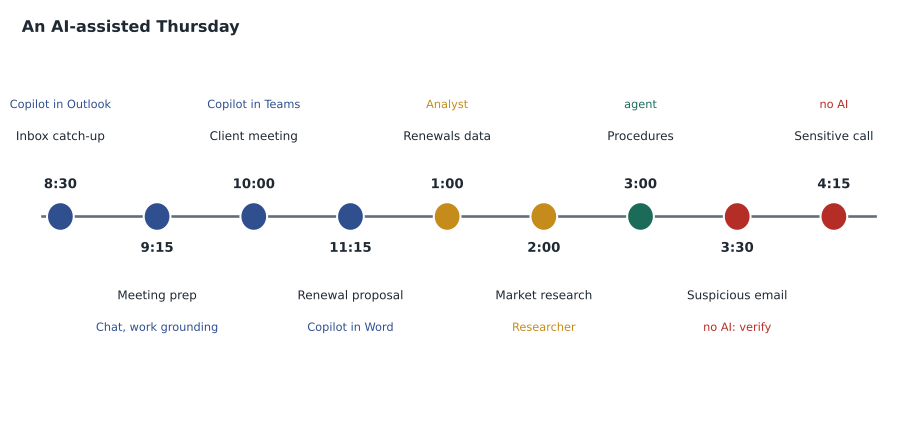
8:30 — Catching up on email
Dolores returned from a day of client visits to 63 unread messages. In Outlook she asked Copilot to summarize the three longest threads, including one with an insurer's underwriter about the Pemberton Bakery renewal. The summary listed the underwriter's three open questions and noted that he wanted answers by Friday. She opened the thread to confirm the deadline, because a date is exactly the kind of specific fact that must be checked, and found that the summary was right.
She then asked Copilot to draft a reply answering two of the questions from information in the thread and flagging the third, about the bakery's new oven, as "to be confirmed with the client". She edited the draft for tone and sent it. Lesson link: summarizing and drafting are strengths (lesson 4); specifics get checked; she stayed accountable for what she sent (lesson 7).
9:15 — Preparing for a client meeting
Her 10:00 meeting was with the owners of Birchgrove Smokehouse, a client considering expanding into wholesale. She needed to know what had already been discussed. Because this required her emails, meeting notes and files, she used Microsoft 365 Copilot Chat with work grounding rather than web-only Copilot Chat: "Summarize my emails, meetings and files about Birchgrove Smokehouse from the past six months, focusing on coverage changes they have asked about and anything still unresolved. List sources."
The response listed four topics with citations, including a product recall question she had forgotten. She clicked two citations to check the details. She also noticed that one cited file was a colleague's draft proposal she had not known existed, stored in a shared client folder where she rightly had access. Lesson link: work grounding through Microsoft Graph within her permissions (lessons 3 and 6); choosing the right Copilot experience (lesson 9).
| Time | Task | Tool | Key check |
|---|---|---|---|
| 8:30 | Summarize threads and draft a reply | Copilot in Outlook | Confirm deadlines and facts in the thread |
| 9:15 | Meeting preparation from past work | Copilot Chat with work grounding | Open citations for key points |
| 10:00 | Meeting recap and actions | Copilot in Teams | Correct attribution of who agreed to what |
| 11:15 | Draft renewal proposal | Copilot in Word | Every limit, premium and date against the quote |
| 1:00 | Analyze renewals data | Analyst | Calculation steps and a sample of rows |
| 2:00 | Market research | Researcher | Citations for every claim used with a client |
| 3:00 | Procedures question | Service procedures agent | The cited procedure page |
| 3:30 | Suspicious email | None; report to IT | Verify through a known channel |
| 4:15 | Sensitive client call | None | Human judgment and empathy |
10:00 — The client meeting
The meeting ran in Teams with the clients joining remotely. At the start Dolores asked whether they were comfortable with the meeting being transcribed so that she could produce accurate notes; they agreed, and Teams showed the transcription notice. Afterwards she asked Copilot for a recap with decisions and action items. The recap was accurate except for one point: it attributed a promise to send payroll figures to Dolores instead of to the client. She corrected it before sharing the notes. Lesson link: consent for transcription (lesson 8); meeting recaps can misattribute, so review before sharing (lesson 4).
11:15 — Drafting a renewal proposal
Pemberton Bakery's renewal proposal was due Friday. In Word, Dolores asked Copilot to draft a two-page proposal using the insurer's quote file and last year's proposal as sources, in the same structure as last year, and in plain language. The draft took under a minute. Checking it took twenty minutes, and she was glad she did: the draft had carried over last year's equipment breakdown limit instead of the new, higher limit in this year's quote. She fixed the figure, checked every other limit, premium and date against the quote, and tightened two paragraphs.
Her log entry read: "Proposal: 25 minutes including checking, compared with about 70 before. One carried-over limit caught." Lesson link: fabrications and errors in numbers (lesson 4); grounding in the right documents (lesson 3); measuring time including checking (lesson 11).
Worked problem
Was the proposal worth it?
Dolores writes about 8 renewal proposals a month. Before Copilot each took about 70 minutes; now each takes about 25 minutes including checking. In about 1 proposal in 10 she finds an error that takes an extra 10 minutes to fix. How many hours a month does she save?
Show solution
- Base saving per proposal: 70 - 25 = 45 minutes.
- Average extra fixing time: 10 minutes x 1/10 = 1 minute per proposal.
- Net saving per proposal: 45 - 1 = 44 minutes.
- Monthly: 8 x 44 = 352 minutes, about 5.9 hours.
Answer: About 6 hours a month on proposals alone, with every figure still checked by her.
1:00 — Looking at the numbers
After lunch Celestine asked each account executive to look at retention in their book. Dolores exported her 2026 renewals to a spreadsheet and asked Analyst: "Show my retention rate by industry and by policy size band, and list any clients whose premium rose more than 25 parts in 100 at renewal." Analyst explained its steps, built two tables and a chart, and listed nine clients. She checked the steps it described, recalculated one retention rate by hand and spot-checked three of the nine clients against the system. All matched. The tables went into her notes for her conversation with Celestine. Lesson link: choosing Analyst for data questions (lesson 9); verifying calculations (lesson 4).
2:00 — Researching the market
Birchgrove Smokehouse's move into wholesale raised a product contamination question. Dolores asked Researcher: "What coverage options exist for product contamination and recall for small food producers, how do the insurers we use most often approach it, and what have my food clients asked about it this year? Cite everything." Researcher took several minutes, worked through her emails and files and public sources, and produced a five-section report with citations.
She treated the report as research notes, not advice. She opened the citations for each insurer's position, found that one cited web page was two years old, and marked that point to confirm with the underwriter. The client-facing explanation she later wrote was her own, informed by the report. Lesson link: Researcher for multi-source research (lesson 9); citations and recency (lessons 3 and 4); accountability for advice (lesson 7).
3:00 — Asking an agent
A client needed a certificate of insurance naming a new landlord, and Dolores could not remember the current procedure for additional insureds. She asked the service procedures agent that Yusra had built. It answered in plain language and cited the procedure page, which she opened to confirm. The answer saved her a call to the service team. Lesson link: agents combine instructions, knowledge and tools (lesson 5); citations let you check (lesson 4).
3:30 — A suspicious email
An email arrived that appeared to come from Birchgrove Smokehouse's owner, thanking Dolores for the meeting and asking her to "update the bank account for premium refunds" using a link to a document. It was well written and mentioned the morning's meeting topics. Two things bothered her: the sender's address had one letter different, and the request involved money. She did not click the link. She called the client on the number in Quillfield's system; the owner had sent no such email. She reported it to IT, who found that a client's mailbox had been compromised. Lesson link: AI-powered phishing and verification through a known channel (lesson 8).
4:15 — A call without AI
Her last task was a call to the owner of a restaurant whose kitchen had been badly damaged by fire overnight. Nobody was hurt, but the business would be closed for months. Dolores did not use any AI to prepare. She knew the policy, she knew the owner, and the call needed empathy and clear practical guidance on what would happen next with the claim. Afterwards she asked Copilot in Outlook to draft a follow-up email listing the next steps she had described, checked it against her notes, and sent it. Lesson link: some tasks stay human (lessons 9 and 10).
4:45 — The log
Dolores ended the day by updating her log. Copilot had saved her, by her estimate, about two hours, mostly on the proposal, the meeting preparation and the email catch-up. It had made two errors she caught: the carried-over limit and the misattributed action item. Researcher had cited one outdated page. And the most important decision of the day, not clicking the link, had nothing to do with Copilot at all. "It is a good assistant," she wrote, "as long as I remain the broker."
Apply it: six situations
Use the reasoning from Dolores's day to decide how you would handle each situation below. The practice questions at the end of the lesson give suggested answers.
| Situation | Questions to ask yourself |
|---|---|
| A colleague asks you to paste a client's claim file into a free website that "summarizes better". | Is the tool approved? Which account and protections apply? |
| You need to know what was agreed in last month's meetings with an insurer. | Does this need work grounding? Which Copilot experience can reach meetings? |
| An AI summary of a policy says flood is covered. | Is this a high-stakes specific fact? Where is the clause? |
| Your manager wants a breakdown of claim counts by month from an export. | Is this a data task? Which agent fits, and how do you check it? |
| A Copilot answer quotes a figure from a spreadsheet you did not know you could open. | Is this an oversharing problem? Who should know? |
| A client asks whether the email they received was written by AI. | What do transparency and accountability ask of you? |
Debrief: what the group took away
When Hamish finished the walkthrough, he asked each person in the room for one sentence about what they would do differently. Tobias said he would start a new chat for each claim. Yusra said she would add "cite the procedure page" to every agent she built. Wendell said he would ask Copilot to list what a document did not cover. And Dolores said she would keep checking every number, "because the day I stop is the day it gets one wrong".
Celestine closed the series by connecting it back to Dolores's first question, still written on the whiteboard from the first session: why would a broker trust it with anything? The answer the group had reached was more useful than a simple yes or no. Trust the tool with drafts, summaries and research, grounded in the right sources; trust yourself with the checking, the judgment and the advice. That division of labor, she said, was the whole course in one sentence.
Common mistakes
MistakeTreating an AI-drafted proposal as finished.
InsteadCheck every figure against the source; carried-over values are a common error.
MistakeSharing a meeting recap without reading it.
InsteadRecaps can misattribute actions; correct them first.
MistakePresenting a Researcher report as advice.
InsteadUse it as research notes, check citations and recency, and write your own advice.
MistakeAssuming every task benefits from AI.
InsteadSome tasks, such as a call after a loss, are better without it.
Summary and key terms
- A good AI-assisted day uses different tools for different tasks: Copilot in apps, work-grounded chat, Researcher, Analyst and agents.
- Every client-facing output is checked against its sources, especially names, numbers and dates.
- Citations, recency and attribution are where errors hide.
- Security habits, such as verifying payment requests, matter as much as AI skills.
- Some tasks stay human, and the person remains accountable for everything sent.
- Case study
- A detailed example used to apply concepts to a realistic situation.
- Work log
- A simple record of tasks, tools, time and results used to measure value.
- Additional insured
- A person or organization added to a policy's protection, such as a landlord.
- Product contamination cover
- Insurance for losses from accidental or malicious contamination of products, often including recall costs.
Practice problems
Work each problem on paper first, then reveal the answer to check.
A colleague suggests pasting a claim file into a free summarizing website. What do you do?
Show answer
Decline: it is an unapproved tool without enterprise data protection. Use Microsoft 365 Copilot with your work account and the file in its proper location.
You need last month's agreements with an insurer. Which tool?
Show answer
Microsoft 365 Copilot Chat with work grounding, or Copilot in Teams for a specific meeting, then check the citations.
An AI summary says flood is covered. What next?
Show answer
Find and read the clause yourself before telling anyone; coverage is a high-stakes specific fact.
Your manager wants claim counts by month from an export. Which tool and check?
Show answer
Analyst, then check its steps and spot-check a few months against the data.
Copilot quotes a spreadsheet you did not know you could open. What do you do?
Show answer
Treat it as possible oversharing and report it so the owner can review the permissions.
A client asks whether an email was written by AI. How do you respond?
Show answer
Honestly: explain that you use AI to help draft and that you reviewed and stand behind the content.
Lesson quiz · 5 questions
Score 60% or more to complete this lesson.
Create a free account to save your progress, take quizzes and earn a certificate.