
MSBA-109 · Lesson 9 of 12 · 18 min
Domain 3 review: managing agents and adoption
▶ Video coming soon A video version of this lesson is on the way.
On Tuesday of the final week, Nadia Prevost, the intake coordinator who had built Corvallin's first agent in MSBA-103, came to the review session with a question of her own. Her Intake Questions agent had been approved, published to the intake team and used for six weeks. "Who decides when it is retired?" she asked. "And how would anyone know if it stopped being useful?" Ines turned it into the outline for the session: how people get access to agents, how an agent is created, how it is approved, how it is monitored over its life, and how prompts and adoption are managed alongside it.
This lesson reviews the rest of domain 3: the third objective group, perform basic administrative tasks for agents, and the remaining tasks from the second group, monitor Copilot usage and adoption and manage prompts. Together with lesson 8 it completes the 25 to 30 percent of the exam that domain 3 carries. The teaching is in MSBA-103 lessons 5 to 11.
| Objective | Where it was taught |
|---|---|
| Identify how to configure user access to agents | MSBA-103 lesson 6 |
| Create an agent | MSBA-103 lesson 5 |
| Understand the approval process for agents | MSBA-103 lesson 7 |
| Monitor agents (usage, operational insights, lifecycle) in the Microsoft 365 admin center and the Power Platform admin center | MSBA-103 lessons 8 and 9 |
| Monitor Copilot usage and adoption, including Copilot Analytics | MSBA-103 lesson 11 |
| Manage prompts: saving, sharing, scheduling and deleting | MSBA-103 lesson 10 |
Configuring user access to agents
Access to agents is controlled in the Agents area of the Microsoft 365 admin center. The settings verified in MSBA-103 are the ones to know. User access decides who can access and install agents at all: All users, which is the default, No users, or specific users or groups. Sharing decides who can share agents built with Agent Builder: All users, No users, or specific users or groups. Agent and plugin access settings decide which kinds of agent appear in the agent store: those built by Microsoft, by the organization, or by external publishers. Individual agents can also be published to specific users or groups.
Two details are worth remembering. The sharing setting applies to Agent Builder agents; SharePoint agents follow site permissions and Copilot Studio agents follow their own environment and sharing controls. And even with sharing set to No users, direct sharing with named individuals still works, according to Microsoft's documentation, which Teodor confirmed in a test in MSBA-103.
Creating an agent
The outline's "Create an agent" objective is about Agent Builder, the simplest tool, which any licensed user can open from the Microsoft 365 Copilot app. The steps are short: describe the agent in plain language, review the generated name, description and instructions, add knowledge sources such as SharePoint files or sites, add starter prompts, test in the test pane, and save. A SharePoint agent can be created by anyone with edit permission on a site, and is stored as an .agent file in the site. More capable agents, with actions in business systems, are built in Copilot Studio.
| Tool | Who can create | Typical agent |
|---|---|---|
| Agent Builder | Any user with access | A personal or team question-answering agent over chosen files and sites |
| SharePoint agent | Anyone with edit permission on the site | An agent scoped to a site or library |
| Copilot Studio | Makers with Copilot Studio access in an environment | Agents with topics, actions, connectors and triggers |
| Microsoft Foundry and developer tools | Professional developers | Custom engine agents |
The approval process
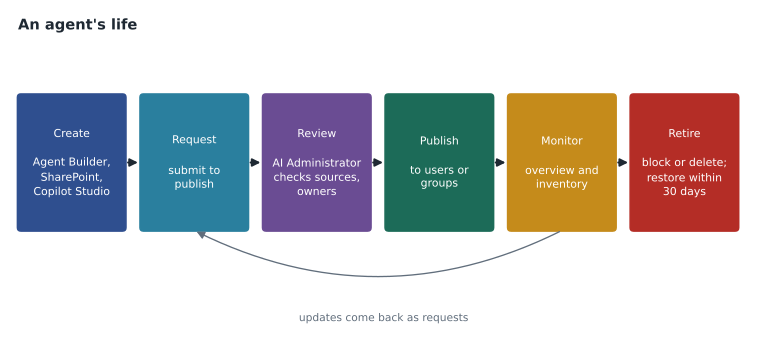
When a user submits an agent for publication to the organization, it arrives as a request in the Agents area of the Microsoft 365 admin center. An administrator reviews it: its purpose, owner, knowledge sources, permissions and the audience requested. The administrator can publish it, choosing users or groups and a policy template and granting consent to its permissions, or reject it. Updates to a published agent come back as update requests. Microsoft's documentation in November 2026 said only the AI Administrator and Global Administrator roles could approve agent requests, and that a Global Administrator cannot approve third-party agents.
Monitoring agents over their life
The outline names usage, operational insights and lifecycle, in two admin centers. In the Microsoft 365 admin center, the Agents overview shows the agent registry, active users, run-time, and cards for pending requests, agents at risk, agents without owners and exceptions. Each agent has a details page with its owners, publisher and usage. Lifecycle actions include install, uninstall, block and unblock, assign owners, and delete, which is a 30-day soft delete with restore. In the Power Platform admin center, the inventory lists Copilot Studio agents, and Agent Builder agents too, with owners, environment, connectors and usage, and lets administrators block or delete them.
| Task | Where |
|---|---|
| See all agents and which have no owner | Agents overview, Microsoft 365 admin center |
| Approve or reject a request to publish | Agents requests, Microsoft 365 admin center |
| Block an agent across the tenant | Agent details, Microsoft 365 admin center |
| Find Copilot Studio agents and their connectors | Inventory, Power Platform admin center |
| Restore an agent deleted last week | Microsoft 365 admin center, within 30 days |
| Govern environments and data policies for makers | Power Platform admin center |
Nadia's question had a clear answer. The agent's owner, Nadia herself, and the AI Administrator share responsibility. The overview would show if usage dropped or if the agent lost its owner, and the agreed rule at Corvallin was that an agent unused for 90 days would be reviewed, then blocked or deleted. Microsoft's Agent 365 is a separate license for broader agent governance, included in Microsoft 365 E7; the basic Agents area is available to administrators without it.
Monitoring Copilot usage and adoption
The outline asks you to monitor Copilot usage and adoption "including Copilot Analytics and the Microsoft 365 admin center". The Copilot usage report in the Microsoft 365 admin center shows enabled and active users and use by app. Copilot Analytics brings together the Copilot Dashboard, advanced reporting and business impact reports, built on Viva Insights; licensed users are automatically given the Viva Insights capability it needs. The Agent Dashboard needs at least 50 Copilot licenses. Microsoft says data can take up to about seven days to appear.
Managing prompts
The final objective is "manage prompts, including saving, sharing, scheduling, and deleting". Users save prompts they want to reuse and share them with colleagues or teams; administrators can publish organizational prompts that appear for everyone, and pin a small number. Microsoft's documentation in November 2026 gave limits of 1,000 published organizational prompts and four pinned. The old Prompt Gallery app was retired in July 2025, so it is a likely distractor.
Scheduling is changing as this course is written. Microsoft announced (Message center post MC1550533) that scheduled prompts move to native Copilot scheduling, under Tasks and Scheduled, rolling out worldwide from November 30 to December 31, 2026, with a limit of 10 active and 50 total schedules per user, and that the older Power Platform-based scheduled prompts retire on December 31, 2026. Teodor's exam falls inside that rollout, so Ines's advice was to know what scheduling does, who can use it (Premium users) and that schedules can be paused and deleted, rather than memorizing a menu path that may change.
Worked problem
An agent request to review
A branch manager submits a request to publish her Rota Helper agent to all 340 home-care staff. It uses the scheduling team's SharePoint library, which also contains staff contact details, and her account is the only owner. What should the AI Administrator check before publishing, and what would make her reject or delay it?
Show solution
- Purpose and audience: is all home-care staff the right audience, and do they have a way to use it (licenses or pay-as-you-go)?
- Knowledge: does the library expose contact details that 340 people should not see? Run a DAG report on the site and narrow the source if needed.
- Ownership: one owner is a single point of failure; add a second owner from the scheduling team.
- Permissions and policy: review what the agent can do and choose an appropriate policy template.
Answer: Delay or reject until the knowledge source is narrowed to the rota documents, a second owner is added and access for unlicensed staff is planned. Then publish to the home-care group.
A practice set for domain 3
| # | Question | Answer |
|---|---|---|
| 1 | What is the default user access setting for agents? | All users |
| 2 | Which roles can approve agent requests? | AI Administrator and Global Administrator (Global Administrator cannot approve third-party agents) |
| 3 | How long can a deleted agent be restored? | 30 days |
| 4 | Where do you find Copilot Studio agents and their connectors? | The Power Platform admin center inventory |
| 5 | Who can create a SharePoint agent? | Anyone with edit permission on the site |
| 6 | How many Copilot licenses does the Agent Dashboard need? | At least 50 |
| 7 | Which retired tool might appear as a distractor for prompts? | The Prompt Gallery app |
| 8 | Does the Agent Builder sharing setting control Copilot Studio agents? | No; it applies to Agent Builder agents |
Teodor scored seven. He had answered question 2 with "any Global Reader", mixing up viewing with approving. Ines added it to his error log under "role confusion", the third role mistake that week, and decided lesson 10 would start with roles.
Governance across the two admin centers
One theme runs through the agent objectives: no single admin center governs everything. Microsoft's guidance in November 2026 split agent governance across four places. The Microsoft 365 admin center handles agent requests, publishing, the registry, user access and sharing. The Power Platform admin center handles environments, data policies, maker access and the inventory of Copilot Studio agents. Microsoft Entra handles identities, including agent identities, and Conditional Access. Microsoft Purview handles the data the agents touch: labels, DLP, audit and retention.
| Question | Admin center |
|---|---|
| Who can see this agent in the agent store? | Microsoft 365 admin center |
| Which connectors can makers use in this environment? | Power Platform admin center |
| Can this agent's identity sign in from outside the network? | Microsoft Entra |
| Is the agent's use of labeled content audited? | Microsoft Purview |
| Which Copilot Studio agents have no owner? | Power Platform admin center inventory |
| Which agents are waiting for approval? | Microsoft 365 admin center |
Corvallin used Copilot Studio's zoned governance model to organize this. Zone 1, citizen development, let anyone build personal agents with Agent Builder or SharePoint agents. Zone 2, partnered development, let trained makers build team agents in Copilot Studio with IT approval before publishing. Zone 3, professional development, was for IT and developers. Each zone had its own controls in the admin centers above, and agents moved up a zone when their audience or capabilities grew.
Adoption is a measurement plan
Monitoring adoption is not only reading a report. Ines asked Teodor what he would measure in the pilot and why, and his answer followed MSBA-103 lesson 11: active users over time, by app; agent use for the three published agents; a small number of business outcomes chosen in advance, such as time to answer a family's intake question; and qualitative feedback from champions. The usage report and Copilot Analytics supply the first two; the outcomes need a baseline measured before the pilot starts. A question on the exam that asks how to "monitor adoption" is usually answered by the usage report or Copilot Analytics, but the reasoning behind measurement helps in scenario questions.
Common mistakes
MistakeAssuming the Agent Builder sharing setting governs every agent.
InsteadIt applies to Agent Builder agents; SharePoint and Copilot Studio agents have their own controls.
MistakeApproving an agent without checking its knowledge sources.
InsteadReview what content it can reach and narrow it before broad publication.
MistakeLooking for Copilot Studio agents only in the Microsoft 365 admin center.
InsteadThe Power Platform admin center inventory lists them with environments and connectors.
MistakeMemorizing menu paths for features that are being rolled out.
InsteadKnow what the feature does and who can use it; check paths before the exam.
Summary and key terms
- User access, sharing and agent and plugin access settings in the Agents area control who can use, share and see agents.
- Agent Builder and SharePoint agents are the simplest creation tools; Copilot Studio builds agents with actions and connectors.
- Publication requests are approved or rejected by the AI Administrator or Global Administrator in the Microsoft 365 admin center.
- Monitor agents in the Agents overview and the Power Platform inventory; deleted agents can be restored for 30 days.
- Track adoption with the usage report and Copilot Analytics; manage saved, shared, organizational and scheduled prompts.
- Agent request
- A submission asking administrators to publish an agent to users or the organization.
- Agents overview
- The Microsoft 365 admin center page that summarizes agents, requests, risks and owners.
- Power Platform inventory
- The admin center list of Copilot Studio and other agents with owners, environments and connectors.
- Copilot Analytics
- Microsoft's set of Copilot adoption and impact reports, built on Viva Insights.
- Organizational prompt
- A prompt published by administrators for everyone in the organization.
- Scheduled prompt
- A prompt set to run automatically at chosen times.
Practice problems
Work each problem on paper first, then reveal the answer to check.
Which admin center would you use to approve an Agent Builder agent for the whole organization?
Show answer
The Microsoft 365 admin center, in the Agents requests area.
Why add a second owner to an agent?
Show answer
So it is not orphaned if the only owner leaves or changes role.
What happens to Power Platform-based scheduled prompts on December 31, 2026?
Show answer
Microsoft announced they retire, replaced by native Copilot scheduling.
Lesson quiz · 5 questions
Score 60% or more to complete this lesson.
Create a free account to save your progress, take quizzes and earn a certificate.