
MSBA-109 · Lesson 10 of 12 · 20 min
Common traps and look-alike answers
▶ Video coming soon A video version of this lesson is on the way.
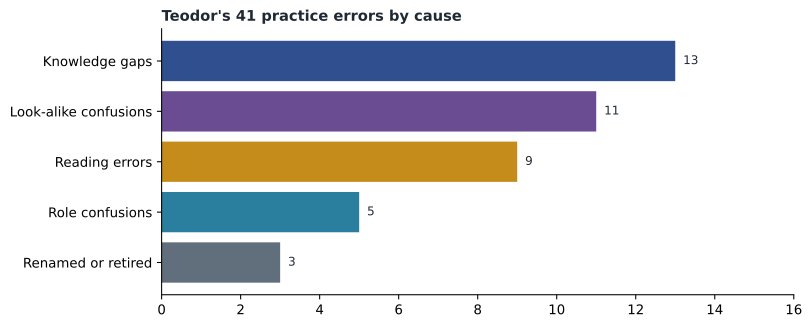
By Wednesday of the final week, Teodor's error log had 41 entries from practice questions, and Ines asked him to sort them not by domain but by why he got each one wrong. The result surprised him. Only 13 were genuine gaps in knowledge. Eleven were look-alike confusions, such as Data Explorer for activity explorer. Nine were reading errors: a missed constraint word or the wrong answer count. Five were role confusions, and three were features that had been renamed or retired. "So most of your lost marks are not about knowing more," Ines said. "They are about telling similar things apart and reading carefully. That is fixable in two days."
This lesson collects the look-alike pairs and traps that come up most often across AB-900's three domains, in one place. Each table gives the pair, the one-line difference and a cue in the question wording. The practice questions are original.
Roles
Administrative roles are a common source of trouble because several have similar scopes. AB-900 does not expect a full list of Entra roles, but it does expect you to know which role does which Copilot and agent task, and the principle of using the least privileged role that can do the job.
| Role | Copilot and agent tasks it covers | Cue |
|---|---|---|
| AI Administrator | Copilot settings, agent requests and management, organizational prompts, pay-as-you-go services | "Manage Copilot settings without being a Global Administrator" |
| Global Administrator | Everything, including emergencies | Rarely the right answer when a narrower role exists |
| Billing Administrator | Purchases, subscriptions and billing, including pay-as-you-go billing policies | "Manage billing" |
| Global Reader | Read-only view of settings and reports | "View but not change" |
| License Administrator or User Administrator | Assign licenses, including Copilot, to users and groups | "Assign Copilot licenses" |
| SharePoint Administrator | SharePoint settings, sites, DAG reports, restricted access control | "Oversharing in SharePoint" |
| Compliance Administrator | Purview compliance solutions | "Configure DLP or retention" |
The trap is usually Global Administrator. If an option lists it alongside a narrower role that can do the task, the narrower role is the better answer, because it applies least privilege. Teodor's five role confusions were all versions of this, plus the Global Reader mistake from lesson 9: viewing is not approving.
Look-alikes in domain 1
| Pair | The difference | Question cue |
|---|---|---|
| Distribution group or Microsoft 365 group | Mail only, or a full workspace with files and calendar | "Email a list" or "collaborate" |
| Private channel or shared channel | Subset of the team, or people from other teams and organizations | "External partners in a channel" |
| Authentication or authorization | Who you are, or what you can do | "Proves identity" or "grants access" |
| App registration or enterprise application | Defines the app, or its instance in a tenant that uses it | "Vendor app added for SSO" |
| Sign-in logs or What If | What happened, or what would happen | "Why was she blocked yesterday?" |
| Identity Secure Score or Microsoft Secure Score | Identity only in Entra, or several areas in Defender | "Identity posture" |
| Security defaults or Conditional Access | A fixed baseline for all, or custom policies (needs P1) | "Least effort baseline" or "only for admins from unmanaged devices" |
| Number matching or phishing-resistant method | Resists MFA fatigue, or cannot be relayed by a fake page | "Attacker-in-the-middle" |
Look-alikes in domain 2
| Pair | The difference | Question cue |
|---|---|---|
| Sensitivity label or retention label | Protects and classifies, or keeps and deletes | "Encrypt" or "keep for seven years" |
| DLP or Insider Risk Management | Stops risky actions on content, or detects risky behavior by people | "Block sharing" or "departing employee" |
| Insider Risk Management or Communication Compliance | Activity, or message content | "Downloads" or "abusive messages" |
| Data Explorer or activity explorer | Where it is, or what happened to it | "How many files" or "who changed" |
| Audit or Content search | Who did what, or what content exists | "Who deleted" or "find emails about" |
| Compliance Manager or Secure Score | Regulatory posture, or security posture | "Meet a regulation" |
| Restricted access control or restricted content discovery | Changes who can access a site, or hides it from Copilot and search | "Only finance may access" or "do not surface" |
| DSPM for AI or DLP | Discovers AI activity and risk, recommends policies; or enforces rules on content | "Discover AI use" or "prevent" |
Look-alikes in domain 3
| Pair | The difference | Question cue |
|---|---|---|
| Copilot Chat or Microsoft 365 Copilot | Included, web and provided content; or paid add-on with Graph grounding | "Use my own email and meetings" |
| Researcher or Analyst | Cited multi-source research, or step-by-step data analysis | "Briefing with sources" or "spreadsheet trends" |
| Monthly license or pay-as-you-go | Fixed per user, or charged per use through a billing policy | "Occasional use by unlicensed staff" |
| Azure budget or spending limit | Alerts only, or stops spending | "Stop spending when" |
| Agent Builder or Copilot Studio | Simple declarative agents by any user, or agents with actions and connectors by makers | "Open a ticket in a business system" |
| Microsoft 365 admin center or Power Platform admin center | Agent requests, registry and access; or environments, data policies and Copilot Studio inventory | "Environment" or "connector" points to Power Platform |
| User access setting or sharing setting | Who can use agents, or who can share Agent Builder agents | "Install" or "share" |
Renamed and retired features
Microsoft renames products often, and exams sometimes use the current name while older courses and blogs use the old one. Recognizing both names, and knowing what has gone, prevents easy mistakes.
| Now | Formerly or retired |
|---|---|
| Microsoft Entra ID | Azure Active Directory |
| Microsoft Defender XDR | Microsoft 365 Defender |
| Microsoft Purview | Microsoft 365 compliance center and Azure Purview |
| Data Explorer | Content explorer |
| Copilot connectors | Microsoft Graph connectors |
| Copilot Chat (Basic) and Microsoft 365 Copilot (Premium) | Earlier Copilot product names |
| AB-900 | MS-900, retired March 31, 2026 |
| Retired | The Prompt Gallery app (July 2025) |
| Retiring December 31, 2026 | Power Platform-based scheduled prompts |
Reading traps
Teodor's nine reading errors fell into four patterns, and each has a simple countermeasure.
| Pattern | Example from his log | Countermeasure |
|---|---|---|
| Missed the answer count | Chose one option on a "Choose two" question | Check the count before answering, every time |
| Ignored a stated fact | Said the license was missing when the question said it was assigned | Underline every given fact before answering |
| Missed a constraint word | Chose a detection tool for a "prevent" question | Circle constraint words: prevent, first, least effort, without |
| Answered a different question | Explained a feature when the ask was where it is configured | Read the last sentence first |
Worked problem
Spotting the trap
Read this original question: "Corvallin must make sure that a branch manager can approve requests to publish agents, without granting more privileges than necessary. Which role should be assigned?" Options: (A) Global Administrator, (B) AI Administrator, (C) Global Reader, (D) Teams Administrator. Identify the trap before answering.
Show solution
- The constraint is "without granting more privileges than necessary": least privilege.
- Global Administrator can approve requests but grants far more than needed: that is the trap.
- Global Reader can view but not approve.
- Teams Administrator has no role in agent approval.
Answer: B, AI Administrator. The trap is A, which is technically capable but fails the least-privilege constraint.
A two-minute pair drill
On Thursday morning Ines ran the pairs as a rapid drill: she read the cue and Teodor answered with the right half of the pair, as fast as he could. The goal was not speed for its own sake but making the distinction automatic, so that on the exam the look-alike would not even seem plausible.
| Cue | Answer |
|---|---|
| "How many documents contain card numbers?" | Data Explorer |
| "Stop spending at the limit" | Spending limit or turning off the service, not a budget |
| "Vendor app for SSO" | Enterprise application |
| "Do not surface in Copilot, keep access" | Restricted content discovery |
| "Abusive messages in chat" | Communication Compliance |
| "Cited briefing from several sources" | Researcher |
| "Attacker-in-the-middle cannot relay it" | Phishing-resistant method such as a passkey |
| "Environment and connectors for an agent" | Power Platform admin center |
| "Keep for seven years" | Retention |
| "View settings, change nothing" | Global Reader |
He got all ten on the second run. On Friday, Ines would test whether the drill had changed his practice results.
License traps
A whole family of distractors depends on licensing, and scenario questions often state the licenses in a single short phrase that is easy to skim past. Ines had Teodor list the license facts that change an answer.
| If the scenario says | Then |
|---|---|
| No Entra ID P1 (for example, Microsoft 365 Business Basic) | Conditional Access and group-based licensing are out; security defaults are the baseline |
| Entra ID P1 but not P2 | Conditional Access yes; risk-based conditions and PIM need P2 or ID Governance |
| Users have Copilot Chat but no Microsoft 365 Copilot license | No Graph grounding; agents using shared data need pay-as-you-go |
| Fewer than 50 Copilot licenses | The Agent Dashboard in Copilot Analytics is not available |
| Business plans with more than 300 users | Not possible; Business plans are capped at 300 users |
| Microsoft 365 E3 rather than E5 | Some advanced Purview and Defender features need E5 or add-ons |
The habit that prevents these mistakes is the same as for any scenario: before answering, underline every license mentioned and ask what each one rules out.
Process-order traps
Some questions ask what to do first, or present steps to put in order. The distractors are steps that are right but out of sequence. The most common sequences in AB-900 topics are short enough to memorize.
| Process | Order |
|---|---|
| Oversharing | Discover, remediate, prevent, monitor |
| New Conditional Access policy | Create in report-only mode, review the impact, then turn on |
| New DLP policy | Create, run in simulation mode, review matches, then enforce |
| Copilot rollout | Check readiness, fix permissions and labels, license a pilot group, measure, expand |
| Agent publication | Create, submit a request, review, publish, monitor |
| Sign-in block investigation | Sign-in logs first, then What If to test a fix |
Teodor's question 11 in the capstone, in lesson 12, was a version of the first row. He had first chosen the remediation step because it was the fix he remembered best. The word "first" turned it into an order question.
Absolute words
Options that contain absolute words such as always, never, all or only deserve a second look. Microsoft 365 has many exceptions, and an option that says "Copilot always uses the web" or "DLP can only protect email" is usually wrong because of one. The reverse is also true: an option that says Copilot "only" uses content the user can access is correct, because that is a documented rule without exceptions. The test is whether you can think of a counter-example. If you can, the absolute option is probably a distractor.
Worked problem
Testing an absolute option
An option reads: "Sensitivity labels can only be applied to documents." Is it likely to be correct?
Show solution
- Look for a counter-example: labels can also be applied to emails.
- They can also be applied to containers such as sites, groups and teams, and to meetings.
- One counter-example is enough to make an absolute statement false.
Answer: No. Labels apply to documents, emails, meetings and containers, so "only documents" is false.
Building your own look-alike list
The tables in this lesson are a starting point. The look-alikes that matter most are the ones in your own error log. After every practice set, Ines had Teodor add any confused pair to a single page with three columns: the pair, the one-line difference, and the cue that should have told him. By Thursday the page had 23 pairs, most of them from these tables, and four of his own, such as "Agent Builder sharing setting versus user access setting". He reread the page each morning until the exam.
Ines's final advice on traps was about attitude rather than content. A distractor is written to catch someone who recognizes a name without understanding its purpose, so the defense is always the same question: what is this feature for? If you can say in one sentence what each option does, the look-alike stops looking alike. When Teodor could not say it for an option, he treated that as a sign to slow down rather than guess, and in practice the option he could not explain was usually the wrong one.
He also stopped treating his own uncertainty as information about the question. On the first pass of a practice set, the questions that felt hardest were not the ones he got wrong most often; the errors clustered in questions that felt easy, where he had answered before reading the constraint. Feeling sure, Ines said, is exactly when to check the count and the constraint once more.
Common mistakes
MistakeChoosing Global Administrator whenever it would work.
InsteadChoose the least privileged role that can do the task.
MistakeTreating an old product name in an option as wrong.
InsteadRecognize both current and former names; judge the feature, not the label.
MistakeSelecting a retired tool because it sounds right.
InsteadKnow what has been retired, such as the Prompt Gallery app and MS-900.
MistakeReviewing only by domain.
InsteadSort mistakes by cause too: gaps, look-alikes, reading, roles, renames.
Summary and key terms
- Most lost marks come from look-alikes and reading errors, not missing knowledge.
- Prefer the least privileged role: AI Administrator for Copilot and agents, Billing Administrator for billing, Global Reader only views.
- Learn each look-alike pair with its one-line difference and its cue words.
- Know current and former names, and what has been retired.
- Counter reading errors by checking the count, marking given facts, circling constraint words and reading the ask first.
- Least privilege
- Granting only the access needed for a task, and no more.
- AI Administrator
- The Entra role that manages Copilot settings, agents and related services.
- Global Reader
- A read-only role that can view settings and reports but change nothing.
- Look-alike pair
- Two features with similar names or purposes that exam questions use to test understanding.
- Error log
- A record of practice mistakes, sorted by domain and by cause.
Practice problems
Work each problem on paper first, then reveal the answer to check.
Which role should manage Copilot settings without full tenant control?
Show answer
AI Administrator.
What is the former name of Microsoft Entra ID?
Show answer
Azure Active Directory.
Name the five causes Teodor sorted his errors into.
Show answer
Knowledge gaps, look-alike confusions, reading errors, role confusions, renamed or retired features.
Lesson quiz · 5 questions
Score 60% or more to complete this lesson.
Create a free account to save your progress, take quizzes and earn a certificate.