
MSBA-109 · Lesson 11 of 12 · 18 min
A timed practice plan
▶ Video coming soon A video version of this lesson is on the way.
On the Thursday afternoon of the final week, Ines put a kitchen timer on the table. "Forty-five minutes is not long," she said. "Today we work out exactly how you will spend them, and how you will spend the twelve days between now and the exam." Teodor had taken the Microsoft practice assessment a second time that morning, after two weeks of review. His result had moved from just short of his target to comfortably above it, and the domain breakdown had changed shape: domain 2 was now his strongest, domain 3 agents was still the softest. The plan had to follow the new evidence, not the old one.
This lesson builds two plans. The first is a pacing plan for the 45 minutes of the exam itself. The second is a study plan for the days before it, weighted by the outline and by practice results. Both are built from facts in earlier lessons: a 45-minute duration, no fixed published question count, 700 to pass, no penalty for wrong answers, and the domain weights dated October 14, 2026.
Pacing for 45 minutes
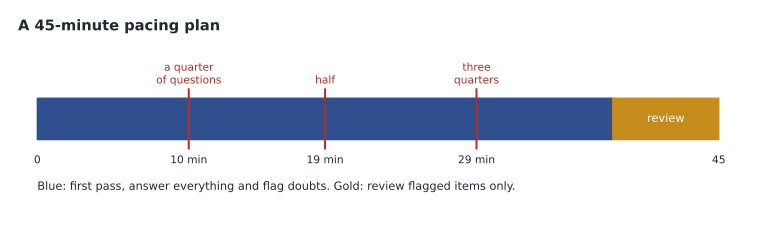
Microsoft does not publish a fixed number of questions for AB-900, and the count can vary by exam form. A pacing plan therefore works with a range and with checkpoints rather than a per-question rule that breaks if the count changes. Ines's approach was to reserve review time first, divide what is left across the likely range, and set three checkpoints at fractions of the exam rather than at question numbers.
| If the exam has about | Answering time (38 minutes) | Time per question | Checkpoint at half the questions |
|---|---|---|---|
| 30 questions | 38 minutes | About 76 seconds | Around minute 19 |
| 40 questions | 38 minutes | About 57 seconds | Around minute 19 |
| 50 questions | 38 minutes | About 46 seconds | Around minute 19 |
The checkpoint is the same in every row because it is a fraction of the exam, not a question number. When Teodor reaches the halfway question, the timer should show around 19 minutes used; if it shows 25, he is behind and needs to stop deliberating on single questions. The question count is visible on screen once the exam starts, so the first thing to do is note it and work out where the halfway and three-quarter marks fall.
Short factual questions take seconds and bank time. A drag-and-drop with eight items or a question with a long scenario takes longer. The plan is a guide for noticing drift early, not a rule to follow mechanically. Teodor's personal rule was that if a question took more than two minutes, he would choose his best answer, flag it and move on.
Worked problem
Working out checkpoints on the day
Suppose the exam shows 42 questions when it starts. With 7 minutes kept for review, at which question numbers should Teodor check the timer, and what should it show?
Show solution
- A quarter of 42 is about 10, half is 21, three quarters is about 32.
- 38 minutes of answering time divided into quarters gives about 9.5, 19 and 28.5 minutes.
- Round to simple marks he can remember: question 10 at about 10 minutes, question 21 at about 19, question 32 at about 29.
Answer: Check at questions 10, 21 and 32, aiming for roughly 10, 19 and 29 minutes used. That leaves about 7 minutes to review flagged items.
Using practice assessments well
Practice assessments are measuring instruments as much as study tools. Used too often, they measure memory of the questions rather than understanding. Ines's rules for the remaining days were simple. Take the Microsoft practice assessment at most once more, near the end, in exam conditions: timed, closed book, no interruptions. Between assessments, use the original questions in this course and in the content courses, which Teodor has not memorized. And after every set, spend at least as long on the review as on the questions.
| Rule | Why |
|---|---|
| Take a full practice assessment in exam conditions | Untimed, open-book practice overstates readiness |
| Do not retake the same set repeatedly | Scores rise from remembering answers, not from learning |
| Review every question, including the right ones | A right answer for the wrong reason is a future wrong answer |
| Log each error by domain and by cause | Shows whether the problem is knowledge, look-alikes, reading or roles |
| Rework the weakest objective, then test it with new questions | Confirms the gap has actually closed |
Building the study plan
Teodor had about ten hours of study time outside work before the exam. Ines used the method from the GH-300 readiness course in the GitHub track: weight each area by how much of the exam it supplies and by how much of it he got wrong on the latest practice assessment, then add a floor so that no area is ignored entirely.
| Area | Midpoint weight | Share missed in second assessment | Weight times gap |
|---|---|---|---|
| Domain 1: objects | 16 (half of domain 1) | 10 percent | 1.6 |
| Domain 1: identity and security | 16 (half of domain 1) | 20 percent | 3.2 |
| Domain 2: Purview | 19 (half of domain 2) | 15 percent | 2.85 |
| Domain 2: Copilot data and oversharing | 19 (half of domain 2) | 10 percent | 1.9 |
| Domain 3: Copilot features and licensing | 14 (half of domain 3) | 15 percent | 2.1 |
| Domain 3: agents and adoption | 14 (half of domain 3) | 35 percent | 4.9 |
The products add up to 16.55. Dividing ten hours in proportion and rounding to tenths gives a plan. Ines also set a floor of half an hour for every area; here every area already cleared it, so no time had to be moved.
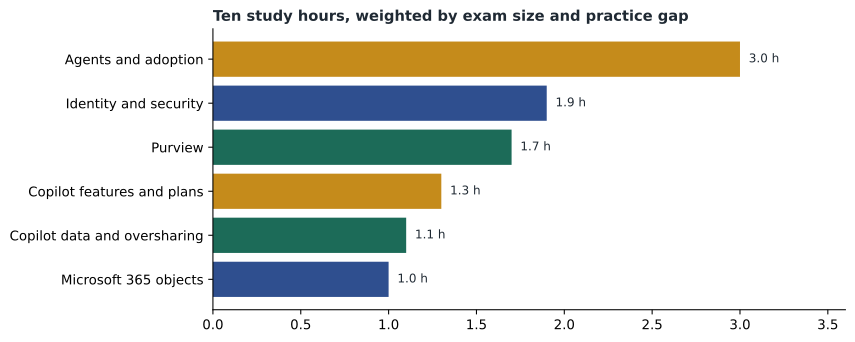
| Area | Hours | What he would do |
|---|---|---|
| Agents and adoption | 3.0 | Reread MSBA-103 lessons 6 to 9; redo the agent request example; drill roles |
| Identity and security | 1.9 | Reread MSBA-101 lessons 6 and 7; rebuild the sign-in tools table from memory |
| Purview | 1.7 | Rerun the ten-question check from lesson 6; redo the explorers card |
| Copilot features and licensing | 1.3 | Redo the break-even calculations; review the billing facts table |
| Copilot data and oversharing | 1.1 | Redraw the oversharing loop from memory; review restricted access control and restricted content discovery |
| Microsoft 365 objects | 1.0 | Rerun the eight-question check from lesson 4; review recipient types |
A pure formula has a blind spot. A good score on one practice set does not prove an area is mastered, because the real exam asks different questions. The floor guards against that, and so does the rule of testing every area with new questions before the exam.
The calendar to exam day
Teodor's exam was booked for the first week of December. Working back from it, Ines and Teodor laid out the remaining days.
| When | Activity |
|---|---|
| Friday, November 20 | Final review session: a full mixed practice set and debrief (lesson 12) |
| Weekend of November 21 and 22 | Two study blocks from the plan; system test on the home computer |
| Week of November 23 | Study blocks on weekday evenings; pair drill daily |
| Weekend before the exam | Last Microsoft practice assessment in exam conditions; light review of errors only |
| Evening before | No new material; check ID, room and confirmation email; sleep |
| Exam morning | Restart the computer, clear the room, start check-in early |
Ines was firm about the last two days. Cramming new material late tends to unsettle what is already known, and a tired candidate makes more reading errors, which was Teodor's second-largest error category. The last practice assessment was there to confirm readiness, not to start new study. If it came back well below the earlier result, the right response would be to reschedule within the notice period, not to cram.
The error log as a study tool
The study plan depends on a good error log, so it is worth setting one up properly. Teodor's log was a simple table with one row per missed or guessed question, whether the question came from the Microsoft practice assessment, from these courses or from Ines. He recorded questions he got right by guessing as well as those he got wrong, because a lucky guess hides a gap.
| Column | What goes in it | Example |
|---|---|---|
| Source | Where the question came from | Lesson 6 check, question 4 |
| Domain and objective | From the study guide | Domain 2, identify user activities |
| My answer and the right answer | Both, in a few words | Data Explorer; activity explorer |
| Cause | Knowledge, look-alike, reading, role or rename | Look-alike |
| Fix | What he did about it | Explorers card; reran lesson 6 check |
| Retested | Date he got a new question on it right | November 13 |
The last column is the important one. An error is only closed when a new question on the same objective has been answered correctly, ideally a few days later. Rereading notes feels productive but does not prove anything. By the final review session, 38 of Teodor's 41 entries were closed, and the three open ones were all reading errors, which is why lesson 12 ends with a habit rather than more study.
Spaced practice in short blocks
With about ten hours to spend, Ines recommended short blocks rather than long ones: forty-five minutes of focused work, the length of the exam itself, followed by a break. Each block started with five minutes of retrieval from memory, such as redrawing the oversharing loop or listing the Purview solutions in Ansel's columns without notes, before any reading. Retrieving first shows what has stuck and makes the reading that follows more targeted.
| Part of a 45-minute block | Minutes | Activity |
|---|---|---|
| Retrieve | 5 | Write or draw a topic from memory |
| Read or watch | 15 | The relevant lesson in MSBA-101, 102 or 103 |
| Practice | 15 | New questions on the same objectives, timed |
| Log | 10 | Update the error log and close entries that are fixed |
The block structure also builds stamina for the real thing. Forty-five minutes of concentrated reading and judging is tiring, and a candidate who has practiced in blocks of that length knows how it feels at minute 35, when attention tends to drift and reading errors creep in.
When to reschedule
A plan should include the conditions under which it changes. Ines set two. If the final practice assessment came back clearly below the level of the second one, or if illness or a work emergency took most of the planned study time, Teodor would reschedule within the notice period rather than sit an exam he expected to fail. A failed attempt is not a disaster, since the first retake needs only 24 hours, but it costs a fee and a morning, and a reschedule made in time costs nothing.
Sleep, food and the morning itself
The last part of the plan was the least technical and, in Ines's experience, the one candidates neglect most. A 45-minute exam rewards a rested, steady reader more than a well-read tired one. Teodor planned a normal evening before the exam, a light breakfast, and no coffee beyond his usual one, because a proctor will not let a candidate leave the camera view for a break. He planned to be at his desk, with the room cleared, twenty minutes before the check-in window opened, so that a slow photo upload or a software update would not eat into the appointment.
| Time before the appointment | Teodor's plan |
|---|---|
| The evening before | Light review of the error log page and look-alike list only; ID and confirmation ready |
| 60 minutes | Breakfast finished; computer restarted; other applications closed |
| 40 minutes | Room and desk cleared; phone placed out of reach; door closed |
| 30 minutes | Check-in started: ID, face and room photos |
| 0 minutes | Proctor releases the exam; note the question count and work out checkpoints |
Common mistakes
MistakePlanning pacing by question number when the count is unknown.
InsteadUse fractions of the exam as checkpoints and work out the question numbers on the day.
MistakeUsing every minute for the first pass.
InsteadReserve review time before you start.
MistakeRetaking the same practice set until the score is high.
InsteadUse new questions between practice assessments; repeated sets measure memory.
MistakeStudying new topics the night before.
InsteadStop new material two days out; review your error log and rest.
Summary and key terms
- Reserve review time first, divide the rest across the likely range, and set checkpoints at a quarter, half and three quarters of the exam.
- Note the question count when the exam starts and work out the checkpoint question numbers then.
- Take practice assessments in exam conditions, sparingly, and spend as long reviewing as answering.
- Weight study hours by exam weight and practice gap, with a floor so no area is skipped.
- Stop new material two days before the exam; if the last practice result drops sharply, reschedule within the notice period.
- Pacing plan
- A plan for spending exam time, with reserved review time and checkpoints.
- Checkpoint
- A point in the exam, such as halfway, where you compare questions done with time used.
- Exam conditions
- Practicing timed, closed book and without interruptions.
- Study weighting
- Dividing study time by the size of each exam area and by the size of your gap in it.
- Floor
- A minimum amount of study time given to every area, however strong it looks.
Practice problems
Work each problem on paper first, then reveal the answer to check.
Why set checkpoints as fractions of the exam rather than question numbers?
Show answer
Because the question count is not published and can vary; fractions work for any count.
What should you do if a question takes more than about two minutes?
Show answer
Choose your best answer, flag it and move on.
Why avoid retaking the same practice set many times?
Show answer
Scores rise from remembering the answers, which overstates readiness.
Lesson quiz · 5 questions
Score 60% or more to complete this lesson.
Create a free account to save your progress, take quizzes and earn a certificate.