
MSBA-109 · Lesson 4 of 12 · 18 min
Domain 1 review: core features and objects of Microsoft 365
▶ Video coming soon A video version of this lesson is on the way.
The second week opened with domain 1, and Ines started with a whiteboard covered in names: mailbox, distribution group, Microsoft 365 group, security group, site, library, folder, team, channel, policy, domain. "Put each one in the admin center where you configure it," she said, handing Teodor the marker. He placed most of them in under a minute. The two he hesitated over, Microsoft 365 groups and channels, were exactly the ones the exam likes, because they live in more than one place.
Domain 1, "Identify the core features and objects of Microsoft 365 services", is weighted 30 to 35 percent. It has three objective groups: the core objects of Microsoft 365 services, the Microsoft 365 security principles, and the core security features of Microsoft 365 services. This lesson reviews the first group. Lesson 5 reviews the security principles and features. The full teaching is in MSBA-101, especially lessons 1 to 4.
| Objective in the outline | Where it was taught | What the exam is likely to probe |
|---|---|---|
| How license types assigned to users and groups affect access to features | MSBA-101 lesson 4 | Why a user cannot see a feature; group-based licensing |
| Organization configuration in the Microsoft 365 admin center (domain names and org settings) | MSBA-101 lesson 1 | Where domains and org-wide settings live |
| Objects in the Exchange admin center (mailboxes and distribution groups) | MSBA-101 lesson 2 | Choosing the right mailbox or group type |
| Objects in the SharePoint admin center (sites, libraries and folders) | MSBA-101 lesson 3 | What sits at each level and where sharing is set |
| Roles and permissions for SharePoint sites | MSBA-101 lesson 3 | Owners, members and visitors; permission levels |
| Objects in the Teams admin center (teams, channels and policies) | MSBA-101 lesson 3 | Channel types and policy assignment |
Licenses and what they unlock
In Microsoft 365, a user can only use what their license includes. A license is a subscription assigned to a user, and each subscription contains service plans: Exchange Online, SharePoint Online, Teams, Entra ID features and so on. Licenses can be assigned directly to a user or through group-based licensing, where a license is assigned to a security group and every member receives it. Group-based licensing needs Microsoft Entra ID P1 or a plan that includes it. Corvallin uses it for all of its licenses, so a new hire gets the right plan by being added to the right group.
The exam objective is about cause and effect. If a user cannot open Teams, or does not see a mailbox, the first thing to check is whether the right license, or the right service plan within it, is assigned. An administrator can turn off individual service plans when assigning a license, which is how a user can have a Microsoft 365 E3 license and still not have, for example, a particular app. Corvallin's plans illustrate the families the exam expects you to recognize.
| Plan family | Typical users | Notes |
|---|---|---|
| Microsoft 365 Business (Basic, Standard, Premium) | Smaller organizations | Capped at 300 users per plan; Business Premium adds Entra ID P1, Intune and Defender for Business |
| Microsoft 365 E3 and E5 | Office and knowledge workers in larger organizations | E5 adds advanced security, compliance and analytics |
| Microsoft 365 F1 and F3 | Frontline workers | Smaller mailbox and storage; web and mobile apps |
| Add-ons | Users who need one more capability | Microsoft 365 Copilot is licensed as an add-on to a qualifying base plan |
Corvallin has 120 office staff and managers on Microsoft 365 E3 and 340 home-care staff on Microsoft 365 F3, with E5 security for its administrators. That mix explains several things the exam likes to test: why an F3 home-care aide has a 2 GB mailbox, why some security features apply only to administrators, and why a Copilot license can only be added to users whose base plan qualifies.
The Microsoft 365 admin center
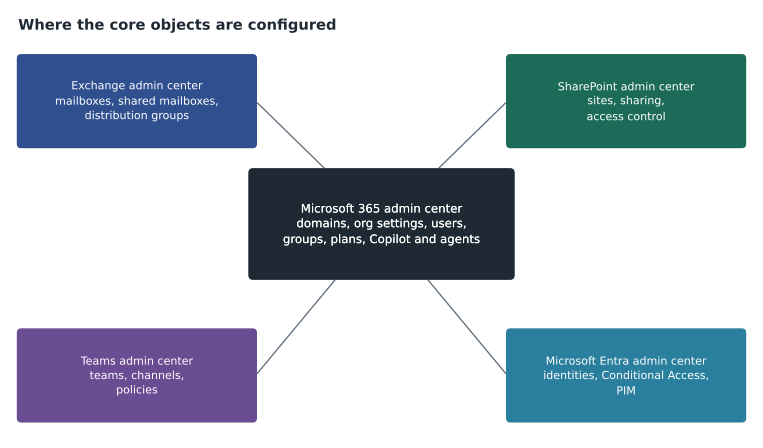
The Microsoft 365 admin center is the starting point for organization-wide configuration. The exam outline names two things in particular: domain names and org settings. Adding a custom domain, such as corvallincare.example, involves verifying ownership with a DNS record and then adding the records each service needs. Org settings hold tenant-wide choices: release preferences, the organization profile, settings for services such as calendar sharing, and security and privacy settings.
The admin center is also where users, groups and licenses are managed for most day-to-day tasks, where service health and the message center are read, and, for domain 3, where Copilot settings and agents are managed. Many tasks can be done in more than one admin center; the exam tends to ask where a task is normally done.
Exchange Online objects
The Exchange admin center manages mail recipients. The outline names mailboxes and distribution groups, and the exam expects you to tell recipient types apart.
| Object | What it is | License needed | Typical use |
|---|---|---|---|
| User mailbox | A mailbox for one person | Yes | Every staff member's own mail |
| Shared mailbox | A mailbox several people open with their own accounts | Not up to 50 GB | intake@ or billing@ addresses |
| Resource mailbox | A room or equipment mailbox for booking | No | Meeting rooms, pool cars |
| Distribution group | A list that delivers mail to its members | No | An all-managers announcement list |
| Microsoft 365 group | A group with a shared mailbox, calendar, SharePoint site and other resources | Members need licenses for the services | A project or team workspace |
| Mail-enabled security group | A security group that can also receive mail | No | Granting access and emailing the same people |
The look-alike pair that matters most is the distribution group and the Microsoft 365 group. A distribution group only distributes mail. A Microsoft 365 group comes with a shared mailbox, a calendar, a SharePoint site, a Planner plan and, if a team is created from it, a team in Teams. If a question asks for "a way to email all branch managers", a distribution group is enough. If it asks for "a shared workspace with files, a calendar and conversations", a Microsoft 365 group is the answer.
SharePoint objects and permissions
The SharePoint admin center manages sites and organization-wide SharePoint settings such as external sharing levels. Within a site, content is organized into libraries, which hold documents, and folders inside libraries. The outline asks you to identify the right object at each level, and to identify roles and permissions for sites.
| Level | What it holds | Where it is configured |
|---|---|---|
| Organization | Tenant-wide sharing level, default link types, access control policies | SharePoint admin center |
| Site | Pages, libraries and lists; its own sharing setting, no more permissive than the organization's | SharePoint admin center and site settings |
| Library | Documents, with versioning and its own permissions if inheritance is broken | Library settings |
| Folder | A subset of documents, which can have unique permissions | Within the library |
| File | A single item, which can be shared with a link | Share dialog |
Sites have three default groups. Owners have full control, members can edit, and visitors can read. Permissions are inherited from the site down to libraries, folders and files unless inheritance is broken. A team site connected to a Microsoft 365 group maps group owners to site owners and group members to site members. A communication site has no group behind it and is designed for a small number of authors and a large number of readers, such as Corvallin's staff intranet.
Teodor's hesitation earlier was about this: a Microsoft 365 group is created in the Microsoft 365 admin center or by a user, but its site is managed in the SharePoint admin center and its mailbox can be seen in the Exchange admin center. The exam usually frames the question by the task. Changing sharing for a site is a SharePoint task; changing group membership is a Microsoft 365 admin center or Entra task.
Teams objects and policies
The Teams admin center manages teams, channels and policies. Every team is backed by a Microsoft 365 group. A team has channels of three types, which the exam expects you to distinguish.
| Channel type | Who can see it | Files stored in |
|---|---|---|
| Standard | Everyone in the team | The team's SharePoint site |
| Private | A subset of team members | Its own separate SharePoint site |
| Shared | Invited people and teams, including people from other organizations | Its own separate SharePoint site |
Policies control what users can do in Teams: meeting policies decide meeting features such as recording and transcription, messaging policies control chat features, and app policies or app availability decide which apps people can use. Policies are assigned to users directly, to groups, or by default through the Global (org-wide default) policy. On the exam, "configure who can record meetings" is a meeting policy question in the Teams admin center, not a SharePoint or Exchange question.
A mixed practice set
Teodor answered these eight original questions in eight minutes, one minute each, the pace lesson 11 will plan for. Try them before reading the answers.
| # | Question | Answer |
|---|---|---|
| 1 | Which object gives a team of eight people a shared calendar, files and a mailbox? | A Microsoft 365 group |
| 2 | Where do you add and verify a custom domain? | Microsoft 365 admin center |
| 3 | A user has an E3 license but cannot open one app in it. What should you check first? | Whether that app's service plan is turned off in the assigned license |
| 4 | Which mailbox type lets the intake team answer one address without an extra license? | Shared mailbox (up to 50 GB) |
| 5 | Which channel type stores its files in a separate SharePoint site and can include people from another organization? | Shared channel |
| 6 | Which SharePoint group can read but not edit by default? | Site visitors |
| 7 | Where do you control whether meetings can be recorded? | Meeting policy in the Teams admin center |
| 8 | How can new hires receive the right license automatically? | Group-based licensing, assigning the license to a security group |
Teodor got seven. The one he missed was question 3: he answered "the license is not assigned", which ignores the fact in the question. The user has the license; the issue is the service plan inside it. It was a reading mistake, not a knowledge gap, and it went into his error log under "ignored a stated fact".
Worked problem
Choosing the right object
Corvallin's finance team needs: (a) a way for payroll questions sent to one address to be answered by any of three clerks; (b) a list to email all 18 branch coordinators about a policy change; (c) a workspace where the finance team shares spreadsheets, a calendar and chat. Which object fits each need?
Show solution
- (a) One address answered by several people: a shared mailbox, configured in the Exchange admin center.
- (b) Only mail delivery to a fixed list: a distribution group.
- (c) Files, calendar and chat together: a Microsoft 365 group with a team in Teams.
Answer: Shared mailbox for (a), distribution group for (b), Microsoft 365 group and team for (c). Each choice is the simplest object that meets the stated need.
Org settings worth recognizing
The outline mentions "org settings" without listing them, and the exam can ask where an organization-wide choice is made. A short list of the settings an administrator meets most often in the Microsoft 365 admin center helps place them.
| Setting | What it controls |
|---|---|
| Release preferences | Whether some users or everyone get new features early |
| Organization profile | Name, address, contact and technical contact for the tenant |
| Security and privacy | Password expiry policy, privacy statement link, self-service password reset entry |
| Services | Tenant-wide options for individual services, such as calendar sharing and Microsoft Forms |
| Copilot | Organization-wide Copilot settings, covered in domain 3 |
Ines's point was not to memorize the list but to recognize that a question about an organization-wide default, rather than a single user or site, almost always points to the Microsoft 365 admin center first.
Common mistakes
MistakeChoosing a Microsoft 365 group when only mail distribution is needed.
InsteadUse a distribution group for a mailing list; a Microsoft 365 group brings a whole workspace.
MistakeAssuming a license missing whenever a feature is unavailable.
InsteadCheck the service plans inside the license too.
MistakeSetting sharing in a site more permissive than the organization allows.
InsteadA site's sharing level can be the same as, or stricter than, the organization level.
MistakeTreating private and shared channels as the same.
InsteadPrivate channels are for a subset of the team; shared channels can include other teams and organizations.
Summary and key terms
- Licenses contain service plans; group-based licensing assigns licenses through security groups and needs Entra ID P1.
- The Microsoft 365 admin center holds domains, org settings, users, groups, licenses, and Copilot and agent settings.
- Exchange objects include user, shared and resource mailboxes, distribution groups and Microsoft 365 groups.
- SharePoint organizes content as organization, site, library, folder and file, with owners, members and visitors and inherited permissions.
- Teams has standard, private and shared channels, and policies assigned to users, groups or the org-wide default.
- Service plan
- One service inside a license, such as Exchange Online, that can be turned on or off when assigning it.
- Group-based licensing
- Assigning licenses to a security group so members receive them automatically.
- Shared mailbox
- A mailbox several users open with their own accounts; no license needed up to 50 GB.
- Distribution group
- A mail-enabled list that delivers messages to its members.
- Microsoft 365 group
- A group with a shared mailbox, calendar, SharePoint site and other resources, behind every team.
- Communication site
- A SharePoint site with no group behind it, for broadcasting to many readers.
Practice problems
Work each problem on paper first, then reveal the answer to check.
What does a Microsoft 365 group provide that a distribution group does not?
Show answer
A shared mailbox, calendar, SharePoint site and other resources, and the option of a team in Teams.
Where do private channel files live?
Show answer
In a separate SharePoint site for the channel.
Which three default groups does a SharePoint team site have?
Show answer
Owners, members and visitors.
Lesson quiz · 5 questions
Score 60% or more to complete this lesson.
Create a free account to save your progress, take quizzes and earn a certificate.