
MSBA-109 · Lesson 7 of 12 · 19 min
Domain 2 review: data security for Copilot and SharePoint
▶ Video coming soon A video version of this lesson is on the way.
The Thursday session started with a story Ansel liked to tell. During the Copilot readiness work in MSBA-102, a scheduler testing Copilot Chat had asked for "anything about staff pay this year" and received a summary drawn from a salary spreadsheet that had been shared with "everyone except external users" three years earlier. Copilot had done nothing wrong. It had only shown her a file she was already allowed to open. "That is the whole of this lesson in one sentence," Ines said. "Copilot does not create new access. It finds the access you already gave away."
This lesson reviews the other two objective groups in domain 2: understand data security implications of Copilot, and identify and monitor oversharing in SharePoint in Microsoft 365. It also covers DSPM for AI, the risk objective that sits closest to Copilot. Together with lesson 6, it completes the 35 to 40 percent of the exam that domain 2 carries. The teaching is in MSBA-102 lessons 1, 2, 7, 8 and 9, and in MSBA-103 lesson 1.
How Copilot accesses data
Microsoft 365 Copilot answers a prompt in stages. The prompt goes through grounding: Copilot retrieves relevant content from Microsoft Graph, the service that connects a user's mail, files, meetings, chats and other work data, using the semantic index to find related items. If the organization allows it, Copilot can also ground in web search. The grounded prompt goes to the large language model, and the response passes through post-processing checks, including responsible AI checks and citations, before it appears in the app.
The key exam fact is in the middle of that flow. Copilot only retrieves content the signed-in user already has permission to access. It respects SharePoint and OneDrive permissions, Exchange permissions and Teams membership. It honors sensitivity labels: if a label's encryption does not give the user the right to view and extract content, Copilot cannot use that content in an answer. Microsoft states that prompts, responses and data accessed through Microsoft Graph are not used to train the foundation models, and that Microsoft 365 Copilot operates under the organization's existing commitments for data protection.
How Microsoft Graph influences responses
Because Copilot grounds in Microsoft Graph, its responses depend on what Graph can see for that user: recent meetings, emails, documents the user has worked on, people they work with, and content in sites they can reach. Two users asking the same question can get different answers because their access differs. Copilot connectors, formerly Graph connectors, extend that reach by indexing content from other systems into Microsoft Graph, with permissions carried across. An exam question that asks why Copilot found a document in a third-party system is usually a connector question.
Permissions and other controls
The outline asks how Copilot uses permissions and other controls in Microsoft 365, Microsoft Purview and Microsoft Defender to protect against risks. The answer is that Copilot does not have its own separate security model; it inherits the controls already in the tenant.
| Product | Control | Effect on Copilot |
|---|---|---|
| Microsoft 365 (SharePoint, OneDrive, Teams, Exchange) | Permissions, sharing settings, restricted access control | Copilot can only reach what the user can reach |
| Microsoft Purview | Sensitivity labels | Encrypted content without view and extract rights is not used; new content can inherit the highest-priority label from its sources |
| Microsoft Purview | DLP for the Microsoft 365 Copilot location | Can stop Copilot from processing labeled items, or prompts containing sensitive information (preview) |
| Microsoft Purview | Audit, retention, eDiscovery | Copilot interactions are recorded, retained and searchable |
| Microsoft Defender | Threat protection, Defender for Cloud Apps | Detects risky AI use and protects identities and devices used with Copilot |
| Microsoft Entra | Conditional Access | Controls who can sign in to Copilot experiences and from which devices |
Lesson 6's DLP review applies here directly. Microsoft added a Microsoft 365 Copilot location to DLP policies, which can prevent Copilot from summarizing items with certain labels, and, in preview, from responding to prompts that contain sensitive information. Ansel had set one up for Corvallin's Highly Confidential label, and noted the documented delay: changes can take up to four hours to take effect.
Responsible AI principles
Microsoft's responsible AI approach rests on six principles, and the outline expects candidates to know them: fairness, reliability and safety, privacy and security, inclusiveness, transparency and accountability. Exam questions usually describe a practice and ask which principle it supports.
| Practice | Principle |
|---|---|
| Copilot shows citations so users can check where an answer came from | Transparency |
| Copilot respects permissions and does not train models on tenant data | Privacy and security |
| Testing that an agent gives the same quality of answer to all client groups | Fairness |
| Filtering harmful content and grounding answers in sources | Reliability and safety |
| Supporting screen readers and multiple languages | Inclusiveness |
| Naming an owner responsible for each agent and its outputs | Accountability |
DSPM for AI
DSPM for AI, Data Security Posture Management for AI, is the Purview solution for discovering and managing AI activity. It shows how people use Copilot and other AI apps, what sensitive data is involved, and which risks need attention, and it offers recommended policies that can be created in one step, such as detecting sensitive information in AI prompts. It also runs a data risk assessment, by default weekly across the most active SharePoint sites, to show where oversharing could expose data to Copilot.
Microsoft's Learn pages in late 2026 describe the version Ansel used as DSPM for AI (classic), and say a broader Data Security Posture Management experience is replacing it. The exam outline still uses the name DSPM for AI. For the exam, know what it does: discover AI interactions, assess data risk for AI, and recommend policies. If a question offers DSPM for AI for "discover and manage AI activity", that is the outline's own wording.
Oversharing in SharePoint
Oversharing is the risk Copilot makes visible. Content shared too broadly in the past, through "Everyone except external users" permissions, organization-wide links or sites with broken inheritance, becomes easy to find once Copilot can search across everything a user can open. The outline names three tasks: identify the tools to troubleshoot oversharing, run a data access governance report, and understand SharePoint Advanced Management features including restricted access control.
| Tool | Stage | What it does |
|---|---|---|
| Data access governance (DAG) reports | Discover | Show sites with sharing links, broad groups such as Everyone except external users, and label coverage |
| DSPM for AI data risk assessment | Discover | Shows which sites and items are most exposed to AI use |
| Site access reviews | Remediate | Ask site owners to review and confirm access found in a DAG report |
| Restricted access control | Remediate and prevent | Limits a site to members of specified groups, even if content is shared more widely |
| Restricted content discovery | Prevent | Stops a site's content appearing in Copilot and organization-wide search, without changing permissions |
| Sensitivity labels for sites | Prevent | Apply privacy and sharing settings to containers |
| SharePoint sharing settings | Prevent | Set default link types and limit external sharing |
SharePoint Advanced Management (SAM) is the set of SharePoint governance features that includes DAG reports, site access reviews, restricted access control, restricted content discovery and inactive site policies. Microsoft's licensing page in 2026 lists the SAM features included for organizations with Microsoft 365 Copilot licenses; others need a SAM license. Microsoft also notes that the default SharePoint sharing settings are the most permissive ones, which is why oversharing is common in older tenants.
The pair to keep straight is restricted access control and restricted content discovery. Restricted access control changes who can open a site's content: only members of chosen groups get in. Restricted content discovery leaves access as it is, but stops the site's content being surfaced by Copilot and search to people who have not visited it. If a question says "users must still be able to open the site if they have the link, but Copilot should not surface it", that is restricted content discovery. If it says "only the finance group may access this site", that is restricted access control.
Worked problem
Fixing the salary spreadsheet
A DAG report shows that the HR site has a library shared with Everyone except external users, and the salary spreadsheet sits in it. The HR director wants only HR staff to reach the site, and wants to stop similar exposure in other sensitive sites. List the steps in order.
Show solution
- Discover: the DAG report has already found the broad permission; confirm with the site owner.
- Remediate now: remove the Everyone except external users permission from the library, and apply restricted access control so only the HR group can access the site.
- Prevent: apply a sensitivity label for sites that sets the HR site to private and blocks external sharing, and consider a label on the spreadsheet itself.
- Monitor: rerun the DAG report on a schedule and review the DSPM for AI assessment.
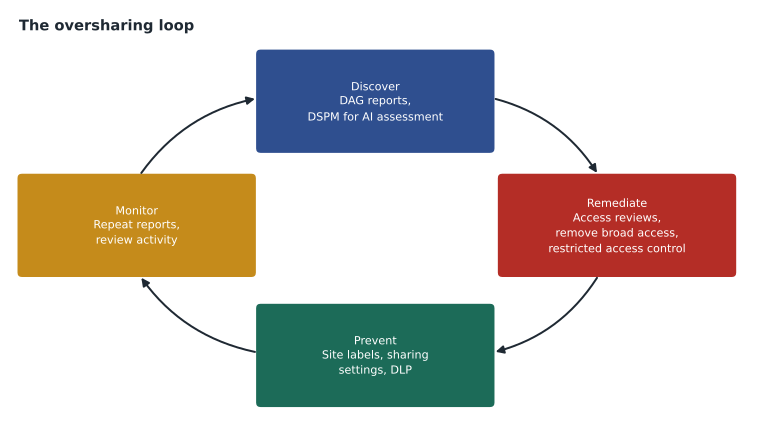
Answer: Discover with the DAG report, remediate by removing the broad permission and applying restricted access control, prevent with a site sensitivity label and file label, then monitor with repeated reports. That order follows the oversharing loop.
A practice set for this lesson
| # | Question | Answer |
|---|---|---|
| 1 | Can Copilot use a document the user cannot open? | No; it works within the user's permissions |
| 2 | What extends Copilot's reach to content in a third-party system? | A Copilot connector |
| 3 | Which responsible AI principle do citations support? | Transparency |
| 4 | Which report shows sites shared with Everyone except external users? | A data access governance report |
| 5 | Which feature limits a site to members of specified groups? | Restricted access control |
| 6 | Which feature hides a site from Copilot without changing access? | Restricted content discovery |
| 7 | Which Purview solution discovers AI interactions and recommends policies? | DSPM for AI |
| 8 | Which DLP location can stop Copilot processing labeled items? | The Microsoft 365 Copilot location |
Teodor got all eight, and said the domain no longer felt like the weak one. Ines reminded him that his practice assessment had said otherwise only a week before. "Score it again at the end of next week," she said. "Then we will know."
Labels and Copilot in more detail
Two label behaviors come up in Copilot questions. First, usage rights: when a label applies encryption, it grants rights such as view, edit and extract to chosen people. Microsoft documents that Copilot needs the user to have both the VIEW and EXTRACT rights to use encrypted content in an answer. A user who can open a document but not copy from it will not see Copilot summarize it. Second, label inheritance: when Copilot creates new content from labeled sources, such as a summary of a Confidential document in a new Word file, the new content can inherit the label, and if several sources have labels, the highest-priority label applies.
| Situation | What happens |
|---|---|
| User has view but not extract rights on an encrypted file | Copilot does not use the file's content in its answer |
| Copilot drafts a document from two sources labeled General and Confidential | The draft can inherit Confidential, the higher-priority label |
| A DLP rule for the Copilot location excludes items labeled Highly Confidential | Copilot does not process those items, after the policy takes effect |
| A file has no label and is shared with everyone | Copilot can use it for anyone who can open it |
Audit, retention and eDiscovery for Copilot
Copilot interactions are part of the compliance record. Microsoft's documentation says that Copilot activity is captured in the unified audit log, that retention policies can apply to Copilot interactions through a dedicated location for Microsoft Copilot experiences, and that eDiscovery searches can find Copilot activity. For AB-900, the point is that Copilot is not a blind spot: the same audit, retention and search tools that cover email and files cover Copilot too. Ansel had shown Corvallin's privacy officer a Copilot interaction found through an eDiscovery search during the readiness work, which settled a question she had raised about whether staff use of Copilot could be reviewed.
The last idea Ines wanted fixed before the domain 2 practice was the relationship between all these pieces. Copilot does not need a new security model because it borrows the one already in place. That makes domain 2 the foundation for domain 3: an organization that has its permissions, labels and DLP in order is ready to license Copilot, and one that has not is about to discover its oversharing in the most visible way possible.
Common mistakes
MistakeBelieving Copilot bypasses permissions.
InsteadCopilot uses only content the user can already access; fixing permissions fixes Copilot exposure.
MistakeConfusing restricted access control with restricted content discovery.
InsteadOne limits who can access a site; the other hides it from Copilot and search without changing access.
MistakeReaching for a new Copilot-specific security product.
InsteadCopilot inherits existing Microsoft 365, Purview, Defender and Entra controls.
MistakeRemediating before discovering.
InsteadStart with DAG reports or the DSPM for AI assessment, then fix what they show.
Summary and key terms
- Copilot grounds prompts in Microsoft Graph and the semantic index, only within the user's existing permissions.
- Labels, DLP for the Copilot location, audit, retention, Defender and Conditional Access all apply to Copilot use.
- Responsible AI principles: fairness, reliability and safety, privacy and security, inclusiveness, transparency and accountability.
- DSPM for AI discovers AI activity and data risk and recommends policies; Microsoft now labels it classic and is replacing it with a broader DSPM.
- Oversharing loop: discover with DAG reports, remediate with access reviews and restricted access control, prevent with labels and sharing settings, monitor continuously.
- Grounding
- Adding relevant organizational content to a prompt before it reaches the model.
- Semantic index
- The index Copilot uses to find content related to a prompt across Microsoft Graph.
- Copilot connector
- A connector that brings content from another system into Microsoft Graph, with its permissions.
- Data access governance report
- A SharePoint report showing sharing links, broad permissions and label coverage across sites.
- Restricted access control
- A SharePoint Advanced Management feature that limits a site to members of chosen groups.
- Restricted content discovery
- A setting that stops a site's content being surfaced in Copilot and search, without changing access.
- SharePoint Advanced Management
- A set of SharePoint governance features for oversharing, access and lifecycle.
Practice problems
Work each problem on paper first, then reveal the answer to check.
Why does fixing SharePoint permissions reduce Copilot risk?
Show answer
Because Copilot only uses content the user already has permission to access.
Name the four stages of the oversharing loop.
Show answer
Discover, remediate, prevent, monitor.
Which principle does naming an owner for each agent support?
Show answer
Accountability.
Lesson quiz · 5 questions
Score 60% or more to complete this lesson.
Create a free account to save your progress, take quizzes and earn a certificate.