
MSBA-109 · Lesson 2 of 12 · 18 min
Booking, online proctoring and test centers
▶ Video coming soon A video version of this lesson is on the way.
Teodor had booked his exam in October in a hurry, between two help desk escalations, and on the Wednesday of the first review week Ines asked him to open the booking again and read every screen. "Most people who have a bad exam day lose it before the first question," she said. "Wrong account, wrong name, a webcam that will not start, a desk with a sticky note on it." They spent the session on the logistics: the profile, the booking, the choice between online and a test center, the rules on the day, and what happens if something goes wrong.
Your certification profile and the account behind it
Microsoft certifications are recorded against a certification profile linked to a Microsoft Learn profile. The study guide notes that connecting the certification profile to Microsoft Learn is what lets a candidate schedule and renew exams and share and print certificates. The AB-900 certification page makes a recommendation that is easy to skip: register with a personal Microsoft account rather than a work or school account. A certification belongs to the person, not the employer. If Teodor booked with his Corvallin account and later left the agency, recovering his records could be slow.
The name on the profile matters as much as the account. On exam day, the proctor or test center checks a government-issued photo ID, and the name on the ID has to match the name on the booking. Teodor's passport has his full name with its accent marks; his profile had a shortened version he used at work. He changed the profile before going further.
| Check | Why it matters | Teodor's status |
|---|---|---|
| Personal Microsoft account | The record stays with you if you change employer | Already used; kept |
| Profile name matches ID | The proctor compares the booking name with your ID | Corrected to match his passport |
| Email address you read | Booking, reminder and result messages go there | Personal address confirmed |
| Learn profile linked | Needed to schedule, renew and share certificates | Linked |
How the exam is booked
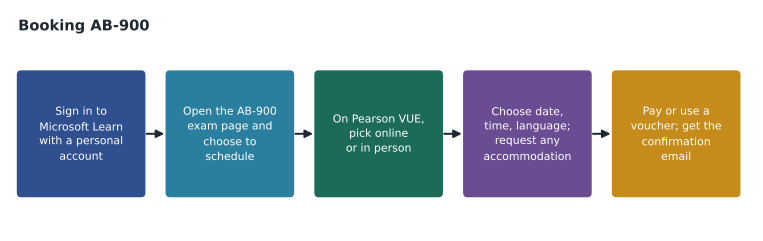
AB-900 is a proctored exam. The certification page says candidates schedule it through Pearson VUE, Microsoft's exam delivery partner, or through Certiport if they are a student or educator. The booking starts from the exam's page on Microsoft Learn, which hands off to the delivery partner's site to choose a delivery method, date and time. The price is not one figure: the page says it depends on the country or region where the exam is proctored, and the booking screen shows the amount before payment. Employers, training partners and Microsoft events sometimes provide discount vouchers, which are entered at checkout.
The certification page lists AB-900 in English, Arabic (Saudi Arabia), Japanese, Simplified and Traditional Chinese, Korean, German, French, Indonesian, Italian, Portuguese (Brazil), Russian and Spanish. Microsoft's study guides note that localized versions are updated about eight weeks after the English version, and that a candidate whose preferred language is not offered can request 30 extra minutes. For an exam that lasts 45 minutes, that is a substantial allowance, and it is worth requesting if English is not your strongest language.
Accommodations
Microsoft runs an accommodations process for candidates who use assistive devices, need extra time or need any other change to the exam experience. The study guide links to the request page. An accommodation must be approved before the exam is booked with it, and approval takes time, so Microsoft advises starting early. Ama Owusu-Pratt, who had also started studying for AB-900, has dyslexia and asked about it during the session. Ines's advice was to submit the request that week rather than waiting until she felt ready to book: the request does not commit her to a date.
Online or at a test center
Pearson VUE delivers Microsoft exams in two ways. Online proctored delivery lets the candidate sit the exam at home or in an office, with a remote proctor watching through the webcam and microphone. Test center delivery means sitting the exam at an authorized center, on its computers, with its staff checking ID and supervising the room. The exam and the score are the same either way; the difference is in the environment and in what can go wrong.
| Question | Online proctored | Test center |
|---|---|---|
| Where | Home or office, in a private room | An authorized Pearson VUE center |
| Equipment | Your computer, webcam, microphone and connection, tested beforehand | Provided by the center |
| Check-in | Online: photos of your ID, face and room, then a proctor review | At the desk: ID check, locker for belongings, often a photo |
| Scratch work | A digital whiteboard in the exam interface | A whiteboard or paper provided by the center |
| Main risks | Interruptions, connection or webcam problems, a room that fails inspection | Travel, traffic, arriving late |
| Best for | Candidates with a quiet private room and reliable equipment | Candidates without a suitable room or who prefer a controlled setting |
Teodor had planned to sit the exam at his desk at Corvallin's head office. Ines pointed out the problems: a glass wall onto the corridor, a desk phone, colleagues who walk in, and a managed laptop whose security software might block the exam browser. He changed the booking to his home office instead and scheduled the system test for that evening.
Preparing for online delivery
For online exams, Pearson VUE provides a system test that checks the computer, webcam, microphone and connection with the same software used on exam day. Running it on the actual computer, on the actual network, a few days before is the single most useful thing a candidate can do to avoid a failed start. Work laptops are a common source of trouble, because corporate VPNs, proxy settings and endpoint protection can interfere with the secure exam browser. A personal computer on a home network is usually the safer choice.
| Before exam day | On exam day |
|---|---|
| Run the system test on the computer and network you will use | Restart the computer and close every other application |
| Choose a private room with a door you can close | Clear the desk and the area around it; remove notes, books and devices |
| Check that your ID is valid and the names match | Have the ID ready for the check-in photos |
| Tell the people you live with when the exam is | Put the phone out of reach, but where you can get it if the proctor calls |
| Know the start time in your own time zone | Start check-in in the window before the appointment, not at the last minute |
Check-in for an online exam opens a short time before the appointment. The candidate photographs their ID, their face and the room from several sides, and a proctor reviews the photos before releasing the exam. During the exam, the proctor watches through the webcam. Looking away from the screen for long periods, reading questions aloud, covering the mouth, leaving the camera view or another person entering the room can lead to a warning or to the session being ended. The candidate is expected to stay in view for the whole exam. Breaks are not a normal part of a 45-minute fundamentals exam, so Teodor planned to treat the session as continuous.
Online or in person, the exam is closed book. Phones, notes, smart watches, headphones and second monitors are not allowed. At a test center, a whiteboard or scratch paper is provided; online, a digital whiteboard is built into the exam interface. Microsoft has offered access to Microsoft Learn during some role-based exams since 2023, in a restricted window with the clock still running, but whether that applies to a given exam depends on its rules at the time. For a 45-minute fundamentals exam, Ines's advice was to prepare as if no reference will be available.
Rescheduling, canceling and missing the appointment
Plans change. Microsoft's exam policies allow a candidate to reschedule or cancel an exam through the booking site within a set notice period before the appointment, and the confirmation email states the deadline. Missing an appointment, arriving too late to check in or canceling after the deadline normally means losing the exam fee. Teodor added the reschedule deadline to his calendar as its own reminder, separate from the exam itself.
The retake policy
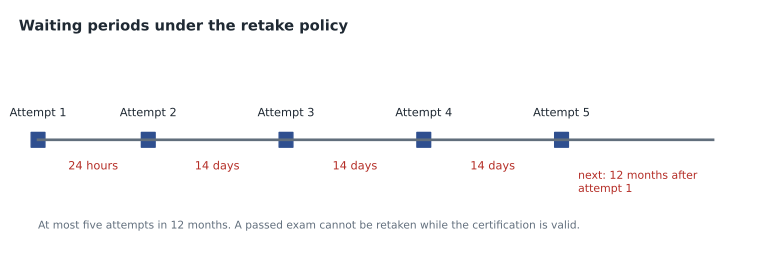
Microsoft publishes one retake policy for role-based, specialty and fundamentals exams. The policy page, last updated on July 27, 2026, sets these rules.
| Situation | Rule |
|---|---|
| First attempt failed | Wait 24 hours before retaking |
| Second and later attempts failed | Wait 14 days between attempts |
| Maximum attempts | Five attempts on the same exam within 12 months of the first attempt |
| Five attempts used | The exam can be taken again 12 months after the first attempt |
| Exam passed | It cannot be retaken unless the certification has expired |
| Fees | Each retake is paid for, unless a voucher or offer covers it |
| Technical failure | A waiting-period waiver is possible only for connectivity or equipment failures during the exam that have a Pearson VUE case number |
The last row matters most if something goes wrong online. If the connection drops or the webcam fails during the exam, the candidate should contact Pearson VUE immediately and keep the case number. Without a case number, Microsoft does not grant a waiver of the waiting period, and the attempt may be treated like any other. Teodor wrote the Pearson VUE support contact on a card to keep outside the room, since phones are not allowed on the desk.
Worked problem
Working out a retake date
Suppose a candidate sits AB-900 on a Thursday morning and fails. She retakes it the following Monday and fails again. When is the earliest she can sit it a third time, and how many attempts will she have left in the 12-month window after that?
Show solution
- The first retake needed only 24 hours, so the Monday attempt was allowed.
- After a second failure, the wait is 14 days, so the earliest third attempt is two weeks after that Monday.
- Five attempts are allowed in 12 months from the first attempt; three would be used.
Answer: The earliest third attempt is 14 days after the Monday retake. After it, she would have two attempts left in the 12 months that began with her first attempt.
After the exam
At the end of the exam, the candidate sees a pass or fail result straight away, with a score report that shows performance by domain as bars. The bars show relative strength rather than exact marks, but they are the most useful thing to keep after a failed attempt, because they show where to study before a retake. When a candidate passes, the certification appears on the Microsoft Learn profile and the candidate can share a digital badge and print a certificate. Results can take a little time to appear on the profile, so a candidate who needs proof for an employer should allow a few days.
A booking record worth keeping
Ines asked Teodor to keep one short record for the exam, in the same notebook as his study plan, so that nothing depended on memory or on finding an email on the day. It took five minutes to write and answered every practical question that came up later.
| Item | Teodor's entry |
|---|---|
| Exam and delivery | AB-900, online proctored, home office |
| Appointment | First week of December, morning, in his own time zone |
| Reschedule deadline | Copied from the confirmation email |
| Account | Personal Microsoft account, profile name matching passport |
| System test | Passed on the home computer and network; to be rerun the weekend before |
| Support | Pearson VUE contact written on a card kept outside the room |
Common mistakes
MistakeBooking with a work account because it was already signed in.
InsteadUse a personal Microsoft account so the certification stays with you.
MistakeSkipping the system test or running it on a different computer or network.
InsteadRun it on the exact computer and connection you will use, a few days before.
MistakeSitting an online exam in a shared office.
InsteadChoose a private room with a closed door, or book a test center.
MistakeHanging up after a technical failure without a case number.
InsteadContact Pearson VUE during the session and keep the case number; waivers need it.
MistakeLeaving the accommodation request until the week of the exam.
InsteadRequest accommodations early; they must be approved before booking with them.
Summary and key terms
- Use a personal Microsoft account linked to a Microsoft Learn profile, with a name that matches your ID.
- AB-900 is scheduled through Pearson VUE, or through Certiport for students and educators; the price depends on the country or region.
- Candidates can request 30 extra minutes if the exam is not in their preferred language, and accommodations through Microsoft's request process.
- Online delivery needs a passed system test, a private room and an uninterrupted session; test centers provide equipment and supervision.
- Retakes: 24 hours after the first failure, 14 days after later ones, at most five attempts in 12 months; a passed exam cannot be retaken while valid.
- Certification profile
- The record of a candidate's Microsoft exams and certifications, linked to a Microsoft Learn profile.
- Pearson VUE
- The company that delivers Microsoft exams online and at test centers.
- Certiport
- The delivery channel Microsoft offers for students and educators.
- Online proctored exam
- An exam taken at home or in an office, watched by a remote proctor through the webcam.
- System test
- Pearson VUE's check of the computer, webcam, microphone and network before an online exam.
- Accommodation
- An approved change to the exam experience, such as extra time or an assistive device.
- Score report
- The result screen and report showing pass or fail and relative performance by domain.
Practice problems
Work each problem on paper first, then reveal the answer to check.
Why does Microsoft recommend a personal account for your certification profile?
Show answer
Certifications belong to the person; a work account may be lost when you change employer.
How long must you wait after failing AB-900 for the second time?
Show answer
14 days.
What should you do if your connection fails during an online exam?
Show answer
Contact Pearson VUE straight away and keep the case number, which any waiver request needs.
Lesson quiz · 5 questions
Score 60% or more to complete this lesson.
Create a free account to save your progress, take quizzes and earn a certificate.