
MSBA-109 · Lesson 6 of 12 · 18 min
Domain 2 review: Purview information protection and DLP
▶ Video coming soon A video version of this lesson is on the way.
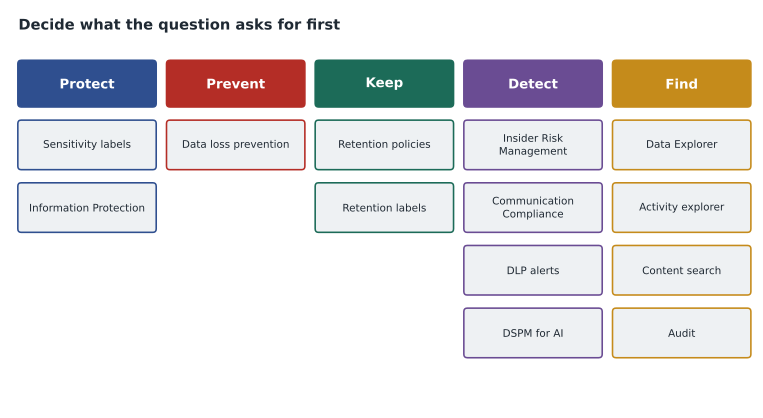
Domain 2 was where Teodor's practice assessment had been weakest, and Ines brought in Ansel Marrowby, Corvallin's records manager, for the Wednesday session. Ansel had run most of the Purview work in MSBA-102, and he started with a single sheet of paper divided into columns: protect, prevent, keep, detect, find. "Every Purview question on the exam is asking which column you are in," he said. "Decide the column first, and the tool usually follows."
Domain 2, "Understand data protection and governance tasks for Microsoft 365 and Copilot", is the largest domain on AB-900, weighted 35 to 40 percent. It has four objective groups. This lesson reviews two of them: understand Microsoft Purview and identify data protection and governance risks for Microsoft 365 and Copilot. Lesson 7 reviews the other two: the data security implications of Copilot, and oversharing in SharePoint. The full teaching is in MSBA-102.
The Purview solutions named in the outline
The first objective lists six Purview solutions by name. Knowing what each is for, in one sentence, is the foundation for the whole domain.
| Solution | Ansel's column | What it does |
|---|---|---|
| Information Protection | Protect | Classifies and labels content with sensitivity labels, which can encrypt it and mark it |
| Data Loss Prevention (DLP) | Prevent | Detects sensitive content in use and blocks or warns on risky actions such as external sharing |
| Data Lifecycle Management | Keep | Retains content for a set period and deletes it afterwards, with retention policies and labels |
| Insider Risk Management | Detect | Correlates signals to find risky user behavior such as data theft by a departing employee |
| Communication Compliance | Detect | Finds policy violations in messages, such as harassment or sharing sensitive information in chat |
| DSPM for AI | Detect and prevent | Discovers AI activity and data risks around Copilot and other AI apps, with one-click policies |
Sensitivity labels and classification
Sensitivity labels are the core of Information Protection. A label is a tag applied to an email, file, meeting or container (a site, group or team) that says how sensitive it is and can apply protection: encryption with usage rights, content marking such as headers and watermarks, and, for containers, settings such as privacy and external sharing. Labels can be applied manually by users, recommended to them, or applied automatically by policy. The exam objective "identify the use cases for sensitivity labels" expects you to choose labels when the need is to classify content, protect it wherever it travels, or mark it visibly.
Data classification is how Purview recognizes sensitive content in the first place. Sensitive information types find patterns such as credit card numbers, health card numbers or social insurance numbers. Trainable classifiers recognize kinds of documents, such as contracts or résumés, from examples. Exact data match compares content with a list of real values. Classification feeds labels, DLP, retention and the explorers.
| Need | Use |
|---|---|
| Encrypt a document so only staff can open it, even if it is emailed outside | A sensitivity label with encryption |
| Add a "Confidential" footer to every document of a kind | A sensitivity label with content marking |
| Make a team private and block guests | A sensitivity label for containers |
| Recognize health card numbers wherever they appear | A sensitive information type |
| Recognize client care plans by their shape | A trainable classifier |
Retention
Retention answers a different question from protection: how long content must be kept, and when it may be deleted. Retention policies apply broadly to locations such as Exchange mailboxes, SharePoint sites and Teams chats. Retention labels apply to individual items and can declare them records. Retention can keep content for a period, delete it after a period, or keep and then delete. The exam objective "understand retention" usually tests the difference from deletion by users: content under retention can be deleted from the user's view but is preserved in the background for the retention period.
Ansel's rule of thumb for the exam: if a question says keep, preserve, for seven years or delete after, it is a retention question, not a labels or DLP question, even if the content is sensitive.
Identifying risks: the tools in the second objective group
The second objective group, "identify data protection and governance risks", names eight tasks. Each points to a specific tool, and several of them have similar names.
| Objective | Tool | What you see there |
|---|---|---|
| Identify compliance risks and recommendations | Compliance Manager | A compliance score, assessments against regulations and improvement actions |
| Identify sensitive information | Data Explorer | Where items with sensitive information types and labels are stored |
| Identify risks | Insider Risk Management | Alerts and cases about risky user activity |
| Identify and respond to alerts | DLP alerts | Alerts raised when DLP policies match, with details and actions |
| Identify policy violations | Communication Compliance | Messages flagged by policies for review |
| Identify user activities | Activity explorer | What users did with labeled or sensitive content: labeled, downgraded, copied, shared |
| Discover and manage AI activity | DSPM for AI | AI interactions, risks and recommended policies |
| Search for files and emails | Content search in eDiscovery | Items matching a query across mailboxes, sites and Teams |
The two explorers are the pair to watch. Data Explorer (formerly content explorer) answers "where is it?": how many items with a given sensitive information type or label exist, and in which locations. Activity explorer answers "what happened to it?": a history of actions on labeled and sensitive content. A question that asks how many documents contain health card numbers is a Data Explorer question. A question that asks who removed a Confidential label last week is an activity explorer question.
Compliance Manager is the odd one out, because it is about the organization's overall posture rather than individual items. It scores the tenant against assessments based on regulations and standards, starting with the Data Protection Baseline, and lists improvement actions, some of which Microsoft manages and some of which the organization must do. Its improvement actions are not the same as those in Secure Score, which is a security measure.
DLP alerts and responding to them
A DLP policy has locations (Exchange, SharePoint, OneDrive, Teams, devices, and for Copilot a Microsoft 365 Copilot location), conditions (such as content containing a sensitive information type or carrying a label) and actions (block, block with override, notify, or audit only). When a policy matches, it can show a policy tip to the user and raise an alert for administrators. Responding to an alert means reviewing the matched item and the user's action, deciding whether it was legitimate, and adjusting the policy or following up with the user. Policies can run in simulation mode first, which shows matches without enforcing actions.
Worked problem
Reading a DLP scenario
Corvallin wants to warn staff, without blocking them, when they share a document containing a health card number with someone outside the agency, and wants the privacy officer to see each occurrence. Before switching it on, the team wants to know how often it would trigger. Which features meet each part?
Show solution
- Warning without blocking: a DLP rule with a policy tip, or block with override.
- The privacy officer seeing each occurrence: DLP alerts or incident reports for that rule.
- Knowing how often it would trigger first: simulation mode.
Answer: A DLP policy with a sensitive information type condition, a policy tip, alerts to the privacy officer, run first in simulation mode. Labels, retention and Insider Risk Management are all wrong columns for this need.
Insider Risk Management and Communication Compliance
These two solutions both detect people-related risk, and the exam distinguishes them by what they look at. Insider Risk Management looks at activity: downloads, copying to USB, sharing, printing, sequences of actions, often triggered by events such as a resignation date. It uses policy templates such as data theft by departing users and, for AI, risky AI usage. User names can be pseudonymized for investigators. Communication Compliance looks at message content: words and patterns in email, Teams and other communications that break policy, such as threats, harassment or sharing regulated information in chat. It routes flagged messages to reviewers.
| Question wording | Likely answer |
|---|---|
| "A departing employee downloaded hundreds of client files" | Insider Risk Management |
| "Messages in Teams contain abusive language" | Communication Compliance |
| "Find every email that mentions the Pellwood acquisition" | Content search in eDiscovery |
| "Who changed this document's label last week?" | Activity explorer |
| "How many files across the tenant contain health card numbers?" | Data Explorer |
| "How well does the tenant meet a privacy regulation?" | Compliance Manager |
Content search
Content search in Microsoft Purview eDiscovery finds emails, documents and Teams messages that match a query, across chosen mailboxes, sites and other locations. It is the tool for "search for files and emails" in the outline. It is not the same as an eDiscovery case with holds, which preserves content for legal matters, though both live in eDiscovery. And it is not the same as audit, which records actions rather than content. Ansel's line: "Audit tells you who did what. Content search tells you what is there."
A practice set for this lesson
Ten original questions, one minute each. Ansel read them aloud and Teodor answered before seeing the options he had written.
| # | Question | Answer |
|---|---|---|
| 1 | Which solution keeps email for seven years even if users delete it? | Data Lifecycle Management (a retention policy) |
| 2 | Which feature encrypts a file so only staff can open it after it leaves the tenant? | A sensitivity label with encryption |
| 3 | Where do you see how many documents contain social insurance numbers? | Data Explorer |
| 4 | Where do you see who downgraded a label? | Activity explorer |
| 5 | Which tool scores the tenant against a data protection regulation? | Compliance Manager |
| 6 | Which solution flags threatening messages in Teams for review? | Communication Compliance |
| 7 | Which solution detects a pattern of downloads before a resignation date? | Insider Risk Management |
| 8 | How can a new DLP policy be tested without affecting users? | Simulation mode |
| 9 | Which recognizes a document type, such as a care plan, from examples? | A trainable classifier |
| 10 | Which tool finds every email that mentions a project name? | Content search in eDiscovery |
Teodor scored eight. He swapped questions 3 and 4, the two explorers, which was exactly the confusion Ansel had warned about. He wrote "where is it: Data; what happened: Activity" on a card and kept it on his desk for the rest of the week.
How the Purview pieces work together
The exam sometimes asks about a combination rather than a single tool, and the solutions are designed to work together. Classification finds sensitive content; labels mark and protect it; DLP uses both labels and sensitive information types as conditions; retention keeps the content for as long as required; the explorers show where it is and what happens to it; audit records who did what; and eDiscovery finds it when needed.
| Step | Solution | At Corvallin |
|---|---|---|
| Find it | Sensitive information types and Data Explorer | Health card numbers found in 3,100 files across 40 sites |
| Mark and protect it | Sensitivity labels | Client Confidential label with encryption for staff only |
| Stop it leaking | DLP | Policy tip and alert when Client Confidential content is shared externally |
| Keep it | Retention policies and labels | Client records kept for the provincial or state retention period |
| Watch it | Activity explorer and audit | Label downgrades reviewed monthly |
| Produce it | Content search | Used for a privacy complaint in October |
Ansel's advice was to rebuild this table from memory the night before the exam. If you can say, for one kind of sensitive data, which solution handles each step, you can answer most domain 2 questions about combinations.
Common mistakes
MistakeChoosing a sensitivity label when the need is to keep content for a period.
InsteadKeeping and deleting on a schedule is retention.
MistakeConfusing Data Explorer with activity explorer.
InsteadData Explorer shows where sensitive items are; activity explorer shows what was done to them.
MistakeUsing Insider Risk Management for abusive chat messages.
InsteadMessage content violations belong to Communication Compliance.
MistakeTreating Compliance Manager as a security score.
InsteadCompliance Manager measures regulatory posture; Secure Score measures security.
MistakeUsing audit to find documents by their content.
InsteadContent search finds content; audit records actions.
Summary and key terms
- Purview's named solutions: Information Protection, DLP, Data Lifecycle Management, Insider Risk Management, Communication Compliance and DSPM for AI.
- Labels classify, protect and mark content and containers; classification uses sensitive information types, trainable classifiers and exact data match.
- Retention keeps and deletes content on a schedule, regardless of user deletion.
- Risk tools: Compliance Manager for posture, Data Explorer for where, activity explorer for what happened, DLP alerts, Insider Risk Management for activity, Communication Compliance for messages, Content search for finding content.
- Decide the column first: protect, prevent, keep, detect or find.
- Sensitivity label
- A tag that classifies content or a container and can apply encryption, marking and settings.
- Sensitive information type
- A pattern Purview uses to recognize sensitive data such as card or ID numbers.
- Retention policy
- A rule that keeps content in chosen locations for a period and can delete it afterwards.
- Data Explorer
- The Purview tool that shows where items with sensitive information or labels are stored.
- Activity explorer
- The Purview tool that shows actions taken on labeled and sensitive content.
- Compliance Manager
- The Purview tool that scores regulatory posture and lists improvement actions.
- Simulation mode
- Running a DLP policy to see matches without enforcing its actions.
Practice problems
Work each problem on paper first, then reveal the answer to check.
Which column, in Ansel's scheme, does Communication Compliance belong to?
Show answer
Detect.
Which tool would you use to search all mailboxes for messages mentioning a supplier?
Show answer
Content search in Microsoft Purview eDiscovery.
What is the difference between a retention policy and a retention label?
Show answer
A policy applies broadly to locations; a label applies to individual items and can mark them as records.
Lesson quiz · 5 questions
Score 60% or more to complete this lesson.
Create a free account to save your progress, take quizzes and earn a certificate.