
MSBA-109 · Lesson 8 of 12 · 20 min
Domain 3 review: Copilot features and licensing
▶ Video coming soon A video version of this lesson is on the way.
Week three began with domain 3, and Lorna Fitch-Adeyemi, Corvallin's finance manager, joined the Monday session for the licensing part. She had sat through Teodor's break-even calculation in MSBA-103 and wanted to see whether the exam would ask the same thing. "It will ask whether you know the difference between a monthly license and pay-as-you-go," Ines said, "and which one fits which user. It will not ask you to negotiate the price." Lorna was relieved.
Domain 3, "Perform basic administrative tasks for Copilot and agents", is weighted 25 to 30 percent. Its three objective groups are: understand features and capabilities of Copilot and agents; perform basic administrative tasks for Copilot; and perform basic administrative tasks for agents. This lesson reviews the first group and the licensing and billing tasks from the second. Lesson 9 covers usage monitoring, prompts and agents. The teaching is in MSBA-103 lessons 1 to 4.
| Objective | Where it was taught |
|---|---|
| Compare the built-in capabilities of Copilot and agents | MSBA-103 lessons 1 and 2 |
| Compare the Copilot monthly license model to pay-as-you-go, including SharePoint | MSBA-103 lesson 3 |
| Identify which Copilot features can be enabled or disabled | MSBA-103 lessons 1 and 12 |
| Identify use cases for Researcher, Analyst and custom agents | MSBA-103 lessons 2 and 5 |
| Assign Copilot licenses | MSBA-103 lesson 4 |
| Monitor and manage Copilot pay-as-you-go billing policies | MSBA-103 lesson 3 |
Copilot Chat and Microsoft 365 Copilot
The first distinction the exam relies on is between the two main Copilot experiences for work accounts. In 2026 Microsoft's materials began calling them Copilot Chat (Basic) and Microsoft 365 Copilot (Premium). Copilot Chat is included for users with a Microsoft 365 work account, with enterprise data protection, and grounds answers in the web and in content the user uploads or opens. Microsoft 365 Copilot is a paid add-on license that adds grounding in the user's work data through Microsoft Graph and Copilot inside apps such as Word, Excel, PowerPoint, Outlook and Teams.
| Capability | Copilot Chat (Basic) | Microsoft 365 Copilot (Premium) |
|---|---|---|
| Chat grounded in the web | Yes, if web search is allowed | Yes, if web search is allowed |
| Enterprise data protection for work accounts | Yes | Yes |
| Grounding in mail, meetings, chats and files through Microsoft Graph | No | Yes |
| Copilot in Word, Excel, PowerPoint and OneNote | Not for organizations over 2,000 seats since April 15, 2026 | Yes |
| Agents grounded only in instructions and web content | Yes | Yes |
| Agents using shared tenant data such as SharePoint | Through pay-as-you-go billing | Included |
| Researcher and Analyst | Not included | Included, within usage limits |
A question that says a user "cannot see their own emails in Copilot's answers" is almost always about the difference between these two: the user has Copilot Chat but not a Microsoft 365 Copilot license. A question that asks how users without a Copilot license can use an agent grounded in a SharePoint library points to pay-as-you-go billing.
Built-in agents: Researcher and Analyst
Microsoft provides built-in agents alongside Copilot. The two named in the outline are Researcher and Analyst. Researcher performs multi-step research across work data, Copilot connectors and, if allowed, the web, and produces a structured report with citations. Microsoft's FAQ in November 2026 described simple Researcher tasks as taking under five minutes and complex ones from ten to 45 minutes, with a limit of 25 queries per user per month. Analyst works through data step by step, writing and running code to analyze spreadsheets and other data files and explaining its reasoning.
| Need | Best fit |
|---|---|
| A cited briefing that combines internal reports and public sources | Researcher |
| Finding trends in a spreadsheet of visit times | Analyst |
| A quick summary of today's unread email | Microsoft 365 Copilot in Outlook |
| Answers drawn only from the intake procedures library | A custom agent, such as a SharePoint agent |
| A first draft of a document from notes | Copilot in Word |
Custom agents and their use cases
A custom agent is an agent an organization or user builds for a specific purpose, with instructions, knowledge, actions and starter prompts. Use cases on the exam tend to share a pattern: a narrow, repeated task grounded in a defined set of content. Corvallin's Intake Questions agent, answering families' common questions from the family handbook, is typical. Agents that need to act in business systems, such as opening tickets, belong in Copilot Studio rather than Agent Builder. Lesson 9 reviews how agents are created, approved and monitored.
The monthly license and pay-as-you-go
This comparison is named in the outline, "including SharePoint". The monthly license, the Microsoft 365 Copilot add-on, is assigned per user and gives that user the full Premium experience for a fixed price. Pay-as-you-go charges for specific Copilot services as they are used, through a billing policy in the Microsoft 365 admin center that is linked to an Azure subscription and covers chosen users. In November 2026 the services billed this way included Copilot Chat agents that use shared tenant data, SharePoint agents, and the Copilot Retrieval API in preview. Usage is measured in Copilot Credits.
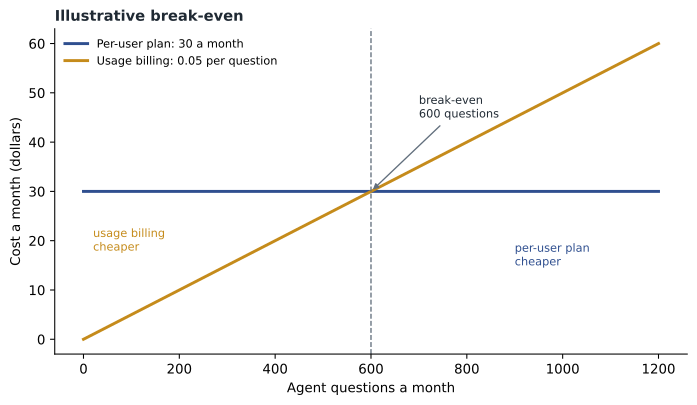
The exam cares about the reasoning more than the numbers. A license suits people who use Copilot daily across many apps. Pay-as-you-go suits people who only occasionally need an agent grounded in shared data, such as home-care aides who look up a procedure a few times a month. Corvallin's plan for spring 2027 followed that logic: licenses for office staff in the pilot, and a pay-as-you-go policy for a group of frontline staff who would use the procedures agent in SharePoint.
Worked problem
An illustrative break-even
Suppose a license costs 30 dollars a user each month and an agent question billed through pay-as-you-go costs the equivalent of 5 cents. A coordinator asks about 200 questions a month and uses no other Premium feature. Which is cheaper for her? (These figures are for practice only; real prices vary by agreement and region.)
Show solution
- Break-even is 30 divided by 0.05, which is 600 questions a month.
- She asks about 200 questions, well below break-even.
- At 200 questions, pay-as-you-go costs about 10 dollars.
Answer: Pay-as-you-go, at about 10 dollars a month against 30. If she also needed Copilot in Word and Outlook every day, the license would be the better fit regardless of question count.
Managing billing policies
The outline asks you to monitor and manage Copilot pay-as-you-go billing policies. The facts from MSBA-103 lesson 3, verified on Microsoft Learn in November 2026, are the ones to know.
| Fact | Detail |
|---|---|
| Where | Microsoft 365 admin center, under Copilot, Billing and usage, Pay-as-you-go services |
| What a policy links | An Azure subscription, the users or groups it covers, and the services it pays for |
| Default | Pay-as-you-go is off until an administrator sets it up |
| Limit | Up to 50 billing policies per tenant |
| Budgets | Azure budgets send alerts; they do not cap spending |
| Who can manage | Billing Administrator and AI Administrator; Global Administrator for emergencies; Global Reader can view |
| Turning off | Disconnecting a service can take up to about two hours to take effect |
| Spending views | Cost management in the Microsoft 365 admin center and cost analysis in Azure |
The budget row is a favorite trap. An Azure budget is a warning, not a brake. If a question asks how to stop spending once a limit is reached, the answer is a spending policy or limit in Copilot cost management, or turning off the service, not a budget alone.
Assigning Copilot licenses
Copilot licenses are assigned like other Microsoft 365 licenses: to users directly in the Microsoft 365 admin center, or through group-based licensing in Entra ID. The user must have a qualifying base license, and Microsoft recommends checking readiness first: an Exchange Online mailbox, OneDrive, and Microsoft 365 Apps on a supported update channel. In late 2026, Microsoft announced naming changes for the add-on (Message center post MC1508148), adding "(add-on)" to its name from October 16, 2026, and new subscription options from December 1, 2026, so scripts should rely on SKU identifiers rather than display names.
Features that can be enabled or disabled
The outline asks which Copilot features administrators can turn on or off. The Copilot settings in the Microsoft 365 admin center, managed by the AI Administrator role, include web search for Copilot, pinning Copilot Chat in apps, and other organization-wide options, and Researcher and Analyst can be blocked by administrators. Teams meeting policies control whether Copilot is available in meetings and whether it needs a transcript. Agent access is controlled in the Agents area, covered in lesson 9. Ines's summary: "Know that web grounding, Copilot in meetings, built-in agents and agent access can each be controlled, and know which admin center holds each."
| Feature | Where it is controlled |
|---|---|
| Web search grounding for Copilot | Copilot settings in the Microsoft 365 admin center |
| Pinning Copilot Chat in apps | Copilot settings in the Microsoft 365 admin center |
| Researcher and Analyst availability | Agents settings in the Microsoft 365 admin center |
| Copilot in Teams meetings | Meeting policies in the Teams admin center |
| Who can use and share agents | Agents settings in the Microsoft 365 admin center |
| Pay-as-you-go services | Billing and usage in the Microsoft 365 admin center |
Readiness before licensing
The licensing objective sits on top of a readiness check, and the exam can ask what must be in place before a Copilot license is useful. A user needs a qualifying base license such as Microsoft 365 E3 or E5, an Exchange Online mailbox for Copilot in Outlook and Teams, OneDrive for file features, and Microsoft 365 Apps on a supported update channel for Copilot in Word, Excel and PowerPoint. Network requirements, such as allowing the Microsoft 365 endpoints Copilot uses, also apply. The Microsoft 365 admin center provides a readiness report that summarizes which users meet the prerequisites.
| Prerequisite | Why it matters |
|---|---|
| Qualifying base license | The Copilot add-on can only be assigned on top of an eligible plan |
| Exchange Online mailbox | Copilot in Outlook and meeting features rely on it |
| OneDrive | File features and saved content rely on it |
| Microsoft 365 Apps on a supported channel | Copilot in the desktop apps needs current builds |
| Network access to Microsoft 365 endpoints | Copilot experiences fail if required endpoints are blocked |
At Corvallin, the readiness report showed that the 340 home-care staff on Microsoft 365 F3 were not candidates for the Premium add-on in the pilot, which matched the plan to use pay-as-you-go for the procedures agent. It also showed 14 office users on an older update channel, which the endpoint team moved before the pilot.
Group-based licensing for Copilot
Most organizations assign Copilot licenses through groups. A security group such as Copilot-Pilot is given the license, and adding a user to the group gives them Copilot. If the group has more members than licenses available, the extra members end up in an error state and do not receive the license until more are bought or members are removed. Teodor's pilot group had 45 members and 41 licenses in a test run, which produced four licensing errors and a useful lesson about counting before assigning.
Worked problem
Choosing between assignment methods
Corvallin will license 60 pilot users in spring 2027 and expects to add more each month. Which assignment method suits this, and what must Teodor watch?
Show solution
- Group-based licensing assigns the license to everyone added to a pilot group, which scales as the pilot grows.
- It needs Entra ID P1, which Corvallin has through Microsoft 365 E3.
- The number of available licenses must be at least the number of group members, or extra members go into an error state.
Answer: Group-based licensing through a pilot security group, with the license count checked each time members are added.
Common mistakes
MistakeAssuming every work account user can ground Copilot in their own email.
InsteadGraph grounding needs a Microsoft 365 Copilot license; Copilot Chat alone grounds in the web and uploaded content.
MistakeUsing an Azure budget to stop pay-as-you-go spending.
InsteadBudgets alert; spending limits or turning off services stop spend.
MistakePicking Analyst for a cited research briefing.
InsteadResearcher produces cited multi-source reports; Analyst works through data files.
MistakeLicensing every user for an occasional SharePoint agent.
InsteadPay-as-you-go suits occasional agent use by unlicensed users.
Summary and key terms
- Copilot Chat (Basic) is included for work accounts; Microsoft 365 Copilot (Premium) adds Microsoft Graph grounding and Copilot in apps.
- Researcher produces cited multi-step research; Analyst reasons over data; custom agents serve narrow, repeated tasks.
- The monthly license suits daily users; pay-as-you-go suits occasional agent use, including SharePoint agents, billed in Copilot Credits.
- Billing policies link an Azure subscription and users, are off by default, allow up to 50 per tenant, and budgets only alert.
- Licenses are assigned directly or by group; check readiness first; web search, meetings, built-in agents and agent access can be controlled.
- Copilot Chat
- The Copilot experience included with Microsoft 365 work accounts, grounded in the web and in content users provide.
- Microsoft 365 Copilot
- The paid add-on license that grounds Copilot in work data and adds it to Microsoft 365 apps.
- Pay-as-you-go billing
- Charging for specific Copilot services as they are used, through an Azure-linked billing policy.
- Billing policy
- A Microsoft 365 admin center setting that links users and services to an Azure subscription for pay-as-you-go.
- Copilot Credits
- The unit in which usage-based Copilot services are measured.
- Researcher
- A built-in agent for multi-step, cited research across work data and the web.
- Analyst
- A built-in agent that analyses data step by step and explains its reasoning.
Practice problems
Work each problem on paper first, then reveal the answer to check.
Which Copilot experience can ground answers in a user's meetings and email?
Show answer
Microsoft 365 Copilot, with the add-on license.
Does an Azure budget stop pay-as-you-go spending at its limit?
Show answer
No. Budgets send alerts; they do not cap spending.
How many pay-as-you-go billing policies can a tenant have?
Show answer
Up to 50.
Lesson quiz · 5 questions
Score 60% or more to complete this lesson.
Create a free account to save your progress, take quizzes and earn a certificate.