
MSAZ-340 · Lesson 9 of 12 · 20 min
Threat analytics and vulnerability management
▶ Video coming soon A video version of this lesson is on the way.
Most of a security operations center's day is reactive: alerts fire and analysts respond. Nadia's view is that the best shifts are the ones where nothing fires because the team removed the weakness first. On Monday, November 9, she gave Ama two hours with no queue at all, only two screens: threat analytics, which tells the team what attackers are doing in the world, and Defender Vulnerability Management, which tells them where the company is exposed to it. This lesson covers both and how they connect.
Threat analytics
Threat analytics is a set of reports written by Microsoft security researchers on active threat actors, campaigns, techniques, vulnerabilities and attack surfaces. Each report has an overview with the key points, an analyst report with technical detail, a list of related incidents and alerts in the tenant, a list of impacted assets, and an exposure and mitigations section that checks the tenant's own devices for the relevant vulnerabilities and settings. Reports are tagged by type, such as ransomware, phishing, vulnerability or activity group, and the dashboard highlights reports with active alerts in the tenant, reports with high impact, and the most recent ones.
The SC-200 outline asks candidates to interpret threat analytics, which in practice means answering three questions from a report: is this threat relevant to us, are we already affected, and are we protected? The overview answers the first. Related incidents and impacted assets answer the second. Exposure and mitigations answers the third, listing items such as the share of devices with a required update, the share with a recommended attack surface reduction rule in block mode, and the share with tamper protection or cloud protection on.
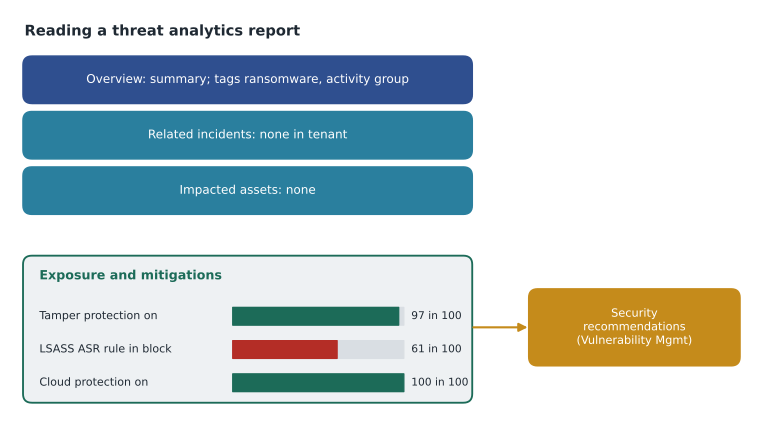
The report Ama read on November 9 described a ransomware operation that gains its first access through remote management software exposed to the internet and through phishing messages with malicious shortcuts in zip files, then disables security tools, steals credentials from memory and encrypts file servers. It had no related incidents at Harrow & Finch. Its exposure and mitigations section showed 97 in 100 devices with tamper protection on, but only 61 in 100 with the attack surface reduction rule that blocks credential theft from the Windows local security authority subsystem in block mode, and 22 devices missing a recent cumulative update the report listed.
| Exposure and mitigations item | Harrow & Finch, November 9 | Action |
|---|---|---|
| Tamper protection on | 97 in 100 devices | Find the 3 in 100 without it (the stored laptops) |
| ASR rule: block credential stealing from LSASS in block mode | 61 in 100 devices | Move remaining head office devices from audit to block |
| Cloud-delivered protection on | 100 in 100 devices | None |
| Latest cumulative update installed | 22 devices missing | Remediation request to the endpoint team |
| Remote management tools exposed to the internet | None found | None; keep checking in exposure management |
The 61 in 100 was the useful finding. The credential theft rule had been left in audit on head office devices since the rollout because of one old backup agent that triggered it. Ama checked the audit events: the backup agent had been replaced in September, and since then the rule had logged nothing. Nadia approved moving it to block that afternoon. A threat that had not touched the company had still produced a concrete improvement, which is exactly what threat analytics is for.
Threat analytics can send email notifications when new reports are published or updated, filtered by report tags; Harrow & Finch sends ransomware and vulnerability reports to the security team mailbox. Nadia reads the overview of every new ransomware report within a day, and she asks the analyst on shift to fill in the relevance, impact and protection questions in a short note, which goes into the weekly security update for Sunil.
Defender Vulnerability Management
Defender Vulnerability Management uses the Defender for Endpoint sensor, with no extra agent or scan schedule, to build continuous inventories of software, vulnerabilities, browser extensions, certificates and hardware and firmware on onboarded devices, and to assess security configuration. Core capabilities come with Defender for Endpoint Plan 2; premium capabilities, such as security baselines assessment, browser extension and certificate inventory, network share analysis and blocking vulnerable applications, need the add-on or the standalone product. Microsoft has moved some features between tiers over time, so the team checks the current comparison page rather than relying on memory.
The main views are the dashboard, with the organization's exposure score and Microsoft Secure Score for Devices; the weaknesses page, which lists known vulnerabilities by their CVE identifiers with severity, exposed devices and whether exploits are known or verified; the software inventory, with versions, end-of-support status and weaknesses per product; and security recommendations, which group the fixes for the weaknesses and misconfigurations into actions such as update a product, change a setting, or uninstall end-of-support software, ranked by how much each reduces exposure.
| View | What it lists | Question it answers |
|---|---|---|
| Dashboard | Exposure score, Secure Score for Devices, top recommendations | How exposed are we overall? |
| Weaknesses | Vulnerabilities with severity, exploit status and exposed devices | Which vulnerabilities affect us? |
| Software inventory | Products, versions, end-of-support status | What is installed, and what is unsupported? |
| Security recommendations | Ranked fixes with impact on exposure | What should we fix first? |
| Remediation | Requests sent to IT, with status and due dates | Is the fix happening? |
Prioritizing what to fix
No team fixes everything at once, so prioritization is the core skill. Severity alone is a poor guide: a critical vulnerability on one isolated test device matters less than a high-severity one that attackers are actively exploiting on every till PC. Defender Vulnerability Management weighs threat context, such as known exploits and use in active campaigns, the number of exposed devices, and the criticality of those devices. Harrow & Finch marks its critical assets in exposure management's critical asset management: domain controllers, the StockLine database servers, the payment gateway servers and the executives' laptops.
# Four open weaknesses from the November 9 review (described, not real CVE numbers)
weaknesses = [
    # name, severity score, exploit in the wild, exposed devices, any critical asset exposed
    ("PDF reader remote code execution", 8.8, True, 388, True),
    ("Old VPN client privilege escalation", 7.8, False, 41, False),
    ("Till PC browser memory flaw", 7.5, True, 140, False),
    ("Print service flaw on servers", 9.8, False, 6, True),
]
def priority(w):
    name, sev, exploited, devices, critical = w
    p = sev * (2 if exploited else 1) * (devices ** 0.5)
    return p * (1.5 if critical else 1)

for w in sorted(weaknesses, key=priority, reverse=True):
print(f"{priority(w):7.1f} {w[0]}")520.0 PDF reader remote code execution 177.5 Till PC browser memory flaw 49.9 Old VPN client privilege escalation 36.0 Print service flaw on servers
What this code does
The program gives each weakness a score from its severity, doubles it if attackers are known to exploit it, scales it by the square root of the number of exposed devices so that large counts matter without swamping everything else, and raises it by half if any critical asset is exposed. The output ranks the PDF reader flaw first at about 520, the till PC browser flaw second at about 177, the VPN client third at about 50 and the print service flaw last at 36, even though the print service flaw has the highest severity.
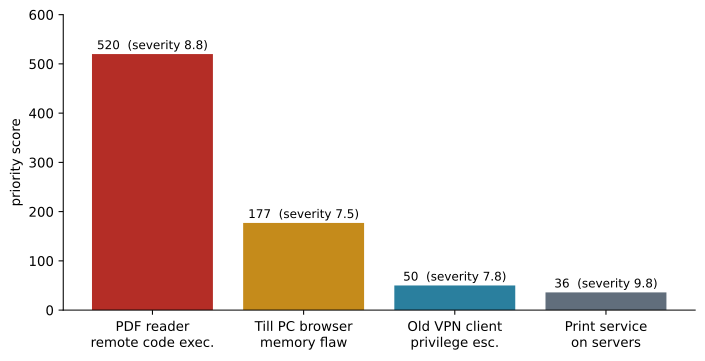
The order matched what Defender Vulnerability Management's recommendations showed, though its own calculation is more sophisticated and not published in detail. The print service flaw had the highest severity score of the four, but it affected six servers with no known exploit, and Renata's team had already disabled the print service on four of them. The PDF reader flaw was on almost every laptop and was being exploited in the phishing campaign the threat analytics report described. Ama raised a remediation request for it first.
Software inventory and end-of-support products
The software inventory deserves a separate look, because some exposures have no patch. End-of-support software, such as an old version of a runtime or a database engine that the vendor no longer updates, accumulates vulnerabilities that will never be fixed. Defender Vulnerability Management flags end-of-support versions and upcoming end-of-support dates. On November 9 Ama found 17 devices with an unsupported version of a Java runtime, all used by one supplier ordering tool, and opened a recommendation to uninstall it once the supplier's new web portal replaced the tool. She set the remediation due date for the portal's launch at the end of January 2027 and added an exception until then, with the 17 devices moved to a device group with stricter attack surface reduction rules as a compensating control.
Worked problem
Raising a remediation request
The PDF reader update is in the top security recommendation, affecting 388 devices, including three executives' laptops. How does Ama turn the recommendation into a fix, and what happens if one department cannot update?
Show solution
- Open the recommendation and check the exposed devices, the vulnerable versions and the fixed version.
- Create a remediation request, choosing the remediation type (update), the device groups, a priority and a due date. With the Intune integration turned on, the request also creates an Intune security task for the endpoint team.
- The endpoint team deploys the update through Intune. Defender Vulnerability Management tracks progress as devices report the new version.
- The accounting team has a plug-in that is not yet certified for the new version. Ama creates an exception for the Finance device group only, with a justification, a compensating control (the ASR rule that blocks child processes from the reader, now in block mode for Finance) and an expiry date 30 days out.
- Check the remediation page each week until the exposed device count reaches zero or only the exception remains.
Answer: Create a remediation request with an Intune task and a due date, track it to completion, and give the one department that cannot update a time-limited exception with a compensating control.
Five days later the exposed count had fallen from 388 to 31, of which 26 were the Finance exception and five were laptops not used since the update. Nadia called that a good week.
Exposure management and attack paths
Microsoft Security Exposure Management, in the Defender portal, widens the view from single devices to the whole attack surface. It builds a graph of assets and their relationships across devices, identities, cloud resources and data, and shows attack paths: chains of exposures, such as a vulnerable device where an administrator has signed in, that would let an attacker reach a critical asset. It also lists initiatives, such as ransomware protection, with metrics that combine settings from several products. Defender for Identity's lateral movement paths in lesson 6 are one input to this graph; Defender for Cloud's cloud attack paths are another.
For SC-200, exposure management sits at the edge of the outline, which focuses on operations, but the hunting objectives now include creating hunting graphs with blast radius, and the graph that powers them is the same one. Ama used it once on November 9 to answer a question Sunil asked: if the PDF reader flaw were used against an executive's laptop, what could the attacker reach? The blast radius view showed the laptop, the executive's mailbox and OneDrive, two SharePoint sites with Confidential financial data, and no path to a domain controller, which gave Sunil a clear answer for the board.
Secure Score and the long view
Microsoft Secure Score measures the tenant's security posture across identity, devices, apps and data as points earned out of points possible, with recommended actions. It is useful for trends and for the board, less useful as a target: chasing points can lead to settings that look good and protect little. Nadia reports two numbers to Sunil monthly, the exposure score from Defender Vulnerability Management and the count of overdue remediation requests, because those reflect real risk being removed.
Common mistakes
MistakeFix vulnerabilities in order of severity score.
InsteadWeigh active exploitation, the number of exposed devices and asset criticality, not severity alone.
MistakeThreat analytics is only useful when the tenant is affected.
InsteadThe exposure and mitigations section often finds weaknesses even when no incident exists.
MistakeVulnerability management needs a separate scanner agent.
InsteadDefender Vulnerability Management uses the Defender for Endpoint sensor; premium features need the add-on.
MistakeExceptions are a way to make recommendations go away.
InsteadAn exception needs a justification, a compensating control and an expiry date.
Summary and key terms
- Threat analytics reports describe threats and check the tenant's related incidents, impacted assets and mitigations.
- Read a report to answer three questions: is it relevant, are we affected, are we protected?
- Defender Vulnerability Management builds inventories and assessments from the existing sensor.
- Prioritize by exploitation, exposed devices and critical assets; security recommendations rank fixes by exposure reduction.
- Remediation requests can create Intune security tasks; exceptions need justification, compensating controls and expiry.
- Exposure management maps attack paths and blast radius across devices, identities, cloud and data.
- Threat analytics
- Microsoft research reports on threats, combined with each tenant's related incidents, assets and mitigations.
- Exposure score
- A measure of how exposed an organization's devices are to vulnerabilities and misconfigurations.
- Security recommendation
- A fix, such as an update or setting change, ranked by how much it reduces exposure.
- Remediation request
- A tracked request to fix a recommendation, optionally creating an Intune security task.
- Exception
- A documented, time-limited decision not to apply a recommendation to some devices.
- Attack path
- A chain of exposures that would let an attacker reach a critical asset.
Practice problems
Work each problem on paper first, then reveal the answer to check.
What three questions should a threat analytics report answer?
Show answer
Is it relevant, are we affected, and are we protected?
What did the November 9 report lead the team to change?
Show answer
Moving the LSASS credential theft ASR rule from audit to block on head office devices.
Why was the PDF reader flaw fixed before the higher-severity print service flaw?
Show answer
It was actively exploited and present on 388 devices, while the print flaw had no known exploit and affected six servers.
What three things did the Finance exception include?
Show answer
A justification, a compensating ASR rule in block mode and a 30-day expiry.
Which two numbers does Nadia report monthly?
Show answer
The exposure score and the number of overdue remediation requests.
Lesson quiz · 5 questions
Score 60% or more to complete this lesson.
Create a free account to save your progress, take quizzes and earn a certificate.