
MSAZ-340 · Lesson 1 of 12 · 22 min
The unified security operations platform
▶ Video coming soon A video version of this lesson is on the way.
On Monday, October 19, 2026, Ama Boateng sat down for her first shift beside Nadia Okonjo, the security operations lead Harrow & Finch hired in September from a managed detection and response provider. Ama had spent a year on Sunil Rao's team doing a little of everything: password resets, phishing reports, the occasional firewall rule. Sunil now wanted a proper security operations function, and he wanted Ama to grow into its first full-time analyst. The plan was simple: twice a week until mid-November, Ama would shadow Nadia through real queues, and in between she would study for the SC-200 Microsoft Security Operations Analyst exam, which she plans to sit in September 2027 after the SC-900 exam she has booked for February.
Nadia started by asking a question she would repeat for the next four weeks: "What did the attacker touch, and what can they still touch?" Everything a security operations center does, she said, is in service of answering that question quickly and accurately. Tools matter because they decide how fast you can answer it. This lesson describes the toolset Harrow & Finch uses, how its parts fit together, and how the SC-200 exam frames the job.
What a security operations analyst does
A security operations analyst watches for signs of attack, decides which signs matter, investigates them, and takes or recommends action to stop the harm and recover. The work falls into a few repeating activities. Triage is deciding what to look at first. Investigation is working out what happened, to which accounts, devices, mailboxes and applications, and in what order. Response is containing the attacker and removing their footholds. Hunting is looking proactively for attacks that no alert has caught. Improvement is tuning detections and automation so the next incident is caught sooner and handled with less effort.
Microsoft's SC-200 study guide groups the skills into three areas. Managing a security operations environment, which covers configuring automation, the Microsoft Sentinel platform, data ingestion and detections, carries the most weight at 40 to 45 parts in 100 of the exam. Responding to security incidents carries 35 to 40, and performing threat hunting 20 to 25. The guide on Microsoft Learn lists skills measured as of October 21, 2026, with a passing score of 700. This course covers the Defender XDR side of that outline; MSAZ-341 covers Microsoft Sentinel, MSAZ-342 hunting with KQL and incident management, and MSAZ-349 reviews the whole outline for the exam.
Extended detection and response
Endpoint detection and response, or EDR, collects detailed activity from computers and servers, detects suspicious behavior and lets analysts respond on the device. Extended detection and response, or XDR, applies the same idea across more domains: email and collaboration, identities, cloud applications and cloud workloads. The value is correlation. A phishing message, a risky sign-in, a new inbox rule and an unusual file download are four separate warnings in four separate tools; in an XDR product they become one incident with one story.
Microsoft Defender XDR is Microsoft's XDR suite. It brings together several products that can also be described on their own. Defender for Endpoint protects Windows, macOS, Linux, Android and iOS devices and servers. Defender for Office 365 protects Exchange Online mail and Teams, SharePoint and OneDrive content. Defender for Identity watches on-premises Active Directory and related identity infrastructure. Defender for Cloud Apps discovers and controls software-as-a-service applications. Microsoft Entra ID Protection contributes identity risk signals, Microsoft Purview contributes data loss prevention and insider risk alerts, and Defender for Cloud contributes alerts from Azure, other clouds and on-premises servers it protects. Each product has its own sensors and settings; the Defender portal is where their alerts, incidents and investigations come together.
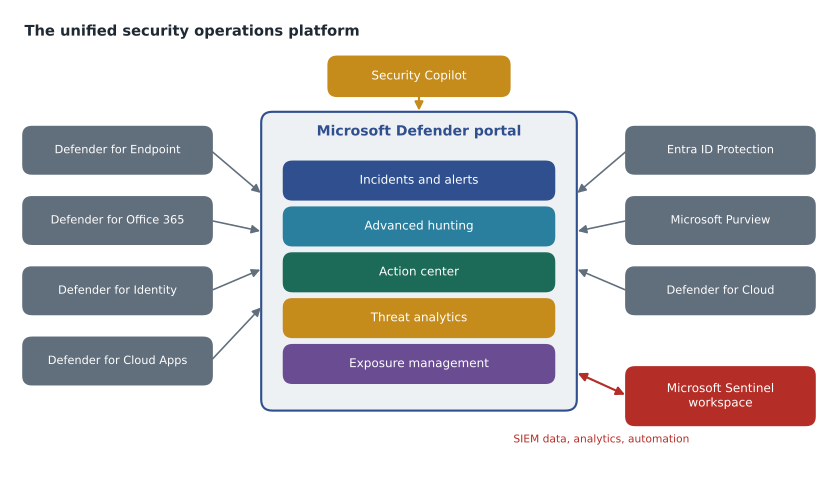
The unified security operations platform
For several years Microsoft Sentinel, the cloud security information and event management (SIEM) product, lived in the Azure portal while Defender XDR lived in the Defender portal. Analysts switched tabs, and incidents existed twice. Microsoft has since merged them into what it calls the unified security operations platform: Sentinel workspaces are connected to the Defender portal, incidents and alerts from both appear in one queue, advanced hunting can query Defender tables and Sentinel tables together, and automation, threat intelligence and exposure management sit alongside. Microsoft announced that the Sentinel experience in the Azure portal will be retired, and in early 2026 it moved that date to March 31, 2027, so every Sentinel customer will be working in the Defender portal by then.
Harrow & Finch made the choice early. When Sunil's team set up Sentinel in November 2026, as SC-900's course MSAZ-131 described, they connected the workspace to the Defender portal from the first day, so Ama has never had to learn the old Azure portal screens. Nadia was firm about why: a single queue means one place to triage, one incident number to quote, and one set of comments and tasks for each case. She has seen teams lose hours because an analyst closed an incident in one portal while another was still working the same attack in the other.
| Capability | Where it comes from | What Ama uses it for |
|---|---|---|
| Incidents and alerts queue | All Defender products, Sentinel analytics rules, Purview, Entra ID Protection | Triage and case work |
| Advanced hunting | Defender tables (about 30 days) plus Sentinel workspace tables | Investigation and hunting with KQL |
| Action center | Automated investigation, attack disruption and manual actions | Approving and reviewing response actions |
| Threat analytics | Microsoft threat intelligence reports | Understanding current campaigns and exposure |
| Exposure management and vulnerability management | Defender for Endpoint, Defender for Cloud and connected sources | Reducing attack surface before attacks |
| Security Copilot (embedded) | Generative AI across the portal | Summaries, guided response, script and query explanations |
Licensing and what Harrow & Finch has
Which features a tenant can use depends on licenses, and the exam expects candidates to know the broad shape rather than prices. Defender for Endpoint comes in Plan 1, which gives next-generation antivirus, attack surface reduction and device control, and Plan 2, which adds EDR, automated investigation, advanced hunting and threat analytics. Defender for Office 365 Plan 1 adds Safe Links, Safe Attachments and stronger anti-phishing to the built-in Exchange Online Protection; Plan 2 adds Threat Explorer, automated investigation and response for email, attack simulation training and more. Microsoft 365 E5 includes the Plan 2 versions of both, plus Defender for Identity and Defender for Cloud Apps. License bundles change, so Nadia keeps a one-page table of what the company actually owns and checks it each renewal.
Harrow & Finch owns Microsoft 365 E5 for 320 head office staff, store managers and IT staff, and Microsoft 365 F3 for the rest of the store workforce, who use shared till PCs and their own phones for scheduling. The company's 412 Windows laptops and desktops, its 140 store till PCs and its 38 on-premises servers are covered by Defender for Endpoint through the E5 licenses and server licenses bought with Defender for Cloud. That coverage plan is the subject of lesson 3.
Security Copilot in the portal
Microsoft Security Copilot is a generative AI assistant for security work. It appears embedded in the Defender portal as incident summaries, guided response suggestions, explanations of scripts and command lines, and help writing hunting queries, and it also has a standalone portal and agents that run tasks such as triaging user-reported phishing. Microsoft began including Security Copilot with Microsoft 365 E5 and E7 from November 18, 2025, rolling it out over the following months. The inclusion page on Microsoft Learn describes a monthly allocation of Security Compute Units, or SCUs, of 400 for every 1,000 paid user licenses, scaled down for smaller tenants and capped at 10,000 a month, resetting each month with no rollover. Those numbers may change, so treat the worked figures below as an example of how the allocation scales.
seats = 320                    # Microsoft 365 E5 users at Harrow & Finch
per_thousand = 400             # SCUs per 1,000 paid user seats each month
cap = 10_000                   # monthly maximum

monthly = min(cap, seats * per_thousand / 1000)
print(f"Monthly allocation: {monthly:.0f} SCUs")

# Nadia's rough budget: incident summaries and guided response on busy days
summaries_per_day = 12
scu_per_summary = 0.4          # illustrative planning figure, not a published rate
days = 30
use = summaries_per_day * scu_per_summary * days
print(f"Planned use: {use:.0f} SCUs, about {use / monthly * 100:.0f} in every 100 of the allocation")Monthly allocation: 128 SCUs Planned use: 144 SCUs, about 113 in every 100 of the allocation
What this code does
The program multiplies the 320 licenses by 400 units per 1,000 licenses to get the monthly allocation, and checks it against the 10,000-unit cap. It then estimates use from twelve summaries a day at an assumed cost per summary over a month. The output shows an allocation of 128 units and planned use of 144, so the plan would run past the allocation and Nadia needs to trim it or accept slower service when usage is throttled.
The result made Nadia rethink her plan. With 128 SCUs a month, Security Copilot is for the incidents that need it, not for summarizing every low-severity alert. She set a rule for the team: use the embedded summary on any incident rated medium or higher that involves more than one product, and use script analysis whenever a command line looks obfuscated. Everything else is read by a person first. Microsoft has said that usage above the allocation will be throttled at a future date and that customers will then be able to pay for more; the team will watch the usage dashboard each month.
Roles and access in the Defender portal
Who can see and do what in the portal is controlled by Microsoft Defender XDR unified role-based access control, which replaced the separate permission models of each product. Administrators create custom roles from permission groups such as security operations, security posture and authorization and settings, and assign them to users or groups, optionally scoped to particular data sources or device groups. Microsoft Entra built-in roles such as Security Reader, Security Operator and Security Administrator still apply as well.
Harrow & Finch created three roles. Analysts, including Ama, can read all security data, manage incidents and alerts, and take response actions such as isolating a device or running an antivirus scan, but cannot change settings. Responders, Nadia and Sunil, can also approve pending remediation actions and run live response with unsigned scripts. Administrators, Sunil and Renata Kowal from the cloud team, manage settings and onboarding. Store support technicians get a narrow role limited to the Stores device group, so they can see the health of the till PCs without seeing head office investigations.
| Role | Members | Key permissions | Scope |
|---|---|---|---|
| SOC analyst | Ama Boateng | Read security data; manage incidents and alerts; basic response actions | All data sources |
| SOC responder | Nadia Okonjo, Sunil Rao | Analyst rights plus approve remediation and advanced live response | All data sources |
| Security admin | Sunil Rao, Renata Kowal | Authorization and settings, onboarding, policies | All data sources |
| Store support | Two store technicians | Read device health and alerts | Stores device group only |
Where the data lives
When a tenant first sets up Defender for Endpoint or Defender XDR, it chooses a data storage location, and that choice cannot be changed later without starting again. Harrow & Finch chose the United States, where its Azure resources and Microsoft 365 data already live. Raw device telemetry is kept for a limited period and queried through advanced hunting, which covers roughly the last 30 days for Defender tables; longer retention comes from sending data to a Sentinel workspace or its data lake, which MSAZ-341 covers. Carmen Ortiz, the privacy officer, asked for one more control: investigation packages and files collected from devices are handled as Confidential under the company's labels, because they can contain personal information.
Worked problem
Mapping a first-week question to the platform
In her first week Ama was asked: a store manager reported that her laptop ran slowly after opening an invoice attachment on Wednesday. Which parts of the platform should she use, in what order, to answer Nadia's question about what the attacker touched?
Show solution
- Start in the incidents queue and search for the user and device. Any alerts from Defender for Office 365 (the message) and Defender for Endpoint (the laptop) should already be correlated into one incident.
- Open the incident and read the attack story and the evidence: the email, the attachment's file hash, any process alerts on the device, and any identity alerts for the user.
- If the incident shows malicious activity, check the action center for actions already taken by automated investigation, then decide on further response such as isolating the device.
- Use advanced hunting to check scope: did the same message reach other mailboxes, and did the same file run on other devices?
- Record findings in the incident's activity log, assign the incident, and set its classification when the case is closed.
Answer: The incidents queue first, then the incident's evidence, then the action center and response, then advanced hunting for scope, with everything recorded in the incident.
The real case turned out to be harmless: the laptop was slow because of a stuck update. But Nadia made Ama walk through the steps anyway, because the habit of checking scope is what separates a closed ticket from a contained incident. The rest of this course follows the platform in the same order: incidents and alerts (lesson 2), each Defender product in turn (lessons 3 to 7 and 10), automation (lesson 8), threat intelligence and vulnerability management (lesson 9), attack disruption (lesson 11), and a full multi-stage incident from November 3, 2026 (lesson 12).
Common mistakes
MistakeDefender XDR and Sentinel are two separate queues that must be worked separately.
InsteadIn the unified platform, a Sentinel workspace connected to the Defender portal shares one incident queue, advanced hunting and automation with Defender XDR.
MistakeEvery Defender feature comes with every Microsoft 365 license.
InsteadPlan 1 and Plan 2 differ; EDR, automated investigation and advanced hunting need Defender for Endpoint Plan 2 or a suite that includes it.
MistakeSecurity Copilot can be used without limit once it is included.
InsteadThe E5 inclusion is a monthly allocation of Security Compute Units; plan which tasks deserve it.
MistakeThe data storage location can be changed later in settings.
InsteadIt is chosen at first setup and cannot be changed without starting again.
Summary and key terms
- A security operations analyst triages, investigates, responds, hunts and improves detections and automation.
- SC-200 weights managing the operations environment 40 to 45, responding to incidents 35 to 40 and threat hunting 20 to 25, with a passing score of 700.
- Defender XDR combines Defender for Endpoint, Office 365, Identity and Cloud Apps, with signals from Entra ID Protection, Purview and Defender for Cloud.
- The unified security operations platform brings Sentinel into the Defender portal; the Azure portal experience retires March 31, 2027.
- Unified role-based access control assigns custom roles, optionally scoped to data sources or device groups.
- Security Copilot included with Microsoft 365 E5 comes as a monthly allocation of Security Compute Units.
- Extended detection and response (XDR)
- Detection and response that correlates signals across endpoints, email, identities, applications and cloud workloads.
- Security information and event management (SIEM)
- A system that collects log data from many sources, detects threats in it and supports investigation.
- Unified security operations platform
- The Defender portal experience that combines Defender XDR, Microsoft Sentinel, exposure management and Security Copilot.
- Incident
- A group of related alerts and evidence that together describe one attack.
- Security Compute Unit (SCU)
- The unit of capacity used to measure and allocate Security Copilot usage.
- Unified RBAC
- The Defender XDR permission model in which custom roles grant permission groups to users, optionally scoped.
Practice problems
Work each problem on paper first, then reveal the answer to check.
Name the three SC-200 skill areas and their weights.
Show answer
Manage a security operations environment 40 to 45, respond to security incidents 35 to 40, perform threat hunting 20 to 25.
What is the main benefit of XDR over separate tools?
Show answer
Correlation: related alerts from different domains are grouped into one incident with one story.
By what date will Sentinel be available only in the Defender portal?
Show answer
March 31, 2027, according to Microsoft's announcement in early 2026.
How many Security Compute Units a month does a tenant with 320 E5 licenses receive under the published formula?
Show answer
128, that is 320 × 400 ÷ 1,000.
Why does the store support role have a device group scope?
Show answer
So technicians can see till PC health without seeing head office investigations: least privilege.
Lesson quiz · 5 questions
Score 60% or more to complete this lesson.
Create a free account to save your progress, take quizzes and earn a certificate.