
MSAZ-340 · Lesson 11 of 12 · 20 min
Attack disruption
▶ Video coming soon A video version of this lesson is on the way.
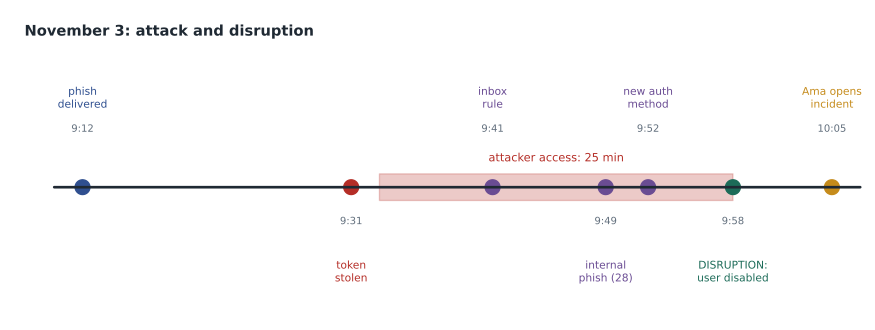
At 09:58 on Tuesday, November 3, 2026, before any analyst at Harrow & Finch had opened the incident, Microsoft Defender XDR disabled the account of Rosa Delgado, the manager of the Ankeny store, and revoked all her sessions. Twenty-seven minutes earlier she had entered her password and multifactor code on a fake sign-in page, and an attacker had been inside her mailbox for 25 minutes. When Ama opened the queue at 10:05, the incident's title ended with the words attack disruption, a yellow banner sat across the top of the page, and the incident graph showed Rosa's account marked as disabled. This lesson explains what automatic attack disruption is, what it can do, how Harrow & Finch configured it, and what analysts must do after it acts. Lesson 12 investigates the whole incident.
What attack disruption is
Automatic attack disruption is a Defender XDR capability that contains assets an attacker controls while an attack is still under way, without waiting for an analyst. It works at the level of the whole incident rather than a single alert: Defender correlates signals across endpoints, identities, email and collaboration, and software-as-a-service applications, and when it concludes with very high confidence that an attack such as human-operated ransomware, business email compromise or an adversary-in-the-middle attack is in progress, it takes containment actions on the compromised users and devices. Microsoft describes the confidence it requires as detector precision of 99 in 100 or higher on production data, with detectors tested before release and disruption activity reviewed by its own experts.
The difference from automated investigation, in lesson 8, is scope and timing. AIR examines entities from an alert and removes malicious artifacts such as files and scheduled tasks. Attack disruption stops an attacker from using the accounts and devices they have taken over, and it acts in the minutes that matter most: ransomware operators often move from a first foothold to encryption in hours, and business email compromise can turn into a fraudulent payment in a single afternoon.
Response actions
Attack disruption uses response actions from the Defender products. Which ones it takes depends on the attack and the assets involved.
| Action | Product | Effect |
|---|---|---|
| Contain device | Defender for Endpoint | Onboarded devices block communication with the compromised device |
| Contain IP | Defender for Endpoint | Blocks an address tied to devices that are not onboarded |
| Isolate device | Defender for Endpoint | Cuts the device off the network except for security services |
| Disable user | Defender for Identity, and Microsoft Entra ID | The account can no longer sign in, on premises and in the cloud |
| Contain user | Defender for Endpoint | Blocks the user's authentication, file and network paths on onboarded devices |
| Revoke user sessions | Microsoft Entra ID | Ends active sessions and refresh tokens |
| Suspend user | Microsoft Entra ID | Temporarily blocks the account |
| OAuth app containment | Defender for Cloud Apps | Applies protective measures to a compromised OAuth app |
| Deny policy on an AWS user, suspend an Okta user | Sentinel connectors (preview) | Extends containment to other identity systems |
How an account is disabled depends on where it lives. For an account only in Active Directory, Defender for Identity disables it through domain controllers running its sensor. For an account synchronized from Active Directory to Entra ID, as Rosa's is, Defender for Identity disables it on premises and disruption also disables the Entra account, closing the gap lesson 6 described. For a cloud-only Entra account, the action runs through a Microsoft-managed enterprise application for Defender for Identity, and does not need Defender for Identity to be deployed. Microsoft also describes predictive shielding actions, such as hardening settings on devices likely to be targeted next and proactively containing users at risk, which are preventive and separate from disruption.
Configuring attack disruption
Attack disruption is on by default for tenants with the right products, but it depends on configuration. Devices must be onboarded to Defender for Endpoint, and Microsoft's guidance is that device groups use the Full automation level for the device actions to apply as intended. Defender for Identity needs its action account configured so it can disable users in Active Directory. Defender for Office 365 and Defender for Cloud Apps must be in use for the email and SaaS signals the detectors rely on. The SC-200 outline lists configuring automatic attack disruption as a skill, so Nadia had Ama check each prerequisite against Microsoft's configuration article rather than assume.
The main setting teams change is exclusions. Users, devices and IP addresses can be excluded from automated response, so that disruption never disables or contains them. Exclusions are meant for assets where an automatic action would cause more harm than the attack it might stop, such as a break-glass emergency account or a system that runs payments. Every exclusion is also a place an attacker would like to be, so they should be few and reviewed.
| Asset | Excluded? | Reason |
|---|---|---|
| Two break-glass global administrator accounts | Yes | Must work when everything else is locked; protected by hardware keys and monitored by a separate alert |
| StockLine database servers | Yes, from device containment only | Containing them would close every till; responders act manually within minutes instead |
| Executives' accounts | No | Executives are prime targets for email compromise |
| Store manager accounts | No | Store managers approve refunds and talk to suppliers |
| Domain controllers | No | A compromised domain controller is the worst case; containing it is worth the disruption |
Nadia was uneasy about the domain controller row and said so. Contained or isolated domain controllers can cause widespread sign-in failures, and Microsoft's documentation describes specific behavior for them. The team's decision, recorded with Sunil's approval, was to trust Microsoft's design and rely on the very high confidence threshold, and to test the recovery procedure in a tabletop in December.
What analysts do after disruption acts
Disruption buys time; it does not finish the job. It contains, but it does not investigate scope, remove persistence the attacker created, repair what they changed, talk to the people affected, or decide when the account is safe to use again. Every disrupted incident therefore needs an analyst to work it as a high-priority case, starting from the actions already taken.
The scenarios attack disruption targets
Microsoft describes attack disruption in terms of the attack patterns its detectors recognize with high confidence. Human-operated ransomware is the best-known: when an attacker who has gained administrative access starts moving between devices or preparing to encrypt, disruption can contain the compromised devices and the user accounts being used, so that encryption cannot spread from them. Business email compromise and adversary-in-the-middle phishing are the others most relevant to Harrow & Finch: once Defender has correlated a credential theft, an attacker's sign-in and suspicious mailbox activity, it can disable the user and revoke sessions, as it did for Rosa. Password spray and the abuse of OAuth applications are further patterns Microsoft has described.
Two features of the design matter for analysts. First, disruption acts on the attacker's means, the compromised accounts and devices, not on the data, so it does not delete mail or files. Second, because it requires several correlated signals, it rarely acts on the first alert; it acts when the pattern is clear, which in Rosa's case was 25 minutes after the attacker's first sign-in. Everything the attacker did before that moment, the inbox rule, the internal messages and the new sign-in method, is left for the analyst to find and undo.
Nadia also pointed out what the exercise had tested indirectly. Disruption could only disable Rosa's account in Active Directory because Defender for Identity's action account had the right directory permissions, which Renata had granted in October. Had that step been missed, the cloud account would have been disabled and then re-enabled at the next synchronization. A prerequisite that nobody checks is a protection that silently does not exist.
Worked problem
Working the disrupted incident on November 3
When Ama opens the incident at 10:05, Rosa's account is disabled in Active Directory and Entra ID, and her sessions are revoked. Her store has no manager on the system, and the morning delivery needs her approval. What should Ama do first, and when can Rosa's account be re-enabled?
Show solution
- Confirm the disruption actions in the action center: disable user (on premises and Entra ID) and revoke sessions, both succeeded at 09:58.
- Read the incident to find what the attacker did in the 25 minutes: an inbox rule, 28 internal phishing messages, and a new authentication method registered at 09:52. Those are persistence and spread that disruption did not undo.
- Remove the attacker's authentication method and the inbox rule; purge the 28 internal messages through Threat Explorer; check whether any colleague clicked.
- Phone Rosa, not email her, to confirm the story, then reset her password and have her register a phishing-resistant method in person with the store support technician.
- Re-enable the account from the action center or the user page only after persistence is removed and the new credentials are in place, and record why.
- Give the store a temporary approval route through the district manager until then.
Answer: Confirm the actions, remove the persistence and spread disruption did not undo, reset credentials with a phishing-resistant method, then re-enable the account, recording each step.
Rosa's account was re-enabled at 11:40, an hour and 42 minutes after disruption acted. Grace Oduya, the store operations director, asked whether the store could have been spared the delay. Nadia's answer was that the delay was the price of containment, and that the alternative, an attacker emailing staff and suppliers from a store manager's account for another hour, would have cost more. Grace agreed, and asked for the temporary approval route to be written into the store operations manual.
Seeing and undoing disruption
Disrupted incidents carry an attack disruption tag in the queue, and the incident title ends with (attack disruption), which is how they appear through the API as well. The incident page shows a yellow banner, the contained or disabled status of assets in the graph, and the actions in the activities tab, which can be filtered by the provider attack disruption. Every action also appears in the action center, where it can be undone. Contained devices are released from their device page; disabled users can be re-enabled. Undoing is an analyst's decision and should always be recorded with a reason.
def minutes(t):
    h, m = map(int, t.split(":"))
    return h * 60 + m

cases = {
    # name: (credentials stolen, attacker first sign-in, containment)
    "Oct 20, Marek (manual)": ("08:09", "08:30", "11:05"),
    "Nov 3, Rosa (attack disruption)": ("09:31", "09:33", "09:58"),
}
for name, (stolen, signin, contained) in cases.items():
    access = minutes(contained) - minutes(signin)
    total = minutes(contained) - minutes(stolen)
print(f"{name:<32} attacker access {access:>3} min; theft to containment {total:>3} min")Oct 20, Marek (manual) attacker access 155 min; theft to containment 176 min Nov 3, Rosa (attack disruption) attacker access 25 min; theft to containment 27 min
What this code does
The program turns each clock time into minutes after midnight and, for each case, works out how long the attacker had access between their first sign-in and containment, and how long it took from the credential theft to containment. The output shows 155 minutes of attacker access in Marek's case, contained by hand, against 25 minutes in Rosa's case, contained by attack disruption, with theft to containment falling from 176 minutes to 27.
The comparison went into Sunil's November report to the board. It is not a fair experiment, since the attacks differed and the October case started before the morning shift, but it made the value of automatic containment concrete. Nadia added a caution to the report: disruption caught this attack because it matched a pattern Microsoft's detectors know well. An attacker who moves more slowly, or uses a technique the detectors do not yet cover, still has to be caught by people.
Common mistakes
MistakeAttack disruption finishes the incident response.
InsteadIt contains users and devices; analysts still remove persistence, scope the attack, reset credentials and decide when to restore access.
MistakeDisruption acts on single alerts.
InsteadIt acts at the incident level when correlated signals show a high-confidence attack in progress.
MistakeExclude any account whose disabling would be inconvenient.
InsteadExclusions should be rare, such as break-glass accounts, because excluded assets are attractive to attackers.
MistakeDisabling a hybrid user in one directory is enough.
InsteadDisruption disables the account on premises through Defender for Identity and in Entra ID.
Summary and key terms
- Automatic attack disruption contains compromised users and devices during high-confidence attacks, at the incident level.
- Actions include containing and isolating devices, containing IPs, disabling, containing and suspending users, revoking sessions and containing OAuth apps.
- It depends on Defender for Endpoint onboarding with Full automation, Defender for Identity's action account and the email and SaaS products.
- Exclusions remove assets from automated response and should be few and reviewed.
- Disrupted incidents carry a tag, a banner and a title suffix; actions appear in the action center and can be undone.
- Analysts must still remove persistence, scope, reset credentials and restore access.
- Automatic attack disruption
- Defender XDR containment of compromised assets during a high-confidence attack in progress.
- Contain user
- An action that blocks a user's authentication, file and network paths on onboarded devices.
- Contain IP
- An action that blocks an address associated with devices that are not onboarded.
- Automated response exclusion
- A user, device or IP address that automated actions will not act on.
- Predictive shielding
- Preventive hardening and containment of assets likely to be targeted next.
- Break-glass account
- An emergency administrator account kept for use when normal access fails.
Practice problems
Work each problem on paper first, then reveal the answer to check.
How long did the attacker have access to Rosa's account before disruption acted?
Show answer
25 minutes, from 09:33 to 09:58.
Which three things had the attacker done that disruption did not undo?
Show answer
Created an inbox rule, sent 28 internal phishing messages and registered a new authentication method.
Why are the StockLine database servers excluded from device containment?
Show answer
Containing them would close every till; responders act on them manually instead.
How can an analyst find disrupted incidents in the queue?
Show answer
By the attack disruption tag, or the (attack disruption) suffix on the title.
When was Rosa's account re-enabled, and why not sooner?
Show answer
At 11:40, after persistence was removed and new phishing-resistant credentials were in place.
Lesson quiz · 5 questions
Score 60% or more to complete this lesson.
Create a free account to save your progress, take quizzes and earn a certificate.