
MSAZ-340 · Lesson 6 of 12 · 20 min
Defender for Identity
▶ Video coming soon A video version of this lesson is on the way.
Most of Harrow & Finch's devices and accounts still depend on an on-premises Active Directory domain, hf.local, with four domain controllers: two at head office, one at the Ames distribution center and one in Azure, added during Project Skylight. Active Directory is where attackers go once they have a foothold, because control of the directory is control of everything joined to it. On October 28 and 29, 2026, an outside firm ran an approved penetration test against the network, and Sunil asked Nadia to treat it as a training exercise: Ama would work the Defender for Identity alerts as if the test were real, then compare notes with the testers. This lesson explains what Defender for Identity watches, how its sensors are deployed, and what Ama learned from the test.
What Defender for Identity watches
Defender for Identity is a cloud service that uses sensors on identity infrastructure to watch authentication traffic, directory queries and changes, and Windows events. It learns normal behavior for users, devices and resources, and raises alerts for activity that matches known attack techniques or departs sharply from the baseline. It covers on-premises Active Directory domain controllers, Active Directory Federation Services servers, Active Directory Certificate Services servers, and Microsoft Entra Connect servers, which synchronize the on-premises directory to Microsoft Entra ID. Its alerts appear in the Defender portal and correlate with endpoint, email and cloud application alerts, which is why a stolen password used on a laptop and then against a domain controller ends up in one incident.
Defender for Identity also contributes to posture. Its identity security assessments, now surfaced through Microsoft Secure Score and exposure management, list risky configurations such as accounts with unconstrained Kerberos delegation, service accounts with old passwords, weak encryption types still allowed, and print spooler services running on domain controllers. Lateral movement path reports show how an attacker who compromised one ordinary account could reach a sensitive one, through chains of local administrator rights and logged-on sessions.
Sensors and deployment
A Defender for Identity sensor is installed on each domain controller and on each other supported server. Microsoft offers two forms. The classic sensor is a separate installation package. The newer sensor, often called version 3, is activated through Defender for Endpoint on domain controllers running Windows Server 2019 or later, so a domain controller already onboarded to Defender for Endpoint can have identity protection turned on from the portal. Microsoft documents which features each form supports, and some organizations run both during a transition. Sensors need a directory service account, ideally a group managed service account, with read access to the directory, and the right Windows audit policies so the needed events are recorded.
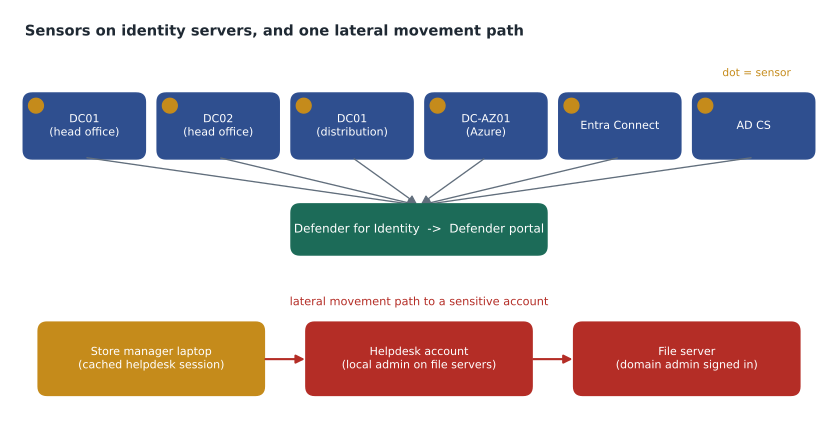
| Server | Role | Sensor | Health on October 27 |
|---|---|---|---|
| HF-DC01, HF-DC02 | Domain controllers, head office | Version 3, through Defender for Endpoint | Healthy |
| AMS-DC01 | Domain controller, distribution center | Version 3 | Healthy |
| HF-DC-AZ01 | Domain controller in Azure | Version 3 | Healthy |
| HF-ENTRA01 | Microsoft Entra Connect | Classic sensor | Healthy |
| HF-CA01 | Certificate authority (AD CS) | Classic sensor | Audit policy missing, fixed October 27 |
The certificate authority's health issue is a common one. Sensors depend on Windows auditing, and if the advanced audit policy for certificate services is not configured, the sensor runs but cannot see the events it needs. Defender for Identity reports such gaps as health issues in the portal. Nadia's rule is that every health issue is a gap in detection, and gets a ticket like any other.
Alerts during the penetration test
The testers started on October 28 from a laptop on the head office network, as if an attacker had compromised an ordinary user's device. Over two days Defender for Identity raised alerts that followed the classic progression of an attack on Active Directory. Ama mapped each one to its MITRE ATT&CK tactic, which is how the portal also categorizes them.
| Time | Alert | MITRE ATT&CK tactic | What defenders saw |
|---|---|---|---|
| Oct 28, 09:40 | Account enumeration reconnaissance | Discovery | Many Kerberos requests for usernames that do not exist, from one device |
| Oct 28, 10:05 | User and group membership reconnaissance (SAMR) | Discovery | Queries listing members of Domain Admins and other sensitive groups |
| Oct 28, 11:30 | Suspected Kerberos SPN exposure | Credential access | Service tickets requested for many service accounts in a short time |
| Oct 28, 15:12 | Honeytoken activity | Credential access | A sign-in attempt with a decoy account that no one should ever use |
| Oct 29, 10:20 | Suspected identity theft (pass-the-ticket) | Lateral movement | A Kerberos ticket issued to one device used from another |
| Oct 29, 14:02 | Suspected DCSync attack (replication of directory services) | Credential access | A non-domain controller requested directory replication |
The test made two things clear to Ama. First, the alerts arrived in an order that tells a story: discovery, then credential access, then lateral movement, then an attempt to gain control of the whole domain. An analyst who sees early discovery alerts has time to act before the later stages. Second, the portal had correlated them, with the endpoint alerts from the testers' laptop, into a single incident, so the progression was visible on one page rather than spread across six notifications.
The suspected Kerberos SPN exposure alert matters because of what it implies. Any domain user can request a service ticket for an account that has a service principal name, and part of that ticket is encrypted with a key derived from the service account's password. An attacker who collects tickets can try to guess weak passwords offline, out of sight. The defense is not to detect it better but to remove the weakness: long, random passwords for service accounts, or better, group managed service accounts whose passwords the directory rotates automatically.
Investigating identities
Every user and device has an entity page that combines directory data, Defender for Identity activity, Entra ID data and endpoint data. The identity timeline lists sign-ins, directory changes, resource access and alerts. Tags show whether an account is marked sensitive, as members of privileged groups are by default, or as a honeytoken. The page also shows the lateral movement paths that lead to the account and any open alerts.
For the pass-the-ticket alert, Ama used the timeline of the test account that the testers had used and of the device where the ticket was reused. The timeline showed the account's normal sign-ins from one laptop, then the same ticket appearing from a server the account had never touched. That pattern, one identity apparently in two places with the same credentials, is the signature of the technique, and in a real incident would be grounds to treat the account as compromised.
Worked problem
Using the test findings
The testers' report listed three findings: a service account for the old reporting system, svc-rpt01, had a nine-year-old password that they cracked from a service ticket; the helpdesk group had local administrator rights on every file server; and a domain administrator regularly signed in to a file server to run reports. Defender for Identity had flagged the first two in its posture assessments weeks earlier. Which changes should the team make, and how do they map to the alerts?
Show solution
- Service account password: replace svc-rpt01 with a group managed service account. That removes the weak password that made the SPN exposure dangerous.
- Helpdesk local administrator rights: remove them from file servers and use just-in-time administration through a separate administrative account. That breaks the first link of the lateral movement path.
- Domain administrator sign-ins: domain administrators should sign in only to domain controllers and privileged access workstations, never to member servers, so their credentials are never cached where ordinary admins can reach them. That breaks the last link of the path.
- Honeytoken: keep the decoy account. It fired once, at 15:12, and gave a high-confidence signal no legitimate user could trigger.
- Close the incident as informational, expected activity, determination security test, and link the testers' report.
Answer: Move the service account to a gMSA, remove helpdesk local admin rights from servers, keep domain admins off member servers, keep the honeytoken, and classify the incident as an expected security test.
The first two changes were made in November; the third needed a privileged access workstation for each of the three domain administrators, which Renata's team ordered for January 2027. Ama added each change to the incident's tasks so the testers could verify them in a retest planned for spring.
Response actions for identities
From a user's page or an incident, analysts can take identity actions. In on-premises Active Directory, through Defender for Identity, they can disable the user or force a password reset at next sign-in; these run through an action account, either the sensor's own identity or a configured account with the right directory permissions. In Microsoft Entra ID they can mark a user as compromised, which raises their risk and triggers any risk-based Conditional Access policies, require the user to sign in again, which revokes sessions, and suspend or disable the account. Automatic attack disruption, covered in lesson 11, can disable an account in Active Directory and in Entra ID without waiting for an analyst when it is highly confident an attack is under way.
| Action | Where it applies | Effect |
|---|---|---|
| Disable user | Active Directory (through Defender for Identity) and Microsoft Entra ID | The account can no longer sign in |
| Force password reset | Active Directory | The user must change the password at next sign-in |
| Confirm user compromised | Microsoft Entra ID | Sets high user risk, triggering risk-based policies |
| Require user to sign in again | Microsoft Entra ID | Revokes refresh tokens and sessions |
| Suspend user | Microsoft Entra ID (and Okta through Sentinel, preview) | Temporarily blocks access during investigation |
Ama noticed a subtlety in the table. For a hybrid user, synchronized from Active Directory to Entra ID, disabling only the cloud account would be undone at the next synchronization if the on-premises account stayed enabled; disabling only the on-premises account would leave cloud sessions alive until they expired. A real response to a compromised hybrid account therefore touches both directories, which is one reason correlated XDR incidents and attack disruption matter.
service_accounts = [
    # name, years since password change, has SPN, is gMSA
    ("svc-rpt01", 9.0, True, False),
    ("svc-backup", 3.5, True, False),
    ("svc-print", 0.4, True, False),
    ("gmsa-sql01", 0.1, True, True),
    ("svc-scan", 6.2, False, False),
]
for name, age, spn, gmsa in service_accounts:
    if gmsa:
        risk = "low (password rotated by the directory)"
    elif spn and age > 1:
        risk = "HIGH: SPN with an old password, replace with a gMSA"
    elif spn:
        risk = "medium: SPN, recent password; plan a gMSA"
    else:
        risk = "medium: old password, no SPN; rotate"
print(f"{name:<11} {age:>4.1f} y {risk}")svc-rpt01 9.0 y HIGH: SPN with an old password, replace with a gMSA svc-backup 3.5 y HIGH: SPN with an old password, replace with a gMSA svc-print 0.4 y medium: SPN, recent password; plan a gMSA gmsa-sql01 0.1 y low (password rotated by the directory) svc-scan 6.2 y medium: old password, no SPN; rotate
What this code does
The program goes through a short list of service accounts with the age of each password, whether the account has a service principal name and whether it is a group managed service account. It assigns a risk level: low for managed accounts, high for accounts with a name and an old password, and medium otherwise. The output marks two accounts as high risk, the reporting account and the backup account, which become the first two to move to managed accounts.
Common mistakes
MistakeDefender for Identity only needs a sensor on one domain controller.
InsteadEvery domain controller, and AD FS, AD CS and Entra Connect servers, needs a sensor, or traffic through the others is unseen.
MistakeHealth issues are cosmetic.
InsteadA missing audit policy or a stopped sensor is a gap in detection and should be fixed like any finding.
MistakeDisabling a hybrid user in Entra ID alone is enough.
InsteadSynchronization can re-enable it; disable it in Active Directory too, and revoke cloud sessions.
MistakeBetter detection is the answer to Kerberos SPN exposure.
InsteadRemove the weakness: long random service passwords or group managed service accounts.
Summary and key terms
- Defender for Identity watches domain controllers, AD FS, AD CS and Entra Connect servers through sensors.
- The version 3 sensor is activated through Defender for Endpoint on newer domain controllers; the classic sensor is installed separately.
- Health issues such as missing audit policies are detection gaps.
- Alerts follow attack stages: discovery, credential access, lateral movement, domain dominance.
- Posture assessments and lateral movement paths show weaknesses before attackers use them.
- Identity actions include disabling users and forcing password resets in AD, and confirming compromise, revoking sessions and suspending users in Entra ID.
- Honeytoken accounts give high-confidence signals because no legitimate user should touch them.
- Defender for Identity sensor
- Software on a domain controller or identity server that sends activity to Defender for Identity.
- Directory service account
- The account a sensor uses to read Active Directory, ideally a group managed service account.
- Lateral movement path
- A chain of access through which an attacker could move from one account to a more sensitive one.
- Honeytoken account
- A decoy account that should never be used, so any activity with it raises an alert.
- Service principal name (SPN)
- An identifier that ties a Kerberos service to an account.
- Group managed service account (gMSA)
- A service account whose password the directory manages and rotates automatically.
Practice problems
Work each problem on paper first, then reveal the answer to check.
Which servers need Defender for Identity sensors?
Show answer
Every domain controller, plus AD FS, AD CS and Microsoft Entra Connect servers.
Why did the certificate authority show a health issue?
Show answer
Its advanced audit policy for certificate services was not configured, so the sensor could not see needed events.
What makes Kerberos SPN exposure dangerous?
Show answer
Service tickets can be attacked offline to guess weak service account passwords.
How should the penetration test incident be classified?
Show answer
Informational, expected activity, with the determination security test.
Why touch both directories when a hybrid user is compromised?
Show answer
Synchronization can re-enable a cloud-only disable, and an on-premises disable leaves cloud sessions active.
Lesson quiz · 5 questions
Score 60% or more to complete this lesson.
Create a free account to save your progress, take quizzes and earn a certificate.