
MSAZ-340 · Lesson 2 of 12 · 21 min
Defender XDR incidents and alerts
▶ Video coming soon A video version of this lesson is on the way.
On Ama's second shift, Tuesday, October 20, the queue showed nine incidents. Behind them sat 41 alerts. Nadia pointed at the two numbers and said that the gap between them was the reason the company pays for an XDR product. Forty-one separate warnings would take a day to read one by one; nine incidents, each telling a single story, could be triaged before lunch. This lesson explains how alerts become incidents, how to read and manage an incident, and how to keep the queue clean enough that the important cases stand out.
Alerts, incidents and correlation
An alert is a single detection: a product saw something that matches a detection rule or a behavioral model. Defender for Endpoint raises alerts for suspicious processes and files, Defender for Office 365 for malicious messages and user clicks, Defender for Identity for suspicious directory activity, Defender for Cloud Apps for risky application behavior, Entra ID Protection for risky sign-ins, and custom detection rules or Sentinel analytics rules for whatever the team defines. Each alert has a severity, a category based on MITRE ATT&CK tactics such as initial access or credential access, the entities involved and the evidence that triggered it.
An incident is a collection of alerts that the correlation engine believes belong to the same attack, together with all the entities and evidence they share. Correlation looks for common entities, such as the same user, device, mailbox, file hash, IP address or URL, and for timing and attack logic that ties alerts together. Defender XDR can add alerts to an existing incident as an attack develops, merge incidents that turn out to be related, and, less often, split them. The result is a single case with an attack story, an incident graph that shows how entities connect, and one place to record work.
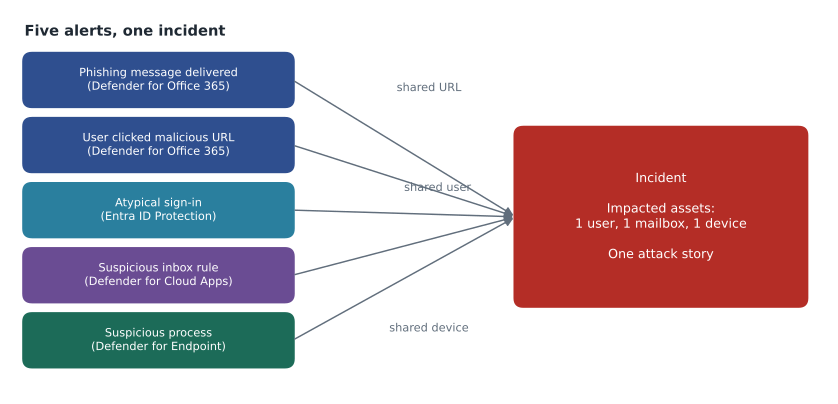
Correlation is automatic, but it is not magic. Alerts that share nothing visible, such as a scan from an outside address and a later sign-in from a different address, may stay in separate incidents even though one attacker caused both. Analysts can link them manually by moving alerts or merging incidents, and the custom detections the team writes should map entities carefully so the engine has something to correlate on.
Reading an incident
An incident page has a predictable layout. The attack story section combines a timeline of alerts with the incident graph, showing the entities involved and the relationships the correlation engine found. The alerts tab lists every alert with its source, severity and status. The assets tab lists impacted devices, users, mailboxes, applications and cloud resources, each with its risk level. The investigations tab shows any automated investigations and their state. The evidence and response tab lists every file, process, URL, IP address and email the system collected, with a verdict for each and any action taken. Finally, the activity log records every comment, assignment, status change and action, with who did it and when.
Nadia taught Ama to read in a fixed order. First the title and severity, which give the system's view of what this is. Then the assets, because impact matters more than technique: a single low-privilege user is a different problem from a domain administrator or a finance mailbox. Then the attack story, from the earliest alert forward, so that the narrative builds in the order the attacker acted. Only then the evidence, item by item. If Security Copilot is enabled, the embedded summary at the top gives a written version of the story; Nadia's rule is that it is a starting point to check, never a conclusion to copy.
| Part of the incident page | What it shows | Question it answers |
|---|---|---|
| Attack story and graph | Alerts in time order; entities and their links | What happened, in what order? |
| Alerts | Each detection with source, severity, status | Which detections fired? |
| Assets | Devices, users, mailboxes, apps, cloud resources | What did the attacker touch? |
| Investigations | Automated investigations and their state | What has automation already checked? |
| Evidence and response | Files, processes, URLs, IPs, emails with verdicts and actions | What is malicious, and what was done about it? |
| Activity log | Comments, assignments, status changes, actions | Who did what, and when? |
Severity, status and classification
Incidents and alerts carry one of four severities: high, medium, low or informational. An incident takes the highest severity of its alerts. Severity reflects the potential impact the detection logic assigns, not the certainty that an attack happened, so a high-severity incident can be a false positive and a low-severity one can be the first sign of something serious. Some tenants also see an incident priority score, which Microsoft calculates from factors such as attack type, asset criticality and threat intelligence to help sort the queue.
Status moves through active, in progress and resolved. When an analyst resolves an incident, they set a classification: true positive, false positive, or informational and expected activity, each with a determination that records more detail, such as malware, phishing, compromised account or a security test. Classification is not paperwork. It feeds tuning: false positives point to detections that need adjusting, and expected activity, such as an approved penetration test or an IT administrator's scripted change, points to suppression or exclusion rules. Classification also feeds the team's metrics, which Sunil reports to the board each quarter.
| Classification | Example determination | What it should lead to |
|---|---|---|
| True positive | Phishing; malware; compromised account | Response, lessons learned, possibly new detections |
| Informational, expected activity | Security test; line-of-business application; confirmed IT activity | Suppression or exclusion so it does not recur as noise |
| False positive | Not malicious; not enough data to validate | Tuning the detection or reporting it to Microsoft |
Managing the queue
The incident queue lists incidents by most recent activity by default, with filters for severity, status, assigned analyst, service sources, tags, device groups, data sensitivity and more. Saved filters are worth setting up early. Ama keeps three views: unassigned incidents of medium or higher severity, everything assigned to her, and anything touching the Finance or Executives device groups and user tags. Tags can be added manually or by automation, and Harrow & Finch uses them for business context: Finance, Stores, Executives, Distribution, and Test for activity the team generates on purpose.
Assignment is the simplest control against duplicated or dropped work: an incident has one owner, and the owner is responsible for moving it to resolved or handing it over in writing. Comments in the activity log should record decisions and the evidence behind them in plain sentences, because the next reader may be an auditor, a lawyer or the analyst on the next shift. The Defender portal has been adding case management features, which group related incidents and tasks into a case with its own workflow; the SC-200 outline now asks candidates to manage incidents using case management, so Nadia had Ama read the current documentation rather than rely on her memory of an older interface.
Worked problem
Triage order for Tuesday's queue
Of the nine incidents on October 20, four matter for this example. A: high severity, a malware detection on a till PC at the Ankeny store, blocked by antivirus, one device. B: medium severity, an atypical sign-in to a buyer's account followed by a new inbox rule, one user and one mailbox. C: low severity, an unusual number of file downloads from SharePoint by a marketing user. D: informational, a scheduled vulnerability scan flagged as port scanning. Which should Ama look at first, and why?
Show solution
- Ask Nadia's question for each: what did the attacker touch, and what can they still touch?
- A: high severity, but the evidence shows the file was blocked and quarantined before it ran. The attacker touched one device and has no foothold. Important, but likely contained.
- B: medium severity, but an atypical sign-in followed by an inbox rule is a classic sign of a compromised mailbox. The attacker may still have access to email and could use it to deceive suppliers.
- C: low severity; possibly a user preparing a presentation, possibly data theft. Worth checking today, not urgently.
- D: matches the scheduled scan's source address and time. Classify as informational, expected activity, and add a suppression rule.
- Order: B first (likely ongoing access), then A (confirm containment), then C, then D.
Answer: B first, because the attacker may still have access; then A, C and D. Severity is an input, not the order.
Incident B was in fact a compromised account: the buyer had entered his password on a fake sign-in page. Automated investigation had already flagged the inbox rule, and Nadia showed Ama how to confirm the remediation, revoke sessions and reset the password. The case became the model for lesson 5. Incident D taught a different lesson: the same scan had generated an informational alert every Tuesday for a month, and nobody had suppressed it.
Tuning alerts
Alert tuning rules, formerly called suppression rules, tell Defender XDR to hide or automatically resolve alerts that match conditions the team defines, such as a particular alert title from a particular device, file path or IP address. A rule can hide matching alerts from the queue or resolve them, and the matching alerts still exist for hunting if needed later. Tuning is powerful and dangerous in equal measure: a rule that is too broad hides real attacks. Nadia's rules for writing one are to match on the narrowest set of conditions that describes the expected activity, to document who approved it and why, and to review every rule each quarter.
For the Tuesday scan, Ama drafted a rule that matched the port scan alert title, the scanner's source address and the vulnerability scanning service account, and nothing else. Nadia approved it and asked Ama to add a review date. The queue the next Tuesday was one incident shorter.
Email notifications
Not every analyst watches the queue all day, so Defender XDR can send email notifications for new incidents, for response actions and for new threat analytics reports. Notification rules filter by severity, service source and device group, and can include or exclude organization details. Harrow & Finch sends high-severity incident notifications to the security team's shared mailbox and to Nadia's phone around the clock, and medium-severity ones only during business hours. Sunil receives a separate notification for any incident touching the Executives tag. Notifications are not a substitute for an on-call rota, but they make sure the rota hears about the incidents that cannot wait.
incidents = [
    # (name, severity, still_active_access, critical_asset, blocked)
    ("A till PC malware", "high", False, False, True),
    ("B buyer inbox rule", "medium", True, True, False),
    ("C SharePoint downloads", "low", False, False, False),
    ("D scheduled scan", "informational", False, False, False),
]
weight = {"high": 3, "medium": 2, "low": 1, "informational": 0}

def score(i):
    name, sev, active, critical, blocked = i
    s = weight[sev]
    if active:
        s += 4      # the attacker may still be inside
    if critical:
        s += 2      # finance, executives, suppliers
    if blocked:
        s -= 2      # threat stopped before it ran
    return s

for i in sorted(incidents, key=score, reverse=True):
print(f"{score(i):>2} {i[0]}")8 B buyer inbox rule 1 A till PC malware 1 C SharePoint downloads 0 D scheduled scan
What this code does
The program gives each incident points for its severity, adds points if the attacker may still have access or the asset is critical, and subtracts points if the threat was blocked. It then lists the incidents from highest score to lowest. The output puts the buyer's inbox rule first with 8 points, the till PC second with 1, the downloads third with 1 and the scan last with 0, matching the order Nadia and Ama chose by reasoning.
Nadia was clear that the script is a teaching aid, not a tool to replace judgment. Its weights are her opinion. Real queues need the context only an analyst can bring, such as knowing that the scan runs on Tuesdays or that the buyer had just changed jobs. But writing the weights down made Ama say out loud what she was weighing, which is the point.
Common mistakes
MistakeWork the queue strictly by severity.
InsteadSeverity is an input; prioritise likely ongoing access and the value of the affected assets.
MistakeClassification only matters for reports.
InsteadClassification drives tuning: false positives and expected activity should lead to detection changes or tuning rules.
MistakeA suppression rule can safely match an alert title alone.
InsteadMatch the narrowest set of conditions, such as title plus source and account, and document and review it.
MistakeIf alerts are in separate incidents, they are unrelated.
InsteadCorrelation needs shared entities; analysts may need to link or merge incidents manually.
Summary and key terms
- An alert is one detection; an incident groups related alerts and their shared entities into one attack story.
- Correlation uses shared entities and attack logic; incidents can grow, merge and occasionally split.
- Read an incident in order: title and severity, assets, attack story, then evidence and actions.
- Severity has four levels and reflects potential impact, not certainty.
- Resolved incidents get a classification and determination that feed tuning and metrics.
- Alert tuning rules hide or resolve expected alerts; keep them narrow, documented and reviewed.
- Email notifications filtered by severity, source and device group alert the right people.
- Alert
- A single detection raised by a product, rule or model, with severity, category, entities and evidence.
- Correlation
- Grouping alerts into incidents based on shared entities, timing and attack logic.
- Incident graph
- A visual map of the entities in an incident and how they relate.
- Classification
- The analyst's verdict on a resolved incident: true positive, false positive or informational expected activity.
- Alert tuning rule
- A rule that hides or resolves alerts matching defined conditions, formerly called a suppression rule.
- Tag
- A label on an incident used for filtering, routing and reporting.
Practice problems
Work each problem on paper first, then reveal the answer to check.
What is the difference between an alert and an incident?
Show answer
An alert is one detection; an incident is a group of related alerts and evidence describing one attack.
Why might two alerts caused by the same attacker stay in separate incidents?
Show answer
They share no entity the correlation engine can link, such as the same user, device or address.
Which tab answers the question of what the attacker touched?
Show answer
The assets tab, which lists impacted devices, users, mailboxes, apps and cloud resources.
What should a weekly vulnerability scan that raises an alert lead to?
Show answer
Classification as informational expected activity and a narrowly scoped alert tuning rule.
Why was incident B triaged before the high-severity incident A?
Show answer
B suggested ongoing access to a mailbox, while A's threat had been blocked before it ran.
Lesson quiz · 5 questions
Score 60% or more to complete this lesson.
Create a free account to save your progress, take quizzes and earn a certificate.