
MSAZ-102 · Lesson 9 of 12 · 18 min
Azure Arc and hybrid management
▶ Video coming soon A video version of this lesson is on the way.
Project Skylight will move most of Harrow & Finch's workloads to Azure, but not all of them, and not all at once. The warehouse management system's vendor supports only its own appliance at the distribution centers. The till servers in each store must keep working if the store's internet link fails. And until the migration ends in 2027, the head office server room will keep running alongside Azure. On November 9, 2026, Renata and Theo connected two servers in the disaster recovery rack at the Ames distribution center to Azure as a pilot. Within an hour, they appeared in the Azure portal next to the cloud VMs, with tags, policy compliance results and update status. The tool that made this possible is Azure Arc.
The hybrid reality
Very few organizations run everything in one cloud. Most have a hybrid estate, with some systems in their own data centers and some in a public cloud, and many are multicloud, using more than one public cloud provider. Hybrid estates are hard to manage when each environment has its own tools. The server team at Harrow & Finch had one console for on-premises VMs, another for patching, a third for monitoring and, now, the Azure portal. Each had its own inventory, its own permissions and its own reports, and none of them agreed exactly on how many servers the company had.
Azure's answer is to bring the management capabilities of Azure to resources that are not in Azure, instead of asking customers to move everything. If a server in Ames can be represented in Azure Resource Manager like any Azure resource, then the same tags, the same role-based access control, the same policies, the same monitoring and the same security tools can apply to it.
What Azure Arc does
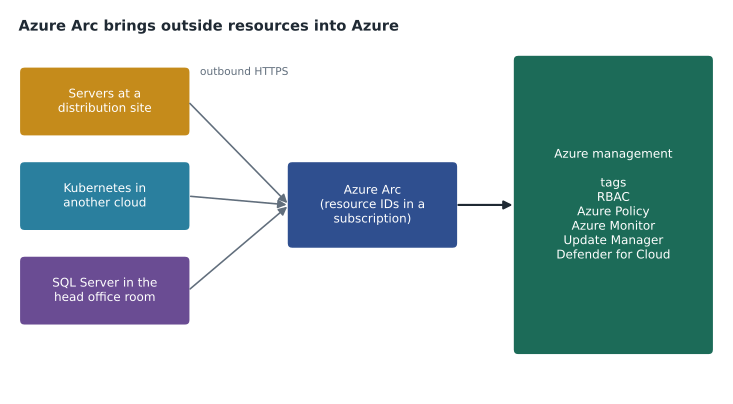
Azure Arc extends Azure Resource Manager to resources outside Azure: servers, Kubernetes clusters, databases and virtualization platforms running on premises, at the edge or in other clouds. When a resource is connected to Arc, it gets a resource ID and appears in a subscription and resource group in Azure, just like an Azure resource. The resource keeps running where it is; Arc does not move it or take over its workload. What changes is that it can now be managed through Azure.
| Arc-enabled resource | What can be connected | Example uses |
|---|---|---|
| Servers | Physical and virtual Windows and Linux machines anywhere | Inventory, policy, monitoring, updates, security |
| Kubernetes | Clusters running on premises or in other clouds | GitOps configuration, policy, monitoring |
| SQL Server | SQL Server instances on Arc-enabled servers | Inventory, assessments, licensing and security |
| Data services | Azure SQL Managed Instance and PostgreSQL running on Arc-enabled Kubernetes | Run Azure data services in your own data center |
| Virtualization platforms | VMware vSphere and System Center Virtual Machine Manager environments | Create and manage VMs there from Azure |
Microsoft also sells hardware-based offerings that run Azure services on premises, such as Azure Local, previously called Azure Stack HCI, which runs virtual machines and other workloads on validated hardware in a customer's site and is managed through Arc. These are useful for locations that need local computing, such as factories and large stores, but they are a different decision from connecting existing servers.
How Arc-enabled servers connect
To connect a server, an administrator installs the Azure Connected Machine agent on it and registers it with a subscription and resource group, usually with a short script generated by the Azure portal. The agent then makes outbound connections to Azure over HTTPS on port 443. No inbound ports need to be opened in the site's firewall, which made the security review at Harrow & Finch much simpler. If the server loses its internet connection, it keeps working normally; it simply cannot be managed through Azure until the connection returns.
azcmagent connect \
  --resource-group rg-arc-dr-cus \
  --location centralus \
  --subscription-id 00000000-0000-0000-0000-000000000000 \
  --tags "env=dr,app=stockline,cost-center=4100"
The location in the command is the Azure region where the Arc resource's metadata is stored, not where the server is. Harrow & Finch used its primary region so that the metadata about its servers stays in the same region as its other systems.
What you can do once connected
Once a server is Arc-enabled, much of what lessons 3 to 8 described applies to it. It can carry tags, so the cost-center and owner tags work the same way for on-premises machines. RBAC controls who can manage it through Azure. Azure Policy can audit and, through a feature called machine configuration, check settings inside the operating system, such as whether a password policy is set. Azure Monitor can collect its performance data and logs into the same Log Analytics workspace as the Azure VMs. Azure Update Manager can assess and schedule operating system updates. Microsoft Defender for Cloud can protect it and report security recommendations. Resource locks also work, though they protect the Arc resource in Azure rather than the physical machine.
Arc also matters for licensing. SQL Server instances on Arc-enabled servers can be inventoried and, if the organization chooses, billed for SQL Server licenses through Azure on a pay-as-you-go basis. Extended Security Updates for older versions of Windows Server and SQL Server can be delivered and billed through Arc as well. Theo noted that the SQL Server instance on one of the DR servers was an older version that would need Extended Security Updates if it stayed on premises past its support date, one more point for the business case.
Connecting servers to Arc's core features, such as inventory, tags and the resource view, does not incur a charge. Many of the services used through Arc, such as Defender for Cloud, Azure Monitor data ingestion, Update Manager for non-Azure machines, machine configuration and pay-as-you-go licensing, are billed according to their own pricing. Theo added those services to his estimate with illustrative rates.
Arc in the Skylight plan
The pilot on November 9 connected two servers. The results were immediate and a little embarrassing. Policy compliance showed that one server was missing the cost-center tag because the agent had been registered without it, and Update Manager showed that the second server was three months behind on updates, which the old patching console had not reported because the server had been moved to a different group in 2025 and forgotten. Theo fixed both that week.
The plan for the rest of the estate is in stages. In December, the remaining head office servers will be connected so that the whole on-premises inventory is visible in Azure and the Azure Migrate business case can compare migrating with simply managing through Arc. In early 2027, the store till servers will follow, giving the store operations director, Grace Oduya, one view of the health of every store's local systems. Servers that move to Azure as VMs will be disconnected from Arc when their on-premises copies are retired, since Azure VMs are managed natively.
| Without Arc | With Arc |
|---|---|
| Separate inventories for on-premises and Azure | One inventory in Azure Resource Manager |
| Different permission systems | The same RBAC roles for both |
| Separate patching and monitoring tools | Update Manager and Azure Monitor for both |
| Policies only for Azure resources | Azure Policy and machine configuration for both |
| No tags on physical servers | The same tag standard and cost reporting for both |
Theo kept a small script to compare the inventories from the old patching console and from Azure, a common first job after connecting machines to Arc. Servers in one list but not the other are the ones to investigate.
old_console = {"hf-dc1", "hf-dc2", "hf-sql01", "hf-file01", "hf-dr-app1"}
arc_connected = {"hf-dr-app1", "hf-dr-sql1"}
azure_vms = {"vm-stockline-prod1", "vm-stockline-prod2"}

print("In old console but not yet in Azure:", sorted(old_console - arc_connected))
print("In Arc but missing from old console:", sorted(arc_connected - old_console))
everything = old_console | arc_connected | azure_vms
print("Total machines known anywhere:", len(everything))In old console but not yet in Azure: ['hf-dc1', 'hf-dc2', 'hf-file01', 'hf-sql01'] In Arc but missing from old console: ['hf-dr-sql1'] Total machines known anywhere: 8
What this code does
Compares three lists of machines with set operations: those in the old management console, those connected through Azure Arc, and native Azure virtual machines. It prints the machines in one inventory but not the other, and the total number of distinct machines known anywhere. This kind of check finds gaps before switching to a single management tool.
Security and governance for Arc-enabled servers
Connecting on-premises servers to Azure changes who can manage them, so Renata applied the same care as for cloud resources. The Arc resource group has its own RBAC assignments: the server team can view and manage the Arc-enabled servers, while the permission to run commands or install extensions on them, which effectively means running code on the physical machine, is limited to a small group. The Connected Machine agent can also be configured locally to allow only approved extensions, so even an Azure administrator cannot install arbitrary software on a server through Arc.
The HF baseline initiative from lesson 5 applies to the Arc resources automatically, because they live in a subscription under the HarrowFinch management group. The allowed-locations rule checks the Azure region of the Arc resource's metadata, and the tag rules work exactly as they do for VMs. Defender for Cloud treats Arc-enabled servers as part of the estate and reports security recommendations for them next to the Azure VMs, which gave Sunil, for the first time, a single list of security findings for both environments.
Arc also helps during the migration itself. Because the on-premises servers are already tagged, monitored and in the same inventory as the Azure VMs, the team can compare an on-premises server's performance with its Azure replacement in the same workbook, and retire the old one with confidence when the new one has run cleanly for a few weeks. Theo planned to use exactly that comparison for the first StockLine cutover in 2027.
Not every server should be connected. Servers that will be retired in the next few weeks, or appliances whose vendor does not allow agents, are better left alone. The warehouse vendor's appliance is one example: the vendor provides its own monitoring and does not support third-party agents, so it will stay outside Arc and be monitored through the vendor's reports instead.
Arc-enabled servers also appear in Cost Management. The free core features add nothing, but the services used through Arc, such as Defender for Cloud plans and monitoring data, show up under the Arc resource group with the same tags as everything else. Dana's monthly report therefore shows the cost of managing the on-premises estate through Azure alongside the cost of the cloud workloads, which is exactly the comparison the business case needs.
For the exam, the key idea is simple: Azure Arc lets you manage resources outside Azure as if they were in Azure, using the same portal, tags, RBAC, policies, monitoring and security tools. Questions often describe a company with servers in its own data center or in another cloud that wants one way to govern everything, and the answer is Azure Arc. If the question instead asks how to move those servers into Azure, the answer is Azure Migrate, not Arc.
Worked problem
Is Arc the right tool?
Three needs come up: (1) apply the company tag standard and see patch status for the warehouse system's two on-premises VMs; (2) move the e-commerce site from the outside web firm into Azure App Service; (3) see the health of the till servers in every store in one place.
Show solution
- (1) The VMs stay on premises, so connecting them with Azure Arc lets tags, Update Manager and policy apply.
- (2) This is a migration to an Azure service, not hybrid management, so Arc is not the tool; it is an App Service deployment.
- (3) The till servers stay in the stores, so Arc-enabled servers with Azure Monitor give one view.
Answer: Arc fits (1) and (3), where resources stay outside Azure; (2) is a migration.
Common mistakes
MistakeThinking Azure Arc moves workloads into Azure.
InsteadArc manages resources where they are; migration is a separate step.
MistakeOpening inbound firewall ports for Arc.
InsteadThe Connected Machine agent uses outbound HTTPS only.
MistakeAssuming every service used through Arc is free.
InsteadCore Arc features for servers are free; services such as Defender for Cloud and monitoring are billed.
MistakeThinking the location in the Arc registration is where the server is.
InsteadIt is the Azure region that stores the Arc resource's metadata.
Summary and key terms
- Many organizations run hybrid and multicloud estates that are hard to manage with separate tools.
- Azure Arc extends Azure Resource Manager to servers, Kubernetes clusters, SQL Server, data services and virtualization platforms outside Azure, giving each a resource ID in a subscription.
- Servers connect through the Connected Machine agent over outbound HTTPS.
- Once connected, they can use tags, RBAC, Azure Policy and machine configuration, Azure Monitor, Update Manager and Defender for Cloud, and SQL Server and Extended Security Updates can be licensed through Azure.
- Core Arc features for servers are free; added services are billed.
- Hybrid
- An estate that combines on-premises systems with a public cloud.
- Multicloud
- Using more than one public cloud provider.
- Azure Arc
- A service that extends Azure management to resources outside Azure.
- Arc-enabled server
- A machine outside Azure connected to Azure Resource Manager through Arc.
- Connected Machine agent
- The agent installed on a server to connect it to Azure Arc.
- Machine configuration
- An Azure Policy feature that checks settings inside a machine's operating system.
Practice problems
Work each problem on paper first, then reveal the answer to check.
Does Azure Arc move an on-premises server into Azure?
Show answer
No. The server stays where it is and is managed through Azure.
Which network direction does the Connected Machine agent use?
Show answer
Outbound HTTPS to Azure.
Name three Azure services that can manage an Arc-enabled server.
Show answer
Any three of Azure Policy, Azure Monitor, Update Manager, Defender for Cloud and RBAC.
Lesson quiz · 5 questions
Score 60% or more to complete this lesson.
Create a free account to save your progress, take quizzes and earn a certificate.