
MSAZ-102 · Lesson 6 of 12 · 18 min
Resource locks
▶ Video coming soon A video version of this lesson is on the way.
On Thursday, October 29, 2026, Theo spent the afternoon cleaning up after a month of experiments. The nonproduction subscription had collected more than twenty resource groups with names such as rg-test-vpn2 and rg-theo-files-trial, and he was deleting the ones nobody needed. In the portal, deleting a resource group asks you to type its name to confirm. Theo had typed four names and was about to type a fifth when he noticed that the list he was working from had been filtered by name, not by subscription, and the next group was rg-connectivity-cus, in the connectivity subscription, holding the VPN gateway that connected head office to Azure. Deleting it would have cut every store's link to the pilot systems and taken an hour or more to rebuild. He closed the browser tab and walked over to Renata's desk. The next morning, the most important resource groups had resource locks.
Why locks exist
Access control decides who is allowed to do something. But the people with the most access, the owners and administrators, are also the people most likely to delete something important by accident, simply because they are the ones doing the work. A resource lock is a safety catch that prevents accidental deletion or modification of an Azure resource, a resource group or a subscription, even by someone who has full permission. To delete or change the locked item, a person must first remove the lock deliberately, which turns a single careless click into a two-step decision.
Locks are not a substitute for access control, backups or good process. They are one more layer, aimed at one specific risk: the honest mistake. Renata's way of putting it was that locks protect the company from its own administrators on a bad day, which is also why she wanted one on everything that would hurt if it vanished.
The two lock types
Azure has two kinds of lock. The portal and the command-line tools use different names for them, and both names appear in documentation and exam questions.
| Portal name | API and CLI name | What users can do | What is blocked |
|---|---|---|---|
| Delete | CanNotDelete | Read and modify the resource | Deleting it |
| Read-only | ReadOnly | Read the resource only | Deleting and modifying it |
A Delete lock is the common choice for production resources. Administrators can still change settings, scale the resource and apply updates, but nobody can delete it without removing the lock first. A Read-only lock is stricter: it behaves much like giving everyone the Reader role for that resource, so nobody can change it at all. Read-only locks suit resources that must not change, but they have side effects that surprise people, covered below.
Locks apply to all users and roles, including Owners. They are not role assignments and they override what a user's role would otherwise allow. The ability to create and remove locks is itself controlled by permissions: by default, the Owner and User Access Administrator built-in roles can manage locks, and custom roles can be given the same permissions. Harrow & Finch gave lock management only to Renata, Theo and the two senior administrators, so that other contributors could work on resources but could not remove the safety catch.
Scope and inheritance
A lock can be applied to a subscription, a resource group or an individual resource. Locks are inherited: a lock on a resource group applies to every resource in it, including resources added later, and a lock on a subscription applies to everything in the subscription. When several locks apply, the most restrictive one wins, so a Read-only lock on a resource group overrides a Delete lock on a resource inside it. Locks cannot be placed on management groups.
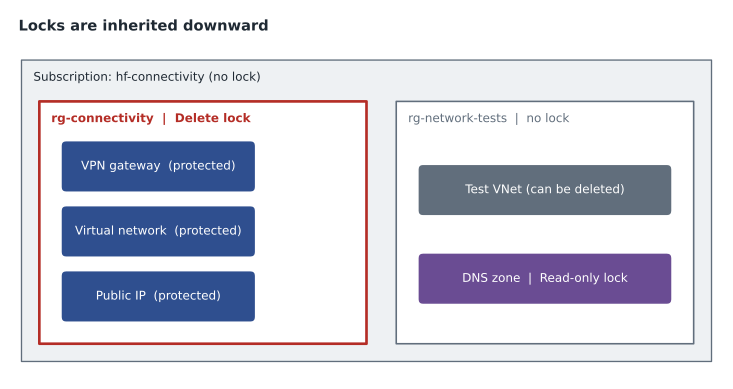
Inheritance works in the other direction for deletion. A resource group cannot be deleted if any resource inside it has a Delete lock, because deleting the group would delete the resource. Azure checks the locks before it starts, so the group is not partly deleted. On October 30, Renata put Delete locks on the connectivity and identity resource groups and on the production StockLine resource group. A single lock on each group protects everything in it, which is easier to manage than locking resources one by one.
az lock create \
  --name lock-no-delete \
  --lock-type CanNotDelete \
  --resource-group rg-connectivity-cus \
--notes "Protects the head office VPN. Remove only with change approval."New-AzResourceLock -LockName lock-no-delete -LockLevel CanNotDelete -ResourceGroupName rg-identity-cus -LockNotes "Protects identity resources."The notes field is worth using. When someone tries to delete a locked resource, the error message tells them a lock is in the way, and the notes explain why it is there and who to ask. Theo wrote every lock note in the same form: what it protects and what approval is needed to remove it.
Control plane, not data
Locks protect the control plane: the management operations that go through Azure Resource Manager, such as creating, changing or deleting a resource. They do not protect the data plane: the operations that work with the data inside a resource. A Delete lock on a storage account stops the account from being deleted, but it does not stop someone with access from deleting the blobs or files stored in it. A lock on a SQL logical server prevents the server from being deleted or changed, but users can still create, change and delete data in its databases.
This distinction matters for planning. Harrow & Finch's pilot Azure Files share is protected from deletion of the storage account by a lock, but protecting the files themselves needs other features: soft delete for files and blobs, which keeps deleted data recoverable for a set period, snapshots, and backups in a Recovery Services vault. Renata summarized it for Theo: "The lock keeps the bucket. Backups keep what is in the bucket."
Side effects of Read-only locks
Because a Read-only lock blocks any change made through Azure Resource Manager, it also blocks some operations that do not look like changes. Many actions in Azure are sent as write or post requests even when they only read something or start something. As a result, a Read-only lock can break things in surprising ways.
| Read-only lock on | Unexpected effect |
|---|---|
| A storage account | Listing the account keys is blocked, so tools that use keys cannot connect; users must use Microsoft Entra credentials |
| A resource group containing VMs | Virtual machines cannot be started or restarted |
| A resource group containing an App Service plan | The plan cannot be scaled |
| A resource group | Resources cannot be moved into or out of the group |
| A subscription | Some services, such as Azure Advisor, cannot store their results |
Delete locks have a few side effects too. A Delete lock on a resource group prevents Azure Resource Manager from automatically cleaning up old deployment history, and a resource group can hold only a limited number of deployment records, so very busy deployment pipelines may need the history cleaned up by other means. Delete locks can also block some cleanup that services perform on their own resources. The general lesson is that locks should be applied thoughtfully and tested, not scattered everywhere.
For these reasons, Harrow & Finch uses Delete locks on almost everything important and Read-only locks only on a few resources that should never change during normal operation, such as the resource group holding the network's DNS zones, and even then only after testing. Read-only locks are a strong control for a frozen configuration and a poor one for anything people work on every day.
Locks, policy and access control together
Locks, Azure Policy and RBAC each answer a different question. RBAC answers who may perform an action. Azure Policy answers what a resource must look like. Locks answer whether a resource may be deleted or changed at all right now. An organization can combine them: RBAC lets only the network team change the VPN gateway, Azure Policy requires that gateways use a specific SKU and region, and a Delete lock stops even the network team from deleting it by accident.
Locks can also be created automatically. A policy with the DeployIfNotExists effect can add a Delete lock to every resource group tagged env = prod, and infrastructure as code templates, covered in lesson 10, can include locks alongside the resources they deploy. Renata planned to use the second approach when the StockLine landing zone is rebuilt with templates in December, so that the lock exists from the moment the resource group does.
Two limits are worth knowing. Locks do not stop a subscription from being canceled; if a subscription is canceled, Azure deactivates its resources and deletes them only after a waiting period, so subscription cancellation needs its own controls. And locks do not protect against someone who is allowed to remove them. A determined or compromised administrator with lock permissions can remove the lock and delete the resource, which is why lock permissions should be limited and why changes to locks should be logged and reviewed.
Theo wrote a short script to model how inherited locks combine, to check his understanding before the exam.
LEVEL = {None: 0, "CanNotDelete": 1, "ReadOnly": 2}
locks = {
    "subscription": None,
    "resource group": "CanNotDelete",
    "resource": None,
}
effective = max(locks.values(), key=lambda lock: LEVEL[lock])
can_delete = LEVEL[effective] == 0
can_modify = LEVEL[effective] < 2
print("Effective lock:", effective)
print("Delete allowed:", can_delete)
print("Modify allowed:", can_modify)Effective lock: CanNotDelete Delete allowed: False Modify allowed: True
What this code does
Works out the lock that actually applies to a resource when locks are set at the subscription, resource group and resource levels. The strictest lock wins, so a delete lock on the resource group protects the resource inside it. The output shows that this resource cannot be deleted but can still be modified.
Managing locks over time
Locks are easy to add and easy to forget. A lock that nobody remembers can block a legitimate change at an awkward moment, such as a planned rebuild or an urgent fix, and people under pressure may then remove locks without thinking. Harrow & Finch treats locks as part of change management. Removing a lock on a production resource group requires a change ticket that says why, for how long and who will put it back. The activity log records every lock created and removed, and the alert rules in lesson 12 notify Renata whenever a lock is deleted in a production subscription.
Theo also keeps a short list of all locks in the team's documentation, generated monthly with az lock list, so that new team members know what is protected and why. When the StockLine landing zone is rebuilt from code in December, the locks will be defined in the same files as the resources, which means the list in the documentation can be replaced by the code itself.
One more practical point: when a deployment or script fails because of a lock, the error message names the lock. That is usually the moment to stop and ask whether the change is really intended, not a reason to remove the lock and try again. Theo's near miss on October 29 would have ended the same way if the lock had been there: with a clear error and a conversation instead of an outage.
Worked problem
Which lock?
The StockLine production database must not be deleted, but the database team needs to scale it up for the spring sale and apply configuration changes. The resource group that holds the company's private DNS zones should not change at all except during planned maintenance. What locks fit?
Show solution
- The database must stay changeable but undeletable, so a Delete (CanNotDelete) lock fits.
- The DNS resource group should not change, so a Read-only lock fits, removed during planned maintenance.
- Before applying the Read-only lock, test that nothing that runs normally needs to write to those resources.
Answer: A Delete lock on the database or its resource group, and a Read-only lock on the DNS resource group after testing.
Common mistakes
MistakeAssuming Owners can delete locked resources.
InsteadLocks apply to everyone; the lock must be removed first.
MistakeExpecting a lock on a storage account to protect its files.
InsteadLocks protect the control plane only; use soft delete, snapshots and backups for data.
MistakePutting Read-only locks on everything for safety.
InsteadRead-only locks can block starting VMs, scaling and key access; use Delete locks unless change must be frozen.
MistakeTrying to lock a management group.
InsteadLocks apply to subscriptions, resource groups and resources.
Summary and key terms
- Resource locks protect subscriptions, resource groups and resources from accidental deletion or change, regardless of users' roles.
- A Delete (CanNotDelete) lock allows reading and changes but not deletion; a Read-only (ReadOnly) lock allows only reading.
- Locks are inherited from higher scopes, the most restrictive one wins, and a resource group cannot be deleted while any resource in it has a Delete lock.
- Locks apply to control plane operations, not to data, can have side effects when read-only, and are managed by roles such as Owner and User Access Administrator.
- Resource lock
- A setting that prevents a resource, resource group or subscription from being deleted or changed.
- CanNotDelete
- The API name for a Delete lock, which blocks deletion but allows changes.
- ReadOnly
- The API name for a Read-only lock, which blocks deletion and changes.
- Inheritance
- A lock at a higher scope applying to everything beneath it.
- Control plane
- Management operations on resources through Azure Resource Manager.
- Data plane
- Operations on the data inside a resource, such as reading or deleting blobs.
Practice problems
Work each problem on paper first, then reveal the answer to check.
What is the API name for a Delete lock?
Show answer
CanNotDelete.
A Delete lock is on a resource group. Can an Owner delete a VM inside it?
Show answer
No, not until the lock is removed, because the lock is inherited.
Does a lock on a storage account stop someone deleting files in it?
Show answer
No. Locks protect management operations, not data.
Lesson quiz · 5 questions
Score 60% or more to complete this lesson.
Create a free account to save your progress, take quizzes and earn a certificate.