
MSAZ-102 · Lesson 5 of 12 · 18 min
Azure Policy and initiatives
▶ Video coming soon A video version of this lesson is on the way.
The tag standard Harrow & Finch adopted on November 4 lasted less than a day before somebody broke it. On the morning of November 5, Liam Ferreira, the junior developer on StockLine, created a resource group for a quick experiment and forgot the tags. Nobody blamed him; he was in a hurry and the portal did not stop him. "That is the point," Renata told Theo. "A standard that depends on everyone remembering will fail. We need Azure to apply the rules for us." That afternoon they assigned their first set of Azure Policy rules to the HarrowFinch management group, and the cloud started enforcing the company's standards on its own.
What Azure Policy does
Azure Policy is a service that creates, assigns and manages rules for Azure resources. Each rule describes a condition that resources should meet, such as being in an approved region, carrying a required tag or using encryption, and an effect that says what happens when a resource does or does not meet it. Azure Policy evaluates resources when they are created or changed, and also checks existing resources regularly, reporting which ones are compliant and which are non-compliant. Depending on the effect, it can block non-compliant changes, record them for review, or fix them automatically.
It helps to contrast Azure Policy with role-based access control (RBAC), which MSAZ-101 introduced. RBAC controls who can do what: whether Liam may create resource groups in the nonproduction subscription. Azure Policy controls what resources must look like, regardless of who creates them: whether any resource group, created by anyone, must have a cost-center tag. A user with Owner rights can still be blocked by a policy. The two work together: RBAC limits actions to the right people, and policy keeps every resource within the organization's rules.
Policy definitions
A policy definition describes one rule. It is written in JSON and has a condition, written as an if block, and an effect, written as a then block. The condition can test almost any property of a resource: its type, its location, its tags, its SKU or settings deep inside its configuration. Definitions can take parameters, so one definition such as Allowed locations can be reused with different lists of regions for different scopes.
Azure includes a large library of built-in definitions written by Microsoft, covering common needs such as allowed locations, allowed virtual machine sizes, required tags, inheriting tags, requiring HTTPS on storage accounts, auditing virtual machines without backup and many security settings. Organizations can also write custom definitions for rules of their own. Most organizations start with built-in definitions, because they are tested and maintained, and add custom ones only where needed.
{
  "if": {
    "not": {
      "field": "location",
      "in": "[parameters('listOfAllowedLocations')]"
    }
  },
  "then": {
    "effect": "deny"
  }
}
Effects
The effect decides what Azure Policy does with a resource that matches the condition. Choosing the right effect is the most important design decision, because a deny that is too broad can stop legitimate work, while an audit that nobody reads changes nothing.
| Effect | What it does | Example |
|---|---|---|
| Deny | Blocks a create or update request that would break the rule | Block resources outside approved regions |
| Audit | Allows the change but marks the resource non-compliant | Report storage accounts that allow public access |
| Append | Adds fields to a request as it is made | Add a firewall rule setting to a new resource |
| Modify | Adds, updates or removes properties such as tags, during creation or by remediation | Copy the cost-center tag from the resource group |
| AuditIfNotExists | Reports when a related resource or setting is missing | Report VMs without a backup configured |
| DeployIfNotExists | Deploys a related resource or setting when it is missing | Turn on diagnostic logging to a Log Analytics workspace |
| Disabled | Turns the rule off without removing the assignment | Pause a rule during testing |
Modify and DeployIfNotExists change resources on the organization's behalf, so their assignments use a managed identity with the permissions needed to make those changes. They act on new and updated resources automatically. For resources that existed before the assignment, you create a remediation task, which applies the fix to the non-compliant resources already in the scope.
Initiatives
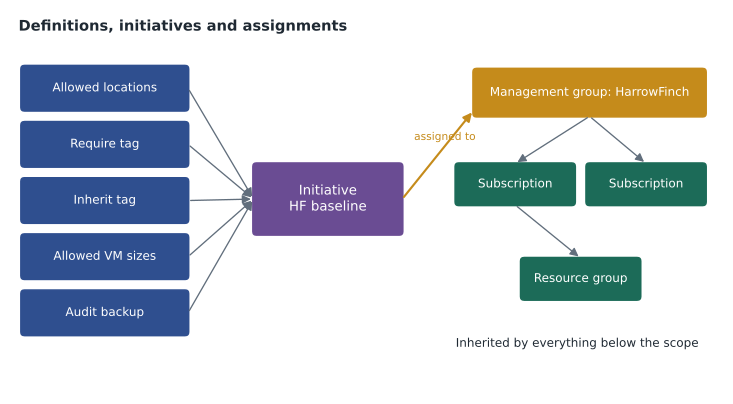
Real governance needs many rules. An initiative, also called a policy set, groups several policy definitions so they can be assigned and tracked as one unit with one compliance figure. Harrow & Finch created a custom initiative called HF baseline with five definitions: allowed locations, require a cost-center tag on resource groups, inherit the cost-center tag from the resource group if missing, allowed virtual machine size families for nonproduction, and audit virtual machines without backup.
Microsoft also provides built-in initiatives. The Microsoft cloud security benchmark initiative, which Microsoft Defender for Cloud uses as its default, contains a large set of security checks across services. Regulatory compliance initiatives map Azure Policy definitions to the controls of standards and regulations, such as ISO 27001, PCI DSS and NIST SP 800-53. Assigning one of these does not make an organization compliant by itself, because many controls are about people and processes, but it shows which technical settings support or break each control.
Assignments and scope
A definition or initiative does nothing until it is assigned to a scope: a management group, a subscription, a resource group or, rarely, a single resource. Assignments are inherited by everything below the scope, so assigning HF baseline to the HarrowFinch management group applies it to every subscription and resource group under it, including ones created later. This is one of the main reasons organizations build a management group hierarchy, as Harrow & Finch did in September.
An assignment sets the parameter values, such as the list of allowed regions, and can exclude child scopes that should not be covered. Separately, exemptions can record that a particular resource or scope is temporarily or permanently excused from a rule, with a reason and an optional expiry date. Exemptions are better than quietly removing rules because they leave an audit trail. When the web team needed a test resource in another region to measure response times from overseas customers, Renata created a 30-day exemption rather than loosening the rule for everyone.
az policy assignment create \
  --name hf-allowed-locations \
  --display-name "HF allowed locations" \
  --scope /providers/Microsoft.Management/managementGroups/HarrowFinch \
  --policy e56962a6-4747-49cd-b67b-bf8b01975c4c \
--params '{ "listOfAllowedLocations": { "value": [ "centralus", "eastus2" ] } }'| Assignment | Scope | Effect | Parameters |
|---|---|---|---|
| Allowed locations | HarrowFinch management group | Deny | Central US and East US 2 |
| Require cost-center tag on resource groups | HarrowFinch management group | Deny | Tag name cost-center |
| Inherit cost-center tag from resource group | HarrowFinch management group | Modify | Tag name cost-center |
| Allowed VM size families | Non-production management group | Deny | Small general-purpose families only |
| Audit VMs without backup | Production management group | AuditIfNotExists | None |
Evaluation and compliance
Azure Policy evaluates resources at several moments: when a resource is created or updated, when an assignment is created or changed, and during a regular compliance scan of existing resources that runs about once a day. You can also start an on-demand scan. Results appear on the compliance dashboard, which shows, for each assignment and initiative, how many resources are compliant, how many are not and why. Each non-compliant resource can be opened to see which condition it failed.
The first scan after the HF baseline assignment found what Renata expected: the resource groups created before the policy, including Liam's experiment, were missing tags, and two test virtual machines had no backup, which was fine for test but showed up because Renata had mistakenly assigned the backup audit one level too high. She moved that assignment to the Production management group. A remediation task then copied cost-center tags onto the existing resources, and Liam added the missing tag to his resource group himself, a little embarrassed.
Theo wrote a small script to show the logic of evaluation. It checks a list of resources against two rules, the way Azure Policy reports compliance for an initiative.
allowed = {"centralus", "eastus2"}
resources = [
    {"name": "rg-stockline-prod", "location": "centralus", "tags": {"cost-center": "4100"}},
    {"name": "rg-liam-test",      "location": "centralus", "tags": {}},
    {"name": "rg-web-latency",    "location": "westeurope",    "tags": {"cost-center": "4300"}},
    {"name": "rg-backup-dr",      "location": "eastus2",    "tags": {"cost-center": "4100"}},
]
compliant = 0
for r in resources:
    problems = []
    if r["location"] not in allowed:
        problems.append("location not allowed")
    if "cost-center" not in r["tags"]:
        problems.append("missing cost-center tag")
    if problems:
        print(f"{r['name']:18s} NON-COMPLIANT: {'; '.join(problems)}")
    else:
        compliant += 1
print(f"{compliant} of {len(resources)} resources compliant")rg-liam-test NON-COMPLIANT: missing cost-center tag rg-web-latency NON-COMPLIANT: location not allowed 2 of 4 resources compliant
What this code does
Checks a list of resource groups against two policy rules: each must be in an allowed region, and each must carry a cost-center tag. It prints compliant or non-compliant with the reason for every resource and counts how many pass. This shows how Azure Policy evaluates resources against rules and reports compliance.
Rolling out policy safely
A deny policy assigned carelessly can stop a whole company's deployments. Renata's approach follows common practice. Start new rules with the Audit effect, read the compliance results for a week, fix the existing resources and talk to the teams affected, then switch to Deny. Assign at the highest scope where the rule truly applies, but test first on a nonproduction management group. Keep the number of custom definitions small, document every exemption with a reason and an expiry, and review the compliance dashboard as part of the monthly governance meeting. Policies can also be stored as code and deployed through pipelines, which lesson 10 touches on.
Policy and the developer experience
A rule that blocks people without explanation creates frustration and workarounds. Renata spent time on the developer experience of the HF baseline. Every custom definition has a clear display name and description, and every Deny assignment has a non-compliance message that appears in the error when a request is blocked, such as: Resource groups must have a cost-center tag with a finance code; see the cloud standards page. Liam's next resource group was blocked by exactly that message, and he fixed it in thirty seconds instead of opening a ticket.
She also published the list of assigned rules on the team's wiki page with the reason for each one, the effect, the scope and the person to ask for an exemption. Governance that people understand is governance they follow. When the web team later asked why they could not use a region in Europe for a latency test, the answer was already on the page, along with the exemption process that let them do it for thirty days.
Policy also helps outside the cloud team. Sunil uses the compliance dashboard to answer security questions quickly: how many storage accounts allow public access, how many VMs lack backup, how many resources are outside approved regions. Each number links to the list of resources involved, so a question from the audit committee becomes a five-minute check rather than a week of spreadsheets.
One more design choice matters: where definitions live. Custom definitions saved at the HarrowFinch management group can be assigned anywhere beneath it, so Renata stored them there rather than in individual subscriptions. That keeps one copy of each rule, and a fix to a definition applies everywhere it is assigned.
Worked problem
Choosing an effect
Harrow & Finch wants three rules: (1) no resource may be created outside the approved regions; (2) any storage account that allows public blob access should be reported, because a few legacy integrations still need it; (3) every virtual machine must send its logs to the central Log Analytics workspace. Which effect suits each rule?
Show solution
- Rule 1 must stop non-compliant requests, so Deny fits.
- Rule 2 should report without blocking existing integrations, so Audit fits.
- Rule 3 needs a setting deployed when it is missing, so DeployIfNotExists fits, with a remediation task for existing VMs.
Answer: Deny for regions, Audit for public blob access, and DeployIfNotExists for log collection.
Common mistakes
MistakeUsing Azure Policy to control which people can create resources.
InsteadThat is RBAC; policy controls what resources must look like.
MistakeAssigning a new Deny rule straight to production.
InsteadStart with Audit, review results, then switch to Deny.
MistakeExpecting Modify or DeployIfNotExists to fix existing resources immediately.
InsteadThey act on new and updated resources; use a remediation task for existing ones.
MistakeDeleting a rule to let one resource through.
InsteadCreate an exemption with a reason and an expiry date.
Summary and key terms
- Azure Policy enforces rules about what resources must look like, independent of who creates them.
- A policy definition has a condition and an effect such as Deny, Audit, Append, Modify, AuditIfNotExists, DeployIfNotExists or Disabled; definitions can be built-in or custom and take parameters.
- Initiatives group definitions, including built-in security and regulatory initiatives.
- Assignments apply definitions or initiatives to a management group, subscription or resource group and are inherited downward, with exclusions and exemptions.
- Compliance is evaluated on changes and regularly, and remediation tasks fix existing resources.
- Azure Policy
- The Azure service that enforces and reports on rules for resource properties.
- Policy definition
- A JSON rule with a condition and an effect.
- Effect
- What Azure Policy does when a resource matches a rule, such as Deny or Audit.
- Initiative
- A group of policy definitions assigned and tracked together.
- Assignment
- Applying a definition or initiative to a scope, with parameter values.
- Exemption
- A recorded exception that excuses a scope or resource from a rule.
- Remediation task
- A job that applies Modify or DeployIfNotExists fixes to existing resources.
Practice problems
Work each problem on paper first, then reveal the answer to check.
What is the difference between Azure Policy and RBAC?
Show answer
RBAC controls who can perform actions; Azure Policy controls what properties resources must have.
If an initiative is assigned to a management group, which resources does it cover?
Show answer
All subscriptions, resource groups and resources beneath it, including new ones, except excluded scopes.
Which effect reports non-compliance without blocking the change?
Show answer
Audit.
Lesson quiz · 5 questions
Score 60% or more to complete this lesson.
Create a free account to save your progress, take quizzes and earn a certificate.