
CSCO-190 · Lesson 9 of 12 · 25 min
Reviewing networking objectives
▶ Video coming soon A video version of this lesson is on the way.
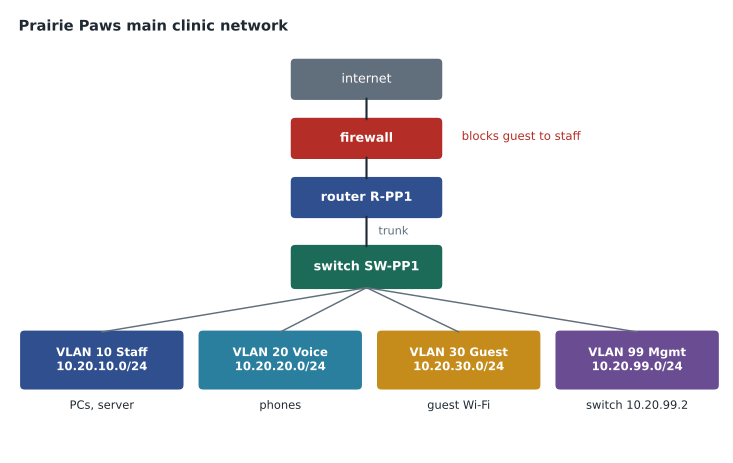
In March 2027, a month before her exam, Lila Haddad will visit Brightline on a school job-shadowing day and spend an afternoon with Dev Anand. Dev has planned it already: he will show her the Prairie Paws clinic network on a whiteboard, the same network he and Jordan worked on in CSCO-112, and ask her to explain it back to him. "If you can draw the clinic's VLANs, address them, and tell me why a guest's phone cannot reach the practice-management server," he says, "you are ready for the networking exam." This lesson is that afternoon in written form: a structured review of the six areas of the CCST Networking exam as commonly listed, with worked subnetting and troubleshooting examples. It assumes you have completed CSCO-111 and CSCO-112 and points back to them for detail.
As in lesson 8, use the lesson actively. Before each section, write down what you remember, then check. Work every calculation yourself on paper before reading the solution. Subnetting in particular becomes fast only with repetition, so treat the examples here as a starting point and make up more of your own.
Area 1: Standards and concepts
This area covers the models and vocabulary of networking. Know the layers of the OSI model, from physical at the bottom through data link, network, transport, session and presentation to application at the top, and the simpler four-layer TCP/IP model that maps onto it. Know which devices and protocols work at which layer: switches forward frames using MAC addresses at layer 2, routers forward packets using IP addresses at layer 3, and TCP and UDP provide transport at layer 4. Know the difference between TCP, which is connection-oriented and reliable, and UDP, which is connectionless and lighter. Know common well-known ports: 22 for SSH, 23 for Telnet, 25 for SMTP, 53 for DNS, 80 for HTTP, 443 for HTTPS and 3389 for Remote Desktop.
Know the kinds of networks by scope, such as LAN, WAN and the wireless LAN, and the basic ideas of cloud and virtualization: public, private and hybrid clouds, and the service models where a provider manages more or less of the stack. CSCO-111 lessons 1 to 4 cover these concepts.
| Layer | Name | Unit | Examples |
|---|---|---|---|
| 7 | Application | Data | HTTP, DNS, SMTP |
| 4 | Transport | Segment or datagram | TCP, UDP, port numbers |
| 3 | Network | Packet | IPv4, IPv6, routers |
| 2 | Data link | Frame | Ethernet, MAC addresses, switches |
| 1 | Physical | Bits | Cables, connectors, radio |
Area 2: Addressing and subnet formats
This is the area with the most calculation. Know that an IPv4 address is 32 bits written as four decimal octets, and that the mask or prefix length says how many of those bits identify the network. Know the private ranges: 10.0.0.0/8, 172.16.0.0/12 and 192.168.0.0/16. Know how to find the network address, the broadcast address and the usable host range of a subnet, and how to count usable hosts: two raised to the number of host bits, minus two for the network and broadcast addresses. A /24 has 8 host bits and 254 usable hosts; a /26 has 6 host bits and 62; a /28 has 4 host bits and 14; a /30 has 2 host bits and 2, which is why it was traditionally used for point-to-point links.
Know IPv6 basics: 128-bit addresses written in hexadecimal groups, the rules for shortening them by dropping leading zeros and replacing one run of all-zero groups with a double colon, link-local addresses beginning fe80, and the idea that a /64 prefix is the standard size for a subnet. CSCO-111 lessons 5 to 9 cover addressing in detail.
Worked problem
Finding the range of a subnet
A Prairie Paws device has the address 10.20.30.77 with mask 255.255.255.192. What are its network address, broadcast address and usable host range, and how many hosts can the subnet hold?
Show solution
- The mask 255.255.255.192 is a /26: the last octet has 2 network bits and 6 host bits.
- A /26 divides the last octet into blocks of 64: 0, 64, 128 and 192.
- 77 falls in the block starting at 64, so the network address is 10.20.30.64.
- The next block starts at 128, so the broadcast address is one less: 10.20.30.127.
- Usable hosts run from 10.20.30.65 to 10.20.30.126, and there are 2 to the power 6 minus 2, which is 62.
Answer: Network 10.20.30.64, broadcast 10.20.30.127, usable 10.20.30.65 to 10.20.30.126, 62 hosts.
# Check the worked example, then a few more, with Python's ipaddress module
import ipaddress
for addr in ("10.20.30.77/26", "192.168.12.200/27", "172.16.5.9/30"):
    iface = ipaddress.ip_interface(addr)
    net = iface.network
    hosts = list(net.hosts())
    print(f"{addr}: network {net.network_address}, broadcast {net.broadcast_address}, "
          f"hosts {hosts[0]} to {hosts[-1]} ({len(hosts)} usable)")
print(ipaddress.ip_address("2001:0db8:0000:0000:0000:0000:0000:0001").compressed)10.20.30.77/26: network 10.20.30.64, broadcast 10.20.30.127, hosts 10.20.30.65 to 10.20.30.126 (62 usable) 192.168.12.200/27: network 192.168.12.192, broadcast 192.168.12.223, hosts 192.168.12.193 to 192.168.12.222 (30 usable) 172.16.5.9/30: network 172.16.5.8, broadcast 172.16.5.11, hosts 172.16.5.9 to 172.16.5.10 (2 usable) 2001:db8::1
The script checks the worked example and two more, and shows the shortened form of an IPv6 address. On the exam you will not have Python, so use it only to check practice you have done by hand. Lila keeps a small table on the first page of her notes: prefix lengths from /24 to /30, the block size in the last octet and the number of usable hosts for each. Writing it from memory on the erasable board in the first minute of the exam is a common and allowed technique.
Worked problem
Choosing a subnet size
Kettle & Crumb is opening a fourth shop. Dev needs one subnet for up to 20 point-of-sale terminals, tablets and printers, with room for about 50 devices in a few years. Which prefix length should he choose, and what is the smallest that would fit today's devices?
Show solution
- Today: 20 devices plus the gateway is 21 addresses. A /27 offers 30 usable hosts, enough for today.
- Future: about 50 devices plus the gateway is 51. A /27 is too small; a /26 offers 62.
- Choosing a /26 now avoids renumbering the shop when it grows, and private address space has plenty of room.
- If the shops use 192.168.14.0 for the new site, a /26 network could be 192.168.14.0/26, with usable addresses 192.168.14.1 to 192.168.14.62.
Answer: A /27 fits today; a /26 fits the expected growth and is the better choice.
IPv6 items on an entry-level exam usually test recognition rather than calculation: can you shorten an address correctly, recognize a link-local address, and say how a device can configure itself? Remember the two shortening rules: leading zeros in any group can be dropped, and one run of consecutive all-zero groups can be replaced by a double colon, but only once in an address, because using it twice would make the address ambiguous. A device can form its own global address from the router's advertised /64 prefix using stateless address autoconfiguration, or receive one from DHCPv6. Lila remembers the double-colon rule with a simple test: if she could not reconstruct exactly how many zero groups were removed, the shortening is wrong.
Area 3: Endpoints and media types
This area covers the devices at the edge of a network and the media that connect them. Know the common copper cable categories and their uses, the difference between straight-through and crossover wiring and why modern equipment usually handles either automatically, the basic difference between multimode and single-mode fiber, and the roles of connectors such as RJ-45 for copper and LC for fiber. Know wireless basics: the 2.4, 5 and 6 GHz bands, why 2.4 GHz travels farther but is more crowded, and which Wi-Fi generations use which bands. Know how to check an endpoint's network settings on Windows, macOS and Linux and on a phone. CSCO-111 lessons 10 to 12 cover endpoints and media.
Area 4: Infrastructure
This area covers switches, routers, firewalls and access points and how they are configured and connected. Know that a switch learns MAC addresses and forwards frames only to the right port, that VLANs divide one physical switch into separate broadcast domains, that a trunk carries several VLANs between switches using tags, and that traffic between VLANs needs a router or a layer 3 switch. Know the purpose of the default gateway, static and dynamic routes, and administrative distance, which ranks route sources when more than one offers a path. Know the services that make networks usable: DHCP to assign addresses, DNS to resolve names and NAT to let private addresses share a public one. Know basic device management: console and SSH access, saving configurations and the commands that show interface status and routing tables. CSCO-112 lessons 1 to 7 cover infrastructure.
Area 5: Diagnosing problems
This area covers troubleshooting networks methodically. A common approach is to work up the layers from the bottom: is the cable connected and the link light on, is the device on the right VLAN, does it have a valid address, mask and gateway, can it reach the gateway, can it reach a remote address, can it resolve names? Know which tool answers which question: link lights and interface status for layer 1 and 2, ipconfig and the device's settings for addressing, ping for reachability, traceroute to find where a path stops, and nslookup for DNS. Know how to read typical outputs: an interface that is administratively down, a ping that times out, a traceroute that stops at the gateway. CSCO-112 lessons 8 to 11 cover diagnosis.
Worked problem
Why a guest phone cannot reach the server
Dev's question for Lila: a visitor at Prairie Paws joins the guest Wi-Fi and reports that she can browse the web but cannot open the clinic's appointment app, which runs on the practice-management server. Is something broken?
Show solution
- Identify where each device sits: guest Wi-Fi is VLAN 30, 10.20.30.0/24; the server is on the staff VLAN 10, 10.20.10.0/24.
- Browsing works, so the phone has an address, a gateway and DNS: layers 1 to 3 and name resolution are fine.
- Traffic from VLAN 30 to VLAN 10 must pass through the router and firewall, and the firewall blocks guest-to-staff traffic by design.
- Nothing is broken; the network is doing its job. The visitor should use the clinic's public booking website, which is reachable from the internet.
Answer: It is working as designed: the guest VLAN is deliberately blocked from staff systems. The right answer is to explain, not to open the firewall.
Wireless problems deserve their own habit. When a laptop drops off Wi-Fi in one corner of the clinic, check signal strength and the band first: 5 GHz gives more speed but weaker coverage through walls, so a device at the edge of coverage may do better on 2.4 GHz. Check for interference from microwave ovens and neighboring networks on the same channel, and check whether the device is trying to join the right network with the right security setting. Dev's favorite exhibit for new technicians shows a laptop's Wi-Fi details with strong signal but a 169.254 address: the radio link is fine, but DHCP has not answered, which moves the problem from wireless to addressing.
Area 6: Security
The networking exam's security area covers the basics every network technician needs: why management access should use SSH rather than Telnet, why default passwords must be changed, how WPA2 and WPA3 protect wireless networks, why guest networks are separated, what a firewall and an access control list do, and the main threats to networks at a conceptual level. It overlaps with the cybersecurity track, which lesson 10 reviews. CSCO-112 lesson 12 covers network security for this track.
Common mistakes
MistakeCounting all addresses as usable hosts.
InsteadSubtract two for the network and broadcast addresses.
MistakeTreating a switch as a layer 3 device by default.
InsteadA standard switch forwards frames by MAC address at layer 2.
MistakeOpening a firewall because a guest cannot reach staff systems.
InsteadCheck whether the block is by design before changing anything.
MistakeStarting diagnosis at the application.
InsteadWork up from the physical layer to name resolution.
MistakeUsing Telnet for device management.
InsteadUse SSH, which encrypts the session.
Summary and key terms
- Standards: OSI and TCP/IP layers, TCP versus UDP, and common well-known ports.
- Addressing: private ranges, masks and prefixes, network and broadcast addresses, usable hosts, IPv6 shortening and link-local.
- Endpoints and media: cable categories, fiber types, connectors and wireless bands.
- Infrastructure: switching, VLANs and trunks, routing and the default gateway, DHCP, DNS and NAT.
- Diagnosis: work up the layers and match each question to the right tool.
- Security: SSH over Telnet, changed defaults, WPA2 and WPA3, separated guests, firewalls and ACLs.
- Write a prefix table from memory at the start of the exam to speed up subnetting.
- Subnet mask
- A value showing which bits of an address identify the network.
- Broadcast address
- The last address in a subnet, used to reach every host in it.
- VLAN
- A virtual LAN that separates broadcast domains on a switch.
- Trunk
- A link carrying traffic for several VLANs, identified by tags.
- Default gateway
- The router address a device uses to reach other networks.
- Administrative distance
- A ranking of route sources used when several offer a path.
Practice problems
Work each problem on paper first, then reveal the answer to check.
How many usable hosts does a /27 provide?
Show answer
30.
What is the network address of 192.168.12.200/27?
Show answer
192.168.12.192.
Shorten 2001:0db8:0000:0000:0000:0000:0000:0001.
Show answer
2001:db8::1.
Which port does HTTPS use by default?
Show answer
443.
At which OSI layer do switches forward frames?
Show answer
Layer 2, the data link layer.
A traceroute stops at the first hop. What does that suggest?
Show answer
Traffic reaches the gateway but goes no further, so check the router's onward path or a firewall.
Why does traffic between VLANs need a router or layer 3 switch?
Show answer
Each VLAN is a separate network, so moving between them is routing.
Lesson quiz · 5 questions
Score 60% or more to complete this lesson.
Create a free account to save your progress, take quizzes and earn a certificate.