
CSCO-190 · Lesson 11 of 12 · 22 min
Reading questions carefully
▶ Video coming soon A video version of this lesson is on the way.
When Marisol reviews Jordan's second timed practice set, she finds something that surprises him. Of the nine items he got wrong, only three were gaps in knowledge. The other six were reading errors. He chose a correct statement when the stem asked which statement was not true. He picked a reasonable step when the item asked for the first step. He answered a question about a laptop when the scenario was about a desktop with a dock. "You knew all six," she says. "You just answered a slightly different question from the one on the screen." Reading errors are the cheapest marks to recover, because fixing them needs no new knowledge, only a method. This lesson describes how exam items are constructed, the words that change their meaning, the traps that catch careful people, and a routine for reading every stem so that you answer the question that was asked.
How an item is built
Professionally written exam items follow a pattern. The stem presents a situation and ends with a clear question or instruction. The options include one key, or several for multiple-answer items, and distractors that are plausible to someone with partial knowledge. Good items test one idea at a time, avoid trick wording and contain all the information needed to answer. That last point matters: if an item seems to be missing information, re-read it before concluding that it is flawed. The missing fact is usually in a detail you skimmed, such as a time, a device type or the word "all".
Item writers also try to make every option the same length and style, so that the key does not stand out. That is why advice such as "choose the longest option" does not work on well-made exams. What does work is understanding what the item is testing. Ask yourself which exam topic the item belongs to and what idea from that topic it is checking. Once you can name the idea, the key is usually clear.
Words that change the question
A handful of words appear again and again in exam stems, and each one changes what counts as the right answer. First and next ask about sequence, usually in a troubleshooting or incident process; several options may be good actions, but only one comes at this point. Best and most appropriate ask for the strongest option among several that may be acceptable; judge them against each other, not against perfection. Most likely asks for probability given the symptoms, not for every possible cause. Not, except and least reverse the logic, asking for the one option that does not fit. Always and never make an option absolute, and absolute statements in technology are often false, though not always.
Develop the habit of spotting these words before reading the options. Some candidates mentally underline them; others say them silently. If the exam allows working notes, writing the qualifier on the erasable board for a long item can help. Jordan's fix, after his six reading errors, is to read the final sentence of every stem twice, once before the scenario and once after, and to say the qualifier to himself: "first", "not", "best".
| Qualifier | What it asks for | Common trap |
|---|---|---|
| FIRST, NEXT | The step that comes at this point in a process | Choosing a good step that belongs later |
| BEST, MOST APPROPRIATE | The strongest of several acceptable options | Choosing an option that works but is weaker |
| MOST LIKELY | The most probable cause given the symptoms | Choosing a possible but less likely cause |
| NOT, EXCEPT, LEAST | The one option that does not fit | Choosing a true statement by habit |
| ALWAYS, NEVER, ONLY | An absolute claim | Accepting an absolute that has exceptions |
Facts that matter and facts that do not
Scenario stems contain details, and part of the skill is deciding which ones matter. The type of device, the operating system, what changed recently, how many users are affected, the time a problem started and the exact error message usually matter. Names of people and businesses, and colorful descriptions, usually do not. A useful exercise is to rewrite a long stem in one line, keeping only the facts that would change your answer. "A clinic receptionist on a Windows 11 desktop with a dock has had no second screen since this morning's updates; the laptop users are fine" becomes "one desktop, dock, second screen lost after update". The likely answer, dock firmware or driver, is easier to see in the short version.
Be equally careful not to add facts. If the stem does not say that a backup exists, do not assume one. If it does not say the user is an administrator, do not assume they can install software. Many wrong answers are correct in a slightly different scenario, and the candidate who imagines that scenario chooses them. Answer the situation on the screen, not the one you would prefer or the one you met at work last week.
Worked problem
Reading a FIRST question
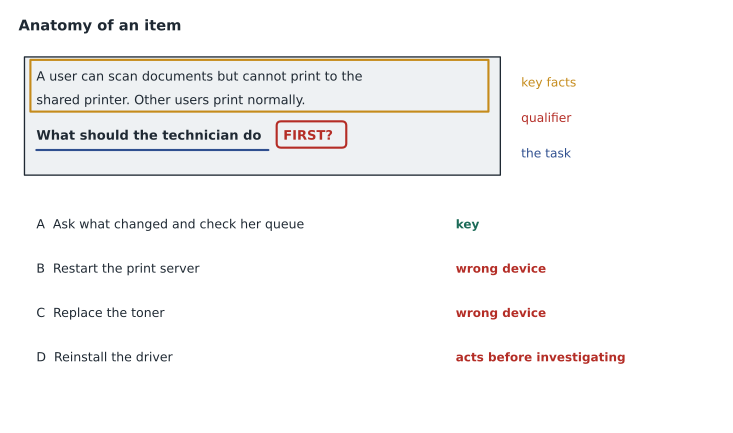
Practice item: A user at Riverside reports that she cannot print to the office printer, although she printed this morning. Other users are printing normally. What should the technician do FIRST? (A) Reinstall the printer driver on her laptop. (B) Ask what has changed since she last printed successfully and check her laptop's connection and print queue. (C) Replace the printer's toner. (D) Restart the print server.
Show solution
- Qualifier: FIRST. Several options might help eventually; we need the right opening step.
- Key facts: one user, worked this morning, others are fine. The printer and server are working, so (C) and (D) target the wrong device.
- (A) might be needed later, but reinstalling before gathering information skips the first troubleshooting step.
- (B) is identifying the problem: question the user, determine what changed, check the simplest things first.
- The distractors are each based on a common mistake: fixing the shared device when only one user is affected, and acting before investigating.
Answer: (B). The first step is always to identify the problem by gathering information.
Multiple-answer and negative items
Multiple-answer items and negative items deserve extra care because they reverse habits. For a choose-two item, treat each option as a separate true-or-false statement about the stem, mark each one, and then check that you have exactly two marked as true. For a negative item, such as "Which of the following is NOT a benefit of multifactor authentication?", it helps to rephrase the question positively in your head, mark each option as a benefit or not, and choose the one that is not. Then reread the stem one more time before confirming, because the most common error on negative items is answering the positive question by habit.
Combined items, which ask for two answers and use a negative, are rare but not unknown. Slow down for them. A few extra seconds on an unusual stem are well spent, and lesson 5's checkpoints leave room for them.
Ordering and matching items have their own reading traps. In an ordering item, check whether it asks for the order in which things happen or the order of priority; a list of incident steps and a list of tickets to work need different kinds of thinking. In a matching item, check whether every left-hand item needs a different partner, or whether one answer can be used twice; the instructions in the item will say. Keisha's tip for both is to read the instruction line aloud in her head as though explaining it to a new technician, because putting the task in her own words exposes any assumption she has made about it.
Language and terminology
Exams are written in a particular style of English, and some terms differ from what you use at work. Candidates who learned British or Canadian spelling may see American forms in the English version of the exam, and candidates everywhere meet occasional unfamiliar phrasing; read for meaning rather than form. Vendors sometimes use their own names for common features, and exam writers usually prefer generic or standard terms. If an option uses a term you do not recognize, consider whether it might be a different name for something you know. If the exam is in a language other than your first, budget a little extra time for long stems, as lesson 5 suggested, and keep your personal glossary of tricky terms in your final review.
Numbers and notation are another source of slips. Read units carefully: megabits and megabytes differ by a factor of eight, and a link speed is usually given in bits per second. Check notation: a mask can be written as a prefix length or in dotted decimal, and an IPv6 address may appear in full or shortened form. When an item gives a number, ask what unit it is in before using it.
Reading exhibits
Exhibits add a second thing to read, and they reward the same discipline. Read the question first, so you know what you are looking for, then scan the exhibit for that thing. If the question asks why a host cannot reach the internet, look at its address, mask, gateway and DNS settings in that order, and compare each with what the rest of the exhibit shows. If the question asks which account caused a series of failed sign-ins, look at the account names and time stamps, not the computer names. An exhibit often contains more information than the item needs, sometimes deliberately, to test whether you can pick out what matters.
Watch for small inconsistencies, because that is usually where the answer hides. A gateway in a different subnet from the host. A switch port shown as administratively down. A time stamp in the middle of the night. A DNS server address that belongs to a public resolver when the scenario involves internal names, like the Riverside laptop in lesson 8. Jordan practices by printing real command outputs from his lab, covering the bottom half, and predicting what the rest will show before uncovering it.
A reading routine
Put these ideas together into a routine and practice it until it is automatic. First, read the final sentence of the stem to learn the task and spot the qualifier. Second, read the whole stem, noting the facts that matter. Third, answer in your head before looking at the options. Fourth, read every option, including after you find one you like, because a better one may follow. Fifth, eliminate and choose, and for multiple-answer items check the count. Sixth, move on without second-guessing unless you notice a specific misreading. The routine takes a few seconds per item once it is familiar, and it removes most reading errors.
Practice the routine on every quiz in this program, not just on timed sets. Lila's teacher asks her class to annotate five practice items a week, circling the qualifier and underlining the key facts, and to explain in one sentence why each distractor is wrong. After a month, the class's reading errors fall by more than half, and the students start to recognize the patterns item writers use.
Common mistakes
MistakeAnswering the positive version of a NOT question.
InsteadRephrase it, mark each option, and reread the stem before confirming.
MistakeChoosing a good step when the item asks for the first step.
InsteadPlace each option in the process and choose the one that comes now.
MistakeAdding facts the stem does not give.
InsteadAnswer the scenario on the screen, not one you imagine.
MistakeStopping at the first plausible option.
InsteadRead every option; a better one may follow.
MistakeIgnoring units and notation.
InsteadCheck bits versus bytes, prefix versus dotted decimal, and full versus shortened IPv6.
Summary and key terms
- Many wrong answers come from misreading, which is the easiest kind of mistake to fix.
- Well-made items have a stem, a key and plausible distractors built from common mistakes.
- Qualifiers such as first, best, most likely and not change what counts as correct.
- Keep the facts that would change your answer and ignore decoration; never add facts.
- Treat multiple-answer and negative items as sets of true-or-false judgments.
- Watch terminology, units and notation.
- Use a fixed reading routine on every item until it is automatic.
- Qualifier
- A word in the stem, such as first or not, that changes what counts as correct.
- Negative item
- An item that asks which option does not fit.
- Key fact
- A detail in the stem that would change the answer if it were different.
- Decoration
- Story detail that does not affect the answer.
- Reading routine
- A fixed sequence of steps for reading each item.
- Plausible distractor
- A wrong option that a partly informed candidate might choose.
Practice problems
Work each problem on paper first, then reveal the answer to check.
What does the qualifier MOST LIKELY ask for?
Show answer
The most probable cause given the symptoms, not every possible cause.
Rewrite in one line: a bakery manager says the office laptop's Wi-Fi drops every afternoon when the microwave in the staff room is used.
Show answer
Laptop Wi-Fi drops when the microwave runs, suggesting 2.4 GHz interference.
Why should you read every option even after finding a good one?
Show answer
A better option may follow, especially on BEST items.
What is the most common error on NOT items?
Show answer
Choosing a true statement by habit, answering the positive question.
How many bits are in a byte, and why does it matter on exams?
Show answer
Eight; link speeds are in bits per second while file sizes are often in bytes.
What should you do if an item seems to be missing information?
Show answer
Reread it; the needed fact is usually in a detail you skimmed.
Name the six steps of the reading routine.
Show answer
Read the final sentence; read the stem for key facts; answer in your head; read every option; eliminate and choose; move on.
Lesson quiz · 5 questions
Score 60% or more to complete this lesson.
Create a free account to save your progress, take quizzes and earn a certificate.