
CSCO-190 · Lesson 7 of 12 · 22 min
Labs and simulators for practice
▶ Video coming soon A video version of this lesson is on the way.
Dev Anand learned networking in a basement. In 2014, with no money for equipment, he bought three secondhand switches and two routers from a company that was closing down, stacked them on a shelf above his parents' washing machine and spent a winter breaking and fixing them. Today he tells Jordan that he would not bother: "Everything I learned on that shelf, you can learn on a laptop now, for free, and the laptop does not hum all night." Hands-on practice is what turns reading into skill, and it is the best preparation for the scenario and exhibit items described in lesson 4. This lesson describes practical labs for each CCST track, the tools that make them possible on a small budget, the line between legitimate practice material and cheating, and the rules that keep a home lab safe and legal.
Why labs matter for an entry-level exam
The CCST exams test practical judgment: which tool to use, what an output means, what to try next. You can learn the facts from a course, but recognizing an address that does not belong, a service that is not running or a log entry that looks wrong comes from having seen many normal ones. A lab lets you create problems on purpose, observe the symptoms and fix them, which is the same cycle of hypothesis and test that the troubleshooting method in CSCO-101 describes. It also builds the kind of memory that holds up under exam pressure, because it is attached to something you did rather than something you read.
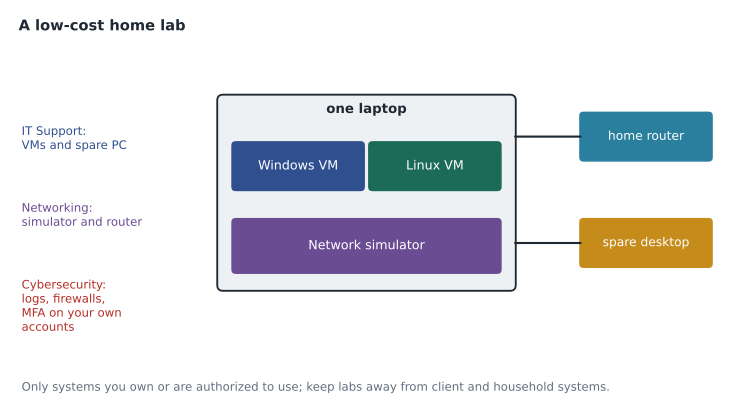
Labs do not need to be elaborate. A single computer running a few virtual machines can cover most of the IT Support and Cybersecurity objectives. A free network simulator can cover almost all of the Networking objectives. What matters is regular, purposeful use: a short lab session with a clear goal, such as making two virtual machines share a folder or configuring a VLAN, is worth more than an afternoon of aimless clicking.
Virtual machines
A virtual machine is a complete computer running as software inside another computer. Free hypervisors, the programs that run virtual machines, are available for Windows, macOS and Linux, and Windows Pro and Enterprise editions include one built in. With a modern laptop with 16 GB of memory, you can usually run two or three small virtual machines at once. Install a Windows evaluation edition and a Linux distribution such as Ubuntu, and you have a safe place to practice everything from creating user accounts to breaking and repairing a boot configuration. Before risky changes, take a snapshot, which saves the virtual machine's state so you can roll back in seconds.
For IT Support practice, use virtual machines to rehearse the tasks in CSCO-101 and CSCO-102: install an operating system, join two machines to a workgroup, share a folder and set permissions, map a printer, configure a static address and then switch back to DHCP, run the command-line tools from CSCO-101 lesson 8 and read their output. Then break things deliberately: fill a disk, stop a service, set a wrong DNS server, and practice diagnosing the symptoms with the six-step method. Jordan keeps a list of twenty faults he has created and fixed, each with a one-line ticket note, as part of his study log.
Network simulators
Cisco Packet Tracer is a free network simulator available to anyone with a Cisco Networking Academy account. It lets you drag routers, switches, computers, servers, wireless devices and cables onto a workspace, configure them through simulated command lines and graphical screens, and watch packets move. It is widely used in Networking Academy courses, including Lila's, and is well suited to the CCST Networking objectives: addressing and subnetting, VLANs, basic routing, DHCP and DNS, wireless settings and simple troubleshooting with ping and traceroute. Packet Tracer simulates rather than emulates, so it supports a subset of real device features, but for entry-level practice that subset is more than enough.
For more realistic practice later, Cisco also offers Cisco Modeling Labs, which runs actual Cisco device software in virtual machines; Cisco has offered a free tier with a small number of devices, and paid editions for larger labs. Most CCST candidates will not need it, but it is worth knowing about as you move toward the CCNA. Whichever tool you use, save each lab as a file with a descriptive name so that you can reopen and repeat it.
# Check a small lab addressing plan before building it in a simulator
import ipaddress
plan = {
    "Staff VLAN 10": "10.20.10.0/24",
    "Voice VLAN 20": "10.20.20.0/24",
    "Guest VLAN 30": "10.20.30.0/24",
    "Management VLAN 99": "10.20.99.0/28",
}
nets = {name: ipaddress.ip_network(cidr) for name, cidr in plan.items()}
for name, net in nets.items():
    hosts = list(net.hosts())
    print(f"{name}: {net}  gateway {hosts[0]}  usable hosts {len(hosts)}")
names = list(nets)
overlaps = [(a, b) for i, a in enumerate(names) for b in names[i + 1:] if nets[a].overlaps(nets[b])]
print("Overlaps:", overlaps if overlaps else "none")Staff VLAN 10: 10.20.10.0/24 gateway 10.20.10.1 usable hosts 254 Voice VLAN 20: 10.20.20.0/24 gateway 10.20.20.1 usable hosts 254 Guest VLAN 30: 10.20.30.0/24 gateway 10.20.30.1 usable hosts 254 Management VLAN 99: 10.20.99.0/28 gateway 10.20.99.1 usable hosts 14 Overlaps: none
The script above, which Dev wrote for Jordan, checks an addressing plan modeled on the Prairie Paws network from CSCO-112 before Jordan builds it in the simulator. It lists each subnet's first usable address, which the lab uses as the gateway, counts the usable hosts and checks that no two subnets overlap. Writing small checks like this is optional, but it reinforces the subnetting arithmetic from CSCO-111 in a different way.
Cybersecurity practice, defensively
Practice for the cybersecurity track should stay on the defensive side and on systems you own or are authorized to use. Good exercises include reviewing the security event log on your own Windows virtual machine after failed sign-ins, configuring the host firewall to allow only the services you need, enabling multifactor authentication on your own accounts and a password manager for your passwords, patching a virtual machine and noting what changed, and capturing traffic on your own home network with a packet analyzer to see which protocols your devices use and which are encrypted. CSCO-121 and CSCO-122 describe each of these in context.
You can also practice reading vulnerability information without touching anyone's systems. Look up a recent advisory for software you use, read its severity score and description, and decide what you would do as Keisha would for a Brightline client: patch now, patch in the next maintenance window, or apply a workaround. That is exactly the kind of judgment the exam's vulnerability and risk items ask for, and it needs nothing more than a web browser.
| Track | Lab tools | Example exercises |
|---|---|---|
| IT Support | Virtual machines, a spare PC, your own phone | Install an OS, share folders, map printers, break and fix network settings, read command output |
| Networking | Network simulator, home router | Build VLANs, address subnets, test with ping and traceroute, find a misconfigured gateway |
| Cybersecurity | Virtual machines, packet analyzer on your own network, your own accounts | Read event logs, configure host firewalls, enable MFA, triage an advisory |
Learning from real work, safely
Jordan has an advantage most students lack: real tickets every day. Marisol encourages him to treat each one as a lab he did not have to build, within the limits of the job. After closing a ticket, he spends two minutes asking which exam area it touched and whether he could have solved it faster. When a ticket teaches him something new, such as a printer that loses its address because its DHCP reservation expired, he recreates the problem in his own virtual lab that evening, so that he can study it at leisure without touching the client's system. That habit links his workplace experience to his study log, and it means the client's network is never part of his experiments.
The rules for a home lab
A home lab has three rules. First, work only on systems you own or have explicit written permission to use. Scanning, probing or testing other people's networks or devices without permission is illegal in Canada and the United States and in most other countries, whatever your intentions, and it can also break the terms of your internet service. Second, keep lab experiments away from production systems and data: never test on a client's network, an employer's servers or your family's shared computer. Brightline's policy is that technicians may not use client systems for study under any circumstances. Third, treat physical equipment safely: unplug devices before opening them, use an anti-static strap as CSCO-101 describes, and do not overload power strips with secondhand gear.
Virtual machines and simulators make the first two rules easy to follow, because everything happens inside your own computer. If you want to practice with real network equipment later, buy or borrow it and connect it to a separate, isolated network, not the one the household depends on.
Practice exams and the line you must not cross
Practice exams are a useful part of preparation when they are written by legitimate providers from the published exam topics. They help with timing and with recognizing weak areas. They are not useful, and are actively harmful, when they claim to contain real questions from the exam. Collections of leaked or memorized exam content, usually called brain dumps or exam dumps, break the confidentiality agreement every candidate accepts. Cisco's exam policy says that penalties for compromising exam integrity can go up to and include a lifetime ban from all future Cisco exams. Employers who discover that a technician's certification was obtained this way are unlikely to keep trusting that technician.
Dumps also fail on their own terms. They teach answers, not understanding, and exam programs refresh and rotate their items, so a memorized answer is often to a question that is no longer asked or is worded differently. Signs of a dump include promises of real exam questions, guarantees of a pass, very low prices for very large question banks, and answer keys without explanations. If a practice set looks like that, close the page.
Worked problem
Planning a two-week lab sequence
Lila wants a lab plan for two weeks of her Networking Academy unit on addressing and VLANs, using Packet Tracer at home on weekends. What should it include?
Show solution
- Weekend 1, session 1: build two switches, four PCs and one router; assign addresses in one subnet; test with ping.
- Weekend 1, session 2: split the PCs into two VLANs with separate subnets; configure the router for inter-VLAN routing; test again.
- Weekend 2, session 1: ask a classmate to introduce three faults (a wrong mask, a wrong gateway, a port in the wrong VLAN) and diagnose them.
- Weekend 2, session 2: rebuild the lab from memory without notes and write a short ticket note for each fault found.
- Each session ends with a saved file and three lines in her study log: what she built, what broke, what she learned.
Answer: A short sequence that builds, breaks and rebuilds a network, with a log entry after each session, covers the topic more deeply than reading it twice.
Common mistakes
MistakeBuilding an elaborate lab before studying.
InsteadStart with one computer, a few virtual machines and a simulator.
MistakeExperimenting on a client or family network.
InsteadUse isolated virtual labs or equipment you own on a separate network.
MistakeScanning other people's systems for practice.
InsteadOnly test systems you own or have written permission to use.
MistakeUsing collections of real exam questions.
InsteadThey break the confidentiality agreement and risk a ban; use legitimate practice sets.
MistakeClicking around a lab without a goal.
InsteadGive each session one clear objective and log what you learned.
Summary and key terms
- Hands-on labs build the practical judgment the CCST exams test.
- Virtual machines and snapshots provide a safe place to practice operating system and support tasks.
- Cisco Packet Tracer, free with a Networking Academy account, covers most CCST Networking practice.
- Cybersecurity practice should be defensive and limited to systems you own or are authorized to use.
- Keep labs isolated from production systems, client networks and household computers.
- Legitimate practice exams help; exam dumps break the confidentiality agreement and risk a lifetime ban.
- Short, purposeful sessions with a goal and a log entry are the most effective lab practice.
- Virtual machine
- A complete computer running as software inside another computer.
- Hypervisor
- Software that creates and runs virtual machines.
- Snapshot
- A saved state of a virtual machine that can be restored.
- Network simulator
- Software that models network devices and traffic for practice.
- Isolated network
- A network kept separate from production systems so experiments cannot affect them.
- Exam dump
- A collection claiming to contain real exam questions, which breaks exam agreements.
Practice problems
Work each problem on paper first, then reveal the answer to check.
Why do labs help with exhibit items?
Show answer
Seeing many normal outputs in a lab makes the unusual detail in an exhibit easier to spot.
What does a snapshot let you do?
Show answer
Restore a virtual machine to an earlier state after a risky change.
Which free simulator suits CCST Networking practice?
Show answer
Cisco Packet Tracer, available with a Networking Academy account.
Name two defensive cybersecurity exercises you can do on your own computer.
Show answer
Reviewing failed sign-ins in the event log; configuring the host firewall; enabling MFA; patching and noting changes.
Why should you never practice on a client's network?
Show answer
It is not authorized, can disrupt the client and breaks professional and legal rules.
Give two signs that a practice set may be an exam dump.
Show answer
Claims of real exam questions; guaranteed passes; huge banks at very low prices; answers without explanations.
What should each lab session end with?
Show answer
A saved file and a short log entry of what was built, what broke and what was learned.
Lesson quiz · 5 questions
Score 60% or more to complete this lesson.
Create a free account to save your progress, take quizzes and earn a certificate.