
CSCO-190 · Lesson 4 of 12 · 24 min
Item types and how to approach them
▶ Video coming soon A video version of this lesson is on the way.
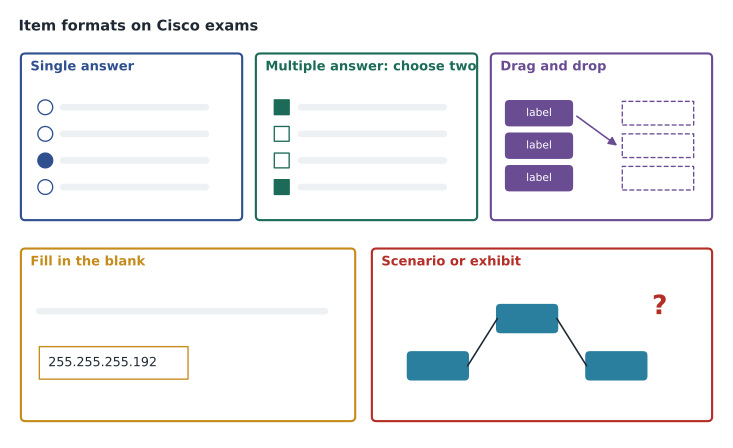
Dev Anand keeps a folder of practice items he has written for new technicians over the years, and on a quiet Friday afternoon he spreads a dozen of them across the meeting room table for Jordan. None of them is a real exam question; Dev wrote them all himself from the published topics, which is the only honest way to make practice material. Some are ordinary multiple-choice questions. Some ask for two answers. One asks Jordan to drag protocols into the right layer of a model, another to type a subnet mask into a box, and one shows a small network diagram with a question about why a printer cannot be reached. "Every one of these tests the same knowledge in a different way," Dev says. "If you know how each kind works, you stop losing marks to the format." This lesson describes the item types you are likely to meet on a CCST exam and a method for each.
What Cisco says about item types
Cisco publishes general guidance and tutorials on the question formats used across its certification exams. Across the program, these include multiple choice with a single answer, multiple choice with several answers, drag and drop, fill in the blank, and interactive items that show a scenario or a simulated device. Not every exam uses every format, and Cisco does not publish the exact mix on any CCST exam. Candidates and training companies commonly report that CCST exams are mostly multiple choice with some drag-and-drop items, and that some include short interactive scenarios; treat this as a reasonable expectation, not a promise. The safest preparation is to be comfortable with every format, which is why the quizzes in this program use several types.
Whatever the format, every item has the same parts. The stem sets out the scenario and the task. The options, or the interactive area, provide the ways to respond. In a multiple-choice item, one or more options are keys, meaning correct answers, and the rest are distractors, wrong answers written to look plausible to someone who half-knows the topic. Good distractors are built from common mistakes, which is why knowing the common mistakes in each lesson of this program matters: you will recognize them when they appear as options.
Single-answer multiple choice
The most common format asks you to choose one answer from four or five options. Read the stem completely before looking at the options; if you look at the options first, a familiar-looking distractor can pull you in before you understand what is being asked. Then try to answer in your head, without the options. If your own answer is among them, it is probably the key. If not, eliminate options you know are wrong, one at a time, and choose the best of what remains. Elimination works even when you are unsure: removing two clearly wrong options from four turns a guess into a fifty-fifty choice.
Watch for qualifying words in the stem: best, first, most likely, least, not. A question asking for the first step in troubleshooting may have several options that are all reasonable steps, but only one comes first in a structured method. A question asking what is not a feature of a protocol reverses the usual logic, and it is easy to choose a true statement by habit. Lesson 11 has more on reading stems carefully.
Worked problem
Eliminating to the best answer
Dev's practice item: A user reports that since this morning their laptop connects to the office Wi-Fi but cannot reach any websites, while colleagues are fine. ipconfig shows an address of 169.254.31.7. What is the most likely cause? (A) The DNS server is down. (B) The laptop did not receive an address from DHCP. (C) The website is blocked by the firewall. (D) The laptop's screen driver is out of date.
Show solution
- Answer in your head first: an address beginning 169.254 is an automatic private address that Windows assigns when DHCP does not respond.
- Eliminate (D): a screen driver has nothing to do with network addressing.
- Eliminate (C): one blocked website would not stop every site, and colleagues are fine.
- Eliminate (A): a DNS outage would affect colleagues too, and the address itself already shows a problem.
- That leaves (B), which matches the answer you formed before looking.
Answer: (B). The 169.254 address is the clue; the distractors each describe a real problem that does not fit these symptoms.
Multiple-answer multiple choice
Some items ask you to choose two, choose three, or choose all that apply. When the stem gives a number, select exactly that many; if you can only find one you are sure of, choose the next most likely rather than leaving the second blank. Cisco does not publish how multiple-answer items are scored, and the safe assumption, which most study guides make, is that an item earns credit only when every required answer is chosen. Treat each option as a true-or-false statement about the stem, decide on each one separately, and then check that your count matches what was asked.
A useful habit for multiple-answer items is to look for options that belong together. If a question asks which two protocols provide encrypted remote management, and the options include SSH, Telnet, HTTPS and HTTP, the pairs reveal themselves: each secure protocol has an insecure partner among the distractors. Recognizing the structure the item writer used often makes the keys obvious.
Drag and drop
Drag-and-drop items ask you to move labels into position: matching terms to definitions, sorting items into categories, or putting steps into order. Begin with the pairs you are surest of, because each correct placement narrows the choices for the rest. For ordering items, find the first and last steps before worrying about the middle; in a troubleshooting sequence, identifying the problem always comes first and documenting always comes last. Some drag-and-drop items have more labels than targets, and some let a label be used twice; read the instructions in the item.
Before moving on, check that every target is filled and that you have not left a label sitting just outside a box. Drag-and-drop items can take longer than multiple choice, which matters for timing on a 50-minute exam. Lesson 5 suggests how to budget for them.
Fill in the blank
Fill-in-the-blank items ask you to type an answer: a number, a command or a short term. They remove the help that options provide, so they test recall rather than recognition. Read the stem for the format it expects. If a question asks for a subnet mask in dotted decimal, type 255.255.255.192 rather than /26. If it asks for a number of usable hosts, type 62 rather than 64. Avoid adding units, spaces or extra words unless the item asks for them, and check spelling for commands and terms. Use your erasable board to work calculations step by step and check them once before typing.
Interactive and scenario items
Some Cisco exams include items that show a scenario, a diagram, a command output or a simulated device and ask questions about it. On an entry-level exam, these are most likely to show something like an ipconfig or show command output, a small network diagram, a ticket from a user or a log extract, and ask you to identify a problem or choose a next step. Read the question before studying the exhibit, so that you know what to look for. Then work through the exhibit methodically: check addresses against masks, check which devices are connected to which interfaces, check time stamps in a log. The answer is almost always in the details.
Jordan's experience with real tickets helps here. Reading an exhibit is the same skill as reading the output of a command at a client site: look for what is unusual. An address in the wrong range, an interface that is down, a log entry at three in the morning from an account that should be asleep. Practice by reading real output from your own lab, which lesson 7 sets up, and by describing to yourself what each line means.
| Format | What it tests | Method |
|---|---|---|
| Single answer | Recognition and judgment | Read the stem, answer in your head, then eliminate. |
| Multiple answer | Knowing every true statement | Judge each option separately; select exactly the number asked. |
| Drag and drop | Matching, sorting and sequencing | Place the surest items first; find the first and last steps. |
| Fill in the blank | Recall and accuracy | Match the expected format; work on the board and check once. |
| Scenario or exhibit | Applying knowledge to evidence | Read the question first, then look for what is unusual in the exhibit. |
Unscored items and guessing
Many certification programs include a small number of unscored items that are being tested for future exams. They look exactly like scored items, and you cannot tell which is which, so answer every item as though it counts. Cisco does not describe any penalty for wrong answers on its exams, and an unanswered item cannot earn credit, so never leave an item blank. If you are truly stuck, eliminate what you can, choose the most likely remaining option and move on. A thoughtful guess costs nothing and sometimes earns a mark.
Finally, remember that the item writers are not trying to trick you for its own sake. Distractors are wrong for a reason, and the reason is usually a common misunderstanding. When you review practice items, as lesson 6 recommends, write down why each distractor is wrong as well as why the key is right. That habit builds exactly the understanding the exam is designed to measure.
Worked problem
Working a drag-and-drop ordering item
Keisha's practice item for the cybersecurity track: drag these incident-handling activities into the order they happen: contain the affected system; detect and analyze the alert; recover normal operations; prepare tools and contacts; review lessons learned; eradicate the cause.
Show solution
- Find the first step. Before anything happens, a team prepares: tools, contacts, plans. Preparation goes first.
- Find the last step. After the incident is closed, the team reviews lessons learned. That goes last.
- Now the middle. Nothing can be contained before it is noticed, so detection and analysis come second.
- Containment stops the spread; only then is the cause removed (eradication); only then are systems restored (recovery).
- Read the finished order once: prepare, detect and analyze, contain, eradicate, recover, review. Each step depends on the one before.
Answer: Prepare, detect and analyze, contain, eradicate, recover, review lessons learned. Anchoring the first and last steps made the middle easy.
Practicing each format
Formats feel natural only after practice. When you work through the quizzes in this program, notice which formats cost you the most time or the most marks. Jordan discovers that he is slow on matching items because he reads every right-hand option for every left-hand term. Dev's advice is to read the left column once, then the right column once, and to place obvious pairs immediately before thinking about the rest. Lila discovers that she rushes fill-in-the-blank calculations and makes small arithmetic slips, so her teacher suggests she always writes the binary or the arithmetic on paper before typing, even when she is sure.
You can also turn ordinary study material into practice items. Take a paragraph from a lesson and write one question of each kind about it: a single-answer item, a choose-two item, an ordering item and a fill-in-the-blank item. Writing distractors is the hard part, and it forces you to think about what a confused learner would believe. Swap your items with a study partner, as Lila's class does every Friday, and you will each meet questions you did not write.
Common mistakes
MistakeReading the options before the stem.
InsteadRead the whole stem first and form your own answer.
MistakeSelecting one answer when the stem says choose two.
InsteadSelect exactly the number asked; partial answers should not be expected to earn credit.
MistakeTyping /26 when the item asks for a dotted-decimal mask.
InsteadAnswer in the format the stem specifies.
MistakeStudying the exhibit before reading the question.
InsteadRead the question first so you know what to look for.
MistakeLeaving a hard item blank.
InsteadEliminate what you can and make a reasoned choice.
Summary and key terms
- Cisco exams can include single-answer and multiple-answer multiple choice, drag and drop, fill in the blank and interactive scenario items.
- Cisco does not publish the exact mix of item types on each CCST exam.
- Every item has a stem and either options or an interactive area; distractors are built from common mistakes.
- Answer in your head before looking at options, then eliminate.
- For multiple-answer items, judge each option separately and select exactly the number asked.
- Match the format a fill-in-the-blank item expects.
- Answer every item; there is no described penalty for wrong answers, and blanks cannot score.
- Item
- A single question or task on an exam.
- Key
- A correct answer option.
- Distractor
- A wrong option designed to be plausible.
- Exhibit
- A diagram, output or document shown as part of an item.
- Unscored item
- An item being trialled for future exams that does not count toward the result.
- Elimination
- Removing options you know are wrong to improve the odds of choosing correctly.
Practice problems
Work each problem on paper first, then reveal the answer to check.
What is a distractor?
Show answer
A wrong answer written to look plausible, usually based on a common mistake.
A stem says choose three. You are sure of two. What should you do?
Show answer
Choose the most likely third option rather than leaving it out.
An item asks for the number of usable hosts on a /27 network. What should you type?
Show answer
30.
Why read the question before studying an exhibit?
Show answer
So you know what to look for in the exhibit and do not waste time on details that do not matter.
Why should you never leave an item blank?
Show answer
An unanswered item cannot earn credit, and no penalty for wrong answers is described.
In an ordering item about troubleshooting, which steps are easiest to place first?
Show answer
The first (identify the problem) and the last (document findings and outcomes).
When reviewing practice items, what should you write down besides why the key is right?
Show answer
Why each distractor is wrong.
Lesson quiz · 5 questions
Score 60% or more to complete this lesson.
Create a free account to save your progress, take quizzes and earn a certificate.