
CSCO-190 · Lesson 3 of 12 · 22 min
What happens on exam day
▶ Video coming soon A video version of this lesson is on the way.
Two weeks before his exam, Jordan asks Marisol the question almost every first-time candidate asks: "What actually happens when I get there?" Marisol has sat eleven certification exams over twelve years, at test centers, at home and once in a hotel conference room, and she answers with a story. Her first exam, a networking associate exam in 2015, went badly before it started. She arrived with ten minutes to spare, discovered that her second piece of identification had expired, waited while the staff found a manager, and started the exam with her heart racing. She passed, narrowly. "Nothing on that exam was harder than the first twenty minutes in the lobby," she says. "So we are going to rehearse the lobby." This lesson is that rehearsal: what to do the day before, what happens at check-in in each format, what the exam itself looks like, and what you see when it ends.
The day before
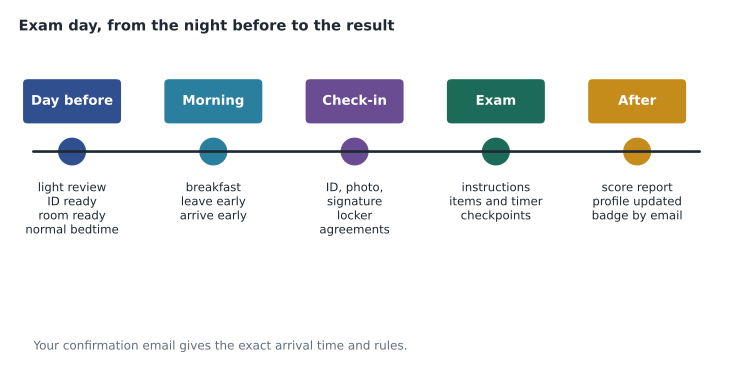
Treat the day before as a preparation day, not a cramming day. Learning new material the night before an exam rarely helps and often hurts, because it crowds out sleep and raises anxiety. Instead, review your summary notes and the mistakes log you have kept, which lesson 6 describes, then stop at a set time. Lay out what you need: both pieces of identification, the confirmation email or its details, directions to the testing center or a cleared desk at home, a water bottle and a snack for afterwards. Check the weather and traffic if you are traveling. Go to bed at your usual time, not unusually early; lying awake for two hours is worse than an ordinary night.
If you are testing online, the day before is when you prepare the room. Run the testing software's system check again on the exact computer, network and room you will use. Close or uninstall software that might interfere, such as screen-sharing tools, extra monitors or background sync programs that pop up notifications. Clear the desk completely, remove anything written on walls or whiteboards in view of the camera, and tell everyone in the household that you cannot be interrupted for the length of the exam plus check-in. Jordan is testing at a center, but Lila's older brother Sami, who sat a different certification online last year, warns her that his proctor paused the exam because a family member walked into view.
Checking in at a test center
Plan to arrive early. Your confirmation email will say how early; many testing centers ask for fifteen to thirty minutes before the appointment, and arriving late can mean losing the slot and the fee. At the front desk, staff check your identification against the booking, take a digital photo and capture a digital signature, as Cisco's policy describes for written exams. They will ask you to store personal belongings, including your phone, watch, wallet, notes and often food and drink, in a locker or a secure area. Some centers also ask you to empty your pockets, roll up your sleeves or show that your glasses have no camera. These checks are routine and apply to everyone.
You are then shown to a workstation in a monitored room, often with other candidates taking different exams. You may be offered noise-reducing headphones or earplugs and an erasable board or sheets for working notes, which must be handed back at the end. Check that the board works before the exam starts, and ask for a replacement marker if it does not. If anything about the workstation is wrong, such as a flickering screen, a sticky key or a noisy neighbor, raise your hand before you begin; once the exam is running, staff can help, but the clock may keep going.
Checking in online
Online proctored exams have a check-in process that replaces the front desk. You usually open the testing software during a check-in window before your appointment, take a photo of yourself and your identification with the webcam, and photograph or film the room from several angles so that the proctor can see your desk and surroundings. A greeter or proctor reviews the photos and may chat with you or ask you to move the camera. Phones must usually be out of reach but sometimes need to be nearby for the proctor to contact you if the connection fails; follow the instructions you are given. Once you are cleared, the exam starts under continuous observation through the webcam and microphone.
During an online exam, behave as though a proctor is sitting beside you, because effectively one is. Reading questions aloud, looking away from the screen for long periods, covering your mouth or having someone enter the room can all trigger a warning or end the exam. If your connection drops, the testing software usually tries to reconnect and the proctor contacts you; stay where you are and do not open other programs. Cisco's policy on the integrity of exams applies to online delivery just as it does in a test center.
Checking in at a school testing center
Certiport testing at a school usually feels more relaxed, because the room and the people are familiar, but the rules are similar. A teacher or testing coordinator acts as the proctor, checks identification, explains what is allowed and starts each candidate's exam. Lila's class will sit CCST Networking in their usual computer lab, with desks spread apart, phones collected in a box at the door and their teacher, Mr. Okonkwo, walking the room. Students who need accommodations will sit in a separate room with the school's accessibility coordinator. Because the room is familiar, the main risk for students is complacency: arriving without identification or treating the exam as a class quiz.
The exam screens
The exam itself usually begins with a few screens before the first question. Expect to see the confidentiality agreement again, which you must accept to continue, and often a short tutorial or instruction screen that explains how to move between questions, how drag-and-drop items work and how much time you have. Read these screens carefully: they are where you learn whether the exam allows you to go back to earlier questions. Cisco's professional-level exams have long been known for not allowing review of earlier answers once you move on, and many candidates assume the same for every Cisco exam. Rather than assume, read the instructions for your exam; lesson 5 explains how to plan your time either way.
A timer is shown on screen throughout. Cisco lists the CCST exams at 50 minutes. Some testing systems count the agreement and tutorial screens separately from the exam time and some do not, so check the instructions. Questions appear one at a time. Each has a stem, which is the question itself and any scenario, followed by answer options or an interactive area. Lesson 4 covers the item types in detail. Work steadily, use the erasable board for anything you need to calculate or sketch, such as a subnet or a troubleshooting sequence, and keep an eye on the timer at the checkpoints you plan in lesson 5.
| Situation | What to do |
|---|---|
| The screen or keyboard is faulty | Raise your hand or contact the proctor before you start, or as soon as you notice. |
| A question seems to have no correct answer | Choose the best available answer; you may be able to leave a comment at the end. |
| You feel panic rising | Stop for one slow breath in and a longer breath out, then reread the stem. |
| You need the restroom | Follow the instructions given at check-in; the timer usually keeps running. |
| The connection drops in an online exam | Stay in place, do not open other programs, and wait for the proctor to contact you. |
Managing nerves
Some anxiety is normal and even useful: it sharpens attention. Too much narrows thinking and makes familiar questions look strange. A few simple habits help. Arrive with time to spare so that the lobby is calm rather than rushed. Before the first question, take two or three slow breaths with a long exhale; slowing the breath slows the heart. If a question throws you, remind yourself that every exam contains items designed to be hard, and that one hard question says nothing about your overall result. Answer it as well as you can and move on. Keisha, who teaches stress management in Brightline's incident response drills, tells Jordan to treat the exam like a ticket queue: one item at a time, the best decision with the information available, then the next.
Food and caffeine deserve a thought. Eat a normal breakfast or lunch before the exam; hunger is distracting. Have your usual amount of coffee or tea, not double, and remember that the timer may keep running if you need a restroom break. Dress in layers, because testing rooms can be cold or warm and you cannot leave to fetch a sweater.
When the exam ends
When you finish the last item or the timer runs out, the exam ends and you may be asked to complete a short survey. Cisco's frequently asked questions say that immediately after completing a CCST exam you will see a score report showing whether you passed or failed. Cisco's policy adds that written exam candidates receive a score report with their performance broken down by exam section, which is the most useful document you will get if you need to retake. At a test center, staff may print the report for you; online, it appears on screen and in your account. Results then appear in your Cisco certification profile, and if you pass, Cisco issues a digital badge that you can share and that employers can verify. Lesson 12 covers what to do with your results either way.
Do not discuss the exam's questions with anyone afterwards, including your study group, your colleagues and online forums. The confidentiality agreement you accepted covers the content of the exam, and Cisco's policy says that exam scores can be revised if there is evidence of misconduct. You can, of course, say whether you passed and which topics you found hard in general terms, and you can share your study approach. Jordan's plan is simpler: he will text Marisol one word when he gets back to his car.
Worked problem
Building an exam-day checklist
Lila's teacher asks each student to write a checklist for the morning of a school-based exam. What should be on it, and in what order?
Show solution
- The night before: identification packed, consent form signed if required, bag ready, normal bedtime.
- Morning: breakfast, water bottle, leave home with time for the bus to be late.
- Arrival: put phone in the collection box, show identification, sit at the assigned desk.
- Start: read the agreement and the instruction screens, check how review works, note the time on the timer.
- End: read the score report, hand back any scrap paper, say nothing about the questions afterwards.
Answer: A short list in time order, from packing the night before to reading the score report, covers almost everything that goes wrong on exam days.
Common mistakes
MistakeCramming new topics late the night before.
InsteadReview your notes and mistakes log, then sleep at your usual time.
MistakeArriving at the appointment time.
InsteadArrive early as the confirmation email says; check-in takes time.
MistakeAssuming you can go back to any question.
InsteadRead the instruction screens to learn whether review is allowed on your exam.
MistakeLeaving extra monitors and notifications on for an online exam.
InsteadDisconnect extra screens and close interfering software beforehand.
MistakeDiscussing the questions with your study group afterwards.
InsteadThe confidentiality agreement forbids sharing exam content.
Summary and key terms
- Use the day before for light review, preparation and a normal night's sleep.
- At a test center, expect identification checks, a photo and signature, and a locker for belongings.
- Online proctored exams add a room scan, webcam monitoring and strict rules about interruptions.
- School-based Certiport exams use a teacher or coordinator as proctor under similar rules.
- Read the instruction screens to learn how navigation and review work on your exam.
- A pass or fail score report appears immediately, with performance broken down by section.
- Keep exam content confidential after the exam as well as during it.
- Proctor
- The person who supervises an exam, in the room or remotely.
- Check-in
- The identity and security process before an exam starts.
- Erasable board
- A writing surface provided for working notes during the exam and returned afterwards.
- Score report
- The result shown at the end of the exam, with a breakdown by section.
- Digital badge
- An online credential issued after passing, which others can verify.
- Stem
- The part of a question that sets out the scenario and what is asked.
Practice problems
Work each problem on paper first, then reveal the answer to check.
Why is cramming the night before a poor idea?
Show answer
It cuts into sleep and raises anxiety, and new material learned that late is rarely retained.
What three things are typically captured or checked at a test center front desk?
Show answer
Your identification, a digital photo and a digital signature.
Name two things that can trigger a warning in an online proctored exam.
Show answer
Someone entering the room; reading aloud; looking away from the screen for long periods; a second monitor.
Where do you find out whether your exam allows reviewing earlier questions?
Show answer
In the instruction screens at the start of the exam.
What does Cisco say you see immediately after a CCST exam?
Show answer
A score report showing pass or fail status, with a breakdown by section.
What should you do if your workstation keyboard has a sticking key?
Show answer
Raise your hand and ask for help before starting, or as soon as you notice.
Can you tell colleagues which topics felt hard?
Show answer
In general terms, yes; you must not share the actual questions or answers.
Lesson quiz · 5 questions
Score 60% or more to complete this lesson.
Create a free account to save your progress, take quizzes and earn a certificate.