
CSCO-101 · Lesson 9 of 12 · 22 min
A structured troubleshooting method
▶ Video coming soon A video version of this lesson is on the way.
On a Thursday afternoon Jordan spends ninety minutes on a ticket that should have taken fifteen. A receptionist at Prairie Paws says her computer "won't print". Jordan reinstalls the printer driver, then updates Windows, then restarts the spooler, then reinstalls the driver again. Nothing helps. Marisol listens to his account and asks one question: did anyone else at the clinic have trouble printing? He did not ask. She calls the clinic; nobody can print, and the printer's display shows a paper jam. "You fixed four things that weren't broken," she says, not unkindly. "Next time, start by finding out what is." On Friday she gives him the method.
Why a method matters
Troubleshooting without a method means guessing: trying fixes until something works. Guessing sometimes succeeds, but it wastes time, it can create new problems, and it teaches nothing, because even when a guess works you do not know why. A structured method makes troubleshooting repeatable. It forces you to understand the problem before you change anything, to test one idea at a time, and to record what you did, so that the next person, or you next month, can learn from it.
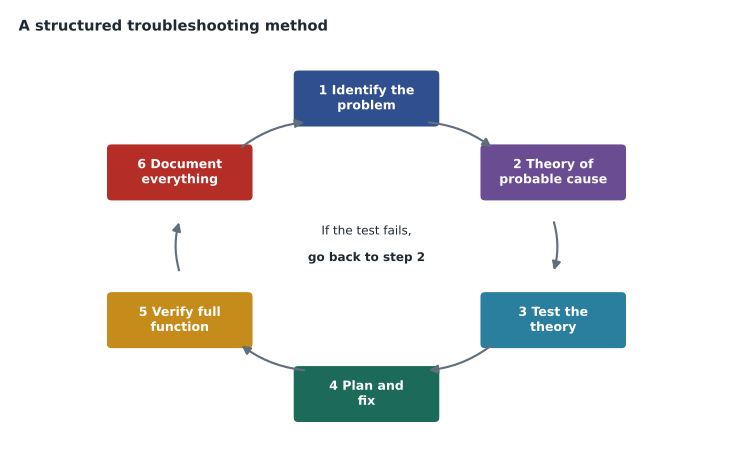
Industry certifications describe troubleshooting methods in slightly different words, but they agree on the same core steps. A widely used version has six: identify the problem; establish a theory of probable cause; test the theory to determine the cause; establish a plan of action and implement the solution; verify full system functionality and, if applicable, implement preventive measures; and document findings, actions and outcomes. Cisco's CCST material uses this kind of sequence, and the exam expects you to recognize the steps and their order.
Step 1: identify the problem
Identifying the problem means gathering enough information to describe it precisely. Ask the user what they were doing, what they expected, what happened instead, and any error message, word for word or as a screenshot. Ask when it started, whether it worked before, and what changed: a new update, a new device, a move to a different desk, a power cut. Ask whether it happens every time or only sometimes. Most importantly, find out the scope: is it one user, one device, one application, or everyone? Scope is what Jordan missed at Prairie Paws, and it often points straight at the cause.
Then see it for yourself if you can. Reproduce the problem, or have the user show you on a remote session. Check logs and error messages. Gather facts with the tools from earlier lessons: ipconfig, Device Manager, Event Viewer, the printer's own display. Back up important data before you change anything, if there is any chance the work could affect it.
Good questions are open first, then narrowing. "Tell me what happens when you try to print" gets more than "Is the printer on?" Once you have the story, closed questions confirm details: "Does the printer show anything on its screen?" Lesson 10 of CSCO-102 covers questioning and listening in more depth.
Step 2: establish a theory of probable cause
With the facts in hand, list the likely causes and choose the most probable one to test first. Start with the obvious and simple: power, cables, settings, a recent change. Experienced technicians call this "question the obvious", because a surprising number of problems are a loose cable, a switch turned off, or a setting changed by accident. If several causes are equally likely, test the one that is quickest and least disruptive to check.
Scope narrows the list. If one user cannot print, look at that user's computer, account or connection. If everyone cannot print to one printer, look at the printer or the network path to it. If nobody can print to any printer, look at the print server or the network. If everyone at a site cannot reach anything, the problem is upstream of all of them. Thinking in layers helps too: physical connection first, then the network, then the operating system, then the application. CSCO-111 explains the layered network models that formalize this idea.
Step 3: test the theory
Test the theory without making permanent changes if you can. If you suspect a cable, swap it for a known good one. If you suspect a setting, look at it. If you suspect a recent update, check the update history and whether the problem started at the same time. If the test confirms the theory, move to step 4. If it does not, the theory was wrong, and you go back to step 2 with one cause eliminated and possibly a new clue. If you run out of theories, or the next theory requires access or skills you do not have, escalate, with everything you have learned so far written in the ticket.
Change one thing at a time. If you change three settings and the problem goes away, you do not know which change fixed it, and you may have introduced two unnecessary changes that cause trouble later. If a change does not help, undo it before trying the next one, unless it is a harmless improvement you meant to make anyway.
Step 4: plan and implement the solution
Once the cause is known, plan the fix. Consider its effects: will it interrupt other users, does it need a restart, does it need approval, could it lose data, and what is the rollback plan if it goes wrong? Some fixes need a maintenance window or a change request, especially on shared systems. Then carry out the fix, following the organization's procedures and the vendor's instructions.
Step 5: verify full system functionality
After the fix, confirm that the problem is solved and that nothing else broke. Do not take your own word for it; have the user try the task that failed. Check related functions: if you fixed printing from one application, try another; if you replaced a network cable, check that the computer still reaches the servers it needs. Where it makes sense, put a preventive measure in place so it does not happen again, such as a reserved address for a printer, a scheduled update, or a note in the knowledge base.
Step 6: document findings, actions and outcomes
Record what the problem was, what you found, what you changed and how you verified it. Documentation closes the loop: it helps the next technician, it reveals recurring problems, and it protects you and the organization by showing what was done. A good knowledge base is built one documented ticket at a time.
| Step | Key question | Typical actions |
|---|---|---|
| 1 Identify the problem | What exactly is wrong, for whom, since when? | Question the user, reproduce, check scope, gather logs, back up |
| 2 Theory of probable cause | What is the most likely cause? | Question the obvious; use scope and layers; rank causes |
| 3 Test the theory | Is that really the cause? | Swap, inspect, compare; return to step 2 or escalate if wrong |
| 4 Plan and implement | How do we fix it safely? | Check impact, approvals and rollback; apply the fix |
| 5 Verify and prevent | Does everything work now? | User confirms; test related functions; add prevention |
| 6 Document | What will the next person need to know? | Record cause, actions, results and time |
Common troubleshooting strategies
Within the method, several strategies help find the cause. Divide and conquer splits the system in half and tests which half has the fault, then repeats. Substitution swaps a suspect part, cable or device for a known good one. Comparison looks at a working system next to the broken one and notes the differences. Top-down starts at the application and works down to the hardware; bottom-up starts with the physical connection and works up. Following the path traces data from source to destination, checking each hop. Experienced technicians mix these freely, but each one gives structure to step 2 and step 3.
Time-boxing is another useful habit. Decide in advance how long you will spend before escalating or asking for help; Brightline uses thirty minutes for tier 1 tickets. Asking a colleague early is not a failure. It is how teams avoid the ninety-minute printer ticket.
Escalating well
Escalation is part of the method, not a failure of it. A technician should escalate when the next theory needs access, skills or authority they do not have, when the time box has run out, when the problem affects many users or a critical service, or when a security incident is suspected. A good escalation passes the problem on in a state the next person can use immediately: the symptom and scope, the theories tested and their results, any error messages and command output, what has been changed and what has been undone, the user's availability and the business impact. The ticket, not a hallway conversation, is where all of this belongs. CSCO-102 covers escalation paths and service levels in more detail.
Escalation is also a learning opportunity. When a tier 2 colleague solves a problem Jordan escalated, Marisol expects him to read the notes and ask how the cause was found. Over time, problems that once needed escalation become ones he can solve himself, and the knowledge base article written from the ticket lets the whole team do the same.
Documenting as you go
Step 6 is listed last, but documentation happens throughout. Notes written while you work capture details that are easy to forget: the exact error message, the time a test was run, the setting that was changed and its original value. If you are interrupted, or the ticket must be handed over, your notes let someone else continue without repeating your work. And if a change you made causes a problem later, a note of the original value makes it easy to undo.
Documentation is also a courtesy to users: when a problem returns, a user who hears "I can see what we did last time" feels looked after.
Worked problem
Working the Prairie Paws printer ticket with the method
Replay Jordan's printer ticket using the six steps. The receptionist cannot print; others at the clinic cannot print either; the printer shows a paper jam.
Show solution
- Identify: ask what happens, what the message says, and whether others are affected. Scope: everyone, one printer.
- Theory: because everyone is affected, the printer itself is the most likely cause; question the obvious, so check its display.
- Test: ask the receptionist to read the printer's display. It shows a paper jam in tray 2. Theory confirmed.
- Plan and fix: talk her through opening tray 2 and the rear door and removing the torn sheet.
- Verify: she prints a test page, and a colleague prints from another computer; both work. Prevention: note that tray 2 was loaded with heavier card stock, and suggest the bypass tray for card.
- Document: record the scope, the jam, the fix, the test and the advice in the ticket.
Answer: Ten minutes, no changes to any computer, and a note that may prevent the next jam.
Common mistakes
MistakeChanging things before understanding the problem.
InsteadIdentify the problem and its scope first.
MistakeChanging several things at once.
InsteadChange one thing, test, and undo it if it did not help.
MistakeAssuming the fix worked.
InsteadHave the user confirm and test related functions.
MistakeEscalating with no notes.
InsteadEscalate with everything learned so far in the ticket.
MistakeSkipping the obvious checks to look clever.
InsteadQuestion the obvious: power, cables, settings and recent changes.
Summary and key terms
- A structured method replaces guessing with repeatable steps.
- The six steps: identify, theorize, test, plan and fix, verify and prevent, document.
- Scope, meaning who and what is affected, is one of the strongest clues.
- Question the obvious and test the simplest likely causes first.
- Change one thing at a time, and escalate when theories or access run out.
- Verification includes the user's confirmation and checks of related functions.
- Strategies such as divide and conquer, substitution and comparison support steps 2 and 3.
- Theory of probable cause
- The most likely explanation for a problem, chosen for testing.
- Scope
- The range of users, devices and services affected by a problem.
- Divide and conquer
- Splitting a system in two and testing which half has the fault.
- Substitution
- Swapping a suspect part for a known good one.
- Rollback plan
- How to undo a change if it causes problems.
- Time-boxing
- Setting a time limit before escalating or asking for help.
Practice problems
Work each problem on paper first, then reveal the answer to check.
What are the six steps of the troubleshooting method?
Show answer
Identify the problem; establish a theory of probable cause; test the theory; plan and implement the solution; verify full functionality and prevent; document.
What should you do if a test does not confirm your theory?
Show answer
Return to step 2 with a new theory, or escalate.
Why change only one thing at a time?
Show answer
So you know which change fixed the problem and avoid unnecessary changes.
Every user at one office cannot reach any website. Where should you look first?
Show answer
Upstream of all of them: the internet connection, router or firewall.
Who should confirm a fix?
Show answer
The user, by repeating the task that failed.
What does question the obvious mean?
Show answer
Check simple causes such as power, cables and settings before complex ones.
Name two troubleshooting strategies.
Show answer
Any two of divide and conquer, substitution, comparison, top-down, bottom-up or following the path.
Lesson quiz · 5 questions
Score 60% or more to complete this lesson.
Create a free account to save your progress, take quizzes and earn a certificate.