
CSCO-101 · Lesson 1 of 12 · 22 min
The CCST IT Support exam and the support role
▶ Video coming soon A video version of this lesson is on the way.
Jordan Pelletier's first morning at Brightline IT Services in Omaha starts with a ringing phone that is not for him. Marisol Tran, the service desk lead, lets it ring twice, picks it up, listens, types while she talks, and in four minutes has a bakery's receipt printer printing again. She hangs up, turns her screen toward Jordan and shows him the ticket she has just written: who called, what they saw, what she checked, what she changed and how she confirmed it worked. "That," she says, "is the job. The printer is the easy part. The ticket is what lets the next person help them." Jordan has a college diploma, a home lab and a lot of enthusiasm. What he does not yet have is a method, and over the next eight weeks Marisol intends to give him one. She also wants him to sit the Cisco Certified Support Technician IT Support exam early next year, because preparing for it covers almost exactly what a first-year support technician needs to know.
What an IT support technician does
An IT support technician, also called a help desk or service desk technician, is the first person a user reaches when technology stops working. In a small managed-services company like Brightline, that might be a lawyer who cannot open a document, a veterinary clinic whose label printer has gone offline, or a bakery manager who has forgotten the password to the office laptop. In a large organization it might be one of hundreds of calls a day handled by a tiered team. The technician's job is to restore service quickly, to gather enough information to solve problems they cannot fix themselves, and to record what happened so the organization learns from it.
Most support teams are organized in tiers. Tier 1 handles first contact: password resets, simple software problems, printer queues, account questions and the triage of everything else. Tier 2 handles problems that need deeper skills or access, such as hardware repairs, operating system reinstalls and network configuration. Tier 3 is usually the specialists and engineers who build and maintain systems: the network engineer, the server administrator, the security analyst. Some organizations add a tier 0 for self-service, such as a knowledge base or a password reset portal. At Brightline the tiers are people more than departments; Jordan starts at tier 1, Marisol covers tier 2, and Dev Anand and Keisha Moreau take the network and security escalations.
Support work happens through several channels. Phone calls are still common, especially for urgent problems. Email and web forms create tickets automatically. Chat and messaging tools allow quick back-and-forth. Walk-up support happens at the desk or the front counter. Remote support tools, covered in CSCO-102, let a technician see and control a user's screen with permission. Each channel has its own etiquette, but all of them end in the same place: a ticket that records the request and its outcome.
Why the ticket matters
A ticket is the written record of a support request from the moment it is opened until it is closed. It holds the user's contact details, the device or service affected, a description of the problem, a priority, the steps taken, the result and the time spent. Tickets allow work to be handed between technicians without starting over, they show managers where problems cluster, and in a managed-services company they are the evidence that a client is getting the service it pays for. Marisol's rule for Jordan is simple: if it is not in the ticket, it did not happen.
Good ticket notes are specific and written for a stranger. "Fixed printer" tells the next technician nothing. "Receipt printer at Kettle & Crumb Broadway store showed offline; USB cable reseated at printer end; printer queue cleared; test receipt printed; manager confirmed sales printing" tells them exactly what was done and what to try next time. Lesson 12 returns to ticket writing in detail, and CSCO-102 covers ticketing systems, service level agreements and escalation.
The CCST IT Support certification
Cisco offers the Cisco Certified Support Technician (CCST) certifications as entry-level credentials. There are several, including IT Support, Networking and Cybersecurity, and they are designed for people starting a career or still in school. CCST IT Support is earned by passing a single exam, numbered 100-140. Cisco's exam page describes it as a 50-minute exam that covers the tasks of an entry-level support role: queue and time management, documentation, troubleshooting, helping end users, managing computer components and recognizing security threats. At the time this course was written, Cisco listed the price as 125 US dollars, and the exam was offered in several languages, including English, French and Spanish.
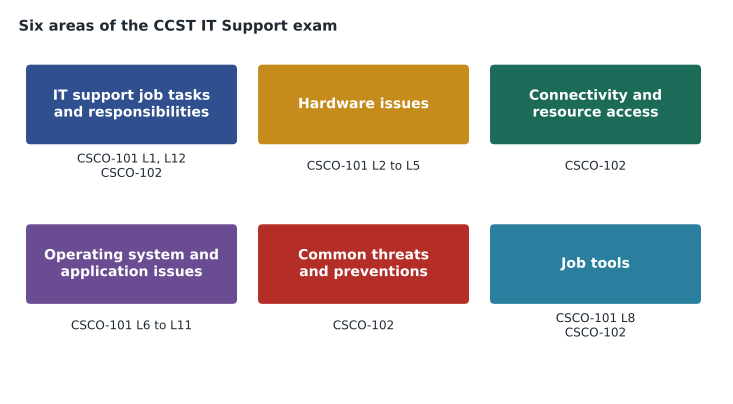
The exam topics are commonly grouped into six areas: IT support job tasks and responsibilities, hardware issues, connectivity and resource access issues, operating system and application issues, common threats and preventions, and job tools. Cisco publishes the detailed topic list on its Learning Network, and that list is the authoritative source for what can appear on the exam; it can change, so always check the current version before you book. Third-party sources commonly report that the exam has about 50 questions and that the passing standard is around 70 on a 100-point scale, but Cisco does not state these figures on its main exam page, so treat them as approximate.
This program splits the exam into two courses. CSCO-101, this course, covers the hardware and operating system areas and the structured troubleshooting method that ties them together. CSCO-102 covers connecting devices to networks, security threats and protections, remote support tools, ticketing and customer service. CSCO-190, the readiness course, reviews both and adds timed practice. Taken together, they are meant to prepare you for the exam and, more importantly, for the first year of a support job.
How the exam is delivered
Cisco delivers CCST exams through a testing partner. Candidates can usually take the exam at an authorized testing center or online with a remote proctor who watches through the candidate's webcam. Online testing requires a quiet room, a clear desk, a reliable internet connection and a computer that passes the testing software's system check. Many schools that teach Cisco Networking Academy courses also offer the exam on site. Because delivery arrangements change, check Cisco's current exam page for the testing partner, the identification you need and the rules for rescheduling.
The questions are designed to test practical judgment, not memorized trivia. Expect scenarios: a user reports a symptom, and you must choose the most likely cause, the best next step, or the correct tool. Some questions may ask you to put steps in order or to match items, such as ports to their uses. The best preparation is to do the tasks yourself, on real or virtual machines, and to practice explaining what you did and why. Every lesson in this course ends with a quiz that uses several question types for that reason.
| Exam area (as commonly listed) | What it asks you to do | Where it is covered |
|---|---|---|
| IT support job tasks and responsibilities | Manage a queue, prioritize, document, communicate and escalate. | CSCO-101 lessons 1 and 12; CSCO-102 lessons 9 to 11 |
| Hardware issues | Identify, install, upgrade and troubleshoot components and peripherals safely. | CSCO-101 lessons 2 to 5 |
| Connectivity and resource access issues | Connect devices, check addressing, Wi-Fi, shares and printers. | CSCO-102 lessons 1 to 4 |
| Operating system and application issues | Install, configure and troubleshoot Windows, macOS, mobile and apps. | CSCO-101 lessons 6 to 11 |
| Common threats and preventions | Recognize malware and social engineering; apply basic protections. | CSCO-102 lessons 5 to 7 |
| Job tools | Use remote access, command-line and knowledge tools. | CSCO-101 lesson 8; CSCO-102 lesson 8 |
Skills beyond the technical
Employers hiring for support roles consistently say that technical knowledge is only half of what they look for. The other half is communication, patience, organization and integrity. A user who calls the help desk is often frustrated, sometimes embarrassed, and usually under time pressure. A technician who listens, explains in plain language, sets realistic expectations and follows through earns trust that makes every later call easier. The exam reflects this with questions about professional behavior, and CSCO-102 has a full lesson on talking to users.
Time and queue management matter too. A support technician rarely works on one problem at a time. Tickets arrive while others are waiting for a user to reply or for a part to be delivered. The technician must decide what to work on next, which depends on priority: how many people are affected, how badly, and whether a deadline or service level agreement applies. A clinic whose appointment system is down is a higher priority than one user whose desktop background has changed, even if the background call came in first.
Integrity is the quiet skill. Support technicians often have access to private information: email, client files, health records, financial data. They may see passwords typed or documents left open. Professional technicians look only at what they need for the task, never share what they see, and follow the privacy rules that apply to the client, such as state privacy and breach-notification laws, and the stricter rules for health information at clinics. Lesson 11 of CSCO-102 covers ethics and privacy in detail.
Planning your preparation
Marisol gives Jordan a plan on his first afternoon. He will work through this course over the next eight weeks, alongside his real tickets, and the two will meet every Friday to review what he learned. He will keep a practice log: every time he solves a ticket, he notes which exam area it touches. He will build a small lab at home with an old desktop, a spare laptop and free virtual machines, so that he can break and fix things without risking a client's data. Near the end, he will take CSCO-102 and the readiness course and book the exam for early next year.
Worked problem
Reading a request for the support role it needs
Three requests arrive at Brightline within ten minutes: (a) the law office's managing partner cannot sign in to any computer; (b) the community center wants to know whether a new projector will work with its lab PCs; (c) the bakery's head office reports that the whole network is down at one shop. Which tier should handle each first, and in what order should they be worked?
Show solution
- (a) A sign-in problem for one user is a typical tier 1 task: check the account, the keyboard layout and caps lock, then reset or unlock if needed.
- (b) A compatibility question with no outage is low priority; tier 1 can answer it by checking the projector's inputs against the PCs' outputs, as in lesson 4.
- (c) A whole-site network outage affects every till at the shop, so it is the highest priority. Tier 1 gathers facts, then escalates to the network technician.
- Order: (c) first because of its impact, then (a) because a senior user cannot work at all, then (b).
Answer: Work (c), then (a), then (b). Priority depends on impact and urgency, not on the order the requests arrived.
By the end of his first day, Jordan has watched Marisol close nine tickets. He notices that she asks the same few questions every time, in the same order, before she touches anything. That habit, which lesson 9 turns into a formal method, is the most valuable thing he learns all week.
Common mistakes
MistakeTreating the exam as a list of facts to memorize.
InsteadPractice the tasks: the exam uses scenarios that test judgment.
MistakeWorking tickets in the order they arrive.
InsteadPrioritize by impact and urgency, and record why.
MistakeWriting ticket notes only for yourself.
InsteadWrite notes that a stranger could follow next week.
MistakeRelying on third-party figures for exam length or passing score.
InsteadCheck Cisco's current exam page and topic list before you book.
MistakeAssuming technical skill is enough.
InsteadCommunication, organization and integrity are tested and expected.
Summary and key terms
- An IT support technician restores service, gathers information for escalation and records every request in a ticket.
- Support is usually organized in tiers, from self-service and first contact up to specialist engineers.
- CCST IT Support is earned with exam 100-140, a 50-minute exam Cisco lists at 125 US dollars.
- The exam topics are commonly grouped into six areas, from job tasks to hardware, connectivity, operating systems, threats and tools.
- Cisco's Learning Network topic list is the authoritative source; check it before booking.
- Priority depends on impact and urgency, not arrival order.
- Professional behavior and privacy are part of the job and the exam.
- Help desk
- The first point of contact for users who need technical help.
- Ticket
- The written record of a support request from opening to closing.
- Tier 1
- First-contact support for common, well-documented problems.
- Escalation
- Passing a problem to someone with more skill, access or authority.
- Triage
- Sorting requests by impact and urgency to decide what to do first.
- Service level agreement
- A promise of response and resolution times for a service.
Practice problems
Work each problem on paper first, then reveal the answer to check.
What is the exam number for CCST IT Support?
Show answer
100-140.
How long is the exam, according to Cisco's exam page?
Show answer
50 minutes.
Which tier usually handles password resets?
Show answer
Tier 1.
Two tickets arrive: one user's mouse is slow, and a clinic's appointment system is down. Which comes first?
Show answer
The clinic's appointment system, because more people are affected and work has stopped.
Where is the authoritative list of exam topics published?
Show answer
On Cisco's Learning Network exam topics page.
Rewrite the note 'fixed it' as a useful ticket note for a frozen laptop.
Show answer
Example: 'Laptop froze at sign-in; forced shutdown; booted normally; installed two pending updates; user signed in and opened email; confirmed working.'
Why should a technician avoid reading files that are not part of the task?
Show answer
To protect the user's privacy and the client's confidential information, as privacy law and professional ethics require.
Lesson quiz · 5 questions
Score 60% or more to complete this lesson.
Create a free account to save your progress, take quizzes and earn a certificate.