
CRE-210 · Lesson 8 of 12 · 25 min
Sound, music and voice
Sound is half of short-form video, even though many viewers start with it muted. Music shapes mood and pace, trending audio connects videos to wider moments, voiceovers carry stories and explanations, and sound effects give edits impact and texture. On some platforms, sound itself is a discovery mechanism: viewers tap a sound to see every video that uses it. CRE-130 covered recording clean audio and the basics of music licensing; this lesson focuses on the creative use of sound in short videos: the roles of sound, choosing music, trending and original sounds, voiceover writing and recording, sound design, mixing for phones, and licensing in commercial and branded contexts.
The roles of sound in short-form
Sound does several jobs in a short video:
- Mood: music and ambience tell viewers how to feel, cheerful, tense, calm or nostalgic, often before they register what they are seeing.
- Pace: music tempo and rhythm drive editing speed and energy (Lesson 6).
- Meaning: speech and voiceover carry information and story.
- Emphasis: sound effects underline actions, transitions and punchlines.
- Recognition: trending sounds and signature sounds connect videos to trends or to a creator's identity.
- Discovery: on platforms with sound pages, using a popular sound can place a video alongside others that use it.
Because many viewers watch muted, the best short videos work without sound through visuals and text, then become richer with it. Designing both experiences, rather than relying on sound to carry meaning, widens the audience.
Choosing music
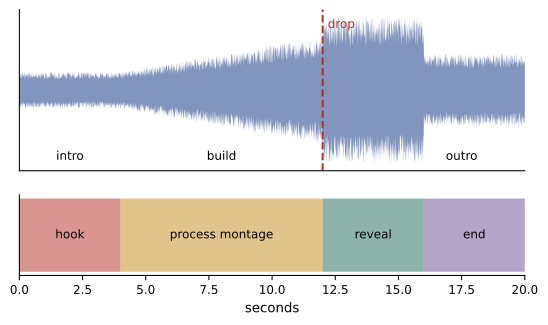
Choosing music is a creative decision. Consider the mood the video needs, the tempo that suits the editing, whether the music has lyrics that might compete with speech, and whether it fits your brand and audience. Instrumental tracks usually work better under speech; tracks with vocals suit montages, transitions and videos without voice. Structure matters too: a track that builds to a drop can be aligned with the video's payoff, so that the reveal lands on the musical climax. Many creators edit to the music, placing cuts on beats, rather than adding music after the edit. Avoid using the same track repeatedly unless it is a deliberate signature, and be aware of the cultural meanings and associations that popular songs carry.
Trending and original sounds
Trending sounds are audio clips, songs or voice recordings being used in many videos at once. Using a trending sound can connect a video to a moment that audiences recognize and enjoy, and on some platforms it may help discovery, although platforms do not guarantee extra reach for any particular sound. Trends move quickly, often within days or weeks, so timing matters: joining early, while the sound is rising, tends to be more effective than joining after it has peaked (Lesson 9). Original sounds, audio recorded by a creator, such as a voiceover, a joke, a song or a catchphrase, can themselves become trends when other people use them, giving the original creator visibility. Many creators maintain a mix: trending sounds for timely content, original sounds for signature content.
Licensing in commercial and branded contexts
Platform music libraries are licensed for personal, non-commercial use within the platform, but these licenses have limits. Business and brand accounts often have access only to commercially cleared libraries, because the general music catalog is not licensed for advertising. Sponsored posts by creators may also be treated as commercial use, depending on platform terms and the agreement with the brand, so creators should check whether trending songs can be used in paid partnerships and, if in doubt, use commercially licensed music. Downloading a video with platform music and reposting it elsewhere, or using it in advertising, may not be covered. CRE-130 Lesson 11 explains copyright, fair dealing and fair use for music, and CRE-320 covers creator law in depth.
| Situation | Typical music source | Note |
|---|---|---|
| Personal creator video | Platform library, including popular songs | Within platform terms only |
| Brand or business account | Commercial or royalty-free library | General catalog often unavailable |
| Paid partnership | Commercial library or licensed track | Check platform rules and contract |
| Advertising campaign | Licensed music or original composition | Sync and master licenses required |
| Cross-posting downloaded video | Re-license or replace music | Platform license may not transfer |
Voiceover
Voiceover, narration recorded separately from the visuals, is widely used in short-form for storytelling, tutorials, explainers and commentary. It allows precise scripting, frees the visuals from talking-head shots, and lets creators who prefer not to appear on camera build audiences. Effective short-form voiceover is written for the ear: short sentences, conversational language, active verbs, and a strong opening line that works as the verbal hook (Lesson 3). Record in a quiet, soft-furnished space with a microphone close to the mouth (CRE-130 Lesson 8), speak with energy and natural variation, and record several takes. In editing, remove breaths and pauses, align the voice with visuals, and keep it clearly above any music. Some editing apps offer synthetic or AI-generated voices; they can be useful, but many audiences prefer real voices, some platforms label or restrict synthetic voices, and cloning another person's voice without consent can be unlawful and harmful.
Worked problem
Writing a 30-second voiceover
A creator films a timelapse of restoring an old wooden chair and wants a 30-second voiceover. How should it be written?
Show solution
- Open with the hook over the first frames: "This chair cost me $5 at a yard sale."
- Add stakes: "Under all that paint, I found something I didn't expect."
- Narrate key steps briefly over the timelapse: stripping, the discovery of solid oak, repairing a loose leg, oiling.
- Deliver the payoff over the reveal: "Forty hours later, it's the best $5 I've ever spent."
- Keep about 70–80 words in total, which fits 30 seconds at a natural pace, and record three takes.
Answer: About 70–80 conversational words: a cost hook, a discovery for tension, brief step narration and a payoff line over the reveal.
Sound design and effects
Sound effects add polish and emphasis. Common short-form sound design includes whooshes on transitions and whip pans; pops, clicks and dings when text or graphics appear; impacts on cuts or reveals; risers to build anticipation before a payoff; record scratches or freezes for comedic interruptions; and ambient sounds such as birds, traffic, café noise or rain that give scenes atmosphere. Foley, recorded everyday sounds such as footsteps, pouring and chopping, can be recorded with a phone close to the source and adds a satisfying, tactile quality, especially in cooking, crafts and ASMR content. As with visual effects, restraint matters: a few well-placed effects add impact; effects on every cut become noise. Use royalty-free sound effect libraries or record your own.
Mixing for phones
Most short videos are heard through phone speakers, earbuds or headphones, so mixing should sound good on all three. Phone speakers reproduce little bass, so important information should not depend on low frequencies, and voices should be clear in the midrange. Keep speech clearly louder than music, typically with music 15 to 20 dB below the voice (CRE-130 Lesson 11), and use ducking so that music dips automatically under speech. Avoid sudden loud sounds that startle viewers, and avoid clipping. Platforms normalize loudness, so making the mix extremely loud does not make it louder in the feed and can make it sound distorted. Check every mix on a phone speaker and on earbuds before publishing.
Silence and sound-off design
Silence is also a tool: a sudden pause before a punchline or reveal creates tension, and quiet, natural sound can feel refreshing in a noisy feed. At the same time, every video should be designed to work for viewers who never turn the sound on. This means visual hooks and storytelling, captions for speech, on-screen text for key information, and visuals that communicate emotion and payoff. A useful habit is to watch every edit once with the sound off: if the video still makes sense and holds attention, it is ready for the feed.
Sound as branding
Some creators develop signature sounds: an intro sound, a catchphrase, a particular effect at the payoff, or a recurring musical motif. These audio cues help viewers recognize a creator's videos even before they see the face or read the name, and they reinforce series identity (Lesson 10). Signature sounds work best when they are short, distinctive and placed consistently, and they should never delay the hook. Original sounds can also spread beyond the creator's account if others use them, increasing visibility.
Recording sound on location
Short-form videos filmed on location, in streets, kitchens, workshops or outdoors, benefit from capturing good natural sound alongside the main audio. Recording a few seconds of ambient sound at each location, close-up foley of key actions such as sizzling, pouring or tools, and clean dialogue with a lavalier microphone gives editors options (CRE-130 Lesson 8). Wind, traffic and echo are the main enemies; windscreens, choosing quieter spots and moving the microphone closer solve most problems. If location sound is poor, a voiceover recorded later can replace it, with ambient sound mixed underneath for realism.
Music and emotion
Music strongly shapes emotional responses. Major keys and bright tempos tend to feel happy and energetic; minor keys and slower tempos feel reflective or sad; tense, rising music builds suspense; silence or sparse sound can feel intimate. Choosing music that matches or deliberately contrasts with the visuals, such as cheerful music over a disaster for comedic effect, is a creative decision. Changing music at a turning point in a story can mark the shift clearly. As with other sound choices, test how the music feels with the visuals on a phone, since the effect can differ from how it sounds in isolation.
Accessibility and sound
Viewers who are deaf or hard of hearing rely on captions for speech, but also benefit from descriptions of important sounds, such as "[alarm ringing]" or "[laughter]", when those sounds carry meaning. Viewers with sensory sensitivities may be affected by sudden loud sounds or harsh effects, so keeping levels consistent and avoiding startling noise helps. Clear speech, with music kept well below it, helps everyone, including viewers listening in noisy places or with hearing loss.
Audio for different genres
Audio conventions differ between genres. Educational and talking-head videos prioritize clear voice with gentle background music or none. Comedy often uses sound effects, music stings and timing pauses to support punchlines. Aesthetic and lifestyle videos may rely on music and ambient sound with little or no speech. ASMR and process videos emphasize close, detailed natural sound with no music at all, recorded with microphones near the source. Dance and music content depends on the track itself and precise synchronization. Matching audio choices to genre conventions, then adding a personal twist, helps videos feel native while remaining distinctive.
Checking rights for every sound
Before publishing, confirm that every sound in the video can be used: music from the platform library available to your account type, licensed tracks with documentation, original recordings you made, royalty-free effects with licenses that allow your use, and voices of people who agreed to appear. Keep a simple record of sources and licenses for each video, particularly for sponsored and business content, so that you can respond quickly if a claim or question arises.
Building a sound library
Many creators maintain a personal sound library: licensed music tracks they like, sound effects organized by type, ambient recordings from different locations, and their own signature sounds. Organizing the library by mood, tempo and use, with license information attached, makes it quick to find the right sound while editing and avoids accidentally using material you cannot license. Reviewing and refreshing the library periodically keeps your videos from sounding repetitive.
Before export, listen once more for abrupt cuts in music, clicks at edit points and uneven levels between clips, and smooth them with short fades.
Common mistakes
MistakeRelying on sound to carry the meaning.
InsteadDesign for sound-off viewing and enrich with sound.
MistakeVocal tracks competing with speech.
InsteadUse instrumental music under speech.
MistakeUsing popular songs in paid partnerships without checking.
InsteadUse commercially licensed music where required.
MistakeJoining trends after they have peaked.
InsteadJoin rising trends early when they fit.
MistakeMixing only on headphones.
InsteadCheck mixes on phone speakers and earbuds.
Summary and key terms
- Sound sets mood, pace, meaning, emphasis, recognition and discovery.
- Choose music for mood, tempo and structure, and edit to it.
- Trending sounds connect to moments; original sounds can become signatures.
- Commercial contexts need commercially licensed music.
- Voiceovers are written for the ear and recorded cleanly.
- Sound effects and foley add polish when used with restraint.
- Mix for phones, use silence deliberately and test with sound off.
- Trending sound
- Audio used widely in many videos at once.
- Original sound
- Audio created by a creator and reusable by others.
- Sound page
- Platform page listing videos using a sound.
- Drop
- Climactic moment in a music track.
- Voiceover
- Narration recorded separately from visuals.
- Sound design
- Creative use of effects and ambience.
- Foley
- Recorded everyday sounds added in editing.
- Ducking
- Automatically lowering music under speech.
- Loudness normalization
- Platform adjustment of audio levels.
- Commercial music library
- Music cleared for business and advertising use.
Practice problems
Work each problem on paper first, then reveal the answer to check.
Name four roles of sound.
Show answer
Mood, pace, meaning, emphasis, recognition, discovery.
Why use instrumental music under speech?
Show answer
Lyrics compete with the voice.
How can music structure support a reveal?
Show answer
Align the reveal with the drop.
When is it best to join a trending sound?
Show answer
Early, while it is rising.
What music can brand accounts usually use?
Show answer
Commercially cleared libraries.
How many words fit a 30-second voiceover?
Show answer
About 70–80.
Name three common sound effects.
Show answer
Whoosh, pop, impact, riser, ambience.
How much quieter should music be than speech?
Show answer
About 15–20 dB.
Why not make mixes extremely loud?
Show answer
Platforms normalize loudness and it may distort.
What habit checks sound-off design?
Show answer
Watch every edit once muted.
Lesson quiz · 5 questions
Score 60% or more to complete this lesson.
Create a free account to save your progress, take quizzes and earn a certificate.