
COMP-101 · Lesson 7 of 12 · 22 min
Booking an exam at a test center or online
▶ Video coming soon A video version of this lesson is on the way.
Two weeks into the cert club, Dez decides it is time to book. He has studied for Security+ for two months, his practice scores are steady, and he wants a date in his calendar to aim at. He sits at Lorna's desk with his laptop and walks through the process aloud so that Noor can see it, and halfway through he discovers the first catch: the name on his Pearson VUE profile says "Dez Okafor," but his driver's license says "Desmond Okafor-Laine." He fixes it on the spot. This lesson follows the booking process from buying a voucher to the confirmation email, compares testing at a center with testing online, and explains the details, like that name, that cause problems on exam day if they are missed at booking.
The pieces of a booking
Booking a CompTIA exam involves three organizations, and it helps to know which does what. CompTIA owns the exam and the certification, sells exam vouchers in its online store, and keeps your certification record in your CompTIA account. Pearson VUE delivers the exam, runs the test centers and the OnVUE online service, and handles scheduling, rescheduling and accommodations. Your employer, school or a training provider may be a third party, if they buy the voucher for you or arrange testing through an academic program. Knowing who handles what saves time when something goes wrong: a scheduling problem is Pearson VUE's to fix, while a question about your certification record is CompTIA's.
A voucher is a prepaid code that covers the exam fee. You can buy one from the CompTIA store, receive one from an employer or school, or get one bundled with a training course. Vouchers have expiry dates, and the terms vary by where you bought one, so read them before you pay. Some bundles include a retake voucher, which can be worth the extra cost. Prices vary by country and change from time to time, so check the CompTIA store for the price where you will test rather than relying on a figure from a forum or a colleague.
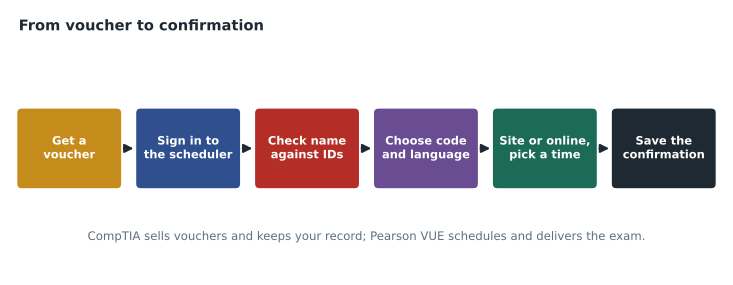
Step by step
The usual sequence starts on CompTIA's website, which links to Pearson VUE's scheduling system for CompTIA exams. You sign in or create an account, and the account profile asks for your legal name, contact details and address. This is the moment to get your name right. CompTIA's ID policy says the first and last name you register with must match exactly the first and last name on both of the IDs you will present on test day. Nicknames, missing hyphens and swapped name orders are common causes of trouble, as Dez found out. If your IDs themselves differ, sort that out before booking, because exceptions must be approved by Pearson VUE in advance.
Next you choose the exam by its code, which is why lesson 1 made such a point of codes. Selecting "Security+" may offer more than one version during an overlap period, such as SY0-701 and a newer version when it launches, and each has its own code. Choose the language: Tech+, for example, is offered in English and Japanese, and other exams in other sets of languages, listed on each certification page. Candidates whose first language is not English should check the languages offered for each exam before booking. Then you choose the delivery method and pick a date and time from those available.
Finally you enter the voucher code or pay, review the details, and confirm. Pearson VUE sends a confirmation email with the exam, date, time, location or online instructions, and the rules for rescheduling. Save it, and read it again a few days before the exam, because it contains the arrival time or check-in window, and the policy on what happens if you are late or need to change the appointment.
Testing at a test center
A Pearson VUE test center is a supervised room with computers set up for exams. Many are in colleges, training companies and business centers, and larger cities usually have several. Testing at a center means the equipment, the network and the room are someone else's responsibility. You bring your IDs, store your belongings in a locker, are checked in by staff, who may photograph you and check your IDs, and take the exam in a room watched by a proctor in person or through cameras. Centers usually provide a way to make notes, such as an erasable board, which is collected at the end.
The main drawbacks are travel and availability. In rural areas the nearest center may be an hour or more away, and popular centers may book up weeks ahead, especially at the end of a school term or before an exam version retires. Fairhaven has staff across Spokane County, and Lorna keeps a list of the centers nearest to each branch, with notes on parking and transit. Arrive early, as your confirmation email advises, because check-in takes time and late arrivals may lose their appointment.
Testing online with OnVUE
OnVUE is Pearson VUE's online proctoring service. You take the exam on your own computer at home or at work, while a proctor watches through your webcam and microphone and can see your screen. It saves travel and offers more appointment times, sometimes around the clock, but it shifts responsibility for the equipment and the room to you. CompTIA's online-proctored exam guidelines are specific: you must run Pearson VUE's system test on the same computer and network you will use for the exam, restart the computer first, and have a connection of at least 6 Mbps down and 2 Mbps up. CompTIA advises against corporate networks and VPNs, which often block the software or interrupt it.
Timing matters online too. The guidelines say you should log in at least 30 minutes before your appointment, that check-in can begin up to 30 minutes before, and that if you are more than 15 minutes late you will not be allowed to test. Check-in involves photographing your ID and your face, and photographing the room from several angles so the proctor can see that it is clear. Lesson 8 covers the room rules in detail. If your work computer is locked down by your employer's IT department, as most are, use a personal computer instead; security software and restrictions on installing programs are common reasons a system test fails.
| Consideration | Test center | Online (OnVUE) |
|---|---|---|
| Equipment and network | Provided by the center | Your computer, webcam and connection |
| Travel | Required; may be far in rural areas | None |
| Appointment times | Center opening hours | Often many more times |
| Room | A supervised testing room | A private room you prepare to the rules |
| Notes during the exam | Usually an erasable board from the center | The built-in digital whiteboard only |
| Main risk | Travel delays, booked-up dates | System problems, room rule violations |
Choosing a date
A booked date is a powerful motivator, but only if it is realistic. A date too far away invites procrastination; a date too close leaves no time to fix weak areas. A common approach is to book once practice scores are close to where you want them, leaving about four to six weeks for focused review. Check the retirement date of the exam version you are booking: if it retires soon after your date, a failed attempt might force you onto the new version. Check your own calendar for busy periods at work and at home, and avoid booking on a day after a late shift.
Noor wants to take Tech+ in March 2027. She plans to book in January, after the holiday rush at the branches, once her practice scores are steady. She writes a short script to put the planning dates in her calendar.
from datetime import date, timedelta

exam_day = date(2027, 3, 18)
plan = {
    "book the exam (8 weeks before)": exam_day - timedelta(weeks=8),
    "first full practice test (6 weeks before)": exam_day - timedelta(weeks=6),
    "OnVUE system test on the exam computer (2 weeks before)": exam_day - timedelta(weeks=2),
    "re-read the confirmation email (3 days before)": exam_day - timedelta(days=3),
}
for task, day in plan.items():
print(day.isoformat(), task)2027-01-21 book the exam (8 weeks before) 2027-02-04 first full practice test (6 weeks before) 2027-03-04 OnVUE system test on the exam computer (2 weeks before) 2027-03-15 re-read the confirmation email (3 days before)
What this code does
It counts back from the exam date to set dates for key preparation tasks. Each task is placed a fixed number of weeks or days before the exam. The output lists the dates in order, from booking the exam eight weeks ahead to re-reading the confirmation email three days before.
The dates are plans, not promises; if her practice scores are not where she wants them by late January, she will move the exam rather than book it. That flexibility is the point of planning backward from a date: each milestone is a check on whether the date is still right.
Rescheduling and canceling
Plans change, and exam appointments can usually be moved or canceled, within limits. The rules are set out in your confirmation email and in Pearson VUE's policies for CompTIA exams, and they typically require you to make changes a set time before the appointment. Changes made too late, or a missed appointment, can mean losing the exam fee. Because the deadlines and any fees can change, do not rely on a rule a colleague remembers: read the policy in your own confirmation before you need it, and put the last date for changes in your calendar alongside the exam itself.
If something goes wrong on the day, such as an illness, a family emergency or a technical failure during an online exam, contact Pearson VUE as soon as you can and keep a record of what happened, including any case number you are given. Problems reported promptly are much easier to resolve. For online exams, a failure on Pearson VUE's side is handled differently from a failure caused by the candidate's own equipment or room, which is one more reason to run the system test early and follow the room rules closely.
Other ways to test
Some candidates test through a school or training program. CompTIA offers arrangements for academic institutions and other organizations, including client-proctored delivery, in which an approved organization administers certain exams to its own students under CompTIA's rules. High-school and college students may be able to take exams such as Tech+ in a computer lab at their school, often with vouchers paid for by the program. Ava's friend Jun is taking Tech+ this way through his school's technology program in the spring. If you are a student, ask your instructor whether such an arrangement exists before buying a voucher yourself, because the school's price and process may be different.
Accessibility of the location
If you need an accessible test center or have questions about the building, contact the center or Pearson VUE before booking, not on the day. Some centers are on upper floors, in buildings with limited parking, or in areas that are hard to reach by transit, and the booking site may not say so. If you need changes to the exam itself, such as extra time or a separate room, those are requested as accommodations, described in the next lesson, and they must be approved before you book the appointment that uses them.
Worked problem
Avoiding a booking mistake
Ava, one of the makerspace volunteers, wants to book Tech+ online for a Saturday morning. She plans to use a library laptop in the makerspace, which is open to the public on Saturdays, and she registered under the name "Ava R." because that is what her friends call her. What should she change?
Show solution
- The name must match her IDs exactly, so she should update her profile to her full legal first and last name.
- A library laptop is managed by LTS, with restrictions that may block the testing software, and it connects through the library network; she should use a personal computer or ask about a center.
- The makerspace is a public room on Saturdays, and the online rules require a private, quiet room where no one else can enter; she needs a different location.
- She should run the system test on the computer and network she will actually use, well before the day.
Answer: Fix the name to match her IDs, use a suitable personal computer, choose a private room, and run the system test early, or book a test center instead.
Ava decides that a test center near her school is simpler, and books for a weekday afternoon during the spring break. Noor, who has a quiet spare room at home and a reliable connection, decides that online testing suits her better. Both are good choices, made for different reasons.
Common mistakes
MistakeRegistering under a nickname or a shortened name.
InsteadUse your legal first and last names exactly as they appear on both IDs.
MistakeRunning the OnVUE system test on a different computer or network.
InsteadTest on the exact computer and network you will use, after a restart.
MistakeUsing a locked-down work computer or a VPN for an online exam.
InsteadUse a suitable personal computer and a direct connection.
MistakeChoosing a date without checking the version's retirement date.
InsteadLeave room for a retake before the version retires.
MistakeBuying a voucher without reading its expiry date and terms.
InsteadCheck expiry, retake inclusion and price for your country.
Summary and key terms
- CompTIA owns the exam and sells vouchers; Pearson VUE delivers the exam and handles scheduling.
- Register with your legal first and last names, matching both IDs exactly.
- Choose the exam by code and language, then a test center or OnVUE, then a time.
- OnVUE requires a system test on the exam computer and network and at least 6 Mbps down and 2 Mbps up; avoid VPNs and corporate networks.
- Log in at least 30 minutes early for online exams; more than 15 minutes late means no test.
- Book a realistic date, checking the version's retirement date, and plan milestones backward from it.
- Voucher
- A prepaid code that covers an exam fee.
- OnVUE
- Pearson VUE's online proctoring service.
- Test center
- A supervised location where exams are taken on provided computers.
- System test
- A check that your computer and network can run the online exam.
- Confirmation email
- The message from Pearson VUE with your appointment details and rules.
Practice problems
Work each problem on paper first, then reveal the answer to check.
Which organization handles rescheduling an exam appointment?
Show answer
Pearson VUE.
What must match exactly between your registration and your IDs?
Show answer
Your first and last names.
What minimum connection speeds do CompTIA's online guidelines give?
Show answer
6 Mbps download and 2 Mbps upload.
How late can you be for an online exam before you are refused?
Show answer
More than 15 minutes late means you will not be allowed to test.
Name one advantage of a test center over online testing.
Show answer
The center provides the equipment, network and room.
Why check the exam version's retirement date before booking?
Show answer
So that a retake, if needed, can still be on the same version.
Lesson quiz · 5 questions
Score 60% or more to complete this lesson.
Create a free account to save your progress, take quizzes and earn a certificate.