
COMP-101 · Lesson 4 of 12 · 22 min
Reading exam objectives
▶ Video coming soon A video version of this lesson is on the way.
Noor prints the Tech+ exam objectives on the photocopier by the staff room and is surprised by how thick the stack is. She had expected a page; it is more like twenty. At the fourth cert club session, Lorna spreads her own copy of the A+ Core 1 objectives across the table, covered in highlighter and pencil ticks, and says that this document is the single most important study resource for any CompTIA exam. "Every question on the exam is written to an objective," she says. "If you know what the objectives say and you can do what they describe, there is nothing on the exam that should surprise you." This lesson explains how to read the objectives, how to use their weights, and how to turn them into a checklist you can study from.
What the objectives document is
Every CompTIA certification has a published exam objectives document for each exam version. It is free to download from the certification's page on CompTIA's website, usually after entering a name and email address. The document lists everything the exam can test, organized into domains, objectives and sub-objectives, and it states how much of the exam each domain represents. It is written by CompTIA with subject matter experts from the industry, who agree on what a person in the target job needs to know. The same experts then write and review the exam questions, which is why the questions line up so closely with the objectives.
The objectives document is the authority. Study guides, video courses and practice tests are all interpretations of it, and they vary in quality. When a book and the objectives disagree about what is on the exam, the objectives win. When a forum post claims that a topic "is always on the exam" but it is not in the objectives, ignore the post. Lorna's habit is to print the objectives for any exam she is preparing for, keep them in a binder, and tick off each line as she studies it.
Domains and weights
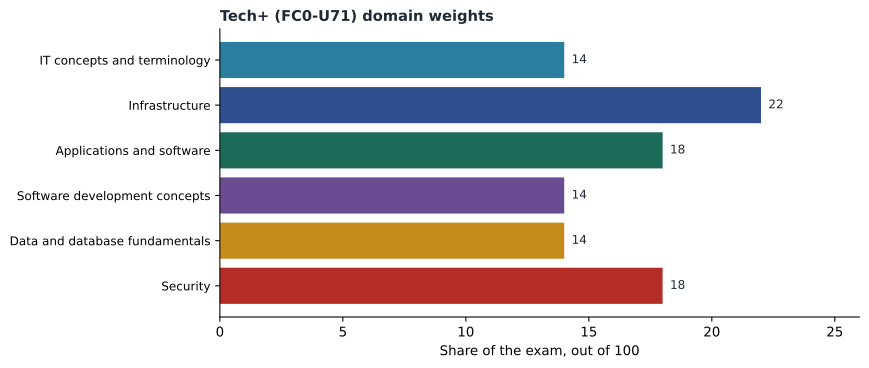
A domain is a major area of the exam. Tech+ has six domains, which CompTIA's partner site lists as IT concepts and terminology, infrastructure, applications and software, software development concepts, data and database fundamentals, and security. Each domain has a weight, which is the share of the exam's questions drawn from it. For Tech+, the partner site gives infrastructure the largest share, about 22 out of every 100 questions, applications and software and security about 18 each, and the other three about 14 each. Weights for other exams are in their own objectives documents, and they change between versions, so always read them from the document for your exam code.
Weights tell you where to spend time. If a domain is worth twice as much of the exam as another, it deserves roughly twice the study time, adjusted for how much you already know about each. Weights also warn you against a common trap: spending weeks on a favorite topic that is worth a small share of the exam while neglecting a large domain you find dull. Noor loves the software development domain because she has been learning a little Python, but she notices that infrastructure, which she finds harder, is worth more.
A worked estimate
Weights can be turned into rough question counts. Tech+ has a maximum of 70 questions, so a domain weighted 22 out of 100 would account for about 15 of them. The real number on any one exam form may differ a little, because exams are assembled from pools of questions, but the estimate shows the scale. Noor checks her arithmetic with a few lines of Python.
weights = {
    "IT concepts and terminology": 14,
    "Infrastructure": 22,
    "Applications and software": 18,
    "Software development concepts": 14,
    "Data and database fundamentals": 14,
    "Security": 18,
}
max_questions = 70
print("total weight:", sum(weights.values()))
for domain, w in weights.items():
print(f"{domain:32} about {round(max_questions * w / 100)} questions")total weight: 100 IT concepts and terminology about 10 questions Infrastructure about 15 questions Applications and software about 13 questions Software development concepts about 10 questions Data and database fundamentals about 10 questions Security about 13 questions
What this code does
It lists the exam's six domains with their weights out of 100 and checks they add up to 100. It then multiplies each weight by 70 questions to estimate how many questions come from each domain. The output shows Infrastructure has the most, about 15.
The weights add up to 100, as they should, and the estimates add up to about 70. Infrastructure, at about 15 questions, is the largest single block, and the three domains at 14 each are about 10 questions apiece. That changes Noor's study plan immediately: infrastructure gets the most time, and her favorite domain gets its fair share and no more.
Objectives and sub-objectives
Inside each domain are numbered objectives. They are written as a verb followed by a topic, and they are numbered by domain, so objective 2.3 is the third objective in domain 2. Under each objective is a bulleted list of sub-objectives and examples: specific terms, technologies, tools and tasks. In the A+ objectives, for example, an objective about networking hardware might list routers, switches, access points and firewalls underneath it. These lists are the most detailed guide you will get to what the questions can mention.
CompTIA's objectives documents usually note that the bulleted lists of examples are not exhaustive. That means the exam may include related technologies or newer versions that are not named, as long as they fit the objective. Do not treat the lists as the only things you need to know; treat them as a strong signal of what matters, and learn the concept well enough that a related example will not throw you. If the list mentions three types of storage, know what makes each one different, so that you can reason about a fourth.
The verbs matter
The verb at the start of each objective tells you the level of understanding the exam expects. CompTIA objectives commonly use verbs such as explain, summarize, compare and contrast, identify, install, configure and, very often, the phrase "given a scenario." An objective that says "explain" or "summarize" asks you to understand and describe a concept. "Compare and contrast" asks you to know how similar things differ, which is why so many questions offer two plausible answers that differ in one detail. "Given a scenario" asks you to apply knowledge to a situation: a user reports a symptom, and you must choose what to check, install, configure or recommend.
Scenario objectives are where hands-on practice pays off. You can memorize a definition of a VLAN, but a scenario question about a branch whose guest Wi-Fi can reach the staff printers tests whether you understand what a VLAN is for. When you read an objective that starts with "given a scenario," plan to practice it in a lab or at work, as lesson 10 explains, and not only to read about it.
| Verb in the objective | What it asks of you | How to study it |
|---|---|---|
| Explain, summarize | Understand and describe a concept | Read, then explain it aloud in your own words |
| Compare and contrast | Know how similar things differ | Make a table of differences |
| Identify | Recognize something from a description or picture | Flashcards, labeled diagrams, real hardware |
| Install, configure | Carry out a task correctly | Do it in a lab, more than once |
| Given a scenario | Apply knowledge to a situation | Practice realistic problems and explain your choice |
The acronym list and other appendices
At the end of most objectives documents is a list of acronyms used in the exam, often several pages long. It is worth working through, because exam questions use acronyms freely and a question you would otherwise know can be lost to an unfamiliar abbreviation. The acronym list is also a quick self-test: if you can expand an acronym and explain what the thing does in one sentence, you probably know it well enough; if you cannot, it goes on your study list. Some documents also include a list of hardware and software that the exam developers recommend for preparation, which is a useful shopping list for a home lab.
Turning objectives into a checklist
The objectives become a study tool when you convert them into a checklist. Copy every sub-objective into a spreadsheet or a notebook, one per line, with columns for domain, objective number, the sub-objective, and your confidence. Rate yourself honestly: 3 for "I could teach this," 2 for "I know it but would need a moment," 1 for "I have heard of it," and 0 for "new to me." Then sort by domain weight and confidence, and your study priorities appear: high-weight domains with low confidence first.
Repeat the rating every couple of weeks. The numbers should rise, and the ones that do not rise show you where to change your approach, perhaps by moving from reading to a lab exercise. Lorna keeps her A+ checklist from years ago and shows the cert club how her ratings changed week by week. The final column, filled in the week before her exam, is almost all 3s, with a few 2s she reviewed the night before.
Objectives and other study materials
Once you have the objectives as a checklist, every other resource can be mapped to it. Good study guides and video courses say which objectives each chapter or module covers, often in a table near the front. Use that table to link each line of your checklist to the place in the book or course that explains it. When a resource covers an objective badly, look for a second explanation of that objective alone, rather than switching resources entirely. When a practice test question surprises you, find the objective it was testing and check your rating for that line; a surprise usually means a rating was too generous.
Mapping also exposes gaps in a resource. If your checklist has an objective that no chapter mentions, either the resource was written for a different version or it skipped the topic. Either way, you know to look elsewhere for that one line. Noor finds two such gaps in the second-hand book a colleague lent her, both in newer topics about AI tools and data, which confirms that the book was written for the previous foundation exam.
When the objectives change
Each new exam version comes with a new objectives document, and the changes can be large. CompTIA usually publishes the new objectives before the new exam launches, sometimes alongside a comparison with the old version. If your exam date is near a version change, read both documents and decide which version to take based on which you are better prepared for and how much time you have. Do not mix them: a checklist built from the old objectives will mislead you on the new exam, and the other way round. Lorna keeps the version number and the date she downloaded the document in the header of every checklist she makes, for exactly this reason.
Finally, read the short introduction at the top of the objectives document. It usually describes the job role the exam is aimed at and the level of experience CompTIA assumes, in a paragraph or two. That paragraph is a useful check on the goal sentence from lesson 3: if the role it describes sounds like the work you want, you have chosen well.
Worked problem
Reading one objective
Here is an objective written in the style of a CompTIA document: "2.4 Given a scenario, configure basic wireless settings on a small office network," with sub-objectives listing network name, security type, password, guest network and channel. What kind of question should Noor expect, and how should she study it?
Show solution
- The verb is "given a scenario ... configure," so expect a situation, not a definition: for example, a small office whose visitors can reach the staff printer over Wi-Fi.
- The sub-objectives say what the scenario may involve: the network name, the security type, the password, a guest network and the channel.
- Studying it means doing it: log in to a home router or a lab access point, find each of those settings, and change them.
- Then explain the result: a guest network keeps visitors separate from staff devices, which would fix the printer problem.
Answer: Expect a scenario question about choosing or changing wireless settings, and study it by configuring a real or lab router and explaining why each setting matters.
Noor spends the weekend turning the Tech+ objectives into a spreadsheet. It has a little over two hundred lines when she is done. Her first set of ratings has more 1s than she expected in infrastructure and more 3s than she expected in applications and software, which matches the advice from the cert club: her four years at the circulation desk taught her more about applications than about networks.
Common mistakes
MistakeStudying from a book without reading the objectives.
InsteadUse the objectives as the master list and the book as one explanation of it.
MistakeTreating the bulleted examples as complete.
InsteadThe lists are not exhaustive; learn the concept so related examples make sense.
MistakeSpending study time evenly across domains.
InsteadWeight study time by domain weight and by how much you already know.
MistakeIgnoring the acronym list.
InsteadWork through it; unfamiliar acronyms cost easy marks.
MistakeReading scenario objectives and stopping there.
InsteadPractice them hands-on, then explain your choices.
Summary and key terms
- The exam objectives document lists everything an exam can test and is free from CompTIA.
- Domains are weighted; the weights show where to spend study time.
- Tech+ has six domains, with infrastructure the largest at about 22 out of 100.
- Objectives are numbered and start with a verb that shows the expected level of skill.
- Bulleted examples are not exhaustive.
- Turn the objectives into a rated checklist and repeat the ratings as you study.
- Exam objectives
- CompTIA's published list of everything an exam version can test.
- Domain
- A major area of an exam, with a weight.
- Weight
- The share of an exam's questions drawn from a domain.
- Sub-objective
- A specific term, tool or task listed under an objective.
- Scenario objective
- An objective that asks you to apply knowledge to a situation.
Practice problems
Work each problem on paper first, then reveal the answer to check.
Where do you get the exam objectives?
Show answer
Free from the certification's page on CompTIA's website.
Which Tech+ domain has the largest weight?
Show answer
Infrastructure, at about 22 out of 100.
About how many of 70 questions would a domain weighted 18 out of 100 account for?
Show answer
About 13.
What does "given a scenario" ask you to do?
Show answer
Apply knowledge to a situation and choose what to check, configure or recommend.
Why are the bulleted examples not a complete list?
Show answer
CompTIA notes they are not exhaustive; related technologies can appear.
What are the four confidence levels suggested for a checklist?
Show answer
3 could teach it, 2 know it, 1 heard of it, 0 new.
Lesson quiz · 5 questions
Score 60% or more to complete this lesson.
Create a free account to save your progress, take quizzes and earn a certificate.