
COMP-101 · Lesson 5 of 12 · 22 min
Question types and performance-based questions
▶ Video coming soon A video version of this lesson is on the way.
Hana brings a story to the fifth session. When she sat Security+, the first thing on her screen after the instructions was not a multiple-choice question but a small simulated network: a diagram of a firewall, a web server and a workstation, with a table of rules to complete by dragging entries into place. "I froze for about thirty seconds," she says. "Then I flagged it, did the multiple-choice questions, and came back to it with time to spare." Noor asks whether Tech+ will have anything like that. Lorna checks the Tech+ page: CompTIA lists its questions as multiple-choice. A+, which Noor plans to take next, is different, and its page lists several kinds of question, including performance-based ones. This lesson describes each kind and how to approach it.
Why question types matter
Knowing the material is only part of passing an exam. You also need to recognize what each question is asking and how it wants you to answer. A multiple-choice question with one right answer rewards careful elimination; a question with several right answers rewards completeness; a drag-and-drop question rewards precise matching; a performance-based question rewards hands-on familiarity. Candidates who know the content but have never seen a performance-based question sometimes lose time or confidence on the first one, as Hana nearly did. Seeing each type before exam day removes that surprise.
CompTIA lists the question types for each exam on the certification page or in the exam details. For A+ Core 1 (exam 220-1201), CompTIA's page lists single-response and multiple-response multiple-choice, drag-and-drop and performance-based items. For Network+ and Security+, the pages describe a mix of multiple-choice and performance-based questions. For Tech+, the page lists multiple-choice only. Check the page for your exam, because the mix can change between versions.
Single-response multiple choice
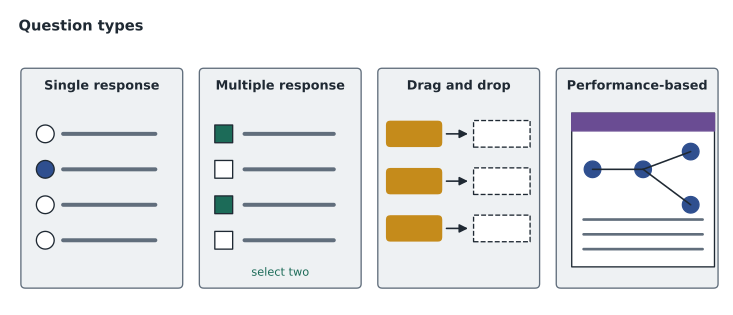
The most common question has a stem, which is the question or scenario, and four or so options, of which exactly one is correct. The wrong options, called distractors, are written to be plausible: they are often correct statements that do not answer this particular question, or answers that would be right in a slightly different situation. That is why reading the stem carefully matters more than anything else. A stem that asks for the best first step, the most likely cause or the most secure option is telling you that several options may work but one is better.
A reliable method is to read the stem, decide what you would answer before looking at the options, and then look for that answer. If it is there, check the others quickly to make sure none is better. If it is not, eliminate the options you know are wrong, then compare what remains against the exact words of the stem. Watch for absolute words such as always and never in options, which are often a sign of a distractor, though not always. And watch for words in the stem such as not or except, which reverse the question.
Multiple-response multiple choice
Some questions have more than one correct answer and tell you how many to choose, such as "select two." These are harder because partial knowledge is not enough: you need to recognize every correct option. Treat each option as a true or false statement about the stem, decide each one independently, and then check that you have selected exactly the number requested. If you are sure of one answer and unsure of the second, eliminate the options you are confident are wrong and choose the most likely of the rest.
Drag-and-drop and ordering
Drag-and-drop questions ask you to move items into the right places: matching ports to protocols, connectors to their names, steps into the right order, or components onto a diagram. They test precise recall and the ability to tell similar things apart. Start with the matches you are surest of, because each correct placement reduces the choices left for the harder ones. If the question asks for an order, think through the process from start to finish rather than placing steps one by one; a troubleshooting method or a boot sequence makes more sense as a story than as a list. The quizzes in this course include matching and ordering questions so that you can practice the same skill.
Performance-based questions
A performance-based question, often shortened to PBQ, asks you to perform a task in a simulated environment rather than answer a question about it. It might show a simplified operating system and ask you to change a setting, a network diagram and ask you to configure addresses, a command-line window and ask you to run the right command, or a log and ask you to identify what happened. Performance-based questions test exactly the "given a scenario" objectives from lesson 4, and they are the main reason hands-on practice matters so much for the higher-level exams.
Several practical points help with them. Read the whole task before touching anything, including any tabs or scroll areas; important instructions are sometimes below the visible part of the window. Do only what the task asks; configuring extra settings rarely helps and can introduce mistakes. If there is a reset button, know that it exists in case you need to start over. And manage time: performance-based questions usually take longer than multiple-choice questions, and many candidates choose to answer the multiple-choice questions first and return to the simulations, as Hana did. Whether you can flag and return to a particular question depends on the exam's interface, so read the on-screen instructions at the start of your exam rather than relying on what others say.
CompTIA does not publish exactly how many performance-based questions appear on each exam, or exactly how they are scored, and different forms of the same exam may have different numbers. You may read claims online about how many to expect, or about whether partial credit is given, but treat those as unconfirmed. The safe preparation is the same whatever the number: practice the tasks in the objectives until you can do them without notes.
| Question type | What it tests | Best approach |
|---|---|---|
| Single response | Choosing the best of several plausible answers | Answer in your head first, then eliminate |
| Multiple response | Recognizing every correct option | Judge each option as true or false; select the number asked |
| Drag and drop | Precise matching or ordering | Place the surest items first; think in sequences |
| Performance-based | Doing a task in a simulation | Read everything first, do only what is asked, watch the time |
Budgeting time
A time budget turns the exam length and question count into a pace. Tech+ allows 60 minutes for a maximum of 70 questions, which is a little under a minute per question. A+ Core 1 allows 90 minutes for a maximum of 90 questions, about a minute per question, but if some of those are performance-based questions that take several minutes each, the multiple-choice questions must go faster to leave room. Planning that in advance means you will not be surprised by the clock. Noor works out a budget for A+ with a short script, using a guess of how many performance-based questions there might be, labeled as a guess because CompTIA does not publish the number.
minutes = 90
questions = 90
pbq_guess = 4            # an assumption for planning, not a published figure
pbq_minutes_each = 5
review_minutes = 10

mc = questions - pbq_guess
left_for_mc = minutes - pbq_guess * pbq_minutes_each - review_minutes
seconds_per_mc = left_for_mc * 60 / mc
print(f"multiple-choice questions: {mc}")
print(f"minutes left for them: {left_for_mc}")
print(f"seconds per multiple-choice question: {seconds_per_mc:.0f}")multiple-choice questions: 86 minutes left for them: 60 seconds per multiple-choice question: 42
What this code does
It plans time for a 90-minute exam with 90 questions, assuming about four performance-based questions at five minutes each and ten minutes kept for review. It subtracts that time and divides what is left among the multiple-choice questions. The output shows 86 multiple-choice questions with about 42 seconds for each.
About 42 seconds per multiple-choice question sounds tight, and it is a useful warning. It tells Noor that she needs to know the core facts well enough to answer most questions quickly, saving her thinking time for the scenarios. It also tells her to practice timed sets, which lesson 9 builds into her plan. For Tech+, with multiple-choice only and a little under a minute each, the pace is more relaxed, but the same habit of timed practice applies.
Exhibits, images and long scenarios
Many questions include an exhibit: a picture of a connector, a screenshot of a settings page, a diagram of a network or a few lines of command output. The exhibit usually holds the key fact, so look at it carefully before reading the options, and look for anything unusual, such as an address in an unexpected range or a setting that is switched off. Some exhibits contain more information than the question needs, just as real screens do; part of the skill is ignoring what does not matter. Others may be small on screen, and the exam interface may let you enlarge them.
Long scenarios work the same way. A question that describes a branch, three users, two printers and a recent change is giving you clues, and usually one or two of them decide the answer. A good habit is to read the final sentence of the stem first, so you know what is being asked, and then read the scenario looking for the facts that bear on it. In the example later in this lesson, the clue that other computers worked was the deciding fact; everything else was background.
When no answer looks right
Sometimes every option looks wrong, or two look equally right. When that happens, go back to the exact wording of the stem. Questions are written to an objective, and the objective's level of detail is a hint: an entry-level exam is usually asking for the standard, textbook answer, not the clever exception you know from experience. Choose the option that best matches what the objectives teach. If you are still unsure, eliminate what you can, choose the most likely remaining option, flag the question if the interface allows, and move on. An unanswered question can never earn a mark, so it is generally wise to answer every question before time runs out.
Practicing each type
Practice should include every question type the exam uses. For multiple-choice, use reputable question banks and, more importantly, read the explanation for every question you get wrong and every question you got right by guessing. For drag-and-drop and ordering, make your own matching cards from the objectives: ports and protocols, connectors and uses, troubleshooting steps in order. For performance-based questions, the best practice is the real task in a lab, described in lesson 10, followed by simulated practice if your course or study guide provides it. Lorna also recommends writing a few questions of your own for each objective. Writing a good distractor forces you to understand exactly why it is wrong, which is a deeper kind of learning than answering someone else's question.
Worked problem
Approaching a scenario question
A practice question reads: "A patron reports that a public computer in the branch lab shows a message that the network cable is unplugged, although the cable is visibly connected at both ends. Other computers in the lab are working. What should the technician check FIRST?" The options are: replace the network switch; check that the cable is fully seated and try a known-good cable; reinstall the operating system; call the internet service provider.
Show solution
- The stem says other computers in the lab are working, so the switch and the internet connection are probably fine; that rules out the first and last options.
- Reinstalling the operating system is drastic and slow, and a message about an unplugged cable points to the physical connection, not software.
- The word FIRST asks for the simplest, most likely check. A cable that looks connected may not be fully seated or may be damaged.
- Checking the seating and swapping in a known-good cable is quick and tests the most likely cause.
Answer: Check that the cable is fully seated and try a known-good cable. The stem's details rule out the network and the provider, and FIRST asks for the simplest likely check.
Noor notices that the question is really about reading: the clue that other computers work does most of the work for you. Lorna says that is true of a surprising number of exam questions, and of real tickets too.
Common mistakes
MistakeReading the options before the stem.
InsteadRead the whole stem first and answer it in your head, then look at the options.
MistakeMissing NOT or EXCEPT in the stem.
InsteadUnderline reversing words mentally; they flip the question.
MistakeSelecting the wrong number of answers on a multiple-response question.
InsteadCount your selections against the number the question asks for.
MistakeSpending ten minutes on the first performance-based question.
InsteadBudget time, and if the interface allows it, return to long tasks after the quicker questions.
MistakeTrusting online claims about the number of PBQs or partial credit.
InsteadCompTIA does not publish these; prepare by practicing the tasks.
Summary and key terms
- CompTIA lists the question types for each exam on its certification page; Tech+ is multiple-choice.
- A+ Core 1 lists single- and multiple-response multiple-choice, drag-and-drop and performance-based questions.
- Read the stem first, answer it in your head, then eliminate distractors.
- For multiple-response questions, judge each option independently and select the number asked.
- Performance-based questions are simulations of tasks from the scenario objectives; read everything first and do only what is asked.
- Turn the exam length and question count into a time budget, and practice timed sets.
- Stem
- The question or scenario part of an exam item.
- Distractor
- A plausible wrong option.
- Multiple response
- A question with more than one correct option.
- Performance-based question
- A task performed in a simulated environment; often called a PBQ.
- Time budget
- A planned pace per question based on the exam length.
Practice problems
Work each problem on paper first, then reveal the answer to check.
What question type does CompTIA list for Tech+?
Show answer
Multiple-choice.
Name two question types listed for A+ Core 1 besides single-response multiple choice.
Show answer
Any two of: multiple-response multiple-choice, drag-and-drop, performance-based.
What is a distractor?
Show answer
A plausible but wrong option.
A stem asks which option is NOT a benefit. What should you do?
Show answer
Spot the reversal and look for the one option that is not a benefit.
Roughly how much time per question does Tech+ allow?
Show answer
A little under a minute: 60 minutes for up to 70 questions.
Why read the whole performance-based task before starting?
Show answer
Instructions or details may be in tabs or below the visible area.
Lesson quiz · 5 questions
Score 60% or more to complete this lesson.
Create a free account to save your progress, take quizzes and earn a certificate.